
PerfectScale
Kubernetes Namespace Isolation: RBAC & Network Policy
How namespaces, RBAC, NetworkPolicy, and ResourceQuota work together to isolate tenants in Kubernetes, with YAML examples and a practical checklist.
This page is also available in Deutsch, Español, Français, Italiano, 日本語, and Português.


About Josh Palmer
Head of Content
I'm Josh Palmer, Head of Content at DoiT, where I split my time across multiple business units including DoiT Cloud Intelligence, PerfectScale (Kubernetes cost optimization), and SELECT (Snowflake, Databricks, and BigQuery cost optimization). Before DoiT, I spent four and a half years at OnBoard building content for a board intelligence platform used by 6,000+ organizations, and before that, two years as Content Marketing Manager at Zylo, a SaaS management platform.
My personal pageTL;DR
- A namespace draws a name boundary, not a security one. It doesn't stop cross-namespace API access, network traffic, or resource contention on its own.
- RBAC controls who can act on a namespace's resources. It denies by default: nobody gets access until you grant a Role and bind it.
- NetworkPolicy controls what can talk to what. Kubernetes does the opposite of RBAC here: every pod can reach every other pod until you add a policy that restricts it.
- ResourceQuota and LimitRange cap how much a namespace can consume, on both compute and object count, so one tenant can't starve the rest of the cluster or the control plane.
- None of these come configured. You add every one of them, per namespace, or the isolation doesn't exist.
Namespaces look like isolation. Create one for team A and one for team B, and the two teams' pods, services, and configs sit in separate buckets with separate names. That's where the boundary stops. Nothing about a namespace, by itself, stops team A's service account from reading team B's secrets, stops team A's pods from opening a connection to team B's database, or stops team A's workloads from starving team B's pods on a shared node.
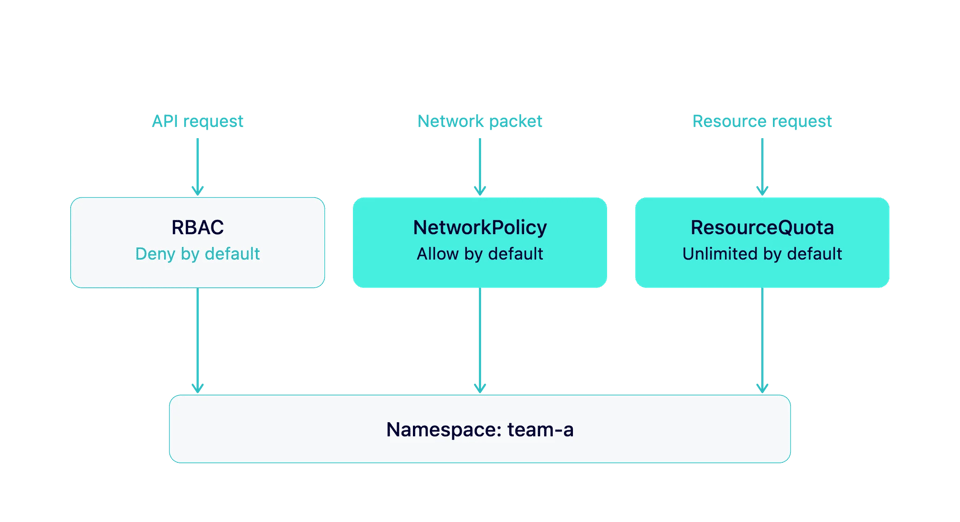
Kubernetes multi-tenancy runs on three controls that turn that name boundary into an actual security and resource boundary: RBAC, NetworkPolicy, and ResourceQuota. Each one governs a different kind of access, and each one has its own default that catches teams off guard.
RBAC: controlling who can act
RBAC decides which users, groups, and service accounts can do what to which resources, in which namespaces. Its default state works in your favor: a service account or user has zero permissions until a Role grants some and a RoleBinding hands that Role to them. Nothing leaks by accident.
A namespace-scoped Role limits the blast radius of that grant to one namespace:
apiVersion: rbac.authorization.k8s.io/v1kind: Rolemetadata: namespace: team-a name: team-a-editorrules: - apiGroups: ["", "apps"] resources: ["pods", "deployments", "services"] verbs: ["get", "list", "watch", "create", "update", "patch"]---apiVersion: rbac.authorization.k8s.io/v1kind: RoleBindingmetadata: name: team-a-editor-binding namespace: team-asubjects: - kind: Group name: team-a-engineers apiGroup: rbac.authorization.k8s.ioroleRef: kind: Role name: team-a-editor apiGroup: rbac.authorization.k8s.ioThree habits keep RBAC from turning into a liability of its own:
Bind to groups, not individual users. A RoleBinding tied to named users rots the moment someone changes teams; a group binding updates automatically when your identity provider's group membership changes.
Watch for ClusterRoleBindings granted for tenant convenience. A ClusterRole bound cluster-wide hands out access to every namespace on the cluster, which defeats the point of scoping a Role to team-a in the first place. Reach for a ClusterRole only when you specifically need one, and bind it with a namespace-scoped RoleBinding when you can.
Review bindings on a schedule. RBAC sprawl (dozens of near-duplicate Roles and stale bindings for people who left the team) makes an audit take days instead of minutes. A quarterly pass catches drift before it becomes a security incident.
RBAC also decides who can read Kubernetes Secrets and manage resource ownership inside a namespace, so a Role that's too broad exposes more than compute access. And when RBAC blocks a request, Kubernetes returns a Forbidden error rather than a 404, a distinction worth knowing when you're debugging cluster errors.
NetworkPolicy: controlling what can talk to what
Flip the default from RBAC and you get NetworkPolicy's starting state. Kubernetes ships with flat networking: any pod can open a connection to any other pod on the cluster, across every namespace, unless something blocks it. A NetworkPolicy blocks it once you add one; until then, RBAC's tight access control does nothing to stop a compromised pod from reaching across namespace boundaries over the network.
Start with a default-deny policy per namespace:
apiVersion: networking.k8s.io/v1kind: NetworkPolicymetadata: name: default-deny-all namespace: team-aspec: podSelector: {} policyTypes: - Ingress - EgressWhen you deny egress, you also block DNS. CoreDNS normally runs in the kube-system namespace on port 53. Without DNS access, pods in team-a cannot resolve service names, so applications that depend on DNS will start failing. Allow DNS before adding other egress rules: apiVersion: networking.k8s.io/v1 kind: NetworkPolicy metadata: name: allow-dns namespace: team-a spec: podSelector: {} policyTypes: - Egress egress: - to: - namespaceSelector: matchLabels: kubernetes.io/metadata.name: kube-system ports: - protocol: UDP port: 53 - protocol: TCP port: 53
Then add explicit allows for what actually needs to talk. This one permits traffic only from other pods in the same namespace:
apiVersion: networking.k8s.io/v1kind: NetworkPolicymetadata: name: allow-same-namespace namespace: team-aspec: podSelector: {} policyTypes: - Ingress ingress: - from: - namespaceSelector: matchLabels: kubernetes.io/metadata.name: team-aOne gotcha catches teams who've never hit it: NetworkPolicy only works if your CNI plugin enforces it. Calico, Cilium, and a handful of others implement the NetworkPolicy API; some CNI plugins don't, and on those, your carefully written policies get accepted by the API server and silently ignored at the network layer. Confirm your CNI enforces NetworkPolicy before you treat it as a real boundary, not after.
ResourceQuota and LimitRange: capping how much a namespace can use
RBAC and NetworkPolicy stop access. ResourceQuota stops consumption. Without a quota, one namespace can request enough CPU and memory to leave nothing for the rest of the cluster, or create enough objects to slow down the API server for every tenant on it, which triggers the same mechanism behind the noisy neighbor problem.
apiVersion: v1kind: ResourceQuotametadata: name: team-a-quota namespace: team-aspec: hard: requests.cpu: "10" requests.memory: 20Gi limits.cpu: "20" limits.memory: 40Gi pods: "50" count/deployments.apps: "20"That last line matters as much as the compute limits above it. A compute-only quota still lets a namespace create unlimited Deployments, ConfigMaps, or Services, which overwhelms etcd and slows down the control plane for every other tenant on the cluster. Capping object counts protects the thing every namespace shares.
Pair the quota with a LimitRange so pods that don't declare their own requests and limits get sane defaults instead of getting rejected outright, and set a per-container maximum so no single pod can claim the entire namespace budget. For the full mechanics, including how to size the numbers to real usage instead of guessing, see the dedicated ResourceQuotas and LimitRanges guide.
Namespace isolation checklist
- Treat the namespace as a label, not a boundary; add RBAC, NetworkPolicy, and ResourceQuota before you call it isolated
- Bind RBAC Roles to groups, and scope them to the namespace unless a workload genuinely needs cluster-wide access
- Add a default-deny NetworkPolicy to every tenant namespace, then layer on explicit allows
- Confirm your CNI actually enforces NetworkPolicy before relying on it
- Set both compute quotas and object-count quotas on every tenant namespace
- Pair every ResourceQuota with a LimitRange so pods get sane defaults instead of getting rejected
- Review RBAC bindings and quota values on a schedule; both drift as teams and workloads change
FAQ
What's the difference between RBAC and NetworkPolicy in Kubernetes? RBAC controls API access: which users, groups, and service accounts can create, read, update, or delete which Kubernetes objects. NetworkPolicy controls network traffic: which pods can send packets to which other pods. A user can have full RBAC access to a namespace and still have their pods blocked from talking to another namespace over the network, and the reverse: open network access doesn't grant any API permissions.
Does Kubernetes NetworkPolicy work with any CNI? No. Kubernetes exposes NetworkPolicy as an API, but enforcing it falls to the CNI plugin. Calico, Cilium, and several others implement it; some CNI plugins accept NetworkPolicy objects without enforcing them at all. Check your CNI's documentation before treating NetworkPolicy as an actual security boundary.
Do ResourceQuotas apply automatically to new namespaces? No. You create a ResourceQuota per namespace, the same as any other Kubernetes object. Teams that want every namespace to get a quota automatically typically enforce that through GitOps templates or an admission controller (like Kyverno or OPA Gatekeeper) that generates a default quota the moment someone creates a namespace.
Isolation only holds if the numbers stay right
RBAC and NetworkPolicy mostly need periodic auditing once set. ResourceQuota works differently: it only protects the cluster when the requests and limits behind it match what workloads actually use, and that match shifts every time a workload changes. PerfectScale by DoiT keeps requests and limits matched to real usage as workloads shift, so quota-governed namespaces get right-sized instead of left over-provisioned to stay safely under the cap, and gives you the per-namespace visibility to see which tenant is closest to its limit before it becomes an incident.
Want to see it on a real cluster? Join the live multitenancy workshop on September 29, or book a technical session.
<