


The noisy neighbor problem in Kubernetes is when one workload on a shared node uses more than its fair share of CPU, memory, disk, or network, and starves or slows down the other workloads running next to it. It is a side effect of multitenancy: the moment you pack many apps or teams onto the same cluster, they start competing for the same node resources.
This matters because Kubernetes packs pods together on purpose to save money. That packing is also what lets one badly behaved pod hurt the ones around it. The good news is that Kubernetes gives you the controls to stop it. This article walks through what the problem actually is, why it hurts more than people expect, and the settings and habits that fix it.

What is the noisy neighbor problem in Kubernetes?
A Kubernetes node has a fixed amount of CPU and memory. Every pod scheduled onto that node draws from the same pool. When one pod uses far more than it should, there is less left for everyone else on that node. That is the noisy neighbor problem.
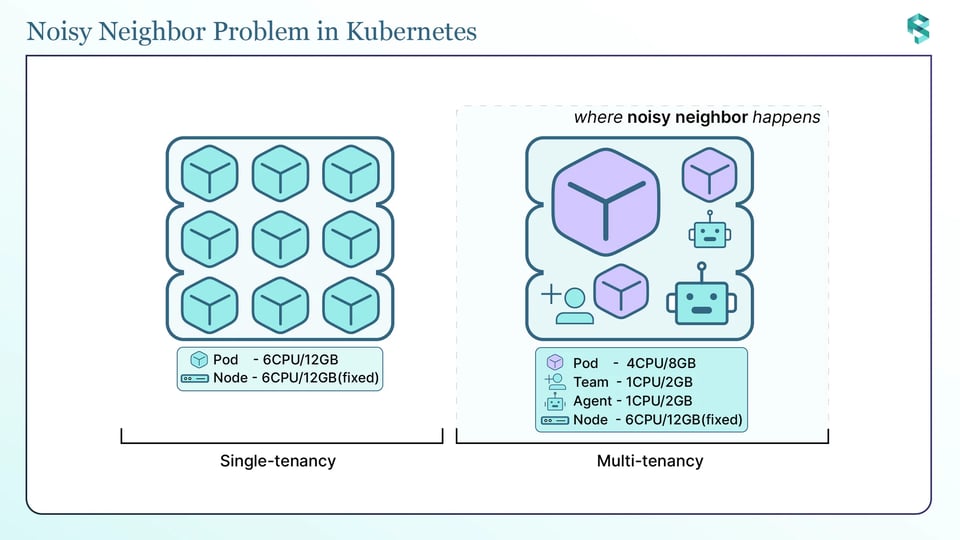
It is called a byproduct of multitenancy because it only shows up when you share. When several teams share a cluster with a fixed number of nodes, one team can end up using more than its fair share. A single-tenant cluster with one app per node rarely has this issue. A shared cluster with many teams, many namespaces, and tight bin-packing has it all the time.
To see why one pod can hurt another, you need to know how Kubernetes hands out CPU and memory. The two behave very differently:
CPU is compressible. If a pod wants more CPU than is free, the kernel just makes it wait. Nothing crashes. When you set a CPU limit, Kubernetes enforces it by throttling: the kernel caps the container at its limit, and it cannot go past that. When the whole node is busy, Kubernetes shares CPU time in proportion to each pod's CPU request. So a pod that declared a real request keeps getting its slice, and a pod that declared nothing can get starved.
Memory is incompressible. You cannot make a process "wait" for memory it already needs. If a container goes past its memory limit, the kernel kills it with an OOM (out of memory) kill. And if the whole node runs low on memory, Kubernetes does not politely ask anyone to slow down. It starts removing pods. This is where the real damage happens.
Noisy neighbors are really a multitenancy problem, and it gets worse the more teams share a cluster. That is exactly what we are covering live on 29 September, on a real cluster. Save your seat.

Why the noisy neighbor problem matters
The surprising part is who gets hurt. It is often not the greedy pod.
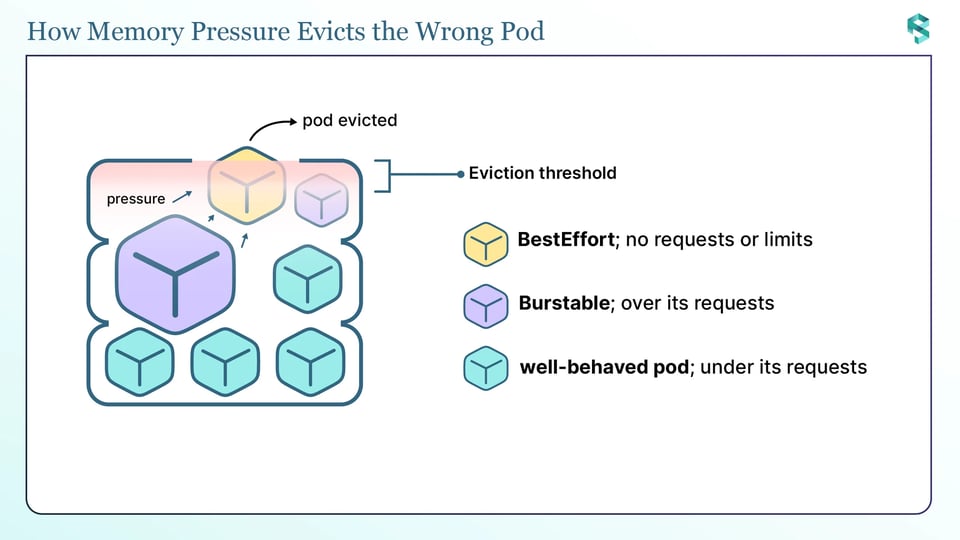
When a node runs low on memory, the kubelet steps in and starts evicting pods to free memory. This is a node-level action. The kubelet watches a node signal like memory.available, and once it crosses the eviction threshold, it picks pods to remove.
How does it pick? Not by "who is the noisy one". The kubelet ranks pods by whether their usage is over their requests and then by pod priority. A pod that is staying under its requests is evicted last. A pod that is over its requests is a candidate, even if it is not the pod that caused the pressure.
This is where it goes wrong for whoever set the weakest requests. When the node runs low on memory, the kubelet does not evict the pod that caused the pressure. It evicts the least-protected pods first: pods with no requests or limits (BestEffort) go first, then pods using more than they requested. Pods staying within their requests, and Guaranteed pods, are evicted last. So a small workload that set no requests, just to keep its config simple, can be the first one killed the moment any other workload fills the node, even though it did nothing wrong. The pod that skipped its requests pays for pressure someone else created.
There are two more eviction behaviours important to know:
Guaranteed pods are protected from eviction, but not from the OOM killer: A pod where every container has equal requests and limits gets the Guaranteed quality of service class, and the kubelet evicts it last. But if that same pod hits its own memory limit, the kernel's OOM killer still fires and kills the container. Guaranteed protects you from node-level eviction, not from your own limit.
CPU noise mostly hurts pods that skipped requests: Because CPU is shared by request weight, a pod with a proper CPU request keeps its share even when the node is under heavy load. The pods that suffer are the ones that set no CPU request at all. They get whatever is left, which under load can be almost nothing.
So the cost of the noisy neighbor problem is not just a slow pod. It is evictions and OOM kills landing on workloads that did nothing wrong, latency spikes on services that skipped their requests, and restarts that break your SLOs. And it is hard to debug, because the symptom shows up on the victim, not the cause.
How to prevent the noisy neighbor problem in Kubernetes
The fix is a few layers that work together: set requests and limits, cap namespaces with quotas, right-size the values, automate the right-sizing, and get visibility into who is using what.
a. Set resource requests and limits
This is the foundation. Everything else builds on it.
A request is what the pod reserves. The scheduler uses the request to pick a node, and the kubelet holds at least that much for the container. A limit is the ceiling that the pod cannot exceed. Here is what each one actually does:
| Setting | What it controls | What happens when reached |
|---|---|---|
| CPU request | Reserves CPU, sets the pod's share when the node is busy | Pod can use more if CPU is free |
| CPU limit | Caps CPU | Throttled at the limit, never killed |
| Memory request | Reserves memory, decides scheduling and eviction ranking | Pod can use more if memory is free |
| Memory limit | Caps memory | OOM killed if it goes over |
Two practical rules follow from how CPU and memory behave:
For memory, always set a request, and set the limit equal to it. That way the pod can never use more than it reserved, so it will not be the pod that tips the node into pressure, and it is evicted last. (Setting CPU and memory requests equal to limits on every container gives the whole pod the Guaranteed class, the strongest protection, but that means setting CPU limits too, with the throttling trade-off from the CPU rule below.) A missing memory limit is how one pod eats the whole node.
For CPU, always set a request so the pod keeps its share under load. Be careful with CPU limits: because CPU is compressible, a limit mostly throttles the pod that owns it and does little to protect neighbors (the request weight already does that). Many teams set CPU requests and skip CPU limits on latency-sensitive services to avoid throttling. Test this for your own workloads rather than treating it as a rule.
One gotcha to know: if you set a limit but no request, Kubernetes copies the limit and uses it as the request. That is not always what you want, so set both on purpose.
b. Cap each namespace with resource quotas
Requests and limits work per pod. A ResourceQuota works per namespace. It sets a hard cap on the total CPU, memory, and object counts a namespace can use, so one team cannot take the whole cluster.
apiVersion: v1kind: ResourceQuotametadata: name: team-a-quota namespace: team-aspec: hard: requests.cpu: "10" requests.memory: 20Gi limits.cpu: "20" limits.memory: 40Gi pods: "50"The quota is enforced at admission time. If a new pod would push the namespace over the cap, the API server rejects it. Pods already running are left alone.
Once a namespace has a compute quota, every pod in it must set the matching requests and limits, or the pod is rejected. That sounds strict, but it is the point: it forces every pod to declare what it needs, which is exactly what stops noisy neighbors.
To make that painless, pair the quota with a LimitRange. A LimitRange does two useful jobs in a namespace: it sets default requests and limits that get injected into any pod that forgot to set them, and it sets a min and max per container so no single pod can ask for a giant slice. Quota sets the namespace budget; LimitRange stops one pod from grabbing it all and fills in sensible defaults.
apiVersion: v1kind: LimitRangemetadata: name: team-a-limits namespace: team-aspec: limits: - type: Container default: cpu: 500m memory: 512Mi defaultRequest: cpu: 250m memory: 256Mi max: cpu: "2" memory: 2Gi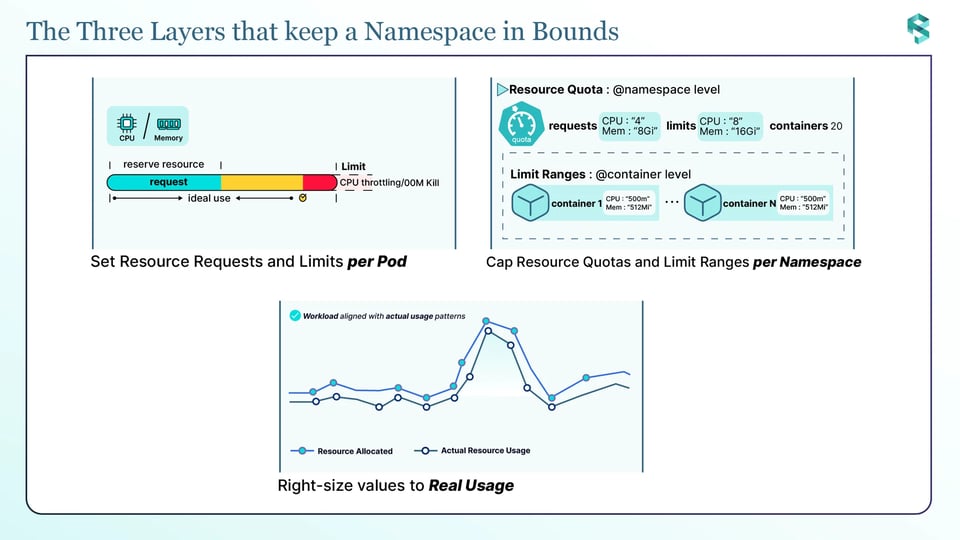
In a namespace with a ResourceQuota, raising a workload's requests counts against the namespace budget, so an optimizer has to avoid breaching the quota. PerfectScale's Full-mode ResourceQuota support makes its right-sizing quota-aware: it raises a workload's requests and limits up to the room the quota still allows, so quota-governed namespaces get right-sized like any other instead of being left under-provisioned to stay safely under the cap.
Want to see this on a live cluster, not just on the page? Join our multitenancy webinar on 29 September. Save your seat.
c. Right-size to real usage
Quotas and limits only help if the numbers are right. Values that are set once and forgotten are usually wrong and wrong in both directions.
Set requests too high and you reserve capacity nobody uses. The scheduler thinks the node is full, so it spreads pods across more nodes than you need, and your bill goes up. Set them too low and you get the opposite problem: too little CPU request and the pod is starved for CPU when the node is busy; too little memory and the pod runs over its request, which moves it toward the front of the eviction line when the node runs low on memory. Either way, you are back to the noisy neighbor problem.
Right-sizing means setting requests and limits to match what the workload actually uses. PerfectScale does exactly this: it compares what each workload requests against what it actually uses, and gives you the number to set, per workload. But setting it once is the easy part. The hard part is keeping the numbers right as the workload changes.
d. Automate it, because workloads change
Right-sizing is not a one-time task. Traffic changes, features ship, and a new release can change how much memory or CPU a service needs. The values you tuned last month can be wrong today, and stale requests are how a workload quietly drifts into being a noisy neighbor again.
Doing this by hand across hundreds of workloads does not scale, and it is boring enough that it stops getting done. The workable answer is automation, which is what PerfectScale does: it keeps watching real usage and keeps each workload's requests and limits right as it moves, instead of leaving it to a spreadsheet someone updates once a quarter. This is the reliability angle: isolation only holds if the numbers stay right, and the numbers only stay right if something keeps them there.
e. Get visibility into who is using what
You cannot fix a noisy neighbor you cannot see. When a node is under pressure, or a namespace is over its quota, the first question is always "which workload, and which team?" Without per-namespace and per-team usage broken out, you are guessing.
Visibility means being able to quickly answer: which workloads are using more than their requests, which namespaces are close to their quota, and how much each team is actually using and costing.
This is where Attribute™ by DoiT helps. It watches real runtime consumption and maps it back to the workload and team that drove it, with no tagging project needed. So instead of guessing, you can see exactly which workload is the noisy neighbor, and what each team is actually using and costing.
What requests and quotas do not cover
Be honest about the edges: Requests, limits, quotas, and LimitRanges cover CPU and memory. They do not directly solve every kind of noisy neighbor.
Disk I/O and network bandwidth are not fully controlled by these settings. A pod that uses too much disk or network bandwidth can still slow down other pods on the same node. You need different tools to handle this, such as separate node pools for heavy workloads, storage-level I/O controls, and network shaping through your CNI. Local disk usage can be managed to some extent with ephemeral-storage requests and limits, but they do not control disk speed or throughput.
The takeaway is not that these tools are weak. It is that "noisy neighbor" covers more than CPU and memory, and a complete answer plans for the other resources too.
Keeping workloads healthy with PerfectScale by DoiT
The noisy neighbor problem comes down to two things being true at once: every workload declares what it needs, and those numbers stay correct as workloads change. Doing that by hand across a real cluster does not hold up.
PerfectScale by DoiT is a resiliency-first kubernetes optimization platform that keeps watching your workloads for resource-driven risk (OOM kills, CPU throttling, and eviction) and turns it into right-sizing recommendations you can apply manually or autonomously. It keeps requests and limits matched to real usage as your workloads move, so one tenant does not quietly grow into everyone else's problem, and gives you the per-namespace and per-team visibility to see exactly who is using what. Teams like Paramount Pictures and Creditas run it to keep clusters both efficient and reliable.
Sign up or Book a technical session to see it on your own cluster.
Before you go: our multitenancy webinar is on 29 September. Same problem as this article, but live on a real cluster, with your questions answered. [Save your seat]