


Karpenter changed how teams scale nodes on AWS and later on Azure. Instead of managing fixed node pools, it can provision right-sized machines when they are needed. If you run workloads on Google Cloud, you may wonder if you can do the same with GKE. The honest answer, as of 2026, is that Karpenter support on GCP is still early. There is no official GCP provider, and the available community provider is still in preview.
In this guide, you'll learn what Karpenter is and why GCP teams are interested in it, how it compares with GKE's built-in autoscaling, the current state of Karpenter support on Google Cloud, how the community provider works, how to set it up for testing, its current limitations, and how to keep GKE costs under control whichever approach you choose.
What is Karpenter and why GCP teams want it?
Karpenter is an open-source node autoscaler. It watches for pods that cannot be scheduled, finds the most cost-effective machine that can run them, provisions the node, and removes it when it is no longer needed.
Instead of scaling fixed groups of identical nodes, Karpenter provisions nodes based on actual workload demand. This approach is called groupless autoscaling.
GCP teams want Karpenter for the same reasons it became popular on AWS. Managing node pools manually can be tedious. You choose machine types in advance, create different pools for different workloads, and often over-provision capacity to stay safe.
Karpenter reduces this manual work. It can choose machine types based on current demand, pack pods efficiently, mix Spot and on-demand capacity, and consolidate nodes as demand falls. This can lead to faster scaling and lower costs.
After seeing these benefits on EKS and AKS, teams naturally want the same approach on GKE.
Karpenter vs. GKE's built-in autoscaling options
Before using Karpenter, it is worth understanding what GKE already provides. These native features are production-ready and cover many of the same use cases as Karpenter:
The GKE Cluster Autoscaler is the foundation. In Standard clusters, it scales your node pools up or down based on pending pods. These node pools are backed by Compute Engine Managed Instance Groups. The main limitation is that you define the node pools and machine types in advance, so you still have to decide what capacity you want to use.
Node auto-provisioning goes a step further. GKE can create and manage node pools automatically based on your pending workloads, so you do not have to define every pool yourself. This is closer to Karpenter, but GKE still provisions capacity through node pools rather than launching individual instances directly.
Custom compute classes with priority-based fallback give you another option. You can define a prioritized list of machine configurations, and GKE moves down the list if the preferred option is unavailable. This lets you prefer cheaper or Spot capacity and fall back to on-demand capacity when needed, providing some of Karpenter's flexibility using native GKE features.
GKE Autopilot removes node management completely. You deploy your pods, and Google provisions and manages the underlying nodes. You are billed based on the resources your pods request. For teams that do not want to manage nodes, this is the easiest option.
Karpenter's main difference on GCP is its groupless model. It can launch instances directly instead of relying on predefined node pools, which is the model many teams already use with Karpenter on EKS.
The trade-off is simple: GKE's native autoscaling options are mature and production-supported, while Karpenter on GCP is still early and community-driven. The rest of this guide looks at what that means in practice.
Current state of Karpenter support on Google Cloud
The only way to run Karpenter on GCP today is through the community provider, cloudpilot-ai/karpenter-provider-gcp. It was started and is mainly developed by CloudPilot AI, with contributions from the open-source community, and the project is under the Apache 2.0 license.
However, it is still a preview release. The maintainers do not currently recommend it for production use, although it is functional for testing and experimentation. Its API is also still at v1alpha1, which means the API can change in ways that may require configuration changes between versions.
There is no official Karpenter provider for GCP. The kubernetes-sigs organization, which hosts the official Karpenter projects, does not have a GCP provider repository, and Google has not released one. This is why GKE continues to rely on its native autoscaling options instead of Karpenter.
The difference between the clouds is important:
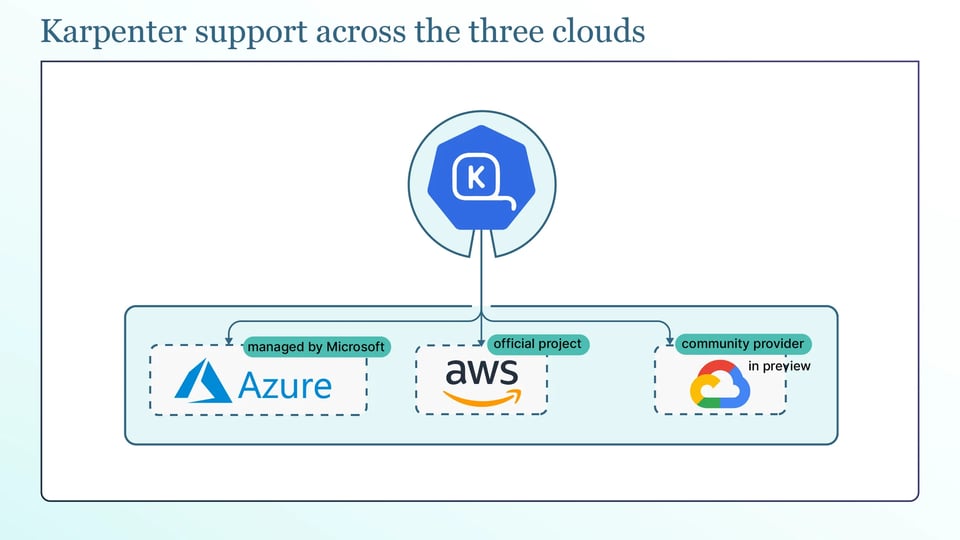
AWS: Karpenter is an official project, generally available, and widely used for node provisioning on EKS.
Azure: The Karpenter provider powers AKS Node Auto Provisioning and is generally available and managed by Microsoft.
GCP: There is no official or managed provider. The available option is a community provider that is still in preview.
So the practical takeaway is to use the community provider for testing and experimentation and use GKE's native autoscaling features for production workloads.
How does Karpenter provision nodes on Compute Engine?
The community provider follows the same basic Karpenter model used on other clouds, but adapts it to Compute Engine.
It starts by reading unschedulable pods and their scheduling constraints. When the scheduler marks pods as unschedulable, Karpenter reads their resource requests, node selectors, affinities, tolerations, and topology spread rules to work out what kind of node would let them run.
From there it selects a machine type from the Compute Engine catalog. Rather than being limited to machine types you chose in advance, it considers the range your configuration allows and picks one that fits the pending pods at the lowest cost, packing as many onto the node as will fit.
The GCP-specific part is how the node is created: Karpenter calls the Compute Engine API directly to launch the virtual machine, instead of resizing a Managed Instance Group. This is the groupless approach, with no node pools to define, only rules for what Karpenter may create, and it then joins the new instance to your GKE cluster.
Karpenter keeps working after the node is up. It consolidates underused nodes onto fewer machines when workloads shrink, detects drift when a node no longer matches your desired configuration and replaces it, and can expire nodes after a set age so they are regularly recycled. Together these keep the node set matched to demand rather than drifting into waste.
Karpenter GCP resource definitions
You configure the GCP provider using the same two-resource pattern Karpenter uses on other clouds, with a GCP-specific NodeClass. Let's see:
The GCENodeClass contains the Google Cloud-specific node settings under the karpenter.k8s.gcp API group. This is where you define the node image with imageSelectorTerms (for example, ContainerOptimizedOS@latest), boot disk size and type under disks, the Google service account used by the node, and network and kubelet settings such as maxPods. Because the API is still at v1alpha1, check the provider's documentation for the current supported fields.
apiVersion: karpenter.k8s.gcp/v1alpha1kind: GCENodeClassmetadata: name: defaultspec: serviceAccount: "karpenter-sa@my-project.iam.gserviceaccount.com" imageSelectorTerms: - alias: ContainerOptimizedOS@latest disks: - boot: true sizeGiB: 128 category: pd-balancedThe NodePool is the upstream Karpenter resource, and it sets the rules for what Karpenter may provision. Its requirements restrict the machine families, sizes, and architectures Karpenter can pick, its limits cap the total CPU and memory it may create, and taints let you reserve a pool for specific workloads.
There are two important settings to know: capacity type and disruption settings. Capacity type, set through the karpenter.sh/capacity-type requirement, lets you allow spot VMs, on-demand instances, or both, so Karpenter can prefer cheap spot capacity and fall back to on-demand. And the disruption settings control lifecycle: consolidationPolicy (WhenEmpty or WhenEmptyOrUnderutilized) decides how aggressively it removes or repacks nodes, consolidateAfter sets how quickly it acts, and expireAfter recycles nodes after a set age.
A NodePool looks like this:
apiVersion: karpenter.sh/v1kind: NodePoolmetadata: name: defaultspec: template: spec: requirements: - key: karpenter.sh/capacity-type operator: In values: ["on-demand", "spot"] - key: kubernetes.io/arch operator: In values: ["amd64"] nodeClassRef: group: karpenter.k8s.gcp kind: GCENodeClass name: default limits: cpu: "100" disruption: consolidationPolicy: WhenEmptyOrUnderutilized consolidateAfter: 1m expireAfter: 720hSetting up Karpenter on a GKE cluster
If you want to try the provider, follow these basic steps. You have to use a test cluster, not production. Let's try it out:
You need a running GKE cluster and the right access. You have to enable the Compute Engine APIs on your project and make sure you have enough Compute Engine quota for the instances Karpenter will create, since quota limits are a common reason provisioning silently fails. Karpenter also needs a Google service account with permission to create instances, disks, and related resources.
For authentication, prefer Workload Identity over a service account key. The Workload Identity binds a Kubernetes service account to a Google service account, so Karpenter authenticates without a long-lived JSON key file sitting in a secret. Service account key authentication works too, but a key file is a credential you have to store and rotate, which is why Workload Identity is the better default.
The provider installs with its Helm chart, pointing it at your project, location, and cluster, and wiring in the service account:
helm upgrade --install karpenter charts/karpenter \ --namespace karpenter-system --create-namespace \ --set "controller.settings.projectID=${PROJECT_ID}" \ --set "controller.settings.region=${REGION}" \ --set "controller.settings.clusterName=${CLUSTER_NAME}" \ --set "serviceAccount.annotations.iam\.gke\.io/gcp-service-account=${KARPENTER_SA}" \ --waitWith the controller running, apply a GCENodeClass and NodePool, then verify with a test workload. You have to Deploy something that does not fit on the current nodes so pods go pending, and watch Karpenter provision a node:
kubectl get nodeclaimskubectl get nodes -wYou should see a NodeClaim appear and a new Compute Engine instance join the cluster, which confirms the provider is working.
Limitations to account for before production use
The following are the important limitations:
a. GPU, TPU, and Compute Engine reservation gaps: The GPU support has been actively fixed and extended in recent releases rather than being long-settled, TPU support is not a focus, and consuming committed-use discounts or reservations is not something to assume works. If your GCP workloads depend on GPUs, TPUs, or reservations, test very carefully or stay on GKE native autoscaling.
b. Multi-zone scheduling and PersistentVolume affinity conflicts: The Zone selection has been an area of active bug fixing, and as with any groupless autoscaler, a node provisioned in the wrong zone for a zonal persistent disk leaves the pod unable to attach its volume. You should validate multi-zone behavior for stateful workloads specifically and be careful where PersistentVolumes are pinned to a zone.
On top of these, always remember the API is v1alpha1, so expect breaking changes between versions, and support is community-only, with no vendor SLA behind the open-source provider. Both are reasons to keep it out of production for now.
Why node autoscaling alone does not cut GKE costs?
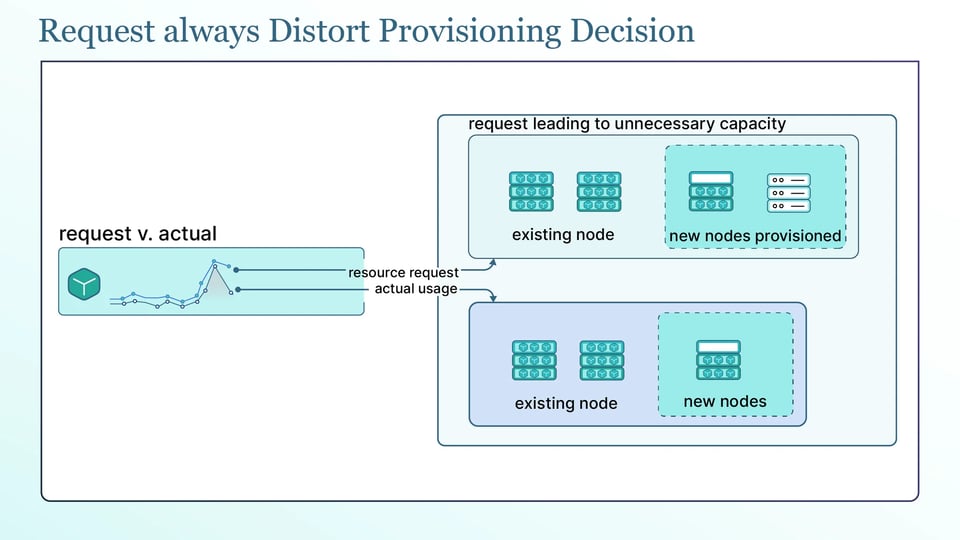
Every option here, Karpenter, Cluster Autoscaler, node auto-provisioning, and Autopilot, makes provisioning decisions based on pod resource requests, not on how much CPU and memory the pods actually use.
That means excessive requests can lead to unnecessary capacity. If a pod requests much more CPU and memory than it actually uses, the autoscaler provisions a larger machine to satisfy those requests. With Autopilot, you are also billed directly for the requested resources. The autoscaler is doing what you asked; the problem is that the requests are too high.
This is why right-sizing is a prerequisite for effective bin packing, not an optional. Karpenter's main advantage is packing pods efficiently onto the smallest suitable nodes, but it can only pack based on their requests.
If those requests are oversized, Karpenter reserves capacity that the pods never use. The result can look efficient while the nodes remain partially idle. Get pod-level requests right first. Then the autoscaler, whatever you use, can actually deliver the savings it promises.
Best practices for node autoscaling on GCP
The following are the best practices that can help keep node autoscaling safe and efficient on GKE, whether you use GKE autoscaling or Karpenter:
a. Right-size pod requests before tuning the autoscaler: Since every autoscaler works from requests, accurate requests do more for cost than any autoscaler setting. You have to fix sizing first, then tune.
b. Diversify machine families to survive Spot VM preemption: The Spot VMs are much cheaper but can be reclaimed at any time. You should allow several machine families and sizes so the autoscaler can replace preempted capacity from a different pool instead of getting stuck waiting for one type.
c. Separate node pools by workload profile instead of by team: You should group nodes by what the workloads need, such as general-purpose, memory-heavy, or GPU, rather than by which team owns them. This lets the autoscaler pack similar workloads together and pick the right machine shape.
d. Set CPU and memory limits on every node pool to cap spend: Whether it is a GKE node pool or a Karpenter NodePool, set limits so a misconfigured or runaway workload cannot provision unlimited capacity and cost.
e. Use PodDisruptionBudgets to protect stateful services during consolidation: During Consolidation moves pods to pack them onto fewer nodes. A PodDisruptionBudget caps how many pods of a service can be unavailable at once, so consolidation does not take a stateful workload below a safe replica count.
f. Track node utilization and provisioning latency continuously: You have to watch how full your nodes actually run and how long new nodes take to become ready. Low utilization points to oversized requests or poor packing, and rising provisioning latency points to quota or capacity problems.
Tools for optimizing Kubernetes autoscaling on GCP
Autoscaling gives you flexible capacity, but the following tools can help you use it more efficiently:
a. PerfectScale addresses the cost problem at its root: the resource requests that every autoscaler depends on. Its Kubernetes governance platform looks at how workloads actually use CPU and memory and provides actionable, automated right-sizing recommendations that you can apply manually or autonomously. With requests that better match actual usage, your GKE autoscaler can provision the right amount of capacity and pack workloads more efficiently.
PerfectScale also provides cost visibility with breakdowns by cluster, namespace, and workload, helping you see where your Kubernetes spend is going. Teams such as Paramount Pictures and Creditas use PerfectScale to keep their clusters efficient. You can give it a try or book a technical session.
b. CloudPilot AI leads the community GCP Karpenter provider. Alongside the open-source provider, it offers managed cost optimization, reliability automation, and production support. This can be an option for teams that specifically want the Karpenter model on GCP with a vendor supporting the deployment.
c. Kubecost provides Kubernetes cost visibility by breaking spend down by cluster, namespace, workload, and label. It helps teams identify waste and understand where their Kubernetes budget is going.