


What Are Kubernetes Workloads?
Kubernetes workloads are applications, services, or tasks that run on a Kubernetes cluster. They execute inside Pods, but are normally managed through higher-level workload resources that tell Kubernetes how Pods should be created, replaced, scaled, updated, and terminated. Different workload resources provide different lifecycle behavior, allowing Kubernetes to support stateless services, stateful applications, node-level agents, one-time batch processing, and scheduled tasks.
Core built-in workload resources:
| Workload Type | Primary Use Case | Key Features and Behavior | Common Examples |
|---|---|---|---|
| Deployment | Stateless, continuously running applications | Maintains interchangeable Pod replicas through ReplicaSets and supports scaling, rolling updates, rollback, and automatic replacement of failed Pods. | Web applications, APIs, microservices |
| StatefulSet | Stateful applications requiring stable identity or storage | Gives Pods stable names and identities, supports ordered creation and termination, and can associate each replica with its own persistent volume claim. | PostgreSQL clusters, distributed databases, Kafka |
| DaemonSet | Node-level services | Ensures a Pod runs on every eligible node or selected nodes and automatically adds or removes Pods as matching nodes join or leave the cluster. | Log collectors, monitoring agents, networking and storage agents |
| Job | Finite or batch tasks | Creates one or more Pods and tracks them until the required number of successful completions is reached; supports sequential and parallel execution. | Database migrations, batch processing, administrative scripts |
| CronJob | Scheduled recurring tasks | Creates Jobs according to a cron schedule and can control concurrency, missed executions, and retention of completed Jobs. | Backups, report generation, cleanup, periodic synchronization |
| ReplicaSet | Maintaining a fixed number of identical Pod replicas | Ensures the specified number of matching Pods remains available, replacing failed or deleted Pods as needed. Usually created and managed by a Deployment rather than directly. | Replica management underlying Deployments |
Workload best practices:
- Define accurate resource requests and limits: Set realistic CPU and memory requests for scheduling, and use limits carefully to prevent excessive consumption without causing unnecessary throttling or OOMKilled events.
- Continuously right-size workloads: Compare historical CPU and memory usage with configured requests and limits, then adjust them as application demand changes.
- Use the appropriate workload controller: Use Deployments for stateless services, StatefulSets for workloads needing stable identity or storage, DaemonSets for node-level services, Jobs for finite tasks, and CronJobs for scheduled work.
- Configure readiness, liveness, and startup probes: Use probes to control traffic eligibility, detect unrecoverable application failures, and protect slow-starting workloads from premature restarts.
- Use Pod Disruption Budgets for critical applications: Limit how many replicas can be unavailable during voluntary disruptions such as node drains and maintenance.
- Distribute replicas across nodes and availability zones: Use pod anti-affinity or topology spread constraints to reduce the impact of node or zone failures.
- Combine workload and cluster autoscaling: Coordinate HPA or other workload autoscaling with node autoscaling so additional replicas have sufficient cluster capacity to run.
This is part of a series of articles about Kubernetes scheduling
In this article:
- Kubernetes Workloads vs. Workload API
- Types of Kubernetes Workloads
- AI and Machine Learning Workloads in Kubernetes
- Kubernetes Workload Lifecycle
- Kubernetes Workload Monitoring
- Kubernetes Workload Management Best Practices
Kubernetes Workloads vs. Workload API
A Kubernetes workload is the actual resource that represents and manages an application or task running in the cluster. Examples include a Deployment, StatefulSet, DaemonSet, Job, or CronJob. These objects describe the desired state of the workload, such as the container image to run, the number of replicas, update strategy, and scheduling requirements.
A workload API is the Kubernetes API interface used to create, read, update, delete, scale, or otherwise manage those workload objects. For example, a Deployment is a workload object, while the Deployment API, exposed through the Kubernetes apps/v1 API group, provides the operations and schema used by tools such as kubectl, controllers, and application code to manipulate Deployment resources.
The distinction is therefore between the resource being managed and the API used to manage it. A StatefulSet is a workload; the StatefulSet API lets clients create or modify StatefulSet objects. Similarly, a Job is a workload, while the Job API provides programmatic access to Job resources.
This distinction becomes especially important when building operators, automation, platform tooling, or custom integrations. These systems interact with Kubernetes through workload APIs rather than directly manipulating running containers or pods, allowing the Kubernetes control plane to reconcile the requested workload state.
Types of Kubernetes Workloads
Kubernetes provides several workload resources for different application requirements. Each resource manages pods but uses different rules for scheduling, scaling, updates, and pod replacement. Choosing the right resource depends on whether the application is stateless, stateful, node-specific, or designed to run for a limited time.
Deployments
A Deployment manages stateless applications that need one or more interchangeable pod replicas. You define the desired container image, replica count, and pod configuration, and the Deployment continuously works to maintain that state.
Deployments also support controlled application updates. They can gradually replace old pods with new ones during a rolling update and support rollback to an earlier revision if an update fails. Deployments manage pods through ReplicaSets rather than creating them directly.
Example:
apiVersion: apps/v1kind: Deploymentspec: replicas: 3StatefulSets
A StatefulSet manages applications whose pods need stable identities, predictable ordering, or persistent storage. Unlike Deployment pods, StatefulSet pods receive persistent names such as database-0 and database-1.
StatefulSets can create and terminate pods in a defined order and associate each pod with its own persistent volume claim. These properties make them useful for databases, distributed data stores, and other applications where individual replicas are not interchangeable.
Example:
apiVersion: apps/v1kind: StatefulSetspec: serviceName: database replicas: 2DaemonSets
A DaemonSet ensures that a pod runs on every eligible node, or on a selected group of nodes. When a matching node joins the cluster, Kubernetes creates the pod on that node. When the node is removed, its DaemonSet pod disappears with it.
DaemonSets are commonly used for node-level services such as log collectors, monitoring agents, storage components, and networking software. Node selectors, affinity rules, and tolerations can restrict which nodes receive the pods.
Example:
apiVersion: apps/v1kind: DaemonSetmetadata: name: node-agentJobs
A Job runs one or more pods until a specified task completes successfully. Unlike a Deployment, which keeps an application running continuously, a Job tracks successful completions and stops creating pods once its completion requirements are met.
Jobs are useful for finite tasks such as database migrations, data processing, batch calculations, and administrative operations. They can run a single task or execute multiple tasks sequentially or in parallel.
Example:
apiVersion: batch/v1kind: Jobmetadata: name: migrationCronJobs
A CronJob creates Jobs according to a recurring schedule expressed in cron syntax. Kubernetes evaluates the schedule and starts a Job when the configured execution time arrives.
CronJobs are suitable for recurring tasks such as backups, report generation, cleanup operations, and periodic data synchronization. Their configuration can also control concurrent executions, missed schedules, and retention of completed Jobs.
Example:
apiVersion: batch/v1kind: CronJobspec: schedule: "0 2 * * *"ReplicaSets
A ReplicaSet maintains a specified number of identical pod replicas. If a pod fails or is deleted, the ReplicaSet creates a replacement. If too many matching pods exist, it removes the excess pods.
ReplicaSets are usually managed indirectly through Deployments. A Deployment creates new ReplicaSets when its pod template changes and uses them to perform rolling updates and rollbacks. Creating ReplicaSets directly is generally unnecessary when a Deployment provides the required lifecycle management.
Example:
apiVersion: apps/v1kind: ReplicaSetspec: replicas: 3AI and Machine Learning Workloads in Kubernetes
Kubernetes can run AI and machine learning workloads such as model training, distributed training, batch processing, and inference. These workloads still run in Pods, but they often have more demanding requirements than conventional applications, particularly around accelerators, resource availability, and coordinating multiple Pods.
GPU and Accelerator Requirements
AI/ML workloads frequently depend on GPUs or other specialized hardware. Kubernetes supports device plugins that expose hardware such as AMD and NVIDIA GPUs as schedulable resources.
This allows teams to:
- Request GPUs for specific Pods.
- Schedule workloads only on nodes with appropriate accelerator hardware.
- Use node labels, selectors, and affinity to target particular GPU types.
- Manage GPU capacity alongside other Kubernetes resources such as CPU and memory.
Distributed AI and ML Workloads
Large training jobs may consist of multiple related Pods, such as a driver and a set of workers. Scheduling these Pods independently can be inefficient because the workload may be unable to make progress unless enough workers are available at the same time.
The Kubernetes Workload API addresses this type of requirement by allowing related Pods to be grouped and assigned scheduling policies. For example, gang scheduling can use an all-or-nothing approach in which the required group of Pods is scheduled together rather than allowing only part of a distributed job to consume resources.
Workload Placement for AI/ML
Placement can also affect AI/ML performance. Distributed training often involves significant communication between workers, so Kubernetes can use workload-aware and topology-aware scheduling to coordinate where related Pods run.
These capabilities can help organizations:
- Keep distributed workers within appropriate topology domains.
- Reduce communication latency between related Pods.
- Avoid partially scheduled training jobs that cannot make useful progress.
- Allocate scarce GPU and accelerator resources more efficiently.
Kubernetes Workload Lifecycle
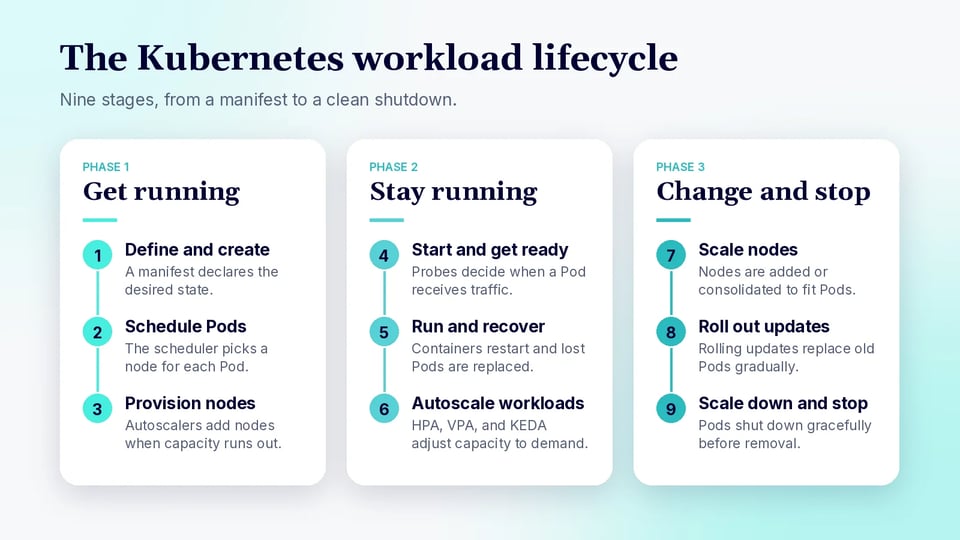
A Kubernetes workload moves through several stages, from its initial declaration through scheduling, execution, scaling, updates, and eventual termination. Modern Kubernetes environments can automate much of this lifecycle, including both application-level scaling and dynamic provisioning of the underlying nodes.
1. Workload Definition and Creation
The lifecycle begins when you define a workload resource such as a Deployment, StatefulSet, DaemonSet, Job, or CronJob. The manifest specifies the desired state of the application, including container images, replica counts, resource requests and limits, environment configuration, storage requirements, and scheduling constraints.
When the resource is submitted to the Kubernetes API, the relevant controller starts reconciling the actual cluster state with the desired state. For example, a Deployment controller creates and manages ReplicaSets, which in turn maintain the required Pods.
2. Pod Scheduling
Newly created Pods generally begin without an assigned node. The Kubernetes scheduler evaluates available nodes and selects suitable placement based on factors such as:
- CPU and memory requests
- Node selectors and node affinity
- Pod affinity and anti-affinity
- Taints and tolerations
- Topology spread constraints
- Storage and hardware requirements
Kubernetes also supports scheduling gates, which can keep a Pod out of the scheduler until external conditions are satisfied. Once an appropriate node is selected, the Pod is bound to that node.
3. Node Provisioning When Capacity Is Insufficient
If the scheduler cannot place a Pod because suitable capacity is unavailable, node autoscaling can provision additional infrastructure.
Modern Kubernetes distinguishes this from workload autoscaling. Node autoscalers react to unschedulable Pods and provision nodes that satisfy their resource and scheduling requirements. Kubernetes currently identifies both Cluster Autoscaler and Karpenter as SIG Autoscaling-sponsored implementations.
Karpenter takes a more dynamic approach to this process. Instead of relying only on predefined node groups, it can use NodePool constraints and the requirements of pending Pods to select and provision suitable node capacity. It also manages broader node lifecycle operations, including consolidation and replacement of nodes.
4. Pod Startup and Readiness
After a Pod reaches its assigned node, the kubelet prepares the Pod and starts its containers. Applications may require initialization time before they are ready to serve traffic.
Kubernetes provides several probes to manage this stage:
- Startup probes determine when an application has successfully initialized.
- Readiness probes determine when a Pod should receive traffic.
- Liveness probes detect containers that are running but unhealthy and should be restarted.
A Pod can therefore be running without yet being considered ready to handle requests.
5. Runtime Operation and Health Management
Once ready, Pods perform their application workload while Kubernetes continuously works to maintain the declared state.
If a container fails, the kubelet can restart it according to its restart policy. If a Pod managed by a Deployment or StatefulSet disappears entirely, the workload controller can create a replacement. Readiness checks can also temporarily remove unhealthy Pods from service endpoints without necessarily restarting them.
6. Workload Autoscaling
During operation, Kubernetes can adjust workload capacity as demand changes. Current Kubernetes supports several approaches rather than relying on a single scaling mechanism.
- Horizontal Pod Autoscaler (HPA): Changes the number of replicas based on CPU, memory, custom, or external metrics.
- Vertical Pod Autoscaler (VPA): Adjusts resource requests and limits based on workload requirements. VPA is installed separately rather than being part of the core Kubernetes API.
- In-place vertical resizing: Kubernetes can resize CPU and memory resources assigned to containers without necessarily replacing the Pod. In-place Pod vertical scaling is stable as of Kubernetes 1.35.
- KEDA: Adds event-driven autoscaling based on sources such as queues, streaming systems, databases, and monitoring platforms.
KEDA is particularly useful when scaling should follow application events rather than CPU or memory utilization. It can scale Deployments, StatefulSets, and other scalable resources, including scaling workloads between zero and one replica before using HPA for further scaling. KEDA can also create and scale Kubernetes Jobs through ScaledJob.
7. Node Scaling and Consolidation
An increase in workload replicas does not automatically mean existing nodes have enough room to run them. Workload autoscaling and node autoscaling therefore often operate together.
For example:
- HPA or KEDA increases the number of Pods in response to demand.
- Some new Pods become unschedulable because the cluster lacks capacity.
- A node autoscaler provisions additional nodes.
- The scheduler places the pending Pods on the newly available capacity.
The process also works in reverse. When demand decreases, workload autoscaling removes unnecessary Pods, and node autoscaling can consolidate underutilized infrastructure.
With Karpenter, consolidation can remove or replace nodes that are empty or underutilized, helping the cluster adapt its infrastructure to the workload rather than simply maintaining fixed node groups.
8. Workload Updates and Rollouts
Workloads frequently change during their lifetime as teams deploy new container images, configuration, resource settings, or application versions.
For Deployments, Kubernetes typically performs a rolling update, gradually creating Pods based on the new specification while terminating older Pods. This allows applications to remain available while a new version is introduced. Rollout behavior can be controlled through settings such as maxSurge and maxUnavailable.
Controllers continue reconciling the workload until the running Pods match the updated desired state.
9. Scale-Down and Termination
Pods can be terminated because of manual deletion, workload scale-down, rolling updates, node disruption, or node consolidation.
During normal termination, Kubernetes gives the application an opportunity to shut down gracefully. The Pod is removed from normal service traffic, containers receive a termination signal, and Kubernetes waits for the configured termination grace period before forcibly stopping any remaining processes.
Once workload demand falls, autoscalers can reduce replica counts, and node autoscalers such as Karpenter can subsequently consolidate or remove capacity that is no longer required.
Kubernetes Workload Monitoring
Monitoring Kubernetes workloads should do more than show whether Pods are running. The goal is to identify capacity problems, application instability, scheduling bottlenecks, and inefficient resource allocation, and then use those findings to tune resource settings, autoscaling policies, and workload configuration.
CPU and Memory Utilization
CPU and memory metrics help determine whether workloads have enough resources to perform reliably without reserving more cluster capacity than they need.
Metrics to Monitor
- CPU usage: Actual CPU consumed by each container and Pod.
- CPU requests: CPU reserved for scheduling purposes.
- CPU limits: Maximum CPU a container can use, when limits are configured.
- CPU throttling: Time a container is prevented from using additional CPU because it has reached its CPU limit.
- Memory usage and working set: Memory actively consumed by the workload.
- Memory requests and limits: Memory reserved and maximum memory permitted for the container.
- Utilization trends: Historical usage patterns, including peaks, sustained utilization, and gradual memory growth.
Comparing actual utilization against requests is particularly useful because requests influence both Pod scheduling and Horizontal Pod Autoscaler behavior when resource utilization metrics are used.
Tips for Optimization
Use utilization data to right-size resource requests instead of relying only on initial estimates. Consistently underutilized workloads may have unnecessarily high requests, while workloads that regularly approach their available resources may require more capacity.
Consider actions such as:
- Adjusting CPU and memory requests to better reflect observed demand.
- Investigating sustained CPU throttling before simply increasing limits.
- Increasing memory limits when legitimate workload demand exceeds current settings.
- Investigating steady memory growth for potential memory leaks.
- Using HPA, VPA, or other autoscaling mechanisms when resource requirements change significantly with demand.
- Reviewing long-term percentiles and peak periods rather than optimizing around a single snapshot.
Pod Restarts and Failures
Restart and failure metrics reveal workload instability that might not be obvious from the current Pod phase. A Pod can report Running while one of its containers repeatedly crashes and restarts.
Metrics and Signals to Monitor
- Container restart count and restart rate
- Container termination reason
- Exit codes
- Current and previous container states
- Failed startup, readiness, and liveness probes
- CrashLoopBackOff events
- Image pull and configuration errors
- Application logs before and after a restart
Monitoring restart rates over time is generally more useful than reacting to an isolated restart. Sudden increases or persistent restart loops are stronger indicators of an underlying problem.
Tips for Troubleshooting and Optimization
The appropriate response depends on why the container restarted. Start with the termination reason, previous container state, Kubernetes events, and application logs.
Common actions include:
- Fixing application crashes or unhandled exceptions.
- Adjusting probes that are too aggressive for application startup or response times.
- Correcting missing Secrets, ConfigMaps, volumes, or environment variables.
- Increasing memory when restarts are caused by OOM conditions.
- Investigating unavailable downstream services when failures coincide with dependency errors.
- Reviewing recent deployments when restart rates increase immediately after a rollout.
Avoid treating restarts purely as a capacity problem. Increasing resources will not resolve failures caused by application bugs, invalid configuration, or incorrectly configured health probes.
Pending and Unschedulable Pods
Pending Pods can indicate that workload demand has exceeded available cluster capacity or that scheduling constraints prevent Kubernetes from finding an eligible node.
Metrics and Signals to Monitor
- Number of Pending Pods
- Time Pods remain Pending
- Unschedulable Pod count
- Scheduler events and rejection reasons
- Requested CPU, memory, GPUs, and other resources
- Available capacity on eligible nodes
- Node affinity and selector requirements
- Taints and tolerations
- Topology spread constraints
- PersistentVolume scheduling and attachment conditions
The age of Pending Pods is particularly useful. Brief scheduling delays can be normal, while Pods that remain unschedulable for extended periods usually require intervention.
Tips for Resolving Scheduling Bottlenecks
First identify whether the problem is caused by insufficient capacity or overly restrictive scheduling rules.
Possible actions include:
- Right-sizing resource requests when Pods request substantially more capacity than they actually require.
- Correcting node selectors, affinity rules, or tolerations that unnecessarily restrict placement.
- Reviewing topology spread requirements when Kubernetes cannot find enough eligible nodes.
- Ensuring GPU or other specialized workloads have access to compatible nodes.
- Adding cluster capacity when legitimate workload demand exceeds available resources.
- Configuring node autoscaling so new capacity can be provisioned automatically.
In dynamically scaled environments, persistent Pending Pods should also trigger a review of the node provisioning layer. For example, Karpenter can provision nodes based on the requirements of unschedulable Pods, but its NodePool constraints must still allow suitable instance capacity to be created.
OOMKilled Containers
OOMKilled indicates that a container was terminated by the operating system's out-of-memory handling. One common cause is a container attempting to consume more memory than its configured limit allows.
Metrics and Signals to Monitor
- Container termination reason: OOMKilled
- Exit code 137
- Memory working set
- Memory requests and limits
- Peak memory consumption
- Memory utilization immediately before termination
- Restart frequency following OOM events
- Long-term memory growth
Historical metrics are especially valuable because current container metrics are reset after a container restarts.
Tips for Preventing OOM Kills
Start by determining whether memory usage represents legitimate application demand or abnormal behavior.
Potential optimizations include:
- Increasing memory limits when normal workloads legitimately require more capacity.
- Raising memory requests when Pods consistently consume substantially more memory than requested.
- Investigating application memory leaks when usage grows continuously over time.
- Limiting concurrency or batch sizes when individual requests cause large memory spikes.
- Reviewing caches, JVM heap settings, and application-level memory configuration.
- Using historical utilization data to establish realistic resource settings.
- Evaluating vertical autoscaling when memory requirements change substantially over time.
Repeatedly increasing memory limits without identifying the cause can hide application problems and increase infrastructure costs. Resource changes should therefore be based on workload behavior and historical usage rather than OOM events alone.
Kubernetes Workload Management Best Practices
Define Accurate Resource Requests and Limits
Set CPU and memory requests based on realistic workload requirements. The scheduler uses requests when deciding where to place pods, so values that are too high can waste cluster capacity or leave pods pending. Requests that are too low can lead to overloaded nodes.
Use limits where they provide useful protection against excessive resource consumption. CPU limits can cause throttling, while exceeding a memory limit can result in an OOMKilled container. Test limit settings under representative load rather than choosing arbitrary values.
Continuously Right-Size Workloads
Resource requirements change as application code, traffic, and usage patterns evolve. Review actual CPU and memory consumption regularly and compare it with configured requests and limits.
Use historical metrics instead of short snapshots when right-sizing workloads. Account for normal usage, peak demand, startup requirements, and expected growth. This helps reduce unused capacity without making applications vulnerable to predictable spikes.
Use the Appropriate Workload Controller
Choose a controller based on how the application needs to run. Use Deployments for stateless, continuously running applications and StatefulSets when replicas require stable identities, ordered operations, or persistent storage.
DaemonSets are appropriate for software that must run on selected nodes, such as monitoring or networking agents. Use Jobs for finite tasks and CronJobs for scheduled execution. Selecting the correct controller provides lifecycle behavior without requiring custom management logic.
Configure Readiness, Liveness, and Startup Probes
Use readiness probes to determine when a pod can safely receive traffic. A failed readiness probe removes the pod from normal Service endpoints without restarting its container, making it suitable for temporary conditions such as dependency failures or initialization.
Use liveness probes to detect applications that cannot recover without a restart. Startup probes are useful for applications with long or unpredictable initialization times because they prevent liveness checks from restarting the application before startup completes.
Configure probe paths, thresholds, intervals, and timeouts carefully. Overly aggressive probes can create failures by restarting healthy but temporarily slow applications.
Use Pod Disruption Budgets for Critical Applications
A PodDisruptionBudget limits how many replicas of an application can be unavailable during voluntary disruptions. These disruptions can occur during operations such as node draining, cluster maintenance, or some autoscaling activities.
Configure a budget using minAvailable or maxUnavailable according to the application's redundancy requirements. A budget does not prevent every type of failure, such as an unexpected node outage, and it cannot provide availability when an application has too few replicas.
Avoid budgets that make routine maintenance impossible. The workload needs enough healthy replicas for Kubernetes to satisfy the budget while safely evicting pods.
Distribute Replicas Across Nodes and Availability Zones
Multiple replicas provide limited protection if they all run on the same node or in the same failure domain. Use pod anti-affinity or topology spread constraints to distribute replicas across nodes, zones, or other topology boundaries.
Distribution reduces the impact of node and availability-zone failures. It can also prevent maintenance on a single node from removing too much application capacity at once.
Balance resilience requirements with scheduling flexibility. Strict placement rules can leave pods pending when the cluster does not have enough suitable nodes across the required topology.
Combine Workload and Cluster Autoscaling
Workload autoscaling and cluster autoscaling address different capacity problems. The HorizontalPodAutoscaler can increase or decrease application replicas according to metrics, while node-level autoscaling can adjust cluster capacity when pods cannot be scheduled with existing resources.
These mechanisms should be configured together. Scaling a Deployment has little benefit if new replicas remain pending because the cluster has no capacity. Similarly, adding nodes does not automatically increase application replicas when demand rises.
Accurate resource requests are important for both mechanisms because they affect scheduling and capacity decisions. Set sensible scaling ranges and monitor scaling behavior to avoid excessive changes, slow responses to demand, or unnecessary infrastructure usage.
FAQ
What is a Kubernetes workload? A Kubernetes workload is an application, service, or task that runs on a cluster. Workloads execute inside Pods, but they are normally managed through higher-level resources that tell Kubernetes how to create, replace, scale, update, and terminate those Pods.
What are the main types of Kubernetes workloads? The core built-in workload resources are Deployments, StatefulSets, DaemonSets, Jobs, CronJobs, and ReplicaSets. Each one fits a different need, such as stateless services, stateful applications, node-level agents, one-time tasks, and scheduled tasks.
What is the difference between a Deployment and a StatefulSet? A Deployment manages stateless applications whose Pod replicas are interchangeable. A StatefulSet is for applications whose Pods need stable names, predictable ordering, or their own persistent storage, such as databases.
What is the difference between a Job and a CronJob? A Job runs one or more Pods until a task finishes successfully, such as a database migration. A CronJob creates Jobs on a recurring schedule written in cron syntax, which suits tasks like backups and report generation.
What is the difference between a Kubernetes workload and the Workload API? A workload is the resource being managed, such as a Deployment or a Job. The workload API is the Kubernetes API interface that tools, controllers, and applications use to create, read, update, delete, and scale those resources.
Why is my Pod stuck in Pending? Pending Pods usually mean the cluster lacks capacity or that scheduling rules prevent Kubernetes from finding an eligible node. Check scheduler events, then look at resource requests, node selectors, affinity rules, tolerations, and topology spread constraints. Node autoscaling can add capacity when demand is legitimate.
How to Optimize Kubernetes Workloads with PerfectScale
PerfectScale by DoiT is a platform for optimizing resources across every Kubernetes cluster. After a one-time Helm deployment, it delivers actionable insights and autonomous optimization across your K8s stack, from individual workloads to the underlying nodes. It works with autoscalers such as HPA, Karpenter, Cluster Autoscaler, EKS Auto Mode, Fargate, Node Auto Provisioning, and Google Autopilot. It supports public clouds such as EKS, GKE, and AKS, private clouds such as OpenShift, and on-premises and hybrid environments.
Key capabilities of PerfectScale:
- Autonomous workload right-sizing: Podfit gives a granular view of cluster health and costs, identifies wasted resources and resilience issues, and provides data-driven recommendations to right-size workloads. You can also set up automation for immediate optimization.
- Autoscaling configuration recommendations: Get actionable recommendations to improve your HPA and KEDA configurations so workloads scale efficiently with demand.
- Ephemeral and ML workload optimization: Autonomously right-size ephemeral workloads such as Airflow and Spark Jobs, so dynamic environments stay optimized.
- Revision-aware automation: PerfectScale evaluates every new code release and adjusts to changing workload requirements, so its optimizations never contradict your development changes.
- Node-level optimization: Infrafit provides node utilization visibility to help eliminate idle capacity, select the right nodes for your workloads, and maximize the effectiveness of node autoscalers like Karpenter.
- Prioritized real-time alerts: Address resilience risks and cost spikes with impact-driven prioritization, and receive alerts in Slack, Datadog, MS Teams, PagerDuty, and other tools.
- Trends and governance reporting: Track cost, waste, and risk metrics over time across clusters, node groups, namespaces, and workloads to improve forecasting and root cause analysis.
Discover how PerfectScale continuously optimizes Kubernetes workload performance and cost