


What are Kubernetes Tolerations?
Kubernetes tolerations are applied to pods to let them "tolerate" node taints. While taints repel a set of pods from a node, matching tolerations allow the scheduler to place those pods onto the tainted node.
Tolerations are defined in the pod specification and tell the Kubernetes scheduler that a pod can run on nodes with specific taints, effectively bypassing the restrictions imposed by those taints. This capability is important for advanced workload placement and isolation scenarios. Tolerations do not guarantee scheduling on a tainted node; they simply allow it. The actual scheduling decision also depends on other factors like resource requests and node affinity.
Taint effects:
- NoSchedule: Blocks new pods without a matching toleration from scheduling onto the node.
- PreferNoSchedule: A soft version where the scheduler tries to avoid the node but isn't forced to.
- NoExecute: Evicts running pods immediately or after a set time if they lack the toleration.
Toleration operators:
- Equal: The key, value, and effect must match the taint explicitly.
- Exists: Only the key and effect must match; value is ignored.
- Gt: The taint value must be an integer greater than the toleration value (added in v1.35).
- Lt: The taint value must be an integer less than the toleration value (added in v1.35).
Example YAML configuration:
apiVersion: v1kind: Podmetadata: name: database-podspec: tolerations: - key: "workload" operator: "Equal" value: "database" effect: "NoSchedule"This is part of a series of articles about Kubernetes scheduling
In this article:
- How Kubernetes Tolerations Work
- Kubernetes Taints vs. Tolerations
- Common Kubernetes Toleration Use Cases
- Kubernetes Toleration Operators
- Kubernetes Taint Effects
- Kubernetes Tolerations Examples
- Kubernetes Tolerations Best Practices
How Kubernetes Tolerations Work
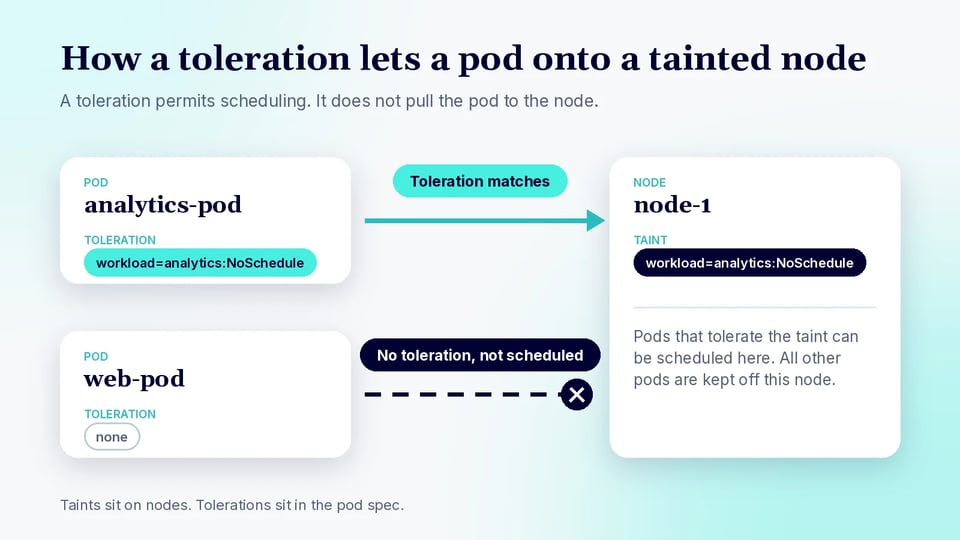
Kubernetes tolerations are specified as part of a pod’s manifest under the tolerations field. Each toleration consists of a key, operator, value, and effect. When a pod is created, the scheduler checks for any taints on the nodes and matches them with the pod’s tolerations. If a node’s taint matches a pod’s toleration, the pod becomes eligible to be scheduled on that node. Otherwise, the pod will not be scheduled there, or if already running, may be evicted depending on the taint effect.
This mechanism allows for granular scheduling control, ensuring that only pods with specific permissions, expressed as tolerations, are allowed on nodes with certain taints. The interplay between taints on nodes and tolerations on pods underpins node isolation strategies, such as dedicating nodes for special workloads, preventing sensitive workloads from running on shared infrastructure, or ensuring only compatible pods run on specialized hardware.
Kubernetes Taints vs. Tolerations
Taints and tolerations are two sides of the same coin in Kubernetes scheduling. Taints are applied to nodes and serve as a repelling mechanism, indicating that only pods with matching tolerations should be scheduled on those nodes. This prevents workloads from being inadvertently scheduled on nodes that are not suitable for them, such as nodes with specialized hardware or those reserved for specific purposes.
Tolerations are applied to pods. They specify which taints a pod can tolerate, thereby allowing the pod to be scheduled onto nodes that carry those taints. Tolerations do not force scheduling onto tainted nodes but make it possible when combined with other scheduling policies. The combination of taints and tolerations provides a flexible framework for workload isolation, resource management, and efficient use of cluster infrastructure.
| Aspect | Taints | Tolerations |
|---|---|---|
| Applied to | Nodes | Pods |
| Purpose | Repel pods from being scheduled unless they match the taint | Allow pods to be scheduled on nodes with matching taints |
| Scheduling effect | Restricts which pods can run on a node | Permits, but does not require, scheduling onto tainted nodes |
| Common use case | Reserving nodes for special workloads, hardware, or roles | Allowing specific workloads to use those reserved or specialized nodes |
Common Kubernetes Toleration Use Cases
Dedicated Nodes
Dedicated nodes are often used for workloads that require isolation due to security, compliance, or performance reasons. By tainting nodes with a unique key and value, and only adding matching tolerations to the pods that should run there, administrators can ensure that these nodes are reserved for specific workloads. This prevents other, potentially less trusted, pods from being scheduled on dedicated hardware, reducing the risk of resource contention and increasing predictability.
For example, a node pool dedicated to financial applications can be tainted with workload=finance:NoSchedule, and only pods with a corresponding toleration can be scheduled there. This approach is also useful in multi-tenant clusters, where you want to guarantee that tenants' workloads are isolated at the node level. By carefully applying taints and tolerations, you can enforce strong workload separation and compliance boundaries.
GPU Nodes
GPU nodes are a valuable and often limited resource within a Kubernetes cluster. To ensure that only workloads requiring GPU acceleration are scheduled onto these nodes, administrators typically taint GPU nodes with a key such as hardware=gpu:NoSchedule. Only pods with the appropriate toleration will be eligible to use the GPU nodes, ensuring that general-purpose workloads do not consume these specialized resources.
This approach minimizes wasted GPU capacity and prevents scheduling conflicts. It also enables teams to control access to costly hardware, reserving it for machine learning, AI, or scientific computing workloads. Proper use of taints and tolerations with GPU nodes is a best practice in clusters where hardware specialization must be protected and utilized efficiently.
Related content: Read our detailed guide to Kubernetes GPU
Spot or Preemptible Nodes
Spot or preemptible nodes are cost-effective but can be reclaimed by the cloud provider at any time. These nodes are often tainted to ensure that only fault-tolerant, stateless workloads are scheduled on them. By applying a taint like instance-type=spot:NoSchedule to these nodes, and configuring tolerations on suitable pods, administrators can ensure that only pods capable of handling interruptions run on these nodes.
This strategy allows organizations to optimize costs while maintaining reliability for critical workloads. Pods without the toleration will not be scheduled on spot nodes, avoiding unexpected terminations for stateful or high-availability services. Using taints and tolerations in this way streamlines cluster resource allocation and protects essential applications from preemption risk.
Related content: Read our detailed guide to Karpenter spot instances
System and Infrastructure Workloads
System and infrastructure workloads, such as core DNS, monitoring agents, or network plugins, often need to run on all nodes or on a specific subset. Nodes can be tainted to repel general application workloads, while adding tolerations to critical system pods ensures they can still be scheduled. For example, a node tainted with node-role.kubernetes.io/infra:NoSchedule will only run pods with a matching toleration, preventing regular application pods from consuming infrastructure node resources.
This approach maintains a clean separation between system-level and user workloads, improving reliability and manageability. It also allows for resource prioritization, as infrastructure nodes can be sized and managed separately from application nodes. Using taints and tolerations for system workloads is a common pattern in production clusters to ensure critical services always have the resources they need.
Kubernetes Toleration Operators
Equal Operator
The Equal operator requires a toleration's key and value to match the corresponding taint exactly. The effect must also match when it is specified. This operator is useful when a pod should tolerate one specific taint rather than every taint that uses the same key.
For example, a toleration with key: "hardware", operator: "Equal", value: "gpu", and effect: "NoSchedule" matches a hardware=gpu:NoSchedule taint. It does not match hardware=cpu:NoSchedule. Equal is the default operator when the operator field is omitted.
Exists Operator
The Exists operator matches a taint based on its key, without requiring a matching value. When using Exists, the toleration's value field must be omitted. If an effect is specified, the taint must also have that effect for the toleration to match.
For example, a toleration with key: "hardware", operator: "Exists", and effect: "NoSchedule" tolerates any NoSchedule taint with the hardware key, regardless of its value. If the key is also omitted, Exists can match all taint keys, subject to any specified effect. This makes the operator useful for broad tolerations, but it should be used carefully because it can allow pods onto a wider range of tainted nodes.
Gt Operator
The Gt (greater than) operator matches a taint when the taint's value is numerically greater than the toleration's value. The key must match, and the effect must also match when it is specified. Both values must be valid 64-bit integers, without leading zeros. Gt was introduced as an alpha feature in Kubernetes v1.35 and requires the TaintTolerationComparisonOperators feature gate.
For example, a toleration with key: "node-sla", operator: "Gt", value: "950", and effect: "NoSchedule" matches a node-sla=990:NoSchedule taint. It does not match node-sla=900:NoSchedule. This operator is useful for threshold-based placement, such as allowing a pod only onto nodes whose reliability score exceeds a minimum.
Lt Operator
The Lt (less than) operator matches a taint when the taint's value is numerically less than the toleration's value. As with Gt, the key must match, the effect must match when specified, and both values must be valid integers. Lt is also alpha in Kubernetes v1.35 and is controlled by the same feature gate.
For example, a toleration with key: "failure-probability", operator: "Lt", value: "5", and effect: "NoSchedule" tolerates a failure-probability=2:NoSchedule taint, but not failure-probability=8:NoSchedule. This makes the operator useful for spot or preemptible nodes. Note that taint values set during node registration are not validated, so a non-numeric taint value causes the toleration not to match.
Kubernetes Taint Effects
Let’s review the taint effects offered by Kubernetes, which tolerations can override.
NoSchedule
The NoSchedule effect prevents new pods from being scheduled on a node unless they have a matching toleration. Pods that are already running on the node when the taint is added are not evicted. This makes NoSchedule useful for reserving nodes for specific workloads without disrupting existing pods.
For example, adding a hardware=gpu:NoSchedule taint prevents pods without a matching toleration from being newly scheduled on the GPU node. Pods already running there can continue to run.
PreferNoSchedule
The PreferNoSchedule effect is a soft scheduling restriction. Kubernetes tries to avoid placing pods without a matching toleration on the tainted node, but it can still schedule them there when necessary. Unlike NoSchedule, it does not strictly block scheduling.
This effect is useful when administrators prefer to reserve nodes for certain workloads but still want the scheduler to use those nodes when other placement options are limited. Existing pods are not evicted when a PreferNoSchedule taint is added.
NoExecute
The NoExecute effect affects both scheduling and pods already running on a node. New pods without a matching toleration cannot be scheduled there, while existing pods that do not tolerate the taint are evicted.
A toleration can include tolerationSeconds to let a pod remain on the node temporarily after a matching NoExecute taint appears. After that period expires, the pod is evicted if the taint remains. If tolerationSeconds is omitted, a matching toleration allows the pod to remain while the taint is present.
Kubernetes Tolerations Examples
Example 1: Basic NoSchedule Toleration
Suppose a node has the taint workload=analytics:NoSchedule. A pod needs a matching toleration to become eligible for scheduling on that node. The following pod tolerates this specific taint:
apiVersion: v1kind: Podmetadata: name: analytics-podspec: containers: - name: web image: nginx:latest tolerations: - key: "workload" operator: "Equal" value: "analytics" effect: "NoSchedule"The Equal operator requires both the key and value to match the taint. This toleration allows the pod onto nodes with the specified taint, but it does not require the scheduler to place the pod on one of those nodes.
Example 2: Tolerating Any Value for a Taint
The Exists operator can be used when a pod should tolerate a taint key regardless of its value. For example, the following configuration tolerates any NoSchedule taint whose key is workload:
apiVersion: v1kind: Podmetadata: name: compute-podspec: containers: - name: worker image: busybox:latest tolerations: - key: "workload" operator: "Exists" effect: "NoSchedule"No value is specified when using Exists. As a result, this pod can tolerate taints such as workload=database:NoSchedule and workload=batch:NoSchedule. Other taint keys or effects still require separate matching tolerations.
Example 3: NoExecute With tolerationSeconds
A NoExecute toleration can include tolerationSeconds to control how long a pod remains on a node after a matching taint is applied. The following pod tolerates a maintenance-window=active:NoExecute taint for 100 seconds:
apiVersion: v1kind: Podmetadata: name: maintenance-workerspec: containers: - name: worker image: busybox:latest tolerations: - key: "maintenance-window" operator: "Equal" value: "active" effect: "NoExecute" tolerationSeconds: 100If the taint is added while the pod is running, the pod can remain on the node for up to 100 seconds. If the taint still exists after that period, Kubernetes evicts the pod. If the taint is removed before the period expires, the pod can continue running.
Kubernetes Tolerations Best Practices
Use Tolerations Only for Workloads That Need Them
Add tolerations only when a workload has a clear reason to run on tainted nodes. Broad or unnecessary tolerations weaken the isolation that taints are intended to provide and can allow workloads onto nodes reserved for other purposes. This can lead to resource contention and make node placement less predictable.
Review tolerations as workload requirements change. Avoid generic Exists tolerations unless the pod genuinely needs to tolerate a wide range of taints. Prefer narrowly scoped keys, values, and effects so each workload receives only the scheduling permissions it requires.
It is also useful to manage tolerations at the workload-controller level, such as in a Deployment, StatefulSet, or DaemonSet. This keeps scheduling behavior consistent when pods are recreated or scaled.
Pair Tolerations With Node Affinity
A toleration makes a pod eligible to run on a tainted node, but it does not direct the pod to that node. If a workload should specifically run on a particular node pool, combine tolerations with node affinity or node selectors.
For example, a GPU workload can tolerate a GPU-node taint while using node affinity to require nodes labeled with the appropriate GPU type. The taint keeps ordinary workloads away, while affinity directs the GPU workload toward compatible nodes.
Choose between required and preferred node affinity based on how strict placement needs to be. Required affinity prevents scheduling on nodes that do not match, while preferred affinity gives the scheduler more flexibility when suitable nodes are unavailable.
Keep Taints and Tolerations Consistent Across Node Pools
Use a consistent naming scheme for taint keys and values across node pools. Inconsistent values such as workload=gpu, type=gpu, and node=gpu for the same purpose make pod configurations harder to maintain and increase the risk of scheduling errors.
Define standard taints for common node roles and apply them through cluster or infrastructure automation. Workload manifests can then use predictable tolerations across development, staging, and production without unnecessary configuration differences.
Consistency is especially important when nodes are automatically created or replaced by cluster autoscaling systems. New nodes should receive the expected taints and labels during provisioning so workloads behave the same regardless of which node instance is running.
Protect Specialized and Expensive Nodes
Use taints to prevent general-purpose pods from consuming specialized resources such as GPUs, high-memory instances, or other expensive hardware. Only workloads designed to use those resources should receive the corresponding tolerations.
Tolerations alone do not ensure that a pod actually requests the specialized resource. For GPU workloads, for example, configure the appropriate resource requests or limits as well as the toleration. Node affinity can provide additional placement control when several hardware types are available.
This approach helps prevent low-priority workloads from occupying capacity needed by specialized applications. It can also reduce infrastructure costs by keeping expensive nodes available for workloads that can benefit from their hardware.
Monitor Scheduling Outcomes, Not Just Configuration
A valid toleration does not guarantee that a pod will be scheduled successfully. Resource availability, node affinity, topology constraints, pod affinity and anti-affinity, and other scheduler rules can still prevent placement.
Monitor pending pods, scheduler events, node taints, and actual pod placement to verify that scheduling policies behave as intended. Commands such as kubectl describe pod and kubectl describe node can help identify taint mismatches and other scheduling constraints.
Monitoring should also detect unexpected placement, not only pods that remain pending. A workload running successfully on the wrong node pool can indicate overly broad tolerations or missing affinity rules. Periodic checks help ensure scheduling policies continue to work as the cluster and its workloads change.
FAQ
What is a Kubernetes toleration? A toleration is a setting in a pod's spec that lets the pod be scheduled on nodes with matching taints. It only allows scheduling. It does not guarantee the pod lands on a tainted node, because resource requests and node affinity still apply.
What is the difference between a taint and a toleration? Taints are applied to nodes and repel pods that do not have a matching toleration. Tolerations are applied to pods and permit, but do not require, scheduling onto nodes with matching taints.
What is the difference between the Equal and Exists operators? Equal requires the toleration's key, value, and effect to match the taint, and it is the default when no operator is set. Exists matches on the key alone, so the value must be left out, and it tolerates any value for that key.
What do the NoSchedule, PreferNoSchedule, and NoExecute effects do? NoSchedule blocks new pods without a matching toleration, but leaves running pods alone. PreferNoSchedule is a soft version where the scheduler tries to avoid the node. NoExecute also evicts running pods that do not tolerate the taint.
What does tolerationSeconds do? On a NoExecute toleration, tolerationSeconds sets how long a pod can stay on a node after a matching taint appears. Once that time passes and the taint is still there, Kubernetes evicts the pod. If it is left out, the pod stays while the taint is present.
Does a toleration make a pod run on a tainted node? No. A toleration only makes the pod eligible. To direct a pod to a specific node pool, pair the toleration with node affinity or a node selector.
Making Toleration-Based Scheduling More Efficient with PerfectScale
Taints and tolerations decide where pods are allowed to run, but they say nothing about whether those nodes are sized correctly or whether the workloads landing on them are requesting the right amount of CPU and memory. PerfectScale is a Kubernetes optimization and governance platform that deploys via a single Helm command and then delivers actionable insights and autonomous optimization across the full K8s stack, workloads, nodes, and autoscalers, so that reserved, specialized, and expensive node pools are actually used efficiently.
Key capabilities of PerfectScale:
- Autonomous workload right-sizing: Podfit gives a granular view of cluster health and cost, highlights wasted resources and resilience issues, and autonomously optimizes workloads with data-driven right-sizing recommendations you can put on automation.
- Node-level utilization insights: Infrafit surfaces idle node capacity and recommends the right node types for your workloads, so dedicated, GPU, and other tainted node pools deliver peak performance without paying for unused capacity.
- Autoscaler optimization: PerfectScale integrates with HPA, KEDA, Karpenter, Cluster Autoscaler, EKS Auto Mode, Fargate, Node Auto Provisioning, and Google Autopilot, maximizing the effectiveness of the systems that provision and replace your tainted nodes.
- Real-time alerts with auto-prioritization: Resilience risks and cost anomalies are surfaced with impact-driven prioritization and delivered straight to Slack, Datadog, MS Teams, or PagerDuty before they reach your users or your cloud bill.
- Trends, governance, and forecasting: The Trends report provides in-depth visibility into cost, waste, and risk metrics over time across clusters, node groups, namespaces, and workloads, supporting root cause analysis and accurate budget planning.
- Any Kubernetes environment: PerfectScale runs on both on-premise and cloud-based clusters, including OpenShift, EKS, GKE, AKS, and hybrid setups, with support for Windows containers and ephemeral or ML workloads such as Airflow and Spark jobs.