


What Is Kubernetes Service Discovery?
Kubernetes Service Discovery is the built-in mechanism that allows containerized microservices to find and communicate with each other dynamically without hardcoding volatile IP addresses. Because Kubernetes Pods are ephemeral (meaning they are frequently destroyed, recreated, and assigned new IPs), Kubernetes abstracts them behind a permanent, logical routing entity known as a Service.
Core components of service discovery: Kubernetes combines several system architectural layers to track backends and route network traffic cleanly:
- Service objects: A custom abstraction layer that defines a logical set of Pods and a policy to access them. Services find targeted Pods using custom defined Labels and Selectors.
- EndpointSlices: Objects automatically managed by the control plane that track the real-time IP addresses and readiness states of all individual Pods targeted by a Service.
- CoreDNS: The internal cluster DNS infrastructure. It acts as the central registry, mapping human-readable Service names directly to their target internal IP addresses.
- Kube-proxy: A network agent running on every worker node. It dynamically updates system network rules (like IPVS or
iptables) to intercept and load-balance client requests directed toward a Service's IP.
Service types for diverse routing needs:
Depending on where client requests originate and how they must discover destinations, developers configure the spec.type parameter of a Service:
| Service Type | Resolution Behavior | Typical Use Case |
|---|---|---|
| ClusterIP | Allocates a stable, internal-only virtual IP address. | Private, inter-pod microservice communication. |
| NodePort | Opens a static port on each worker node's external interface. | Exposing internal services to external hardware routers. |
| LoadBalancer | Provisions an external cloud load balancer automatically. | Direct public access for production internet traffic. |
| ExternalName | Returns a standard CNAME record pointing to an external domain. |
Mapping internal code hooks to third-party APIs. |
This is part of a series of articles about Kubernetes scheduling
In this article:
- Why Does Kubernetes Need Service Discovery?
- Core Components of Service Discovery
- Kubernetes Service Discovery Methods
- Kubernetes Service Discovery Example
- Kubernetes Service Types and Service Discovery
- Kubernetes Service Discovery Best Practices
Why Does Kubernetes Need Service Discovery?
Kubernetes workloads are highly dynamic. Pods can restart, scale, move between nodes, or be replaced, which means their IP addresses can change frequently. Service Discovery provides stable ways for applications to locate these workloads without tracking individual Pod addresses:
- Dynamic Pod IP addresses: Pods usually receive a new IP address when they are recreated. Service Discovery removes the need for applications to maintain changing IP lists.
- Automatic endpoint updates: Kubernetes Services track matching Pods and update their available endpoints as Pods are added, removed, or replaced.
- Reliable communication between services: Applications can connect through stable Service names instead of addressing individual Pods directly.
- Support for scaling: When a workload scales to multiple Pods, Service Discovery makes the new instances available automatically and allows traffic to be distributed across them.
- Reduced configuration overhead: Developers do not need to manually update application configuration whenever the cluster topology changes.
- Decoupled microservices: Services can communicate using logical names, allowing each component to be deployed, scaled, or restarted independently.
Core Components of Service Discovery
Service Objects
A Kubernetes Service is an API object that exposes a network application running as one or more Pods. For the common case, a Service uses a label selector to determine which Pods belong to its backend set. Kubernetes then maintains EndpointSlices containing the endpoints that match that selector.
The default Service type, ClusterIP, receives a cluster-internal virtual IP address. Clients can connect to that stable Service address even though the Pods behind it may be replaced or scaled. This decouples client applications from the changing Pod IP addresses that make up the backend workload.
Services can also be headless by setting .spec.clusterIP to None. In that case, Kubernetes does not allocate a Service cluster IP, and DNS can return addresses for the Service's individual endpoints instead.
EndpointSlices
EndpointSlices represent subsets of the network endpoints backing a Kubernetes Service. For a Service with a selector, the Kubernetes control plane automatically creates EndpointSlices containing references to the Pods that match that selector.
EndpointSlices were designed to scale more efficiently than the older Endpoints API. Rather than storing every backend address in one large object, Kubernetes can divide endpoints across multiple EndpointSlice objects. By default, the control plane creates another EndpointSlice when existing slices have reached the default target of 100 endpoints.
EndpointSlices can contain endpoint addresses, ports, readiness information, node information, and other metadata used by cluster networking components. They are also the source of backend endpoint information used by kube-proxy when routing internal Service traffic.
The legacy Endpoints API has been deprecated in favor of EndpointSlices, and current Kubernetes documentation recommends that clients use the EndpointSlice API instead.
CoreDNS
Kubernetes clusters commonly use CoreDNS as their cluster DNS implementation. A cluster-aware DNS server watches Kubernetes information and creates DNS records that allow Pods to look up Services by name. Kubernetes configures Pod DNS settings through the kubelet so that applications can use standard DNS resolution rather than addressing Services by IP.
For example, consider a Service named my-service in the namespace my-namespace. A Pod can address it using a DNS name such as:
my-service.my-namespaceA fully qualified Service name normally follows this structure:
my-service.my-namespace.svc.cluster.localThe exact cluster domain can differ from cluster.local if the cluster administrator has configured another domain. Within the same namespace, applications can usually use the short Service name alone, such as my-service. Pods in another namespace normally need to include the Service namespace.
kube-proxy
kube-proxy is Kubernetes' default implementation of Service proxying. On nodes where kube-proxy is used, it watches Service and EndpointSlice objects and configures the node's networking data plane so that traffic sent to a Service's virtual IP and port can be redirected to one of its endpoints.
On Linux, current kube-proxy implementations support iptables, nftables, and ipvs modes. On Windows, kube-proxy supports kernelspace mode. IPVS mode is deprecated as of Kubernetes v1.35, while nftables is available as a newer Linux proxy implementation.
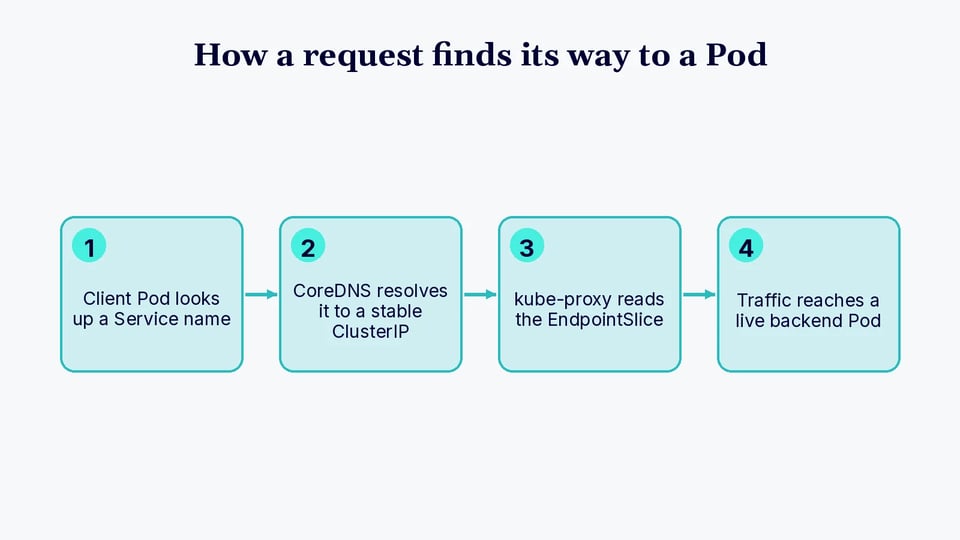
It is useful to distinguish discovery from traffic forwarding: DNS helps an application discover the stable Service identity, while kube-proxy or an alternative Service proxy implementation typically handles forwarding traffic from that Service virtual IP to an appropriate backend endpoint. Some Kubernetes networking implementations replace kube-proxy with their own Service proxy implementation.
Kubernetes Service Discovery Methods
DNS-Based Service Discovery
DNS is the standard and generally preferred method for discovering Services from applications running inside a Kubernetes cluster. Kubernetes assigns DNS names to Services, and a cluster-aware DNS server such as CoreDNS makes those names resolvable from Pods.
For example, if a Service named backend exists in the default namespace, a Pod in the same namespace can normally connect using:
backendA Pod in another namespace can use:
backend.defaultor the fully qualified name:
backend.default.svc.cluster.localFor a normal ClusterIP Service, the DNS name resolves to the Service's cluster IP. Kubernetes also supports DNS records for headless Services and SRV records for named Service ports.
Because applications perform standard DNS lookups, they do not need to implement a Kubernetes-specific discovery protocol.
Environment Variable-Based Service Discovery
Kubernetes can also publish information about active Services as environment variables inside Pods. When the kubelet starts a Pod, it can add variables based on Services that already exist. For a Service named my-service, for example, the generated variables include forms such as:
MY_SERVICE_SERVICE_HOSTMY_SERVICE_SERVICE_PORTThe host variable contains the Service's cluster IP, while the port variable contains its Service port.
This mechanism has an important ordering limitation: the Service must exist before the client Pod is created for its Service environment variables to be populated in that Pod. Creating a Service later does not retroactively add those variables to an already-running Pod. DNS-based discovery does not have this ordering requirement.
Service environment variables can also be disabled for a Pod using the enableServiceLinks field when they are unnecessary.
Kubernetes Service Discovery Example
Create the Backend Deployment
Create a Deployment with two nginx replicas:
apiVersion: apps/v1kind: Deploymentmetadata: name: internal-webspec: replicas: 2 selector: matchLabels: app: internal-web template: metadata: labels: app: internal-web spec: containers: - name: web-server image: nginx:stable ports: - containerPort: 80Save the manifest as nginx-deployment.yaml, then apply it:
kubectl apply -f nginx-deployment.yamlVerify that the Pods are running:
kubectl get pods -l app=internal-web -o wideThe Deployment maintains the requested number of replicas. If one of these Pods is removed and replaced, the replacement can receive a different Pod IP, which is one reason clients should use a Service rather than rely directly on these addresses.
Create the Kubernetes Service
Create a ClusterIP Service that selects Pods carrying the app: internal-web label:
apiVersion: v1kind: Servicemetadata: name: internal-webspec: selector: app: internal-web ports: - protocol: TCP port: 8080 targetPort: 80Save this manifest as nginx-service.yaml and apply it:
kubectl apply -f nginx-service.yamlCheck the Service:
kubectl get service internal-webYou should see output similar to:
NAME TYPE CLUSTER-IP EXTERNAL-IP PORT(S)internal-web ClusterIP 10.96.100.10 <none> 8080/TCPThe specific cluster IP is assigned by your cluster and will vary.
You can also inspect the EndpointSlices created for the Service:
kubectl get endpointslices -l kubernetes.io/service-name=internal-webThe endpoint addresses should correspond to the Pods selected by the Service. If those Pods are replaced or the Deployment is scaled, Kubernetes updates the Service's EndpointSlices accordingly.
Discover the Service from Another Pod
Start a temporary Pod containing BusyBox:
kubectl run service-test --image=busybox --restart=Never --command -- sleep 3600Once the Pod is running, use nslookup to query the Service name:
kubectl exec service-test -- nslookup internal-webThe DNS response should resolve internal-web to the Service's ClusterIP.
You can also query the namespace-qualified name:
kubectl exec service-test -- nslookup internal-web.defaultor the fully qualified Service name when the cluster uses the default cluster domain:
kubectl exec service-test -- nslookup internal-web.default.svc.cluster.localThis demonstrates the key benefit of Kubernetes Service Discovery: the client only needs to know the stable name internal-web. It does not need to know which nginx Pods currently exist or what IP addresses they have. Kubernetes DNS resolves the Service identity, EndpointSlices track the current backend set, and the cluster's Service proxy implementation forwards Service traffic to an appropriate endpoint.
After testing, remove the temporary Pod:
kubectl delete pod service-testKubernetes Service Types and Service Discovery
ClusterIP
A ClusterIP Service exposes an application on a stable virtual IP address that is reachable from within the cluster. It is the default Service type and is commonly used for communication between internal application components.
Clients normally discover a ClusterIP Service through its DNS name rather than its assigned IP address. DNS resolves the Service name to the cluster IP, while the cluster's Service proxy implementation forwards traffic to one of the Service's current endpoints. This allows backend Pods to be replaced or scaled without requiring clients to update their configuration.
NodePort
A NodePort Service exposes a Service on a port on each cluster node, in addition to providing the normal Service cluster IP. Clients that can reach a node can access the Service using a node address and the allocated node port.
NodePort changes how the Service can be reached, but it does not replace Kubernetes' internal discovery mechanisms. Pods inside the cluster can still discover the Service through its DNS name and cluster IP. NodePort is often used as a building block for external access or when clients need to connect directly through node addresses.
LoadBalancer
A LoadBalancer Service requests an external load balancer from a supported cloud provider or another load-balancer implementation. The external load balancer receives traffic from outside the cluster and directs it toward the Kubernetes Service.
Internally, the Service remains discoverable through Kubernetes DNS like other Services. The main difference is that external clients can use the address or hostname assigned to the load balancer. The exact provisioning and traffic path depend on the cluster's infrastructure and load-balancer implementation.
ExternalName
An ExternalName Service maps a Kubernetes Service name to an external DNS name. Instead of selecting Pods or maintaining backend EndpointSlices, it returns a DNS CNAME record pointing to the value configured in the Service's externalName field.
For example, an application can access a name such as database.default.svc.cluster.local, while Kubernetes DNS redirects resolution to an external hostname such as database.example.com. This provides a Kubernetes-local name for an external dependency, although applications must account for protocols such as TLS and HTTP that may depend on the hostname used by the client.
Kubernetes Service Discovery Best Practices
Here are some useful practices to keep in mind when using Kubernetes Service discovery.
1. Use Kubernetes DNS Instead of Hardcoded Pod IPs
Use Service DNS names as the default way for applications to locate other workloads. Pod IP addresses are temporary and can change when Pods restart, are replaced, or move to another node. Hardcoding these addresses makes applications dependent on infrastructure details that Kubernetes is designed to manage dynamically.
Configure clients with names such as backend or backend.production instead of storing Pod addresses. This keeps application configuration independent of workload placement and allows Kubernetes to update the underlying endpoints without requiring client changes.
Prefer namespace-qualified names when applications communicate across namespaces. Fully qualified DNS names can also avoid ambiguity in environments containing similarly named Services. Applications should use sensible DNS caching behavior so records are refreshed when necessary.
2. Right-Size Workloads Without Compromising Service Availability
Run enough replicas to maintain service availability during Pod failures, deployments, scaling events, and routine maintenance. For important services, relying on a single Pod creates a point where the Service may temporarily have no usable endpoints.
Set appropriate resource requests and limits so Pods can be scheduled reliably without unnecessarily consuming cluster capacity. Requests that are too high can make Pods difficult to schedule, while requests that are too low can contribute to resource contention and unstable performance.
Use readiness probes to prevent Kubernetes from sending Service traffic to Pods before they are ready to handle requests. For workloads that require minimum availability during voluntary disruptions, consider PodDisruptionBudgets and distribute replicas across nodes or failure domains where appropriate.
3. Keep Service Selectors and Pod Labels Consistent
A selector-based Service only routes traffic to Pods whose labels match its selector. Incorrect or inconsistent labels can therefore leave a Service with missing endpoints even when the application Pods are running.
Use a predictable labeling scheme and manage Service selectors and workload labels together. Avoid changing labels used by active Services without considering how the change will affect endpoint membership during a deployment.
Commands such as kubectl get pods --show-labels and kubectl get endpointslices -l kubernetes.io/service-name=<service-name> can help confirm that the expected Pods are registered as endpoints. If a Service exists but has no endpoints, checking selectors, labels, and Pod readiness is a useful first troubleshooting step.
4. Monitor EndpointSlice Health
Monitor EndpointSlices to verify that Services have the expected number of usable backend endpoints. An empty or unexpectedly small endpoint set can indicate selector mismatches, failed readiness checks, unavailable Pods, or deployment problems.
Include Service and endpoint availability in cluster monitoring and alerting. Changes in endpoint count can be especially useful for identifying failures during deployments or autoscaling events before they develop into broader availability problems.
During troubleshooting, inspect EndpointSlices alongside Pod status, readiness conditions, and Service configuration. This helps distinguish a discovery problem from an application, DNS, or network failure. Monitoring should focus not only on whether a Service exists, but also on whether it has healthy endpoints capable of receiving traffic.
Related content: Read our article about Kubernetes monitoring for a broader view of cluster metrics and alerting.
5. Coordinate Service Discovery with Autoscaling
Autoscaling changes the number of Pods behind a Service, so discovery and traffic routing must respond correctly as replicas are added and removed. Kubernetes updates EndpointSlices as eligible Pods enter or leave the backend set, allowing clients to continue using the same Service name throughout scaling events.
Configure readiness probes carefully so newly created Pods receive traffic only after they can serve requests. During scale-down, graceful termination settings can give existing requests and connections time to complete while endpoints are removed from active use.
Applications should also use reasonable DNS caching, connection timeouts, retries, and connection-pool behavior. Clients that keep connections open indefinitely may continue communicating with a limited set of backends and fail to take advantage of newly added replicas. Client behavior should therefore complement Kubernetes autoscaling and endpoint management rather than work against them.
Keeping Service Endpoints Healthy with PerfectScale
Service discovery only works as well as the Pods behind it. When workloads are under-provisioned, misconfigured, or scaled inefficiently, Services end up with too few healthy endpoints, and traffic routing suffers even though DNS resolution is working correctly. PerfectScale is a Kubernetes optimization platform that you deploy via Helm once and then use to get actionable insights and autonomous optimization across your entire K8s stack, so workloads stay both cost-efficient and resilient enough to keep serving traffic.
Key capabilities of PerfectScale:
- Autonomous workload right-sizing: Podfit provides a granular view of cluster health and costs, prioritizing the areas that need attention while autonomously optimizing workloads and surfacing wasted resources and resilience issues.
- Data-driven scaling recommendations: PerfectScale delivers actionable recommendations to improve HPA and KEDA configurations, and integrates with autoscaling solutions including HPA, Karpenter, Cluster Autoscaler, EKS Auto Mode, Fargate, Node Auto Provisioning, and Google Autopilot.
- Node-level optimization: Infrafit provides comprehensive node utilization visibility, helping you identify and eliminate idle node capacity and select the right nodes for your workloads with data-driven recommendations.
- Real-time alerts with auto-prioritization: Impact-driven prioritization helps you resolve resilience risks and identify cost spikes and anomalies before they reach users, with alerts delivered into Slack, Datadog, MS Teams, or PagerDuty.
- Trends reporting for governance and forecasting: Granular visibility into cost, waste, and risk metrics over time across clusters, node groups, namespaces, and workloads, with root cause analysis to prevent repeat issues.
- Broad environment support: PerfectScale runs on both on-premise and cloud-based environments, integrating with private clouds such as OpenShift and public clouds such as EKS, GKE, and AKS, and it also supports Windows-based containers.
Learn more about how the PerfectScale platform keeps your Kubernetes workloads right-sized, resilient, and ready to serve traffic.
FAQ
What's the difference between a Kubernetes Service and an EndpointSlice? A Service is the stable, logical front door: a name and virtual IP that clients connect to. An EndpointSlice is the list behind that door: the actual set of Pod IPs currently matching the Service's selector, kept up to date automatically as Pods come and go.
Does Kubernetes prefer DNS-based or environment variable-based service discovery? DNS is the standard and generally preferred method. Environment variable-based discovery has an ordering limitation: the Service must already exist before a client Pod is created, or that Pod never receives the variables. DNS lookups don't have this restriction.
Why would a Service show zero endpoints even though its Pods are running?
This is almost always a label mismatch between the Service's selector and the Pod's labels, though failed readiness checks can also cause it. Checking kubectl get endpointslices alongside kubectl get pods --show-labels is the fastest way to confirm which one is the cause.
What's the difference between ClusterIP, NodePort, and LoadBalancer? ClusterIP is internal-only and is the default. NodePort adds a static port on every node so the Service can be reached from outside the cluster. LoadBalancer provisions an external cloud load balancer in front of the Service. All three remain discoverable inside the cluster through the same DNS name.
Does autoscaling break service discovery? No, but it does require clients to cooperate with it. Kubernetes updates EndpointSlices automatically as replicas scale up or down, but clients that hold connections open indefinitely may keep talking to a stale, smaller set of backends instead of picking up newly added replicas.