
PerfectScale
Kubernetes JobSet Explained: Features, Setup, and Examples (2026)
JobSet lets you manage multiple Kubernetes Jobs as one unit. Learn its core features, how it differs from plain Jobs, and how to get started.
This page is also available in Deutsch, Español, Français, Italiano, 日本語, and Português.


Kubernetes jobs work well for single tasks. Modern workloads need multiple workers to run together. Kubernetes Jobs treat each job as an independent entity. This makes coordination hard.
If you have used jobs for multi-worker workloads, you have probably added scripts to manage them.
That’s why JobSet exists.
What Is jobSet in Kubernetes?
JobSet is a Kubernetes API that lets you manage multiple Kubernetes Jobs as one logical unit. Instead of treating Jobs as independent resources, JobSet allows you to define and operate on them together.
It is designed for coordinated batch workloads where multiple Jobs must start, run, and complete in a controlled way. This includes use cases like HPC workloads and distributed AI/ML training.
How does jobSet work?
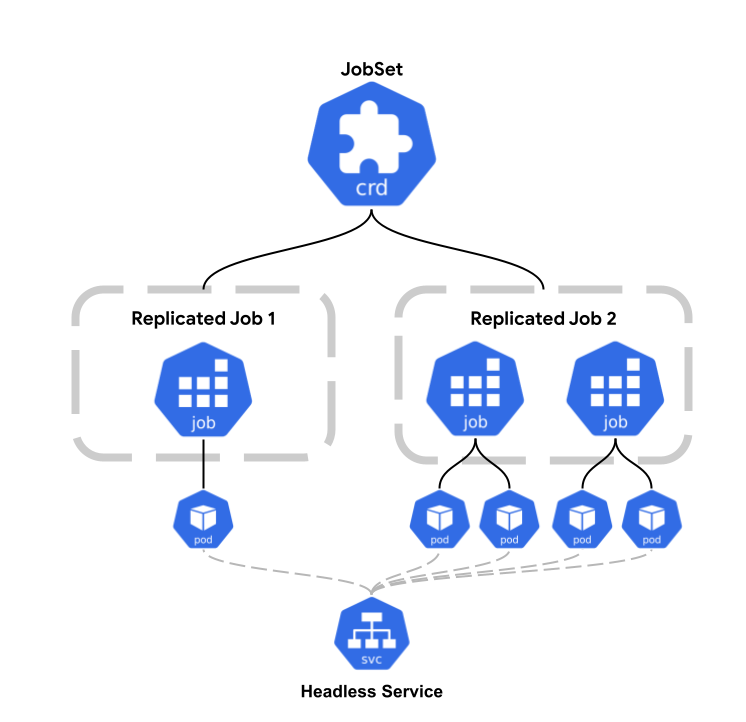
The JobSet works by introducing a ReplicatedJob, which is used to manage child Jobs. A ReplicatedJob defines a Job template along with the number of replicas that should run.
Kubernetes then creates multiple identical Jobs from that template. This makes it easy to run the same workload across different nodes or accelerator islands in a declarative way, without relying on scripts or Helm charts to generate many copies of the same Job.
Core Capabilities and Features of jobSet
JobSet provides the following capabilities and features that simplify running coordinated batch workloads. Let's discuss:
a. Multi-template Jobs (ReplicatedJobs)
JobSet lets you define a distributed workload using multiple ReplicatedJobs, where each one can have its own pod template. This makes it easy to model different roles such as a leader, workers, or parameter servers in a single spec. Instead of creating and wiring multiple Jobs manually, you describe all roles once and let JobSet manage them together.
b. Automatic Networking (headless Services and stable hostnames)
JobSet can automatically create headless services for its Jobs and give Pods stable DNS names based on their index. This is useful for distributed systems that expect fixed hostnames for peer discovery. If needed, you can customize the service name or subdomain in the JobSet spec, which avoids fragile networking logic in init containers or startup scripts.
c. Configurable Success and Failure Policies
JobSet allows you to define what success and failure mean for the entire workload. You can specify whether all ReplicatedJobs must finish or whether success of a specific role (for example, a launcher) is enough. Failure policies also let you control how retries happen and how different failure cases are handled, so workload behavior is declared clearly instead of being implemented in application code.
d. Topology-aware Placement
JobSet supports placement hints through annotations, allowing Jobs to be scheduled with awareness of topology such as nodes, racks, or zones. You can request exclusive placement so that a Job gets a one-to-one mapping with a topology domain. This is especially useful for GPU-heavy workloads or when you want stronger isolation from other jobs.
e. Fast Failure Recovery
When a failure happens, the JobSet controller recreates the affected child Jobs instead of restarting everything blindly. The controller is designed to reduce pressure on the Kubernetes scheduler during recovery, even at large cluster sizes. This helps keep scheduling stable when many Pods need to be restarted.
f. Startup Sequencing
Starting with version v0.6.0, JobSet supports ordered startup of ReplicatedJobs. This allows patterns like starting a leader Job before worker Jobs. Built-in sequencing removes the need for custom scripts that wait or poll for other Pods to become ready.
g. Integration with Kueue
A Kueue is an open source job queueing controller designed to manage batch jobs as a single unit. JobSet integrates with Kueue to support queueing, quota management, and better handling of resource contention.
JobSet vs Job
The following table highlights the key differences between JobSet and Job.
| Capability | JobSet | Job |
|---|---|---|
| Job grouping | ✅ Yes | ❌ No |
| Coordinated startup | ✅ Yes | ❌ No |
| Unified failure handling | ✅ Yes | ❌ No |
| Distributed workloads | ✅ Native | ⚠️ Hacky |
| Operational clarity | ✅ Yes | ❌ No |
How can we install and run jobSet?
In this section, we will see how JobSet runs a coordinated workload using a simple leader and worker pattern. The goal is to understand how JobSet creates, manages, and tracks multiple Jobs as a single unit.
Before we start, we need a working Kubernetes cluster, and kubectl should be installed.
Step 1: Install jobSet
We will install the JobSet using the official release manifest. This installs JobSet CRDs, JobSet controller and required RBAC resources.
VERSION=v0.11.0kubectl apply --server-side -f https://github.com/kubernetes-sigs/jobset/releases/download/${VERSION}/manifests.yamlWait for the controller to start and verify it:
NAME READY STATUS RESTARTS AGEjobset-controller-manager-6b6956779-p5rh5 1/1 Running 0 20sYou see the JobSet controller in Running state.
Also, verify the CRD:
kubectl api-resources | grep -i jobsetOutput:
jobsets jobset.x-k8s.io/v1alpha2 true JobSetStep 2: Create the jobSet manifest
We have to create a file named jobset-demo.yaml with the following content:
apiVersion: jobset.x-k8s.io/v1alpha2kind: JobSet
metadata:  # Single object representing the whole workload  name: demo-jobset
spec:  # Define roles that belong to the same workload  replicatedJobs:
  - name: leader    replicas: 1                  # one Job for the leader role    template:      spec:        parallelism: 1        completions: 1        backoffLimit: 0        template:          metadata:            labels:              role: leader          spec:            restartPolicy: OnFailure            containers:            - name: leader              image: busybox              command:              - sh              - -c              - |                echo "leader started"                sleep 20
  - name: worker    replicas: 3                  # three identical worker Jobs    template:      spec:        parallelism: 1        completions: 1        backoffLimit: 0        template:          metadata:            labels:              role: worker          spec:            restartPolicy: OnFailure            containers:            - name: worker              image: busybox              command:              - sh              - -c              - |                echo "worker started"                sleep 30
  # Workload succeeds only if all roles succeed  successPolicy:    operator: All
This YAML will run a coordinated batch workload with one leader Job and three worker Jobs. All Jobs are created and tracked together, and the JobSet is marked successful only when every Job completes successfully.
If any worker fails, the entire workload fails as a single unit.
Step 3: Apply the jobSet
It creates the JobSet:
kubectl apply -f jobset-demo.yamlVerify:
kubectl get jobset demo-jobsetOutput:
NAME TERMINALSTATE RESTARTS COMPLETED SUSPENDED AGEdemo-jobset 0 31sIt means the JobSet is created and progressing.
Step 4: Observe child Jobs and Pods
It lists the jobs and pods created by the JobSet:
kubectl get jobskubectl get podsOutput:
NAME STATUS COMPLETIONS DURATION AGEdemo-jobset-leader-0 Running 0/1 9s 59sdemo-jobset-worker-0 Running 0/1 9s 59sdemo-jobset-worker-1 Running 0/1 9s 59sdemo-jobset-worker-2 Running 0/1 9s 59sNAME READY STATUS RESTARTS AGEdemo-jobset-leader-0-0-8v4g8 1/1 Running 0 59sdemo-jobset-worker-0-0-vn2n8 1/1 Running 0 59sdemo-jobset-worker-1-0-pntr9 1/1 Running 0 59sdemo-jobset-worker-2-0-57sw5 1/1 Running 0 59sFrom the output, we observe:
- JobSet creates standard Kubernetes Jobs
- Each Job then creates its own Pod
- One Job for the leader role
- Three Jobs for the worker role
- All Jobs and Pods belong to the same JobSet
This confirms that JobSet does not replace jobs. It coordinates them and tracks their lifecycle as one workload.
Step 5: Inspect jobSet status
It describes the JobSet:
kubectl describe jobset demo-jobsetOutput:
Name:         demo-jobsetNamespace:    defaultLabels:       <none>Annotations:  <none>API Version:  jobset.x-k8s.io/v1alpha2Kind:         JobSetMetadata:  Creation Timestamp:  2026-01-28T11:13:06Z  Generation:          1  Resource Version:    4019  UID:                 31e2befd-c29b-44dd-a692-7c2f2edaac1bSpec:  Network:    Enable DNS Hostnames:         true    Publish Not Ready Addresses:  true  Replicated Jobs:    Group Name:  default    Name:        leader    Replicas:    1    Template:      Metadata:      Spec:        Backoff Limit:    0        Completion Mode:  Indexed        Completions:      1        Parallelism:      1        Template:          Metadata:            Labels:              Role:  leader          Spec:            Containers:              Command:                sh                -c                # log startup, then simulate work for 20secho "leader started"sleep 20
              Image:  busybox              Name:   leader              Resources:            Restart Policy:  OnFailure    Group Name:              default    Name:                    worker    Replicas:                3    Template:      Metadata:      Spec:        Backoff Limit:    0        Completion Mode:  Indexed        Completions:      1        Parallelism:      1        Template:          Metadata:            Labels:              Role:  worker          Spec:            Containers:              Command:                sh                -c                # worker logs and work simulationecho "worker started"sleep 30
              Image:  busybox              Name:   worker              Resources:            Restart Policy:  OnFailure  Startup Policy:    Startup Policy Order:  AnyOrder  Success Policy:    Operator:  AllStatus:  Conditions:    Last Transition Time:  2026-01-28T11:13:43Z    Message:               jobset completed successfully    Reason:                AllJobsCompleted    Status:                True    Type:                  Completed  Replicated Jobs Status:    Active:        0    Failed:        0    Name:          worker    Ready:         0    Succeeded:     3    Suspended:     0    Active:        0    Failed:        0    Name:          leader    Ready:         0    Succeeded:     1    Suspended:     0  Restarts:        0  Terminal State:  CompletedEvents:  Type    Reason            Age    From    Message  ----    ------            ----   ----    -------  Normal  AllJobsCompleted  8m58s  jobset  jobset completed successfully
It shows each ReplicatedJob and its replicas, Progress and completion status, and overall success or failure of the JobSet.
This single view replaces the need to inspect multiple Jobs manually.
Step 6: Check completion behavior
We have to wait for the pods to finish and recheck the JobSet:
kubectl get jobset demo-jobsetOutput:
NAME TERMINALSTATE RESTARTS COMPLETED SUSPENDED AGEdemo-jobset Completed 0 True 12mThe JobSet is marked successful becasue the leader and all worker jobs are completed successfully.
Step 7: Clean up
Let's delete the JobSet. It is an optional step.
kubectl delete jobset demo-jobsetThis removes the JobSet and all its child Jobs and Pods.
Note: The JobSet project also provides ready-to-use workload examples, including distributed PyTorch (MNIST CNN) and distributed TensorFlow (MNIST) training. These examples build on the same JobSet concepts shown above and can be used as references for real workloads.
Benefits
The jobSet provides the following benefits:
Easier debugging: JobSet gives you one top-level object to check instead of many independent Jobs. You can quickly see which child Job failed and why, without jumping between multiple resources.
Predictable cleanup: All Jobs created by a JobSet follow the same lifecycle. When the JobSet finishes or fails, child Jobs and Pods are handled together, so you don’t leave behind unused resources when configured.
Fewer partial failures: With plain Jobs, some parts can succeed while others fail. JobSet lets you treat the whole workload as one unit, so failures are handled consistently and results are not misleading.
Better resource usage: JobSet models related Jobs as a group, which works better with scheduling and placement. This reduces resource fragmentation and helps large accelerator-based workloads start together.
Misconceptions
As a newer API, JobSet is sometimes misunderstood. These are the most common misconceptions.
JobSet replaces Kubernetes Jobs: JobSet does not replace Jobs. It creates and manages normal Kubernetes Jobs, but adds grouping and coordination on top. Jobs are still the core building block.
JobSet is only for ML workloads: ML was an early use case, but JobSet is generic. It works for any batch workload where multiple Jobs must run together, such as HPC, MPI, or coordinated data processing.
JobSet is too complex to use: JobSet adds a new API, but it often reduces overall complexity. It removes the need for scripts, init containers, and manual coordination logic that teams build around plain Jobs.
You need deep scheduler knowledge to use JobSet: Basic JobSet usage does not require scheduler internals. It uses familiar Kubernetes patterns, and advanced scheduling features are optional, not mandatory.
Conclusion
JobSet fits naturally into Kubernetes for teams running batch workloads that require coordination rather than isolation. It builds on familiar primitives, stays declarative, and removes the need for user-managed orchestration logic.
As coordinated workloads become more common, JobSet offers a practical and Kubernetes-native way to model them without changing how clusters are operated.