
Autonomous Kubernetes Optimization. Efficient. Reliable. Effortless.
PerfectScale continuously optimizes every workload and node, keeping production stable while it cuts waste.
Trusted by DevOps, SRE and platform engineering teams










The platform
One agent. Every layer of the cluster.
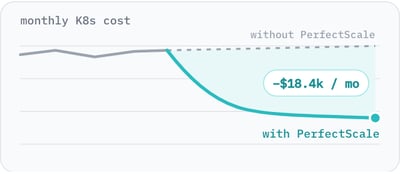
Kubernetes cost optimization and rightsizing
Right-size workloads, tune autoscaling and optimize node utilization.
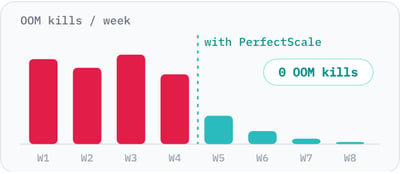
Performance and resilience
Fix the misconfigurations behind SLA breaches and burned error budgets.
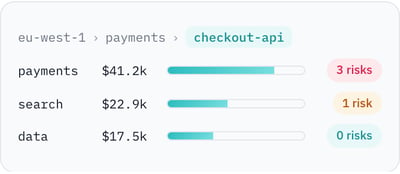
Kubernetes cost visibility and monitoring by team
Cost and risk by cluster, namespace, workload and team. Built for Kubernetes FinOps.
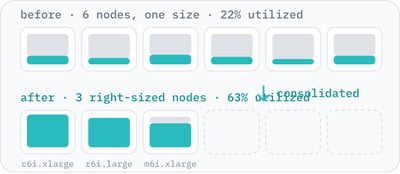
Karpenter and node autoscaling optimization
Fewer nodes and better-fit node types, where the biggest dollars are saved. Works with Karpenter, Cluster Autoscaler and NAP.
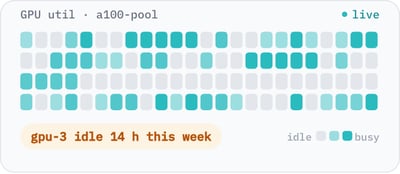
GPU optimization
Real-time visibility into how GPU nodes are actually used.
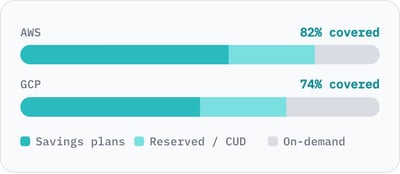
Cloud commitments for EKS and GKE nodes
Automate AWS and GCP commitment savings for the EKS and GKE nodes you keep.
What teams get from PerfectScale
Lower bill. Fewer incidents.
lower Kubernetes cost
K8s availability, protected
Helm chart to install
From install to first fix in one sitting.
Install one Helm chart.
A lightweight agent on each cluster. No fleet of microservices, no extra Prometheus to run, no node migration.
It learns how pods really behave.
Usage, OOM kills, throttling, evictions and node fit, per container and per revision, across every cluster.
It keeps optimizing, safely.
Recommendations, or autonomous changes under your policy. Your autoscaler then consolidates nodes on accurate requests.
Platform teams run on PerfectScale
See all customer stories

Turn automation on. The fix list clears itself.
PerfectScale ranks every workload by waste and risk, then applies the right change under the policy you set. Flip the switch to see it work, or keep a person in the loop and approve each change yourself.
| Workload | Signal | Last 14 days | Recommended change | Impact / month | Status |
|---|---|---|---|---|---|
ml-feature-store |
Over-provisioned | CPU Memory |
−$3,940waste removed | Waiting for review | |
orders-consumer |
OOM risk | Memory limit Auto-shrink paused: leak pattern |
+$41to prevent OOM kills | Waiting for review | |
ci-runners-arm64 |
Over-provisioned | CPU Memory |
−$2,210waste removed | Waiting for review | |
api-gateway |
Throttled | CPU request CPU limitremoved |
+$58to stop throttling | Waiting for review |
Ranked by dollars and risk
Waste and resilience issues on one list, biggest first.
The change, not a chart
Exact requests and limits to set, per container.
Visibility by owner
Cluster, node group, workload, namespace and team.
Routed to the team
Alerts go to the people who run the workload.
You set the policy. Automation acts only when it's safe.
Choose maximum savings, or extra headroom for your most critical services. PerfectScale applies changes once it's confident they won't hurt performance, so you never trade stability for savings.
- Revision-aware: it never fights a fresh deploy.
- Stops on its own when it sees a memory-leak pattern.
- Policies per cluster, namespace or workload.
- Recommend-only mode for teams that review first.
Balanced automation policy
A healthy buffer above observed usage. Strong savings without trading away stability.
Est. monthly savings
Integrations
Fits the stack you already run.
Your clouds, the autoscaler you chose, and the tools your team already watches.


Frequently asked
questions
What is Kubernetes cost optimization?
It means matching CPU and memory requests and limits to what workloads actually use, and letting your autoscaler consolidate nodes on those accurate requests. PerfectScale does this continuously, per container and per revision.
How does PerfectScale work with Karpenter?
PerfectScale works alongside Karpenter, Cluster Autoscaler and GKE NAP. It right-sizes workload requests, and your autoscaler then consolidates nodes. No autoscaler migration is needed.
Is automated Kubernetes rightsizing safe for production?
Automation stays off until you turn it on, and you set the policy. PerfectScale waits for new revisions to stabilize, pauses shrinking when it detects a memory-leak pattern, and guards against OOM kills and CPU throttling. Recommend-only mode is available.
How long does it take to install?
One Helm chart, installed in minutes. The agent is read-only by default, and first recommendations appear shortly after.
How much can teams save?
Up to 50% lower Kubernetes cost. SNCF cut 30% (about €500K a year), NOS cut more than 50% off its largest cluster, and Luma Health cut 40% off total EKS spend.
Cut cloud cost. Keep peak performance.
Install in minutes and see where your clusters are over-provisioned, under-provisioned and at risk.