
Every time I look at a data table in a product, I imagine the ideal version. One that knows what you need. Shows the right columns. Hides the noise. No configuration required, it just works. That version doesn't exist. But we got a little closer.
PerfectScale is a focused product. We work with DevOps and platform engineering teams, helping to optimize Kubernetes workloads. You'd think that's a narrow enough audience to design for confidently. It's not. Teams are set up differently. They monitor different things. What's essential data for one engineer is clutter for another. We kept hearing variations of the same request: let me control what I see. For a long time, the answer was: not yet.
Earlier this year, our engineering team had to refactor the tables engine to fix performance issues. It was significant work, the kind that touches almost everything. It was also an opportunity. Rebuilding the foundation meant we could finally add what users had been asking for: the ability to show or hide columns, pin the ones that matter, resize, and save those preferences per user. We took it.
PerfectScale users can now customize the table view, choosing which columns to show or hide, setting their order, and adjusting each column's width. All of it is saved per user per screen, so everyone can tailor the view to what works best for their setup and resolution.
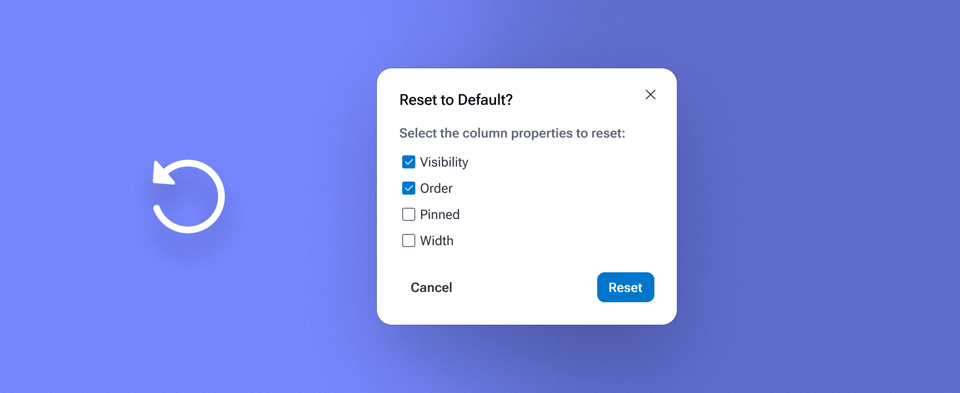
The core feature was clear. The details took longer. One moment I'm proud of: the Rest Table Customization dialog. The obvious solution would be a single "reset everything" button. We didn't do that. Instead, we gave users control over exactly what gets reset, shown, and hidden columns, order, pinned columns, and width. Each one is a separate choice. And column width is unchecked by default. Why? Because adjusting column widths is manual, deliberate work, done one column at a time to fit your screen just right. Accidentally wiping that in a single click would be genuinely frustrating. A small decision. But the kind that separates a feature that works from a feature that respects the person using it.
Column reorder is in, too, but not quite the way we imagined it. Ideally, you'd drag columns directly on the table header. That's the natural interaction. It's also a significant engineering effort, and we had a good solution already in front of us: reordering inside the column customization menu. It works. It's just not as fluid as dragging. We made the call to ship it this way and move on. There's other important work ahead, and "good enough" that ships beats "perfect" that doesn't.
If you're a PerfectScale customer, table customization is live across the product. Go explore it, hide what you don't need, pin what you do, make it yours.
Not a customer yet? This is how we build. Come take a look.