


What Is Kubernetes Exit Code 143?
Kubernetes Exit Code 143 indicates that a container was successfully terminated by a SIGTERM (Signal 15) external request. In most cases, this is not an application error, but rather a sign that the Kubernetes system is working exactly as intended to gracefully shut down a workload.
Why does it happen? Kubernetes sends a SIGTERM signal to a pod's primary process (PID 1) to ask it to finish its current tasks, close open connections, and exit cleanly. Common operational triggers include:
- Deployment or rolling update: Kubernetes terminates old pods with SIGTERM as replacement pods are created during a rollout.
- Manual pod deletion: Deleting a pod starts graceful termination and normally sends SIGTERM to its containers.
- Pod scaling and replica reduction: Scaling down a workload terminates replicas that are no longer required.
- Node drain or pod eviction: Maintenance or eviction can terminate pods so workloads can be moved to other nodes.
- Kubernetes node shutdown: Graceful node shutdown can send SIGTERM to workloads before the node powers off.
- Liveness or startup probe failures: Failed probes can trigger container restarts that begin with graceful termination.
- Application or process manager termination: A process manager, script, sidecar, or application component can send SIGTERM directly.
- Cluster autoscaling or node replacement: Node removal, upgrades, repairs, and infrastructure changes can gracefully terminate affected workloads.
Best practices and how to fix it:
- Implement graceful SIGTERM handling: Ensure the application catches SIGTERM, stops accepting new work, completes necessary cleanup, and exits cleanly.
- Set an appropriate terminationGracePeriodSeconds: Give the application enough time to finish its shutdown procedure before Kubernetes sends SIGKILL.
- Use a preStop hook when additional shutdown logic is required: Run service deregistration or other required shutdown tasks before normal container termination.
- Make background workers shut down safely: Stop accepting new jobs and make unfinished work retryable or resumable to prevent lost or inconsistent processing.
- Monitor exit code 143 in context: Correlate terminations with rollouts, scaling, node operations, probe failures, and application errors rather than treating every occurrence as a failure.
This is part of a series of articles about Kubernetes troubleshooting
In this article:
- How Kubernetes Pod Termination Works
- Common Causes of Kubernetes Exit Code 143
- Kubernetes Exit Code 143 vs. Exit Code 137
- How to Troubleshoot Kubernetes Exit Code 143
- Best Practices to Prevent Kubernetes Exit Code 143
How Kubernetes Pod Termination Works
Step 1: Kubernetes Sends SIGTERM to the Container
When pod termination starts, the kubelet asks the container runtime to stop the containers. The runtime normally sends SIGTERM to the main process in each container. SIGTERM is signal 15 on Linux and requests an orderly shutdown rather than immediately killing the process.
Applications can register a signal handler to react to SIGTERM. For example, a web server can stop accepting new requests while allowing existing requests to finish. If the application does not handle the signal explicitly, its default signal behavior determines how it terminates.
Kubernetes can also use a different stop signal when one is configured for the container or image. However, SIGTERM is the standard signal involved in most Kubernetes shutdowns and is the reason exit code 143 is commonly seen.
Step 2: The Termination Grace Period Begins
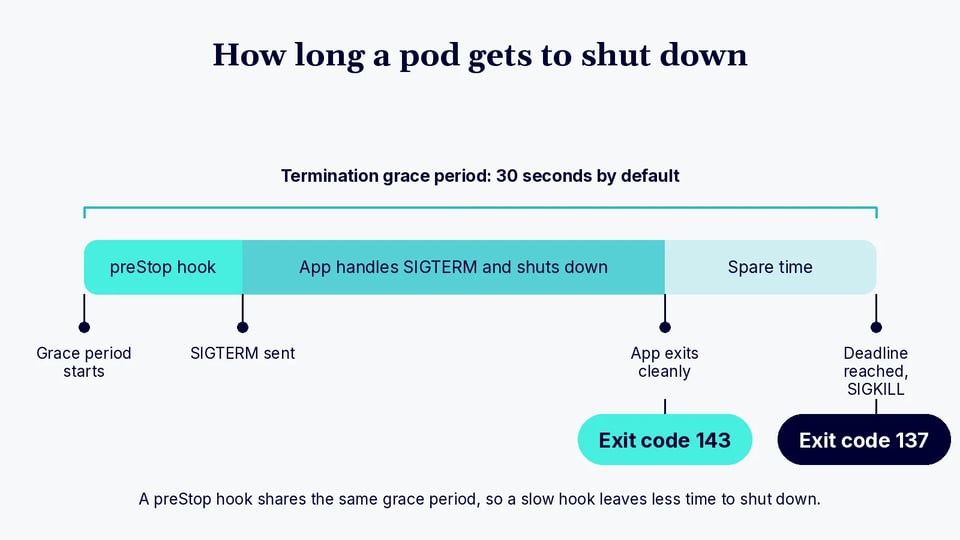
At the same time, Kubernetes starts the pod's termination grace period. This period is controlled by terminationGracePeriodSeconds in the pod specification and defaults to 30 seconds. It sets the amount of time available for the normal termination process before Kubernetes forces remaining containers to stop.
If the container has a preStop lifecycle hook, Kubernetes runs it during this termination period before asking the runtime to stop the container. The hook can perform tasks such as notifying another service, waiting for traffic to drain, or triggering application-specific shutdown behavior.
The preStop hook does not normally provide extra shutdown time. Its execution uses the same grace period, so a long-running hook can leave the application with less time to process SIGTERM and complete its own cleanup.
Step 3: The Application Performs a Graceful Shutdown
After receiving SIGTERM, the application should begin its shutdown procedure. A server might stop accepting new connections, complete requests already in progress, close database connections, flush buffered writes, and stop background workers.
The shutdown logic should complete before the termination grace period expires. Applications with long-running requests or jobs may therefore need a longer terminationGracePeriodSeconds value. The configured period should account for both lifecycle hooks and the application's worst-case shutdown time.
If the process terminates as a result of SIGTERM, monitoring tools and container status information may report exit code 143. In this context, the code often indicates a normal Kubernetes-initiated shutdown rather than an application crash.
Step 4: Kubernetes Sends SIGKILL If the Container Does Not Exit
If a container remains running when the termination deadline is reached, Kubernetes requests a forced shutdown. The container runtime then sends SIGKILL, or signal 9, to the remaining process. Unlike SIGTERM, SIGKILL cannot be caught, ignored, or handled by the application.
This prevents a pod from remaining stuck in the terminating state indefinitely. However, forced termination can interrupt active requests, leave work incomplete, or prevent buffered data and application state from being written correctly.
A process killed with SIGKILL commonly produces exit code 137 because 128 + 9 = 137. Repeated exit code 137 during planned pod termination can therefore indicate that the application's graceful shutdown takes longer than the available termination grace period.
Common Causes of Kubernetes Exit Code 143
Exit code 143 indicates that the container process received SIGTERM and terminated. In Kubernetes, this usually happens because the platform or another process intentionally requested that the container stop. The surrounding pod events and workload history can help identify which operation triggered the signal.
Deployment or Rolling Update
During a Deployment rolling update, Kubernetes creates pods for the new ReplicaSet and terminates pods from the old ReplicaSet. The old containers receive SIGTERM so they can shut down gracefully before being removed. Seeing exit code 143 during a planned rollout is therefore usually expected. It becomes a concern when shutdown interrupts requests or repeatedly exceeds the configured termination grace period.
Manual Pod Deletion
Running kubectl delete pod starts the normal pod termination process. Kubernetes marks the pod for deletion and the kubelet eventually asks the container runtime to stop its containers, normally using SIGTERM. If the application's main process exits because of this signal, Kubernetes may record exit code 143. This is normal when the pod was intentionally deleted.
Pod Scaling and Replica Reduction
Reducing the replica count of a Deployment, StatefulSet, or another controller causes Kubernetes to terminate pods that are no longer required. Those pods go through the standard graceful termination process. For example, scaling a Deployment from ten replicas to five requires five pods to stop. Their containers may report exit code 143 after receiving SIGTERM.
Node Drain or Pod Eviction
Draining a node normally evicts eligible pods so workloads can move elsewhere. Evicted pods are terminated on the old node, while their controllers can create replacement pods on other available nodes. The containers being terminated receive the normal shutdown signals and may exit with code 143. Node maintenance and infrastructure operations are common reasons for seeing several such terminations around the same time.
Kubernetes Node Shutdown
When Kubernetes detects a graceful operating system shutdown and graceful node shutdown is configured, the kubelet can terminate pods before the node powers off. This gives workloads time to stop cleanly instead of disappearing immediately with the node. Containers terminated during this process can report exit code 143. Checking node events and host shutdown activity can distinguish this case from application-level failures.
Liveness or Startup Probe Failures
Repeated liveness probe failures cause Kubernetes to restart the affected container. Startup probe failures can produce the same result when the application fails to become healthy within the allowed checks. As part of the restart, the kubelet terminates the container, normally giving it an opportunity to shut down gracefully. If the process terminates after receiving SIGTERM, its previous container state can show exit code 143.
Application or Process Manager Sending SIGTERM
SIGTERM does not always originate from Kubernetes. These elements can also send signal 15 to the container's main process:
- A shell script
- A supervisor
- A process manager
- A sidecar
- An application component
In this situation, Kubernetes only observes the resulting process termination. Application logs and process-manager logs are important because Kubernetes events may not identify the original sender of the signal.
Cluster Autoscaling or Node Replacement
A cluster autoscaler may remove underused nodes when capacity is no longer needed. Managed Kubernetes platforms can also replace nodes during:
- Upgrades
- Maintenance
- Repairs
- Infrastructure changes
Workloads on nodes being intentionally removed are typically drained or otherwise terminated and rescheduled when appropriate. Containers stopped gracefully during that process can report exit code 143, making the infrastructure event the underlying cause rather than an application error.
Kubernetes Exit Code 143 vs. Exit Code 137
Exit codes 143 and 137 both indicate that a container was terminated by a Linux signal, but they represent different signals. Exit code 143 corresponds to SIGTERM, while exit code 137 corresponds to SIGKILL:
- Exit code 143 is calculated as 128 + 15, where 15 is the signal number for SIGTERM. This signal gives the application a chance to perform a graceful shutdown. It commonly appears during pod deletion, rolling updates, scaling, node drains, and other normal Kubernetes operations.
- Exit code 137 is calculated as 128 + 9, where 9 is the signal number for SIGKILL. A process cannot catch or handle SIGKILL, so termination is immediate. Kubernetes may use it when a container fails to exit before its termination grace period expires. Exit code 137 can also occur when the Linux kernel kills a process because of an out-of-memory condition.
The distinction is useful when troubleshooting. Exit code 143 usually points to an intentional termination request, while exit code 137 indicates forced termination. For code 137, check whether the container shows an OOMKilled reason and review memory usage and limits. If it was not OOM-killed, determine whether the application exceeded its termination grace period.
How to Troubleshoot Kubernetes Exit Code 143
Troubleshooting exit code 143 means finding out who sent SIGTERM and why. Because Kubernetes frequently uses this signal during normal workload management, the exit code alone does not indicate a failure.
Start with the pod and container status, then correlate the termination time with logs, events, rollouts, scaling activity, and node operations. Also verify that the application responds correctly when it receives SIGTERM.
Step 1: Inspect the Pod Status
Start by checking the pod's current state and detailed status:
kubectl get pod <pod-name> -n <namespace>kubectl describe pod <pod-name> -n <namespace>Look for container restarts, pod conditions, recent events, and termination information. kubectl describe pod can also reveal probe failures, eviction activity, scheduling changes, and other events related to the shutdown.
If the pod is managed by a Deployment, StatefulSet, or another controller, identify its owner as well. This helps determine whether the termination was part of normal controller activity.
Step 2: Check the Container Exit Code and Termination Reason
Inspect the container's current and previous termination state. For a restarted container, Kubernetes may retain details such as the exit code, reason, signal, and timestamps:
kubectl get pod <pod-name> -n <namespace> \ -o jsonpath='{.status.containerStatuses[*].lastState.terminated}'Confirm that the recorded exit code is 143. Also check the termination reason and the startedAt and finishedAt timestamps, which can be correlated with Kubernetes events and application logs.
Do not assume that exit code 143 itself explains the cause. It tells you that the process terminated because of SIGTERM, but not which Kubernetes operation or external process initiated the termination.
Step 3: Review Current and Previous Container Logs
Check application logs around the termination time:
kubectl logs <pod-name> -n <namespace>If the container restarted, inspect logs from the previous container instance:
kubectl logs <pod-name> -n <namespace> --previousLook for shutdown messages, received-signal messages, unfinished requests, connection errors, and application exceptions. A clean sequence such as receiving SIGTERM, stopping new work, closing resources, and exiting usually indicates graceful termination.
For multi-container pods, specify the relevant container with -c <container-name>.
Step 4: Inspect Kubernetes Events
Kubernetes events can provide context about what happened immediately before the termination:
kubectl get events -n <namespace> \ --sort-by=.metadata.creationTimestampLook for messages related to failed probes, pod eviction, container restarts, scaling, scheduling, or node problems. Compare event timestamps with the container's termination timestamp.
Events are useful but are not a complete audit trail. They may expire, and not every pod termination cause generates an event that clearly explains why SIGTERM was sent.
Step 5: Check Deployment and Rollout Activity
Determine whether the container stopped during a Deployment update or other workload change:
kubectl rollout status deployment/<deployment-name> -n <namespace>kubectl rollout history deployment/<deployment-name> -n <namespace>Also inspect ReplicaSets when troubleshooting a Deployment. A new ReplicaSet appearing around the termination time is a strong indication that old pods were being replaced during a rollout.
If exit code 143 occurs only when new application versions are deployed, it is usually part of normal pod replacement. The next question is whether those pods shut down cleanly without dropping requests or losing work.
Step 6: Check for Scaling, Eviction, or Node Events
Check whether replica changes, autoscaling, node drains, or infrastructure operations coincide with the termination. For workloads using a HorizontalPodAutoscaler, inspect its current state and recent behavior:
kubectl get hpa -n <namespace>kubectl describe hpa <hpa-name> -n <namespace>Also inspect the node that hosted the pod:
kubectl describe node <node-name>Look for node shutdowns, maintenance, pressure conditions, autoscaler activity, or eviction-related events. If many unrelated pods terminate at approximately the same time, a node-level or cluster-level operation is more likely than an application-specific problem.
Step 7: Determine Whether the Application Handles SIGTERM Correctly
Finally, verify how the application's main process responds to SIGTERM. It should normally stop accepting new work, complete or safely cancel active operations, flush necessary data, close external connections, and exit before the termination grace period expires.
Check the pod's configured grace period:
kubectl get pod <pod-name> -n <namespace> \ -o jsonpath='{.spec.terminationGracePeriodSeconds}'Also verify that signals actually reach the application. Containers that launch applications through shell scripts or incorrectly configured process managers can interfere with signal forwarding when the application is not PID 1.
If graceful shutdown consistently takes longer than the available period, improve the shutdown path or increase terminationGracePeriodSeconds where appropriate. Testing the application directly with SIGTERM can confirm that its signal handler runs and exits within the expected time.
Best Practices to Prevent Kubernetes Exit Code 143 {#best-practices-to-prevent-kubernetes-exit-code-143}
Here are some of the ways you can prevent exit code 143 when working with Kubernetes.
1. Implement Graceful SIGTERM Handling
Applications should explicitly handle SIGTERM and begin an orderly shutdown when the signal arrives. A service should stop accepting new work, finish or safely cancel active requests, close connections, flush buffered data, and then exit.
Make sure the application actually receives the signal. Wrapper shell scripts and process managers can prevent signals from reaching the application if they do not forward them correctly. Using exec in an entrypoint script can replace the shell with the application process:
exec /app/my-serviceThis makes the application PID 1 and allows container termination signals to reach it directly.
2. Set an Appropriate terminationGracePeriodSeconds
Set terminationGracePeriodSeconds long enough for the application to complete its normal shutdown procedure. Kubernetes uses 30 seconds by default, but that may be insufficient for long-running requests, batch jobs, message consumers, or applications with substantial cleanup work.
For example:
spec: terminationGracePeriodSeconds: 60Base the value on observed shutdown times rather than simply setting a large timeout. Applications should still terminate as quickly as practical because an unnecessarily long grace period can delay rollouts, scaling operations, and node maintenance.
3. Use a preStop Hook When Additional Shutdown Logic Is Required
A preStop hook can execute additional logic before the container receives its normal stop signal. It is useful when shutdown requires an explicit command, service deregistration, or another operation outside the application's standard SIGTERM handler.
For example:
lifecycle: preStop: exec: command: ["/bin/sh", "-c", "/app/prepare-shutdown.sh"]Keep the hook short and reliable. Its runtime counts against the pod's termination grace period, so a slow preStop hook reduces the time available for the application to shut down after receiving SIGTERM.
4. Make Background Workers Shut Down Safely
Background workers need termination handling just as much as HTTP services. When a worker receives SIGTERM, it should normally stop taking new jobs and either finish its current job or return unfinished work to the queue using the queue system's supported mechanism.
Avoid immediately exiting while a job is partially processed. Depending on the workload, this can result in lost work, duplicate processing, incomplete database updates, or inconsistent application state.
For long-running jobs, ensure that the termination grace period is compatible with expected processing times. Where jobs cannot reliably finish within that period, design them to be retryable or resumable.
5. Monitor Exit Code 143 in Context
Do not alert on every occurrence of exit code 143. It is expected during rolling deployments, manual pod deletion, scale-down operations, node drains, and other routine Kubernetes activity.
Instead, correlate exit code 143 with pod restart rates, deployment activity, Kubernetes events, node operations, application errors, and failed requests. Repeated SIGTERM terminations without a known cluster operation deserve further investigation.
Monitoring the surrounding context makes exit code 143 useful as a diagnostic signal. It helps distinguish healthy lifecycle activity from probe failures, unstable workloads, unexpected process termination, or infrastructure changes.
FAQ
Is Kubernetes exit code 143 an error? Usually not. Exit code 143 means the container's main process received SIGTERM and stopped. Kubernetes sends this signal during normal activity such as rolling updates, pod deletion, scale-down, and node drains, so the code alone does not point to a failure.
What is the difference between exit code 143 and exit code 137? Exit code 143 is 128 + 15 and means the process stopped after SIGTERM, which gives the application a chance to shut down gracefully. Exit code 137 is 128 + 9 and means SIGKILL, which cannot be caught. It can happen when a container misses its termination grace period or is killed for running out of memory.
How long does Kubernetes wait before sending SIGKILL? The termination grace period defaults to 30 seconds and is set with terminationGracePeriodSeconds. A preStop hook runs inside that same window, so a slow hook leaves the application less time to handle SIGTERM.
How do I find out what sent the SIGTERM? Start with kubectl describe pod and the container's last termination state, then compare timestamps with Kubernetes events, rollout history, HPA activity, and node events. If nothing in the cluster lines up, check application and process-manager logs, since a script, supervisor, or sidecar can also send SIGTERM.
Should I alert on exit code 143? No, not on every occurrence. Alert on patterns instead, such as repeated SIGTERM terminations with no known rollout, scaling, or node operation, or terminations that coincide with failed requests or rising restart rates.
Keep Kubernetes Workloads Stable Through Every Termination with PerfectScale
Exit code 143 is usually a sign of healthy lifecycle activity, but frequent rollouts, scale-downs, and node changes make it harder to tell routine terminations apart from real resilience problems. PerfectScale for Kubernetes by DoiT delivers workload-aware automation with a stability-first approach, keeping application health at the center of every optimization recommendation. It gives platform, SRE, and FinOps teams a single view of cluster health, performance, and cost, so they can spot resilience issues and rightsize workloads without constant manual monitoring and reconfiguration.
Key capabilities of PerfectScale for Kubernetes:
- Resilience issue detection: Podfit provides a granular view of cluster health and costs, prioritizing the areas that need attention and helping teams quickly identify wasted resources and resilience issues.
- Stability-first rightsizing: Context-aware rightsizing tailors actions using performance baselines, traffic patterns, and business criticality, so optimization never comes at the expense of application health.
- Autonomous workload optimization: Data-driven recommendations and automation workflows rightsize workloads continuously, eliminating the constant reconfiguration cycle that drains engineering time.
- Autoscaler configuration insights: Actionable recommendations help improve HPA and KEDA configurations, while Infrafit helps maximize the effectiveness of node autoscalers like Karpenter.
- Node utilization visibility: Infrafit identifies idle node capacity and recommends the right nodes for your workloads, supporting peak cluster performance and reliability.
- Container-level resource tracking: Monitor CPU and memory at the container level to eliminate waste and set resources based on actual usage.
- Guardrails and policies: Define optimization rules by workload criticality and environment type to keep production workloads protected.
- Multi-cloud, multi-cluster visibility: Get data-driven intelligence, policy enforcement, and optimization actions across any number of clusters and cloud providers, including GPU utilization tracking.
Ready to run reliable, cost-efficient Kubernetes workloads? Learn more about PerfectScale for Kubernetes.