
PerfectScale
Karpenter v1.14: What's New and How to Upgrade
DRA support, a new CapacityBuffer API, and a Balanced consolidation policy - here's what's new in Karpenter v1.14, how to upgrade, and what's actually ready for production.
This page is also available in Deutsch, Español, Français, Italiano, 日本語, and Português.


TLDR;
Karpenter v1.14, released July 11, 2026, adds three features: Dynamic Resource Allocation (DRA) support for GPU and accelerator scheduling, an alpha CapacityBuffer API for reserving spare node capacity, and a new Balanced consolidation policy that weighs cost savings against pod disruption. Balanced consolidation is a stable field and safe to use in production; DRA support and CapacityBuffer are still early-stage and best tested in staging first.
Karpenter v1.14: What's New and How to Upgrade
Karpenter v1.14 is the latest release of the Kubernetes node autoscaler. It adds three main things: support for Dynamic Resource Allocation (DRA), a new CapacityBuffer API for spare capacity, and a new Balanced consolidation policy. Two of them are still early. DRA support is not GA in Karpenter yet, and CapacityBuffer is alpha and off by default.
Both Karpenter repos released v1.14.0 on 11 July 2026: the core project and the AWS provider.
This post explains what each one does, how to upgrade, and what is safe to use in production now.
There is a theme across this release. The Karpenter team knows that reliability and availability are top of mind when you tune autoscaling. Nobody wants to save cost at the price of a service outage. Both the new Balanced consolidation policy and CapacityBuffer are built with this in mind. One saves cost without moving nodes you can't afford to lose. The other keeps spare capacity ready so pods don't wait. This is the same reliability-first approach to cost that PerfectScale has taken from the start.
What's New in Karpenter v1.14?
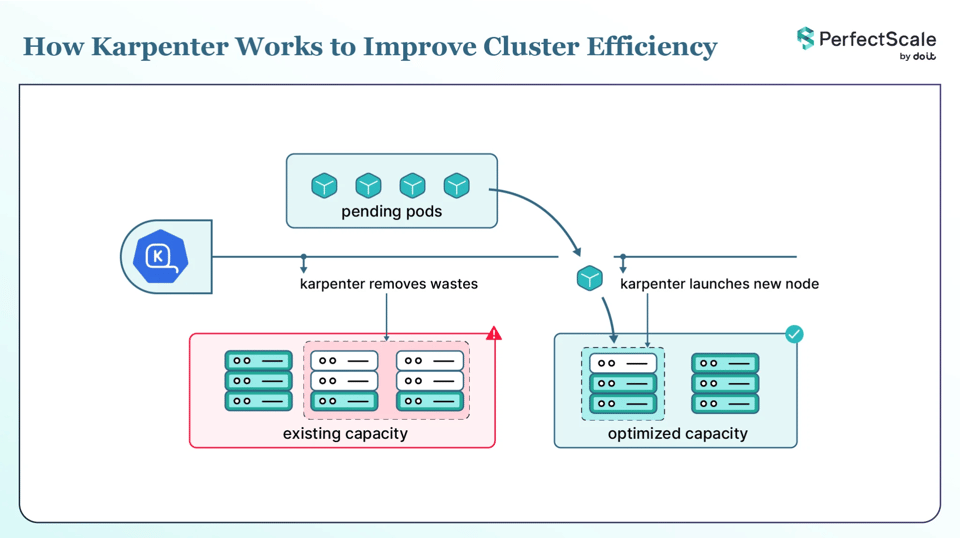
Karpenter launches nodes when pods can't be scheduled, and removes nodes when they are no longer needed. v1.14 does not change that job. It makes Karpenter smarter about GPU and hardware workloads, gives you a way to keep spare nodes ready, and adds a gentler way to save cost.
Three changes stand out in this release:
a. DRA support: Karpenter now reads a pod's DRA request when it picks a node. This matters most for GPU and other hardware workloads.
b. CapacityBuffer: you can keep spare nodes ready so pods start right away. This one is alpha.
c. Balanced consolidation: a new policy that removes a node only when the cost saved is worth the disruption.
DRA support in Karpenter v1.14
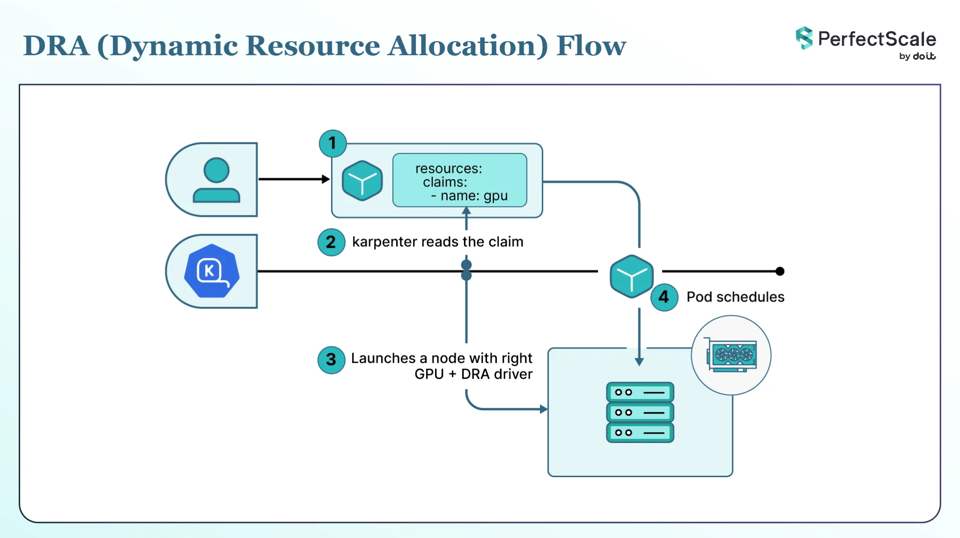
DRA is a Kubernetes way to ask for special hardware like GPUs and other accelerators. Instead of asking for a fixed number like nvidia.com/gpu: 1, a pod describes the device it needs with a ResourceClaim, and the scheduler picks the actual device. Each node needs a DRA driver for your hardware. DRA is GA in Kubernetes since v1.34 and is on by default from that version.
Before v1.14, Karpenter did not read these DRA requests when it planned new nodes. So a pod that needed a GPU through DRA could get stuck, because Karpenter did not launch a node that could run it. To work around this, you had to send these pods to the right nodes yourself, with a nodeSelector or node affinity, the same way GPU pods are routed with the older device plugin model. Karpenter reads those, but it could not read the DRA claim on its own. v1.14 adds a DRA allocator. Karpenter now reads the pod's DRA request and uses it to pick the right node. It also handles shared and splittable devices, which helps when a few pods share one accelerator.
You do not need to turn this on. It is on by default. To make Karpenter ignore DRA requests, set the --ignore-dra-requests flag. But this is still early. If you run GPU or accelerator workloads with DRA, try it in staging first. You also need Kubernetes 1.34 or later and a DRA driver for your hardware. The Settings reference has the flag details.
Karpenter CapacityBuffer: Keep Spare Nodes Ready
New nodes take time to start and join the cluster. For workloads that spike or can't wait, that delay hurts. Pods stay pending, and your service can't scale up in time to serve the traffic. CapacityBuffer lets you keep some spare capacity ready, so pods schedule right away instead of waiting for a new node.
It works with virtual placeholder pods. These pods only live inside Karpenter's planning. They are never real pods in your cluster. They make Karpenter keep spare nodes ready, and they refill on their own when your real pods use the spare space.
You set the size of the spare capacity in one of two ways:
- podTemplateRef: point at a PodTemplate that describes one buffer chunk, then set replicas and/or limits.
- scalableRef: point at a Deployment, StatefulSet, or ReplicaSet, then set a percentage to keep the spare capacity in step with that workload.
Here is a fixed buffer of five chunks:
yaml
apiVersion: autoscaling.x-k8s.io/v1alpha1kind: CapacityBuffermetadata: name: web-app-buffer namespace: defaultspec: provisioningStrategy: "buffer.x-k8s.io/active-capacity" podTemplateRef: name: web-buffer-template replicas: 5 limits: cpu: "20" memory: "40Gi"Or, to keep the spare capacity in step with a workload, point at a Deployment and set a percentage. This keeps buffer capacity at 20% of the api-service Deployment's replicas, so the spare capacity grows and shrinks as that Deployment scales:
yaml
apiVersion: autoscaling.x-k8s.io/v1alpha1kind: CapacityBuffermetadata: name: api-service-buffer namespace: defaultspec: scalableRef: apiGroup: apps kind: Deployment name: api-service percentage: 20When you set more than one of these, the final count is min(max(replicas, percentage), limits). So replicas and percentage are combined by taking the larger one, and limits caps the result.
There is one thing to know about node cleanup. Karpenter will not remove a node as empty if it holds buffer capacity. The virtual buffer pods stop it from counting as empty, and Karpenter marks it with the reason Node has buffer pods. Every other kind of cleanup still runs, and any replacement node must still fit the buffer pods, so the spare capacity stays topped up.
CapacityBuffer is alpha and off by default. You turn it on with the CapacityBuffer=true feature gate. It was added in v1.13, and v1.14 moved its internal API forward and added status metrics, but it is still alpha and the API can change. Try it in a test cluster first. Also remember that spare capacity costs money, because you pay for nodes that sit idle. Size it to the real burst you need.
Balanced Consolidation: Karpenter's New Consolidation Policy
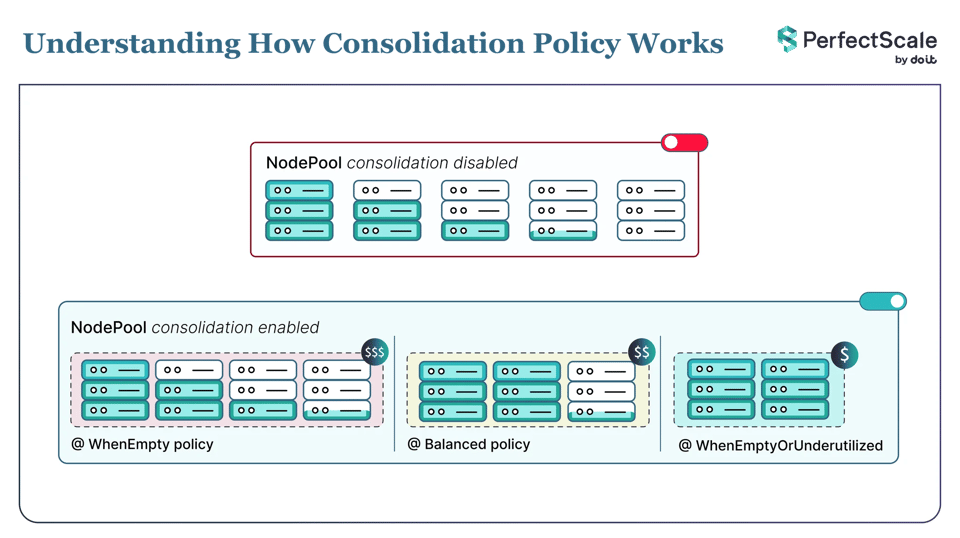
Consolidation is how Karpenter saves you money. It removes empty nodes and packs down or replaces underused ones. You control it with the consolidationPolicy field on a NodePool. v1.14 adds a third choice, Balanced, so you now have three:
| consolidationPolicy | Which nodes it considers | Choose it when |
|---|---|---|
| WhenEmpty | Only empty nodes | You want the most careful behavior and remove nodes only once nothing is running on them. |
| Balanced | Nodes where the cost saved is worth the pod disruption | You want most of the savings without moving nodes for small, marginal gains. |
| WhenEmptyOrUnderutilized | Any node that can be removed or replaced to cut cost | You want the lowest cost and can accept the pod disruption it takes. |
Balanced scores each consolidation action. It weighs how much cost the action saves against how much pod disruption it causes, and acts only when the saving is big enough for the disruption. By default each pod counts the same, so the disruption is basically the number of pods that would move. Pods that cost more to move can count for more. For example, higher-priority pods count as more disruptive, so their node is less likely to be removed.
You can see why Karpenter made each choice. An approved action emits a ConsolidationApproved event with the score and the saving and disruption percentages. Karpenter also exports the karpenter_consolidation_score and karpenter_consolidation_moves_total metrics, and logs the choices at --log-level debug.
To use it, set the policy on your NodePool:
yaml
apiVersion: karpenter.sh/v1kind: NodePoolmetadata: name: defaultspec: disruption: consolidationPolicy: BalancedUse Balanced when WhenEmptyOrUnderutilized saves well but moves nodes too often, and WhenEmpty leaves too much waste. It sits in the middle. Karpenter still removes empty and clearly underused nodes, but skips the small moves where the saving is not worth it. This is the one new feature in v1.14 that is a stable field with no feature gate, so it is safe to try. Turn it on for one NodePool first and watch the events and metrics. If you're not sure which policy fits each NodePool, PerfectScale recommends the right consolidation policy from your real workload data, so you don't have to guess.
Other Karpenter v1.14 Changes
A few smaller changes you should note:
a. EC2 preview instance types (AWS): the AWS provider can now use EC2 instance types that are still in preview, so you can try new instance generations before they are generally available.
b. DaemonSet-aware node choice: Karpenter now checks a DaemonSet's instance type needs when it picks a node, so the node can actually run your DaemonSets.
c. Less churn on new nodes: consolidateAfter now also applies to the replacement nodes made during consolidation, so a fresh node is not removed again right away.
d. Zone label on metrics: node and NodeClaim lifecycle metrics now include a zone label, which makes per-zone monitoring easier.
The full list is in the v1.14.0 release notes.
How to Upgrade to Karpenter v1.14
Karpenter v1.14 works with Kubernetes 1.30 to 1.36. Here is the support matrix:
| Kubernetes | 1.30 | 1.31 | 1.32 | 1.33 | 1.34 | 1.35 | 1.36 |
|---|---|---|---|---|---|---|---|
| Karpenter | >= 0.37 | >= 1.0.5 | >= 1.2 | >= 1.5 | >= 1.6 | >= 1.9 | >= 1.13 |
v1.14.0 is a stable release, and stable releases are the only ones recommended for production.
Karpenter installs from a public OCI registry with Helm. Note the chart version is 1.14.0 with no v, while the Git tag is v1.14.0.
bash
helm upgrade --install karpenter oci://public.ecr.aws/karpenter/karpenter \ --version "1.14.0" \ --namespace "kube-system" --create-namespace \ --set "settings.clusterName=${CLUSTER_NAME}" \ --set "settings.interruptionQueue=${CLUSTER_NAME}" \ --set controller.resources.requests.cpu=1 \ --set controller.resources.requests.memory=1Gi \ --set controller.resources.limits.cpu=1 \ --set controller.resources.limits.memory=1Gi \ --waitYou can check the signed chart with cosign before you install.
Read the upgrade guide before you upgrade, because Karpenter lists any breaking change for each minor version. Apply the CRDs for the new version, then upgrade the controller. Moving up one minor version at a time is the safest path.
Is Karpenter v1.14 Ready for Production?
Here is the short answer on what to trust today:
| Feature | What it does | Maturity in v1.14 | Default | How to control it |
|---|---|---|---|---|
| DRA allocator | Karpenter reads a pod's DRA (GPU/accelerator) claims when it picks a node | Not GA in Karpenter yet | On | Turn off with --ignore-dra-requests |
| CapacityBuffer | Keeps spare capacity ready for instant scheduling | Alpha | Off | Turn on with the CapacityBuffer=true feature gate |
| Balanced consolidation | New consolidation policy that balances savings against disruption | Stable field | Opt-in per NodePool | Set consolidationPolicy: Balanced |
So Balanced consolidation is safe to try in production. Start with one NodePool. DRA support and CapacityBuffer are still early, so keep them in test or staging until you have run your own workloads through them.
Optimize Karpenter Cost and Performance with PerfectScale by DoiT
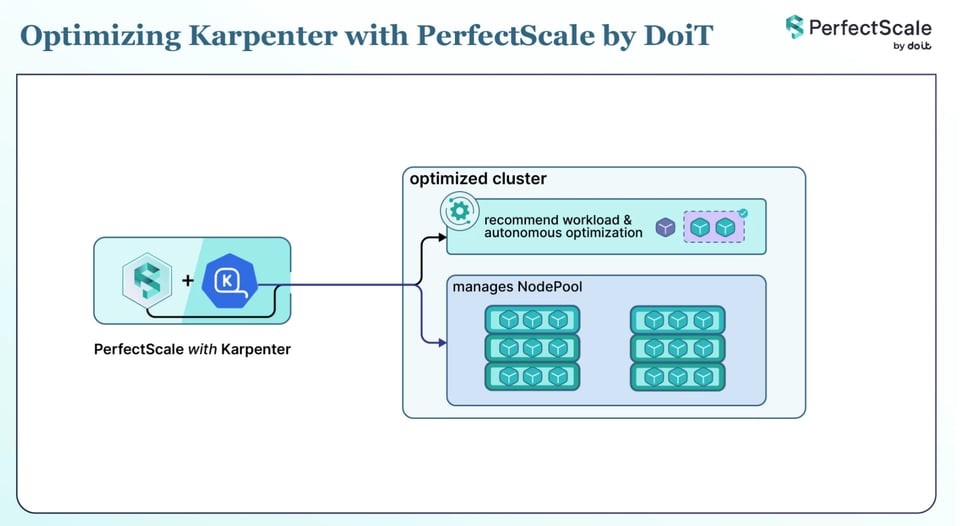
Karpenter and PerfectScale do different jobs, and they work well together. Karpenter works at the node level. It adds and removes nodes. PerfectScale works at the pod level. It watches your workloads and turns real usage into right-sizing recommendations you can apply by hand or autonomously. PerfectScale does not replace Karpenter. It helps Karpenter make better node choices.
There are two ways this helps, and both matter more after v1.14:
- Right-size pods first, so Karpenter picks the right nodes. Karpenter launches nodes based on your pods' CPU and memory requests. If those requests are wrong, Karpenter launches the wrong nodes. PerfectScale sets requests and limits from real usage, so the numbers Karpenter reads are correct.
- Pick the right NodePool settings from real data. PerfectScale reads your Karpenter setup and your workloads and recommends changes: which consolidation policy fits, a consolidation delay (
consolidateAfter), more instance flexibility across generation, family, and category, and NodePool limits that are close to their cap. Now that Balanced is a choice, PerfectScale can tell you which policy fits each NodePool instead of guessing. It also flags unevictable pods, which block consolidation under any policy, so you can fix them.
Teams like Paramount Pictures and Creditas use PerfectScale to keep their clusters right-sized and their costs down. Sign up or book a demo to see PerfectScale on your own cluster.