

You scale a Deployment from 12 pods down to 3, and one large node is now mostly empty. In our sandbox, with a wait time of one minute, Karpenter replaces that node with a smaller one in about 80 seconds. Sometimes it does not, and the large node keeps running and costing you money.
If you wonder why Karpenter will not consolidate your nodes, start with the events. Karpenter writes an event when it skips a node, and the event usually points to the cause.
An event names a cause, but it does not give you the fix. A PodDisruptionBudget (PDB), a pod annotation, a disruption budget, and a placement rule can each keep one node running, and each one belongs to a different team. The person who reads the event is not always the person who can change the cause.
Instead, work along one fixed path. Read the event, confirm it with one command, write the smallest change as a diff, and review that diff before anyone applies it. We call this path event to diff. A diff shows only the lines that change.
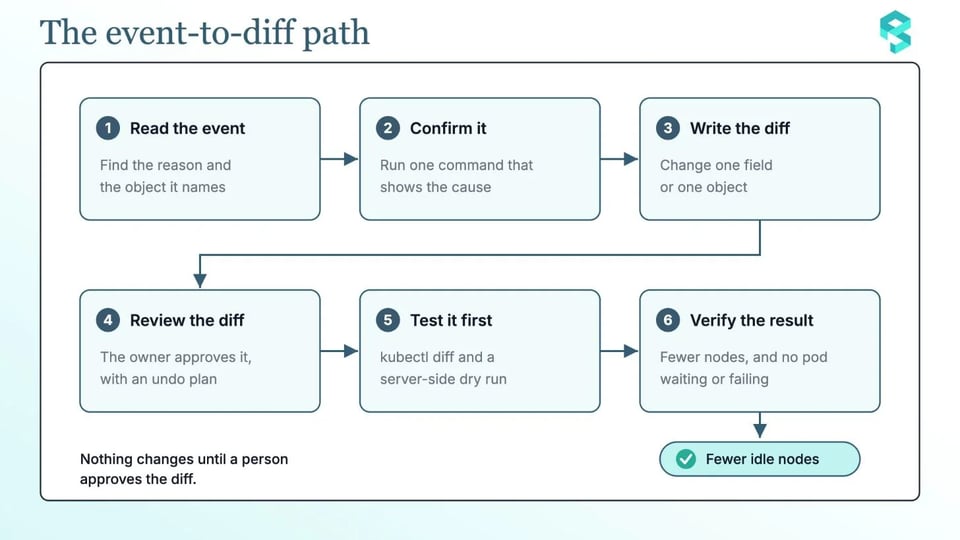
This article follows the path with four cases that you can find in your own clusters:
- A disruption budget that allows no disruption
- A do-not-disrupt annotation
- A PDB with no room
- Pods that cannot run on another node
The examples use Karpenter v1.15 on AWS. They use a small sandbox: a NodePool named workshop, and a Deployment named inflate in the namespace sandbox.
What Karpenter does by default
Karpenter can remove a node in two ways. If all of the pods fit on free capacity of other nodes, it deletes the node. If they fit on free capacity plus one lower-priced node, it replaces the node.
A NodePool that sets nothing else gets consolidationPolicy: WhenEmptyOrUnderutilized and consolidateAfter: 0s. It also gets a budget that lets Karpenter disrupt 10% of the nodes at one time.
For every voluntary disruption, Karpenter follows the same six steps:
- Choose the candidate nodes. Karpenter ignores a node that holds pods that cannot be evicted, and it tries the node again later.
- Check that the disruption does not break the budget of the NodePool.
- Simulate the scheduling of the pods on the node, to find out whether replacement nodes are needed.
- Add the
karpenter.sh/disrupted:NoScheduletaint, so no new pods start on the node. - Start the replacement nodes, if the simulation needs them, and wait until they are ready.
- Delete the node. The termination process drains the node with the Kubernetes Eviction API, so it respects PDBs. It ignores static pods, pods that tolerate the taint, and pods that have succeeded or failed.
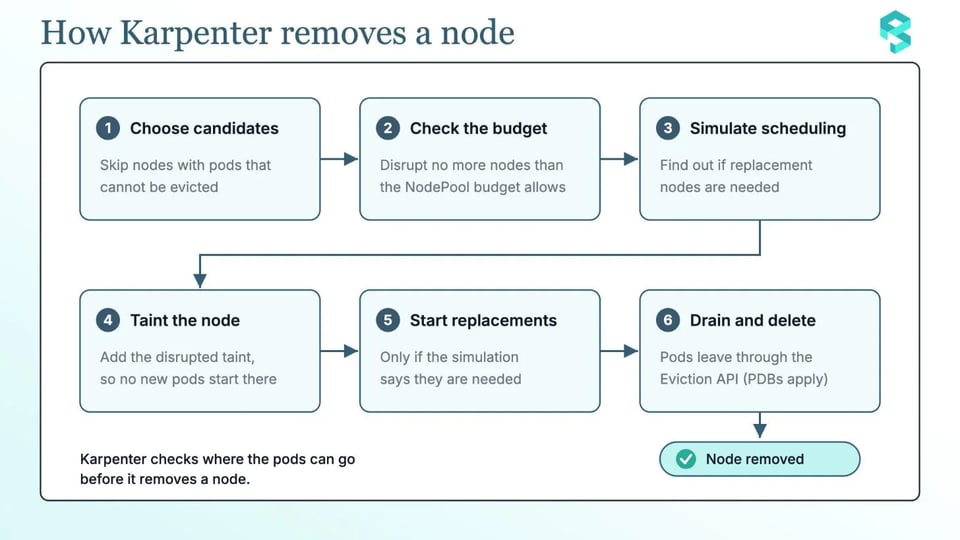
A node stays when Karpenter stops at one of these steps, and the events tell you which one. Budgets and the do-not-disrupt annotation only affect voluntary disruption. Expiration, interruption, and manual deletion ignore them.
Read the events first
Karpenter writes an event when it skips a node, and the reason tells you what kind of problem you have. Unconsolidatable means that consolidation does not fit the node. DisruptionBlocked means that something blocks the disruption: a PDB, an annotation on a pod or a node, or a budget on the NodePool.
Node events appear on the node and on its NodeClaim. Budget events appear on the NodePool, not on the node. These commands collect the events for one node, its NodeClaim, its NodePool, and the whole cluster. Replace $NODE, $NODECLAIM, and $NODEPOOL with your names:
kubectl describe node $NODEkubectl describe nodeclaim $NODECLAIMkubectl describe nodepool $NODEPOOLkubectl get events -A --field-selector reason=Unconsolidatable --sort-by=.lastTimestampkubectl get events -A --field-selector reason=DisruptionBlocked --sort-by=.lastTimestampIn Karpenter v1.15, the messages for the four cases look like this:
| Message | What it means | Confirm it with |
|---|---|---|
No allowed disruptions for disruption reason Underutilized due to blocking budget |
A budget allows no disruption now. This event is on the NodePool. | The disruption block of the NodePool |
Pod has "karpenter.sh/do-not-disrupt" annotation (Pod=<namespace>/<name>) |
A pod on the node carries the annotation. | The annotations of the pods on the node |
Pdb prevents pod evictions (PodDisruptionBudget=[<namespace>/<name>]) |
A PDB has no room for a pod on the node. | The ALLOWED value of each PDB |
Can't replace with a cheaper node |
Karpenter found no cheaper node that can hold the pods. | The pod requests, the NodePool requirements, and the NodePool limits |
Two more messages point to NodePool settings. NodePool "<name>" has consolidation disabled means that consolidateAfter is Never. NodePool "<name>" has consolidation policy WhenEmpty, but node is not empty means that the policy considers only empty nodes. On Spot nodes, Karpenter replaces a node only when the SpotToSpotConsolidation feature gate is on.
Now you can follow the path with each case, one at a time:
Case 1: A budget that allows no disruption
The evidence is on the NodePool here, not on the node. It has a DisruptionBlocked event that says No allowed disruptions for disruption reason Underutilized due to blocking budget.
To confirm it, read the disruption block of the NodePool:
kubectl get nodepool $NODEPOOL -o jsonpath='{.spec.disruption}{"\n"}'Look for nodes: '0', or for a budget with a schedule and a duration that is active now. A budget with nodes: '0' and no reasons blocks all voluntary disruption. When a NodePool has several budgets, Karpenter uses the lowest result.
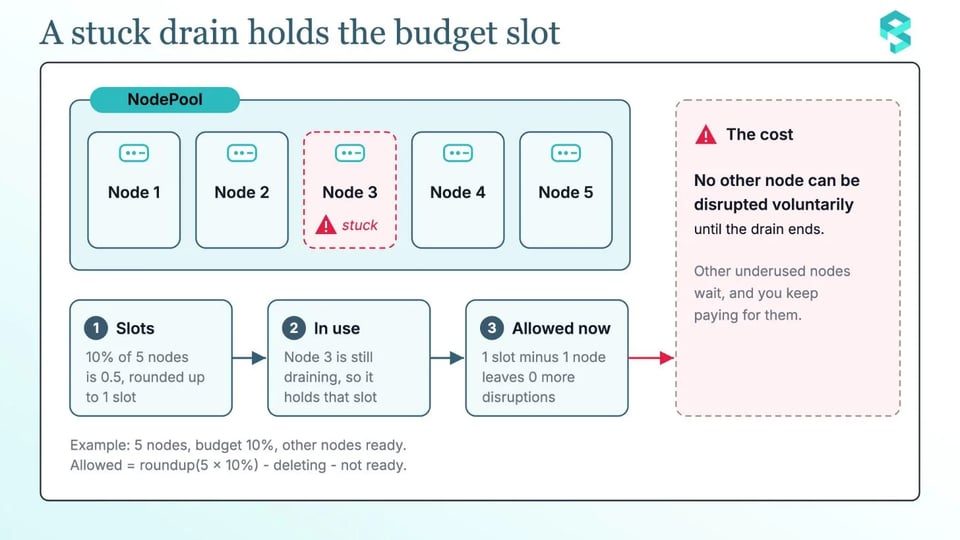
Karpenter also counts nodes that are already being deleted. For a percentage, it works out the allowed disruptions like this:
| allowed = roundup(total x percentage) - deleting - not ready |
|---|
With 5 nodes and a budget of 10%, the result is 1. Now imagine that one node is stuck in a drain. That node uses the slot, so the budget allows 0 more disruptions until the drain ends.
A permanent zero budget stops too much. Pick a window that matches your busy hours instead. This one runs on weekdays from 09:00 UTC for 8 hours, and the first budget keeps the normal limit for the rest of the time:
spec: disruption: budgets:- - nodes: '0'+ - nodes: 10%+ - nodes: '0'+ schedule: '0 9 * * mon-fri'+ duration: 8h+ reasons:+ - UnderutilizedThe freeze now stops only the removal of underused nodes, and only inside the window. Karpenter always reads a schedule in UTC.

Case 2: A do-not-disrupt annotation
The evidence is on the node and on its NodeClaim. The DisruptionBlocked event says Pod has "karpenter.sh/do-not-disrupt" annotation (Pod=<namespace>/<name>). When the node itself carries the annotation, the message is Disruption is blocked through the "karpenter.sh/do-not-disrupt" annotation.
To find the annotation, list the pods and the nodes that carry it. These commands use jq:
kubectl get pods -A -o json | jq -r '.items[] | select(.metadata.annotations["karpenter.sh/do-not-disrupt"] != null) | "\(.metadata.namespace)/\(.metadata.name) node=\(.spec.nodeName) value=\(.metadata.annotations["karpenter.sh/do-not-disrupt"])"'
kubectl get nodes -o json | jq -r '.items[] | select(.metadata.annotations["karpenter.sh/do-not-disrupt"] != null) | .metadata.name'
The value "true" protects a pod for good. A duration such as "30m" protects it for that long after it starts running. The annotation works like a PDB for one pod: it blocks consolidation, and it blocks drift unless the NodePool sets terminationGracePeriod.
A duration is easier to defend in a review than a permanent value, because it says how long the pod really needs protection. If the application team agrees that the pod may move after 30 minutes, change the value from "true" to a duration:
template: metadata: annotations:- karpenter.sh/do-not-disrupt: "true"+ karpenter.sh/do-not-disrupt: "30m"Case 3: A PDB with no room
The evidence is on the node and on its NodeClaim. The DisruptionBlocked event says Pdb prevents pod evictions (PodDisruptionBudget=[<namespace>/<name>]).
To confirm it, list every PDB with its allowed disruptions:
kubectl get pdb -A -o custom-columns='NAMESPACE:.metadata.namespace,NAME:.metadata.name,MIN:.spec.minAvailable,MAXUNAVAIL:.spec.maxUnavailable,ALLOWED:.status.disruptionsAllowed'An ALLOWED value of 0 means that no pod behind that PDB can leave now. If you set maxUnavailable to 0, or minAvailable to 100% or to the number of replicas, you require zero voluntary evictions, and a drain of the node never completes.
Karpenter needs the PDB that selects a pod to allow the eviction. A pod should have only one PDB. If two PDBs select the same pod, Kubernetes refuses to evict the pod, even when both PDBs have room. Karpenter may show no event for this case. Recent Kubernetes versions write a MultiplePodDisruptionBudgets event on the pod. That one pod can then block the whole node. A pod that runs but is not ready can also block an eviction when the budget has no room.
The fix is a small change. For a Deployment with 3 replicas, use maxUnavailable: 1 instead of minAvailable: 3:
spec: minAvailable: 3 maxUnavailable: 1A PDB can set only one of the two fields. Kubernetes recommends maxUnavailable, because it follows the number of replicas.
If a crash-looping pod blocks the eviction, add unhealthyPodEvictionPolicy: AlwaysAllow. This field has been stable since Kubernetes v1.31:
spec: maxUnavailable: 1 unhealthyPodEvictionPolicy: AlwaysAllowCase 4: Pods that cannot run on another node
Karpenter simulates where the pods can go before it removes a node. If one pod fits nowhere else, the node stays. The events do not always name that pod, so you find it in the pod specs.
To see what ties each pod on the node to its place, list the details of every pod on it:
kubectl get pods -A --field-selector spec.nodeName=$NODE -o json | jq '.items[] | {pod: "\(.metadata.namespace)/\(.metadata.name)", owner: (.metadata.ownerReferences[0].kind // "none"), nodeSelector: .spec.nodeSelector, requiredAntiAffinity: (.spec.affinity.podAntiAffinity.requiredDuringSchedulingIgnoredDuringExecution != null), topologySpread: [.spec.topologySpreadConstraints[]? | {key: .topologyKey, maxSkew: .maxSkew, whenUnsatisfiable: .whenUnsatisfiable}], claims: [.spec.volumes[]? | select(.persistentVolumeClaim != null) | .persistentVolumeClaim.claimName]}'Look for these causes:
- A request that is larger than the free capacity of the other nodes.
- A
nodeSelectorthat matches only this node group. - A required anti-affinity rule.
- A topology spread rule that the other nodes cannot meet.
- A volume that is bound to one zone.
- A taint on the other nodes that the pod does not tolerate.
You should also know that preferred anti-affinity and topology spread rules can reduce the effectiveness of consolidation, because Karpenter tries to satisfy them when it removes a node. Also check for pods without a controller. They do not block Karpenter, but nothing starts them again after an eviction.
Start with the first cause. Karpenter places pods by their requests, not by their use. Check the real use against the requests:
sum by (namespace) (rate(container_cpu_usage_seconds_total{container!=""}[5m]))/sum by (namespace) (kube_pod_container_resource_requests{resource="cpu"})A ratio far below 1 means that the requests are too big. Each node then holds fewer pods than it could, and you pay for the empty room.
If the evidence shows an oversized request, lower it to the real need. Change only the one value that the evidence points to:
resources: requests:- cpu: "4"+ cpu: "2"From evidence to diff: review before anyone applies it
Every case ends in a small diff. Review each diff in the same way:
| Case | The event | Confirm it with | The diff changes | Owner |
|---|---|---|---|---|
| Budget | DisruptionBlocked on the NodePool |
kubectl get nodepool with jsonpath |
One budget entry | Platform team |
| Annotation | DisruptionBlocked on the node |
A jq filter for pods and nodes |
One annotation value | Application team |
| PDB | DisruptionBlocked on the node |
kubectl get pdb -A |
One PDB field | Application team |
| No other node | Unconsolidatable, or no event |
A jq filter for pod placement |
One request or one rule | Application team |
Ask these six questions before you apply a diff:
- Which event, field, or annotation proves the blocker?
- Does the diff touch one field or one object?
- Did the owner of that object approve it?
- What limits how many nodes can move at once: a budget or a time window?
- How do you undo the change, and what tells you to undo it?
- Did the change run first on a test cluster or on a sandbox NodePool?
Then test the diff without applying it:
kubectl diff -f workshop-nodepool.yamlkubectl apply --dry-run=server -f workshop-nodepool.yamlThe kubectl diff command shows what kubectl apply would change. The server-side dry run checks the change against the real API, and it saves nothing. The diff command exits with code 1 when it finds a difference, so a script sees that as a failure.
After you apply the diff, verify the result:
kubectl get nodeclaims -wkubectl get pods -A --field-selector=status.phase!=Running,status.phase!=SucceededThe node count should fall, and no pod should wait or fail because of the move. The ALLOWED value of every PDB should be above 0 again for the services that need to move.
How PerfectScale can help
PerfectScale by DoiT does not replace this process. It helps your team run the same path with less manual work. The order matters. Right-sized requests give consolidation more to gain, so PerfectScale recommends right-sizing the workloads first. Then you can tune the NodePool.
Here is how PerfectScale can help you:
- See the configuration and every change to it: Karpenter settings change over time, so it helps to see what changed and when. PerfectScale detects Karpenter in the cluster and shows the NodePool and node class configuration, with a history of changes.
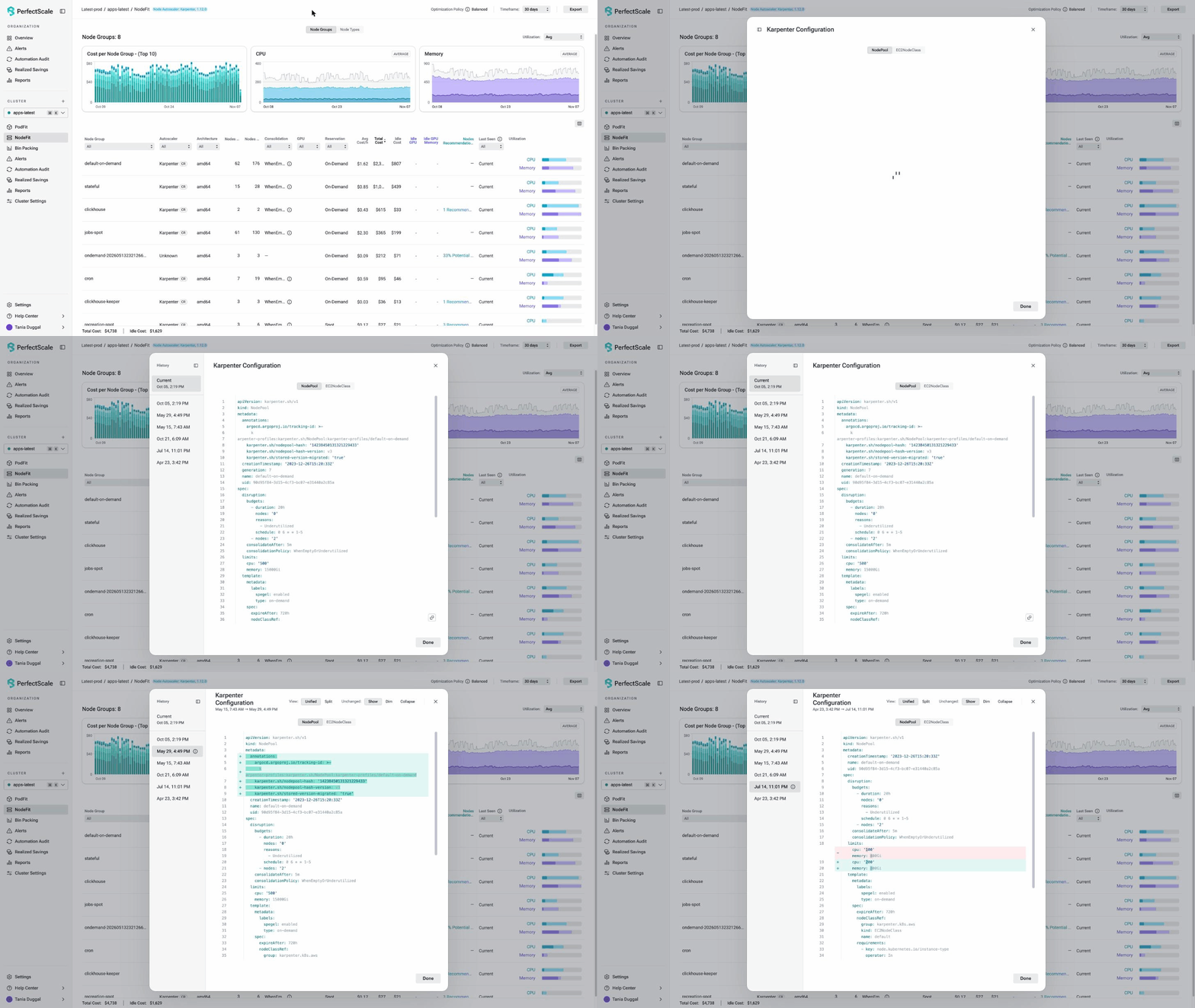
- Get recommendations for the NodePool settings: The consolidation policy, the wait time, and the instance choices decide how fast Karpenter removes nodes. PerfectScale gives Karpenter optimization recommendations for these settings, and for NodePool limits that are close to exhaustion. Its recommendations help you:
- Review the consolidation policy and the wait time.
- Give Karpenter more instance options when it provisions new nodes.
- Find NodePool limits that leave too little room for new capacity.
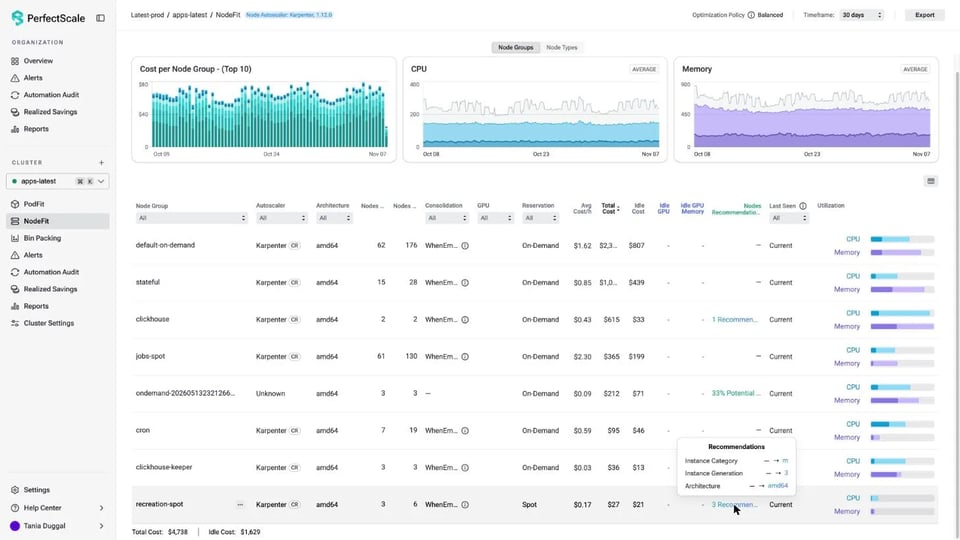
A YAML view shows the current and the recommended configuration, and you can copy the result.
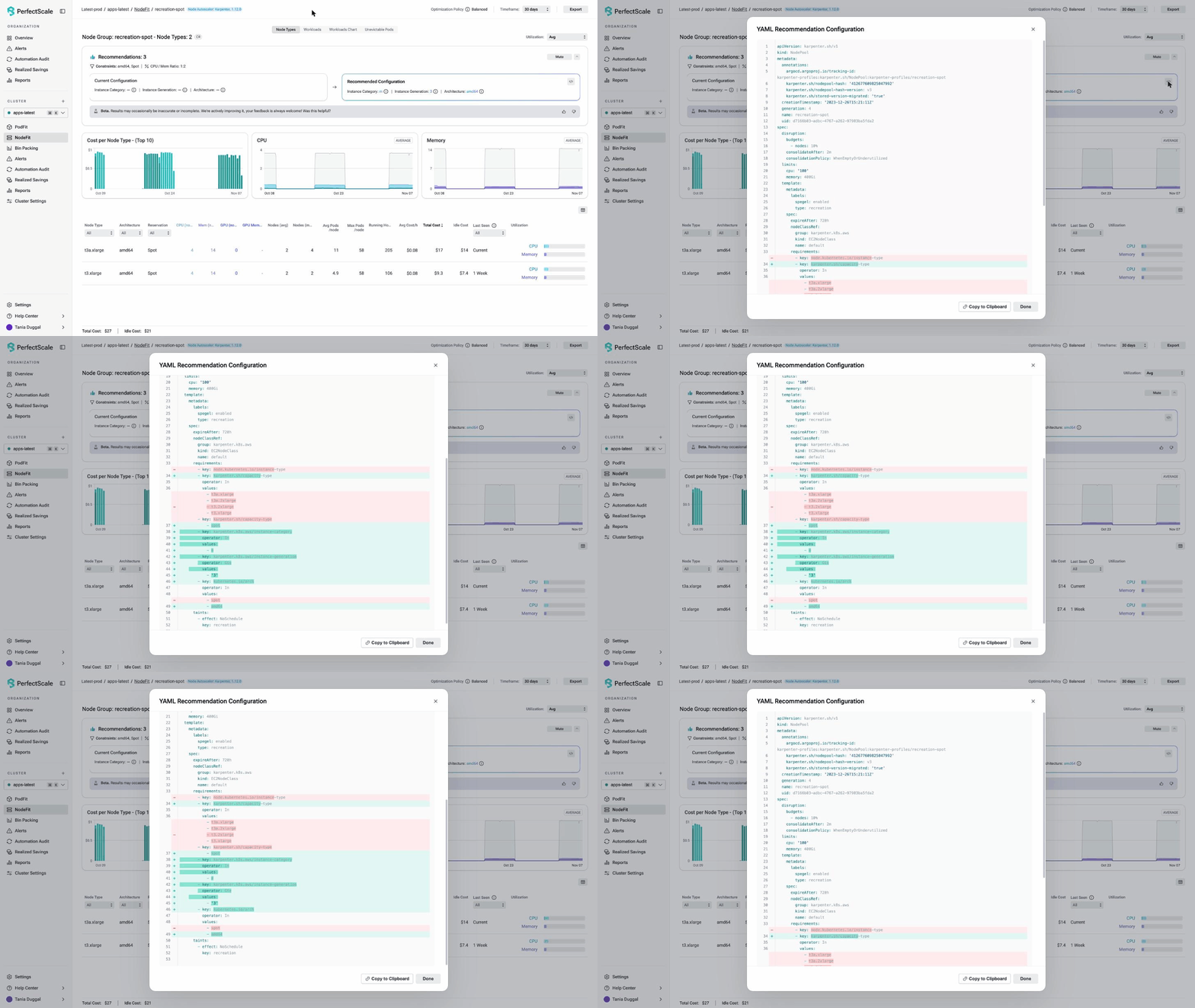
- Find the pods that stop nodes from being removed: One pod that cannot be evicted can keep a whole node running. The bin packing view shows which pods stop nodes from being removed. It gives YAML diff recommendations ranked by cost impact, and each one has a confidence level and a risk level. You can mute a finding that is intentional.
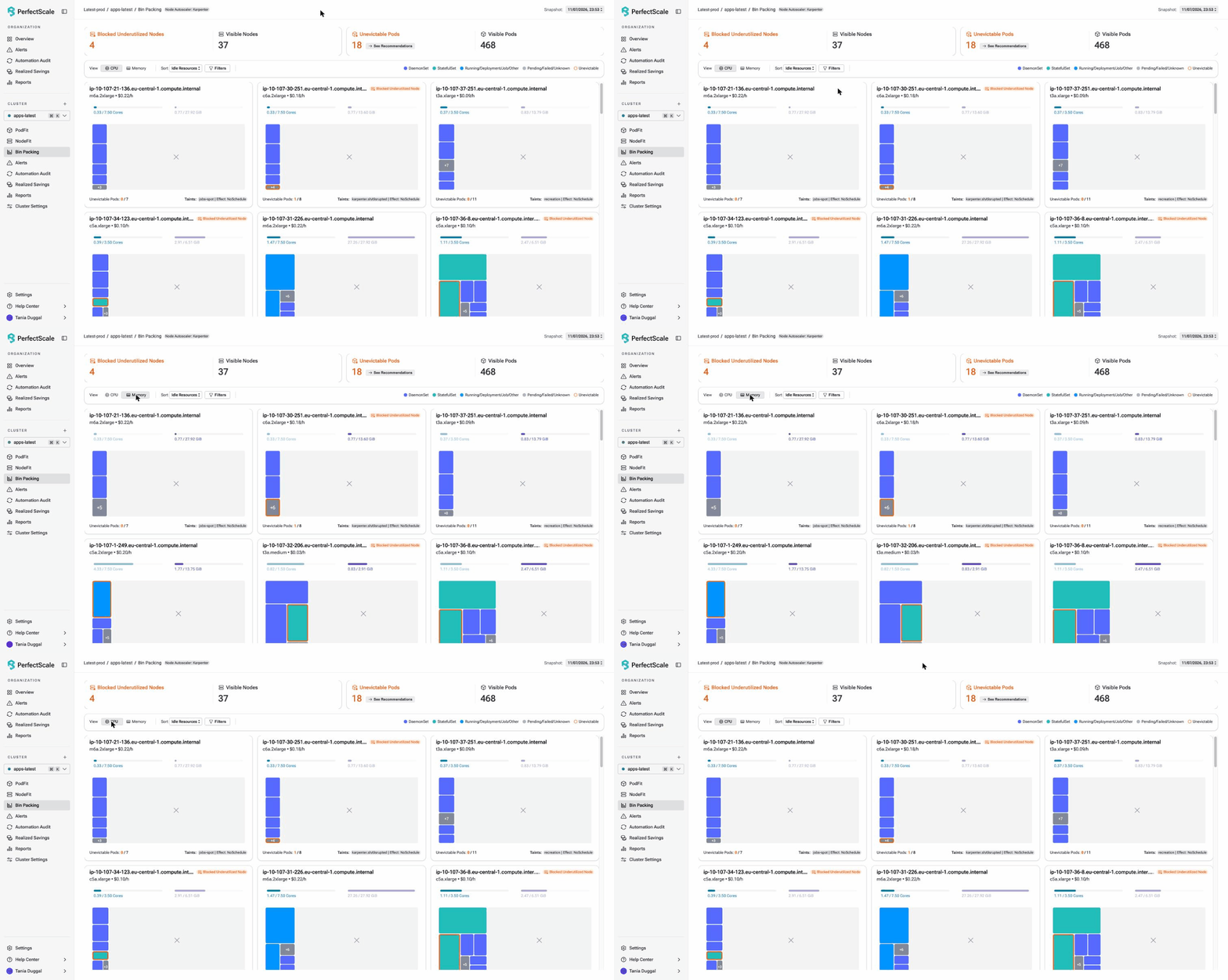
An agent such as Claude can also query PerfectScale data with the PerfectScale AI agent skill. After each change, use the history of changes in your review to see what changed and what to automate next.
See the path run with an agent in the workshop
Next time a node stays, read the event before you touch any setting. An agent can help with the first steps, because it reads events, configuration, and metrics much faster than you can. It can also give a different answer each time you ask. That is why a person reviews every change, and why fixed rules, not an agent, should apply it in production.
The workshop Agentic Karpenter: Using kagent + Claude to Tune Your Autoscaling runs on November 17, 2026, at 11 AM ET. Vikram Seshadri and Ramesh Mathikumar show how an agent reads events like these and drafts the diff, and where fixed rules take over. Register for the workshop.
Dealing with nodes that stay running? Our team can help you find the blocker, review the change, and reclaim capacity without compromising reliability. Talk to our experts or sign up for free and try it yourself.