


What Is GKE Autopilot?
GKE Autopilot is a mode of Google Kubernetes Engine (GKE) in which Google manages much of the underlying cluster infrastructure. Instead of configuring and maintaining nodes, node pools, and their capacity, you define Kubernetes workloads and their resource requirements. GKE provisions and scales the required compute resources automatically.
Autopilot also handles infrastructure tasks such as node upgrades, security configuration, and resource optimization. Workloads still use standard Kubernetes objects and APIs, but Autopilot applies additional constraints and defaults to support a managed operating model. This reduces cluster administration while retaining Kubernetes deployment and orchestration capabilities.
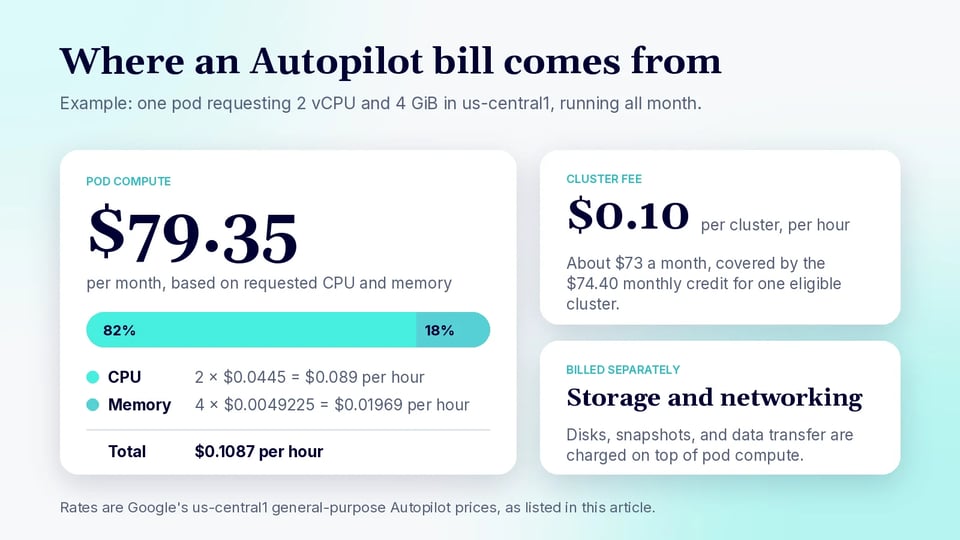
Google Kubernetes Engine (GKE) Autopilot charges a flat $0.10 per cluster per hour management fee (capped or offset by a $74.40 monthly free tier credit for one qualifying cluster) plus resource-based pod pricing.
This is part of a series of articles about Kubernetes pricing
In this article:
- What Factors Affect GKE Autopilot Costs?
- Understanding Google Kubernetes Engine Pricing
- Autopilot CUDs Moved to Spend-Based Flex CUDs
- GKE Autopilot Pricing Best Practices
What Factors Affect GKE Autopilot Costs?
Overprovisioned CPU and Memory Requests
For workloads billed from pod resource requests, requesting more CPU or memory than an application needs increases cost even when those resources remain unused. For example, a pod that requests 4 vCPU but normally uses 1 vCPU may be billed based on substantially more compute than the application actually requires.
This makes accurate resource requests important for both scheduling and cost control. Teams can use historical utilization metrics, load testing, and vertical pod autoscaling recommendations to identify oversized requests. Requests should still leave enough capacity for normal traffic spikes and application startup.
Minimum Resource Requests and Autopilot Adjustments
Autopilot enforces minimum CPU, memory, and ephemeral storage requirements for supported workloads. When a pod requests resources below these limits, Autopilot can increase the requests automatically. It can also modify requests when the CPU-to-memory ratio falls outside the range supported by the selected compute class.
These adjustments matter because the values used for scheduling and billing can be higher than those originally specified in the workload manifest. Applications composed of many very small pods are particularly worth reviewing, since minimum resource requirements can reduce the expected cost benefits of splitting work into tiny containers.
Related content: Learn more about how Kubernetes requests vs. limits affect scheduling and cost
Number of Running Pods
The number of running pods affects costs because every workload requires some amount of compute capacity. Increasing replica counts for availability, rolling deployments, or horizontal scaling increases aggregate CPU and memory requirements. Pods that remain running continuously generate costs even during periods of low application activity.
Pod count should be considered together with resource requests. Ten small replicas and two larger replicas may provide similar total capacity but have different scheduling and scaling characteristics. Background services, sidecars, and system components can also increase the resources associated with each workload.
Compute Class Selection
Autopilot provides compute classes designed for different workload requirements, such as general-purpose workloads, high-performance applications, scale-out workloads, and workloads requiring accelerators. The selected class influences the available hardware, resource limits, scheduling behavior, and applicable pricing.
A specialized compute class can be useful when an application needs specific performance characteristics, but it may cost more than a general-purpose option. Teams should select classes based on measured workload requirements rather than assigning higher-performance resources by default. Different workloads within an environment can use different classes where appropriate.
Region
Google Cloud pricing varies by region, so identical workloads can have different infrastructure costs depending on where they run. Regional differences can affect compute resources as well as storage and some network charges.
Price should not be the only factor in region selection. Applications may need to run close to users, databases, or other services to reduce latency and network transfer. Data residency requirements and service availability can also restrict the regions that are practical, making regional cost one part of a broader placement decision.
Storage Consumption
Storage costs are separate from the CPU and memory used to run pods. Applications can incur charges for persistent volumes, snapshots, backups, and other storage resources. The amount billed depends on factors such as storage type, provisioned capacity, region, and the operations performed against the storage service.
Persistent resources also have a different lifecycle from pods. Deleting or scaling down a workload does not necessarily delete its persistent disks, snapshots, or backups. Unused volumes can therefore continue generating charges after the compute workload has disappeared, making storage lifecycle management an important part of cost control.
Network Traffic
Network costs depend on the amount of data transferred and where that data travels. Traffic between services in different regions, data sent to the public internet, and traffic processed by services such as Cloud Load Balancing can add charges beyond the cost of running the pods themselves.
Network architecture can consequently have a large effect on data-intensive applications. Keeping frequently communicating services in appropriate locations can reduce both latency and transfer costs. Teams should also monitor application behavior for unnecessary cross-region calls, large outbound responses, and repeated transfers of the same data.
GPUs and Specialized Hardware
GPUs and other specialized accelerators can make individual workloads significantly more expensive than standard CPU-based workloads. Costs depend on the accelerator type, number of devices, region, compute configuration, and the amount of time the resources are required.
Utilization is particularly important for accelerator workloads. A GPU assigned to a workload that spends much of its time waiting for data or performing CPU-bound work provides poor cost efficiency. Batch scheduling, autoscaling, suitable accelerator selection, and application profiling can help ensure expensive hardware is used only when it provides a measurable benefit.
Related content: Read our article about running GPU workloads in Kubernetes
Understanding Google Kubernetes Engine Pricing
GKE Free Tier and Pricing Credits
Google Cloud provides $74.40 in monthly GKE credits per billing account. The credit applies toward the cluster management fee for eligible zonal Standard and Autopilot clusters. Since the standard cluster management fee is $0.10 per cluster per hour, $74.40 is roughly enough to cover one eligible cluster running continuously for a typical month.
For example, a cluster running for 730 hours would normally incur about $73 in management fees:
730 hours × $0.10 = $73
The monthly credit could therefore offset the entire management fee in this example. It does not cover the CPU, memory, storage, or networking consumed by workloads.
Cluster Management Fees
GKE charges a $0.10 per cluster per hour management fee, regardless of whether the cluster uses Standard or Autopilot mode.
For example, one continuously running cluster for 730 hours would cost approximately:
730 × $0.10 = $73 per month
Five continuously running clusters would incur approximately $365 per month in management fees before applicable credits:
5 × $73 = $365
For eligible Autopilot and zonal Standard clusters, the $74.40 monthly free-tier credit can offset part or all of these charges.
Compute Costs
For general-purpose Autopilot workloads in Iowa (us-central1), Google currently lists on-demand pricing of approximately $0.0445 per vCPU per hour and $0.0049225 per GiB of memory per hour. Ephemeral storage is priced separately at approximately $0.0001389 per GiB per hour.
For example, consider a continuously running pod requesting 2 vCPU and 4 GiB of memory:
- CPU:
2 × $0.0445 = $0.089/hour - Memory:
4 × $0.0049225 = $0.01969/hour - Total: approximately $0.1087/hour
Over 730 hours, that pod would cost roughly $79.35 per month, excluding ephemeral storage, persistent storage, networking, and other services.
Balanced compute class resources cost more. In us-central1, Google lists approximately $0.0645 per vCPU per hour and $0.0071354 per GiB of memory per hour for Balanced Autopilot pods.
Pod-Based vs. Node-Based Billing
General-purpose Autopilot workloads use pod-based billing. This means billing is based primarily on the CPU, memory, and ephemeral storage requested by the pod rather than the total capacity of the underlying node.
For example, in us-central1, a general-purpose pod requesting 1 vCPU and 2 GiB of memory would cost approximately:
$0.0445 + (2 × $0.0049225) = $0.054345/hour
That is roughly $39.67 per month if it runs continuously for 730 hours.
Autopilot workloads that select specific hardware, such as particular machine series or GPUs, instead use node-based billing. In this model, you pay for the entire underlying Compute Engine node plus an Autopilot management premium. For example, Google lists an Autopilot Performance premium of about $0.004 per vCPU per hour and $0.0005 per GiB of memory per hour in us-central1, on top of the underlying Compute Engine charges.
Storage and Networking Costs
Persistent storage and network traffic are billed separately from Autopilot CPU and memory charges. The amount depends on the storage class, capacity, source and destination of traffic, and region.
For example, Google Cloud Persistent Disk pricing in us-central1 includes SSD provisioned storage at approximately $0.000232877 per GiB per hour. A continuously provisioned 100 GiB SSD disk would therefore cost roughly:
100 × $0.000232877 × 730 ≈ $17 per month
Storage remains billable even when the pod using it is stopped if the persistent disk itself remains provisioned.
Networking can also become significant. For example, inter-region data transfer between two North American Google Cloud regions is currently $0.02 per GiB. Transferring 1 TiB between regions would therefore cost approximately:
1,024 GiB × $0.02 = $20.48
Internet data transfer rates differ by destination and usage tier. For example, outbound Premium Tier traffic from a U.S. region to North America is listed at $0.12 per GiB for the first 1 TiB after the free allowance.
Autopilot CUDs Moved to Spend-Based Flex CUDs
Google has changed how committed use discounts apply to GKE Autopilot. Autopilot-specific spend-based CUDs are no longer available for new purchases. Existing Autopilot commitments continue to be supported until they expire, but new commitments for eligible GKE usage are purchased as Compute Flexible CUDs (Flex CUDs).
Compute Flexible CUDs are spend-based commitments rather than commitments to a fixed number of Kubernetes resources. An organization commits to a minimum hourly dollar spend for a one- or three-year term, and the resulting discount can apply across eligible GKE, Compute Engine, and Cloud Run usage associated with the same Cloud Billing account. This gives organizations more flexibility when workloads move between services, regions, or supported compute configurations.
Google has also moved all Cloud Billing accounts to its newer spend-based CUD consumption model. Under this model, eligible usage is charged directly at the applicable discounted price instead of first being billed at list price and then offset through CUD credits. Google announced in February 2026 that all Cloud Billing accounts had been automatically migrated and that expanded Compute Flexible CUD coverage was available to all customers.
For GKE Autopilot users, the practical difference is that savings are now less tightly tied to Autopilot itself. A Compute Flexible commitment can cover eligible spend across a broader pool of Google Cloud compute services, making it easier to maintain CUD utilization when infrastructure requirements change. However, organizations still pay for the committed amount throughout the commitment term, so Flex CUDs are generally best sized around predictable baseline spend rather than temporary peaks.
GKE Autopilot Pricing Best Practices
Here are some useful practices to help manage costs when using GKE Autopilot.
1. Base Resource Requests on Actual Usage Data
Set CPU and memory requests using observed utilization rather than estimates alone. Collect metrics across normal traffic, peak periods, deployments, and background jobs to determine how much capacity each workload actually requires.
Avoid reducing requests to average utilization without accounting for peaks. Requests should provide enough headroom to prevent throttling, out-of-memory termination, or unnecessary scaling. Vertical pod autoscaling recommendations can provide useful data for refining these values over time.
Key actions:
- Measure CPU and memory usage across normal and peak periods.
- Use VPA recommendations to refine requests over time.
- Keep enough headroom to avoid throttling or memory failures.
2. Review Autopilot Resource Adjustments
Check the resources assigned to pods after deployment rather than assuming the values in the original manifest are unchanged. Autopilot can modify resource requests to satisfy minimums and other requirements associated with workload configuration and compute classes.
Frequent adjustments can indicate that resource specifications do not align well with Autopilot requirements. Updating manifests to reflect the effective resource configuration makes costs more predictable and prevents teams from estimating expenses using values that are not actually being applied.
Key actions:
- Compare requested resources with the values Autopilot actually applies.
- Identify pods that are repeatedly adjusted to minimums or supported ratios.
- Update manifests so configured requests match expected billed resources.
3. Monitor Cost Alongside Application Performance
Lower resource requests do not automatically produce lower overall costs. An undersized workload may experience increased latency, CPU throttling, memory pressure, or aggressive horizontal scaling, which can offset the expected savings.
Compare cost metrics with application metrics such as latency, throughput, error rate, replica count, and resource utilization. This makes it easier to find configurations that reduce spending without degrading service-level objectives or application reliability.
Key actions:
- Track cost together with latency, throughput, errors, and replica counts.
- Watch for savings that trigger throttling or excessive autoscaling.
- Optimize for both cost efficiency and service-level objectives.
4. Separate Predictable and Burstable Workloads
Workloads with stable resource requirements should be configured differently from applications with large or unpredictable traffic changes. Predictable services can often use carefully tuned requests and replica counts, while burstable workloads benefit more from autoscaling.
Separating these workload types also makes capacity and cost behavior easier to understand. For example, batch processing, scheduled jobs, and request-driven services can use different scaling policies instead of sharing a configuration designed around the largest possible demand.
Key actions:
- Use stable requests and replica counts for predictable workloads.
- Apply autoscaling policies to variable or burst-driven services.
- Configure batch, scheduled, and request-driven workloads separately.
5. Use Spot Capacity Where Interruptions Are Acceptable
Spot Pods can reduce compute costs for workloads that can tolerate interruption. They are suitable for tasks such as batch processing, parallel jobs, development workloads, and distributed processing where terminated work can be retried or moved elsewhere.
Do not rely on Spot capacity for workloads that cannot tolerate sudden termination unless the application is designed with sufficient redundancy. Use retry logic, checkpoints, graceful shutdown handling, and appropriate disruption strategies so reclaimed capacity does not cause lost work or unacceptable service interruptions.
Key actions:
- Use Spot Pods for retryable and fault-tolerant workloads.
- Add checkpoints, retries, and graceful shutdown handling.
- Avoid Spot capacity for workloads that cannot tolerate sudden termination.
FAQ
How much does GKE Autopilot cost? GKE Autopilot charges a $0.10 per cluster per hour management fee, about $73 a month, plus pod-based pricing for the CPU, memory, and ephemeral storage your pods request. In us-central1, general-purpose pods are listed at about $0.0445 per vCPU per hour and $0.0049225 per GiB of memory per hour.
Is there a free tier for GKE Autopilot? Google Cloud gives each billing account $74.40 in monthly GKE credits. The credit applies to the cluster management fee for eligible zonal Standard and Autopilot clusters, which is enough to cover about one cluster. It does not cover CPU, memory, storage, or networking.
Does GKE Autopilot bill on resource requests or actual usage? General-purpose Autopilot workloads use pod-based billing, which charges for the CPU, memory, and ephemeral storage the pod requests. Oversized requests cost more even when the resources sit idle, and Autopilot can raise requests that fall below its minimums.
What is the difference between pod-based and node-based billing in Autopilot? With pod-based billing, you pay for the resources your pods request. Workloads that select specific hardware, such as particular machine series or GPUs, use node-based billing instead. You then pay for the whole underlying Compute Engine node plus an Autopilot management premium.
What happened to Autopilot committed use discounts? Autopilot-specific spend-based CUDs are no longer available for new purchases, and existing ones continue until they expire. New commitments are bought as Compute Flexible CUDs, which can apply across eligible GKE, Compute Engine, and Cloud Run spend on the same Cloud Billing account.
Controlling GKE Autopilot Costs with PerfectScale
Because Autopilot bills on pod resource requests, the accuracy of those requests directly determines the bill, and keeping them accurate across a changing environment is not a one-time exercise. PerfectScale reduces Kubernetes spend by continuously analyzing how workloads actually behave and right-sizing them automatically, so clusters stay cost-efficient without sacrificing resilience, availability, or application performance.
Key capabilities of PerfectScale:
- Autonomous workload right-sizing: Continuous, real-time optimization that adapts to usage patterns, node and autoscaling configurations, and code changes, eliminating waste without compromising performance.
- Revision awareness: Workload configurations are re-optimized dynamically with each new code release, so recommendations never contradict development changes.
- Autoscaler integration: Works with HPA, KEDA, Karpenter, Cluster Autoscaler, EKS Auto Mode, Fargate, Node Auto Provisioning, and Google Autopilot to improve the effectiveness of the scaling you already run.
- Node utilization and binpacking insights: Granular node visibility to identify idle capacity, select the right node types, and improve pod scheduling to reduce environment size.
- Complete cost visibility: Detailed cost tracking over time by cluster, namespace, and workload, with flexible grouping to allocate spend by team, subsystem, or environment.
- Predictive cost insights: Forecast future spend and compare cost against performance metrics to align engineering decisions with FinOps goals.
- Optimization policy enforcement: Dynamic policies that govern the desired cost and service level of each workload at scale.
- Broad cloud and workload support: AWS, Azure, Google, OpenShift, Rancher, and private cloud, including custom workloads such as Spark, Flink, and Rollouts.
Learn how PerfectScale cuts Kubernetes costs without tradeoffs →