


ErrImagePull is the error Kubernetes shows when the kubelet cannot pull a container image for a pod. The image is what the container runs from, so if the kubelet cannot download it, the container never starts. You will usually see this as a pod stuck in ErrImagePull or ImagePullBackOff, and no application logs to explain it, because the application has not run yet.
In this guide, you'll learn what ErrImagePull means, how it differs from ImagePullBackOff, how Kubernetes pulls images, the common causes, how to diagnose the failure, and how to fix it. You will also see how stuck pods can waste node capacity.
What is the ErrImagePull error in Kubernetes?
ErrImagePull means a single image pull attempt failed. When you create a pod, the kubelet on the pod's node asks the container runtime to pull the image named in the pod spec. If that pull fails for any reason, the container's state becomes ErrImagePull, and the container waits instead of starting.
The important point is that ErrImagePull is about getting the image, not about running it. The application has not started, so kubectl logs has nothing to show. The reason for the failure is in the pod's events.
ErrImagePull vs. ImagePullBackOff
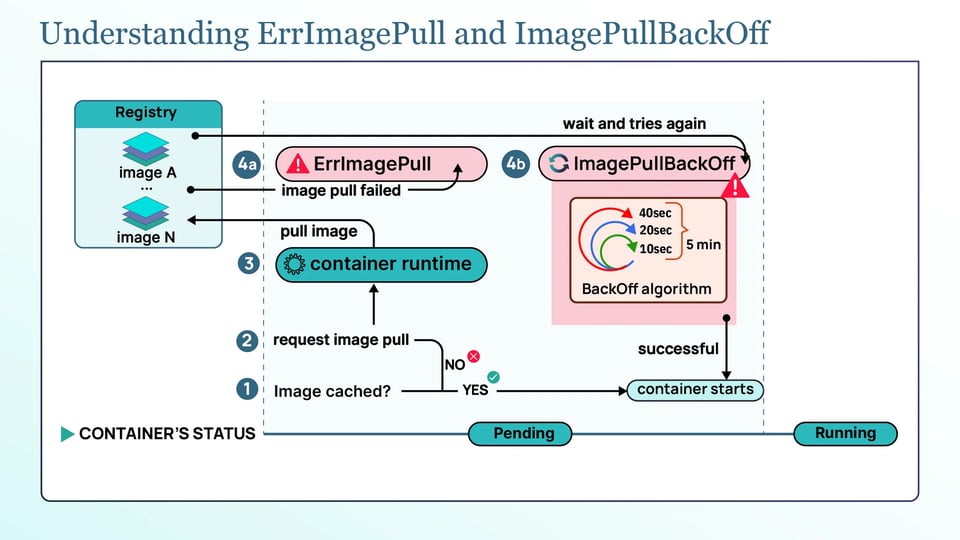
ErrImagePull means the kubelet tried to pull the container image and the attempt failed. It does not stop trying. After the failure, the kubelet waits before attempting the pull again.
ImagePullBackOff means the kubelet is waiting before another pull attempt. The delay between attempts increases after repeated failures.
The backoff starts at around 10 seconds and increases exponentially: roughly 10 seconds, 20 seconds, 40 seconds, and so on. It is capped at 5 minutes (300 seconds). Once the maximum delay is reached, the kubelet continues retrying approximately every 5 minutes.
The pod does not disappear automatically. It remains in this cycle until the image becomes pullable, the underlying problem is fixed, or the pod is deleted.
How does Kubernetes pulls container images?
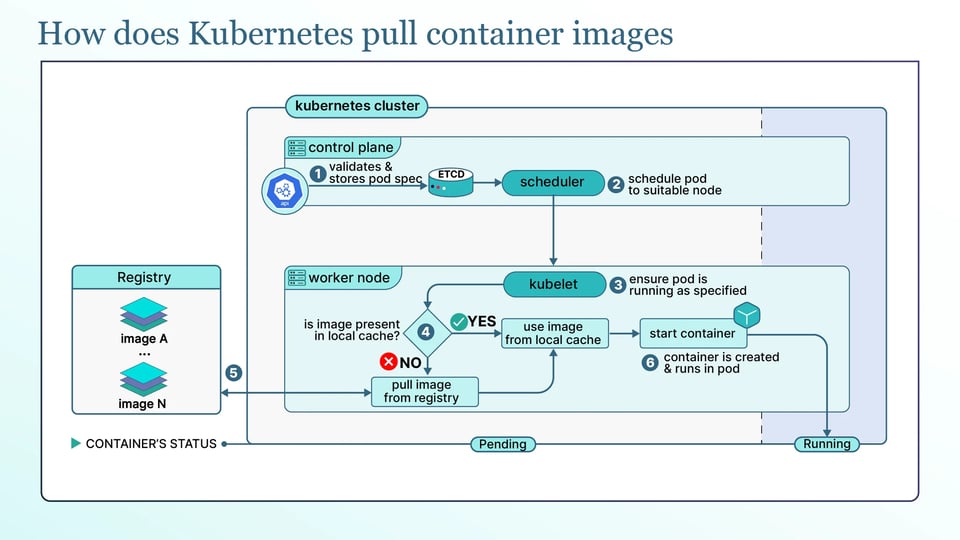
Most ErrImagePull errors are easier to understand once you know how Kubernetes pulls an image. When a pod is scheduled to a node, the kubelet on that node asks the container runtime (such as containerd or CRI-O) to make sure the image is present. The runtime first checks the image pull policy and whether the image is already on the node. If it needs to pull, it contacts the registry, authenticates if the registry is private, downloads the image layers, and unpacks them. Only after the image is ready does the container start. A failure at any of these steps, such as a bad name, a missing credential, or a network problem, shows up as ErrImagePull.
The image pull policy controls when Kubernetes pulls an image. There are three options:
a. Always pulls the image every time the pod starts. It is the default when the image uses the :latest tag or has no tag.
b. IfNotPresent pulls the image only when it is not already on the node. It is the default for images with any other tag.
c. Never tells the runtime to use only an image that is already on the node. It never pulls the image. If the image is not available locally, you get the ErrImageNeverPull error.
The image reference controls exactly which image gets pulled. It includes a repository and either a tag or a digest, written as repository:tag or repository@sha256:<digest>. A tag such as :1.4 is mutable, meaning the image it points to can change over time. A digest is a unique ID for an image, so it always points to the same image.
Common causes of ErrImagePull
ErrImagePull usually comes from the following common problems:
a. Wrong image name, repository, or tag: A typo in the image name, the wrong registry path, or a tag that does not exist will all fail the pull. The message is usually something like manifest unknown or repository does not exist or may require authorization. This is the first thing to check.
b. Missing, wrong, or expired registry credentials: A private registry needs credentials, and if they are missing or wrong, the pull fails with unauthorized: authentication required. The Common versions of this are a pull secret that was never attached to the pod, a secret in the wrong namespace, or a token that has expired. Amazon ECR tokens, for example, are short-lived, so a setup that pulled fine yesterday can fail today if token refresh is not configured.
c. Registry rate limits and pull throttling: Public registries limit how often you can pull. Docker Hub returns toomanyrequests (a 429 response) once you cross its limit. As of today, anonymous pulls are limited to 100 per 6 hours per IP address, authenticated free accounts get 200 per 6 hours, and paid accounts are unlimited. A widely-shared figure of "10 pulls per hour" was announced but never enforced, so the current limit is 100 per 6 hours. On a busy cluster behind one public IP, this is easier to hit than it sounds.
d. Node network, DNS, or proxy blocking the registry: If the node cannot reach the registry, the pull fails with errors like dial tcp: lookup ... no such host or i/o timeout. This happens with broken DNS, a corporate proxy the runtime does not know about, a firewall rule, or an air-gapped cluster with no route to a public registry.
e. TLS certificate errors with private registries: A private registry using a self-signed or otherwise untrusted certificate fails the pull with x509: certificate signed by unknown authority. The node's container runtime does not trust the registry's certificate, so it refuses the connection.
f. Image architecture does not match the node's CPU: An image built only for amd64 will not run on an arm64 node, and the pull fails with no matching manifest for linux/arm64. This is common in mixed-CPU clusters and on Arm-based nodes.
g. Node disk pressure and insufficient space for image layers: Image layers need room on the node. If the node is low on disk, the pull fails with no space left on device, and the node may also carry a disk-pressure condition that stops new pods from landing there.
How to diagnose an ErrImagePull error?
To find the cause is mostly about reading the right output in the following order:
a. Read pod status with kubectl get pods: This confirms the symptom. The pod's STATUS shows ErrImagePull or ImagePullBackOff, and a rising RESTARTS count or age tells you it has been stuck for a while.
kubectl get pods
b. Find the actual error in kubectl describe pod: This is the key step. The Events: section in the kubectl describe pod output shows the actual image-pull error, which usually tells you which cause you are dealing with.
kubectl describe pod <pod-name>Look for a Failed event with a message such as Failed to pull image ...: unauthorized or ... no such host. That message is the answer most of the time.
c. Check kubelet and containerd logs on the node: If the event message is not enough, the logs on the scheduled node have more detail. On the node, read the kubelet log with journalctl -u kubelet, and the containerd log the same way for the runtime's view of the pull.
d. Reproduce the pull from the node with crictl pull: To confirm whether the problem is on the node itself, pull the image directly with crictl, the CRI debugging tool, on the node:
crictl pull <image>If this fails with the same error, the problem is at the node level, such as networking, credentials, or TLS trust, rather than anything in the pod spec.
How to fix ErrImagePull?
Once you know the cause, the fix is usually straightforward. Here are the fixes for the causes above:
a. Correct the image reference and pin it to a digest: you have to fix any typos in the repository, tag, or registry path first. For production workloads, go further and pin the image to a digest (repository@sha256:<digest>) instead of a mutable tag, so the pod always pulls the exact image you tested.
b. Create an imagePullSecret and attach it: For a private registry, create a pull secret and give it to the pod. Create the secret:
kubectl create secret docker-registry regcred \ --docker-server=<registry> \ --docker-username=<user> \ --docker-password=<password> \ --namespace=<namespace>Then reference it in the pod spec under imagePullSecrets, or attach it to the pod's ServiceAccount so every pod that uses that account gets it automatically. The secret must live in the same namespace as the pod.
c. Fix node networking, proxy settings, and CA trust: For network causes, make sure the node can resolve and reach the registry. If the node uses a proxy, configure the container runtime to use it. For a TLS error, add the registry's CA certificate to the node's trust store or the runtime's configuration so it trusts the registry.
d. Set up a registry mirror or pull-through cache: To avoid rate limits, stop pulling the same public images over and over from the internet. A pull-through cache or registry mirror (for example, an ECR pull-through cache) stores images closer to your cluster, and authenticating your pulls raises your limit as well.
e. Free disk space and tune image garbage collection: For disk pressure, free space on the node and let the Kubelet clean up unused images. The kubelet's image garbage collection is controlled by imageGCHighThresholdPercent (default 85) and imageGCLowThresholdPercent (default 80): when disk usage crosses the high threshold, the kubelet removes unused images until it reaches the low one. A lower threshold means cleanup starts earlier, helping prevent nodes from filling up.
ErrImagePull in managed and local clusters
Some environments handle image credentials differently, so it helps to know the common cases:
a. Amazon EKS pulling from ECR: The node or pod needs AWS permissions to pull from ECR, rather than a Docker pull secret. The node's IAM role can use the AmazonEC2ContainerRegistryReadOnly policy. For more limited access, use IRSA or EKS Pod Identity to give specific workloads access. ECR tokens are short-lived, but the kubelet refreshes them automatically.
b. GKE pulling from Artifact Registry: The node's service account needs the Artifact Registry Reader role. For workload-level access, use Workload Identity to connect a Kubernetes service account to a Google service account with the Reader role.
c. Local clusters such as minikube and kind: An image built on your laptop may not be available on the cluster's nodes. Load the image directly into the cluster instead of pushing it to a registry. With minikube, use minikube image load <image>. With kind, use kind load docker-image <image>. Then set imagePullPolicy to IfNotPresent or Never so Kubernetes uses the local image.
How pods stuck in ImagePullBackOff waste node capacity and budget?
When a pod reaches ImagePullBackOff, it has already been scheduled to a node. Its CPU and memory requests count toward the node's reserved capacity, and that reservation remains while the pod waits for the image. So the node is holding capacity for a pod that is doing no work.
One stuck pod may not matter much. But a rollout with many stuck replicas, or pods with oversized resource requests, can reserve a significant amount of capacity. In an autoscaling cluster, this can even cause the Cluster Autoscaler to add nodes to make room for other workloads. You end up paying for capacity while the stuck pods do nothing.
Because the kubelet keeps retrying the image pull, this wasted capacity can remain until the image problem is fixed or the pod is removed.
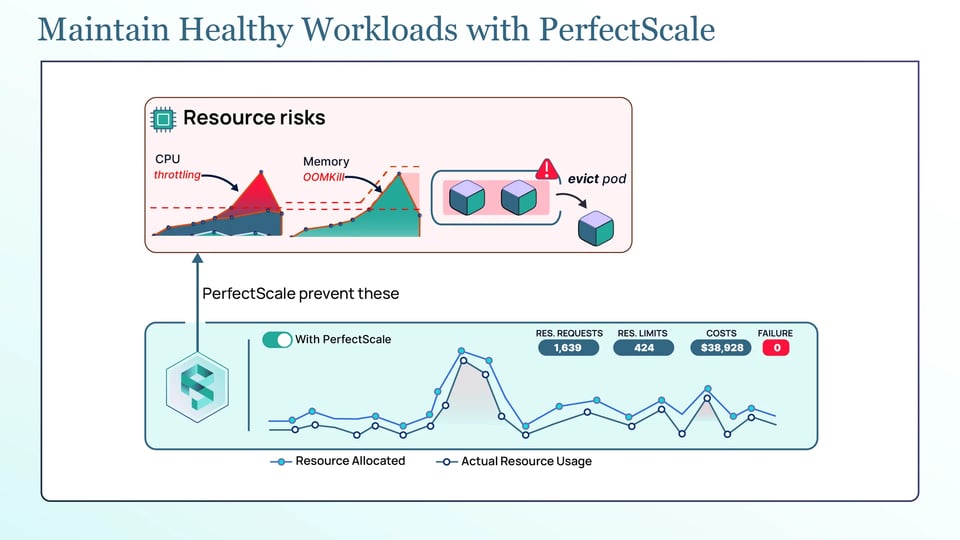
This is where PerfectScale helps on the cost side. PerfectScale's Kubernetes governance platform gives you visibility into how your workloads actually use CPU and memory, and turns that into actionable, automated right-sizing recommendations that you can apply manually or autonomously. Right-sized requests mean a stuck pod reserves only what it truly needs rather than an oversized amount. Teams like Paramount Pictures and Creditas use PerfectScale to keep their clusters efficient. You can sign up or book a technical session.
Best practices for preventing ErrImagePull errors
Here are the main practices for preventing ErrImagePull errors:
a. Pin production workloads to image digests instead of mutable tags: A digest (@sha256:...) always points to the exact image you tested, so changes to a tag cannot change the image your pods pull.
b. Publish multi-architecture images for mixed-CPU node pools: If your nodes include both amd64 and arm64, use multi-architecture images so each node can pull the correct version.
c. Validate image references in CI and use admission policies: Check image names and tags before deployment. Admission policies can also require image digests or allow images only from approved registries.
d. Pre-pull critical images before a rollout: You have to pull important images onto nodes ahead of time, such as with a DaemonSet, so the rollout does not depend on pulling the image at startup.
e. Alert on image pull failures, node disk pressure, and image garbage collection: Early alerts for failed pulls, low disk space, and image garbage collection help identify problems before they affect more pods or nodes.