
Every claim about Cast AI below links to their own public documentation, checked 2 September 2026. Both products ship frequently, so follow the links rather than taking our word for it.
TL;DR
Cast AI and PerfectScale both optimize Kubernetes workloads, but they differ in three ways that matter once you are running production clusters at scale.
Here is what you need to know:
- Deploys break Cast AI's sizing: Their autoscaler does not re-baseline when you ship a new release. Recommendations built from the old version get applied to your new code, and their safety nets only react after something already fails (an OOMKill, a CPU stall)
- Configuration lives in the wrong place: Cast AI requires per-workload overrides as annotations directly in your application manifests. This means optimization settings live in the same YAML your product teams edit, and a Git redeploy can silently wipe them out
- Cast AI stops at the cluster edge: No historical reporting for commitments, AWS Cost and Usage Report ingestion is limited with lack of support for GCP/Azure billing, and default pricing based on public list price rather than your actual bill
- PerfectScale fixes all three: Revision-aware sizing that adapts to your actual running code, automation config kept in its own custom resources outside your manifests, and integration with DoiT Cloud Intelligence for commitments, cost attribution, and multi-cloud billing
Book a call and bring your last three invoices
1. Their autoscaler does not re-baseline on new releases
Cast AI's Workload Autoscaler sizes workloads from a look-back window, configurable from 3 hours to 7 days and defaulting to 24 hours, gated by a confidence score that measures "the ratio of collected metric data points to the expected number of data points within the configured look-back period."
Look at what actually causes that recommendation to change. Their documentation lists the triggers: a 30-minute regeneration cycle and anomalous usage, OOM events, memory-pressure evictions, usage surges, CPU stall, and startup probe failures.
Shipping a new version of your application is not on that list.
So run the sequence. At 14:00 you deploy a release that changes an application's memory profile. The recommendation in flight was computed from a window dominated by the previous version. In their default deferred mode, "the Cast AI mutating admission webhook applies the recommendation when pods are naturally recreated, for example, during application deployments." Your deploy is the event that stamps yesterday's sizing onto today's code.
Their safety nets are real, and they are all reactive. Stall detection raises the recommendation when PSI shows CPU contention, though it is CPU-only and needs Kubernetes 1.34 or above. After an OOMKill, memory overhead adjustment adds "either 20% or 100Mi, whichever is the greater," then decays it linearly to zero over 24 hours. That is a good recovery mechanism. Recovery means the pod already died.
PerfectScale approaches the same moment from the other end. Revision awareness scopes recommendations to the revision that is actually running rather than blending across old ones, and when you change resources yourself, automation defers to you: "PerfectScale does not contradict your development changes, and despite having automation turned on, PerfectScale immediately accepts any specific user's changes instead of the current recommendations. The system will increase or reduce resources as needed only after we have a clear understanding of how the changes compare with usage patterns."
That is the difference in one line. At deploy time, one system applies what it learned before your change. The other gets out of the way until it has learned your change.
For phased rollouts, PerfectScale detects your Argo Rollouts strategy automatically, blue-green, canary or A/B, with no tagging or manual configuration. You choose the behaviour: pause, the default, applies nothing while concurrent ReplicaSets exist, or aggregate merges utilization across them and applies one recommendation.
The point is not a cleaner graph. It is that the automation stays switched on. Teams that get burned once quietly exclude their largest services, and the savings leave with them.

2. Your optimization config should not live in your application manifests
Ask a narrower question than the usual one: not where is my data, but who owns the configuration and what file is it in.
In Cast AI, per-workload settings are annotations on the workload controller, and their documentation is explicit that there is no alternative: "Annotations are the only way to override vertical scaling settings for individual workloads. The Cast AI console does not support per-workload setting overrides." The settings reference says the same thing: "You can still toggle optimization on or off for individual workloads via the console, but all other workload-level overrides must be configured through annotations."
That means optimization policy is smeared across your application manifests, in the same YAML your product teams edit, and it is your app owners who end up carrying it. Cast AI also documents the drift this creates: "these optimizations exist only in the live cluster state. When you redeploy a workload from Git, the original manifest values overwrite the optimized settings, reverting your resources to outdated, unoptimized values."
PerfectScale keeps optimization out of your application manifests entirely. Automation config is its own set of custom resources, ClusterAutomationConfig, NamespaceAutomationConfig and WorkloadAutomationConfig, with workload settings overriding namespace and namespace overriding cluster. One object graph, owned by the platform team, reviewed in its own pull request.
Automation does not touch the resources spec of your Deployments. From the Argo CD integration docs: "Automation changes resources at the pod level without affecting the parent resources spec (Deployment, StatefulSet, etc.), so ArgoCD doesn't detect any changes and will not attempt to revert them." Argo CD and Flux are both supported.
And the controls you care about at 2am are kubectl operations against a resource in your own cluster, not a support ticket. stopAllAutomation halts everything cluster-wide, "overriding any existing automation settings for specific namespaces or workloads." cleanupAllAutomation goes further and "will not only stop automation but also roll back any modifications made by the automation processes, restoring the original resource specifications and settings."
At one cluster this is a preference. At fifty it is the difference between a platform team that owns optimization and one that inherits it.
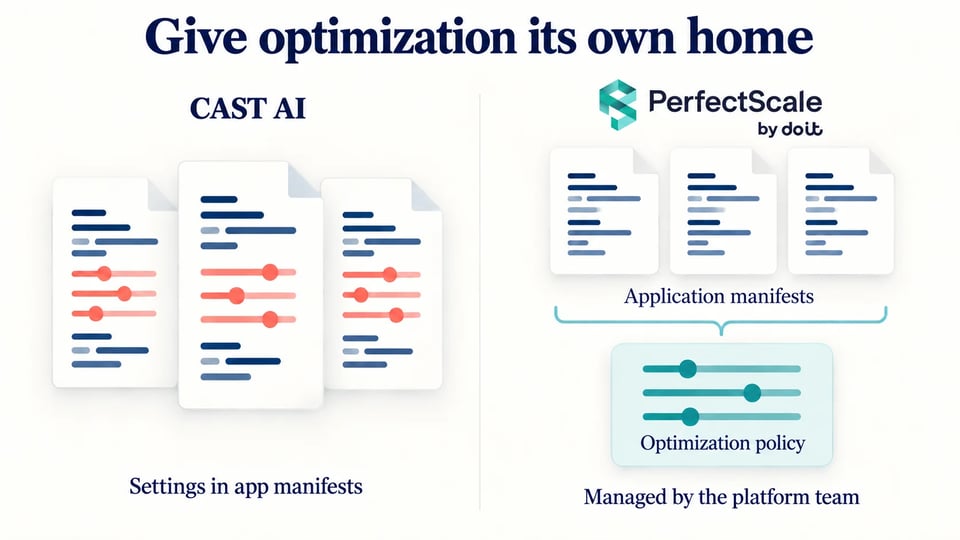 Cast AI mixes optimization settings into your application manifests, so a Git redeploy silently overwrites them. PerfectScale keeps automation config separate, so it survives every redeploy untouched.
3. Optimization does not stop at the cluster edge
The third reason is about scope rather than any feature.
Cast AI does track commitments. What it does not do is give you the history or the billing ground truth. Their own docs: "Currently, reporting only provides a snapshot of the present situation without the ability to review historical data." Utilization is "not updated frequently," recalculated on node and cluster changes. And the cost model underneath is list price, not your bill. From their cost management page: "Billing access not required. CAST AI uses public pricing, so you don't have to share billing details." That is a genuine convenience at onboarding and a real ceiling later. Cast AI's cost picture is cluster-scoped and AWS-first: CUR access is opt-in and single-account only, there is no billing ingestion for GCP or Azure, and their cost monitoring docs still state reports are built on public cloud inventory pricing with custom pricing models not reflected
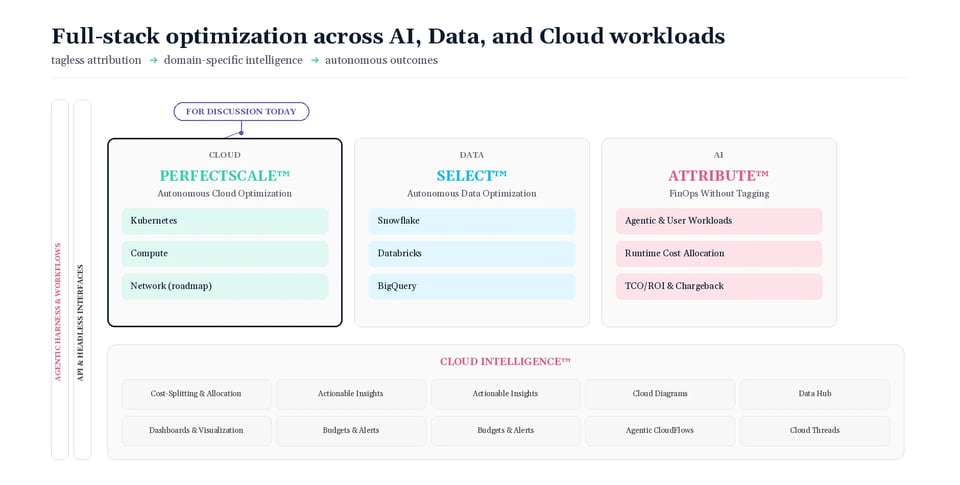
PerfectScale sits inside DoiT, so the same relationship covers the work that starts where the cluster ends.
Commitments. PerfectScale for Commitments continuously optimizes AWS Savings Plans across EC2, Fargate and Lambda, plus database Savings Plans across Aurora and RDS, Aurora Serverless v2, Aurora DSQL, DynamoDB, ElastiCache for Valkey, DocumentDB, Neptune, Keyspaces, Timestream, DMS and OpenSearch, following AWS eligibility rules. Google Cloud CUDs support is now GA as well, covering Compute Engine, Cloud SQL, BigQuery Editions, AlloyDB, Spanner, Firestore, Dataflow, Memorystore, Bigtable and Managed Service for Apache Kafka. Commitment laddering stages multiple smaller plans with overlapping dates, so "if usage drops, only a small fraction of your commitments are impacted."
Attribution. Attribute answers the question tags cannot: which customer or feature generated this spend. A lightweight eBPF sensor deploys via Helm in about 15 minutes with no code or configuration changes, and multi-tenant clusters, shared databases and message queues get split by observed runtime consumption rather than allocation keys.
The bill itself, and the people. DoiT Cloud Intelligence covers cost across AWS, Google Cloud and Azure, with Forward Deployed Engineers who, as we put it, come with the platform and not the invoice.
The cherry on top
If you are a Cast AI customer today, we will take the average of your last three monthly Cast AI invoices, cut it in half, and make that your fixed monthly PerfectScale price for 24 months.
Same core job. Roughly half the platform cost. Automation that gets out of the way when you deploy, configuration that lives where your platform team can own it, and a platform that keeps going after the cluster edge.
If you are running Cast AI today, the fastest way to see the difference costs nothing. Run PerfectScale alongside it on the same clusters, no migration, no rip and replace, and compare the results on your own production workloads. If the numbers hold up, we will cut your average monthly Cast AI spend in half and lock it in for 24 months.
Book a call and bring your last three invoices
Offer available to current Cast AI customers. Terms confirmed on the call.
Frequently Asked Questions
Why does Cast AI's autoscaler not adapt to new application releases?
Cast AI's Workload Autoscaler builds its sizing recommendations from a look-back window of collected metrics, typically defaulting to 24 hours. According to their own documentation, the triggers that cause a recommendation to update include a 30-minute regeneration cycle, OOM events, memory-pressure evictions, usage surges, CPU stalls, and startup probe failures.
A new application deployment is not on that list. So when you ship a release that changes your app's memory or CPU profile, the recommendation still in flight was built from the previous version's behavior. In Cast AI's default deferred mode, that outdated recommendation gets applied the moment your pods are recreated during the deploy itself.
Their safety nets, like stall detection and post-OOMKill memory overhead adjustment, only respond after a problem has already occurred, not before.
How does PerfectScale handle sizing differently during deployments?
PerfectScale uses revision awareness, which scopes resource recommendations to the specific revision that is actually running, rather than blending data across old and new versions. When you make manual resource changes yourself, PerfectScale's automation defers to your changes immediately rather than overriding them, and only adjusts again once it has observed how your change compares to real usage patterns.
For teams using phased rollout strategies, PerfectScale automatically detects Argo Rollouts strategies (blue-green, canary, or A/B) with no manual tagging required, and lets you choose whether to pause recommendations during a rollout or aggregate utilization across concurrent ReplicaSets.
Where does Cast AI store per-workload optimization settings, and why does that matter?
Cast AI requires per-workload configuration overrides to be set as annotations directly on your workload controllers, inside the same application manifests your product teams edit. Cast AI's own documentation confirms there is no alternative: annotations are the only way to override vertical scaling settings for individual workloads.
This creates a real operational problem. Because these optimizations only exist in the live cluster state, redeploying a workload from Git overwrites the manifest with its original, unoptimized values, silently reverting any tuning that had been applied.
PerfectScale avoids this by keeping automation configuration in its own set of custom resources (ClusterAutomationConfig, NamespaceAutomationConfig, and WorkloadAutomationConfig), separate from your application manifests entirely. This means the platform team owns and reviews optimization settings independently, and a GitOps redeploy through Argo CD or Flux will not detect or revert PerfectScale's pod-level adjustments.
What does "optimization does not stop at the cluster edge" mean?
It refers to the difference in scope between the two platforms once you look past the Kubernetes cluster itself. Cast AI's commitments reporting only provides a snapshot of your current situation, with no ability to review historical data. Its default cost model is also based on public list pricing rather than your actual cloud bill, since Cast AI does not require billing access.
PerfectScale sits inside DoiT, which extends optimization beyond the cluster to include continuous management of AWS Savings Plans and Google Cloud Committed Use Discounts across a wide range of services, cost attribution down to the customer or feature level using an eBPF sensor, and unified billing visibility across AWS, Google Cloud, and Azure through DoiT Cloud Intelligence.
What is the offer for current Cast AI customers switching to PerfectScale?
PerfectScale will take the average of your last three monthly Cast AI invoices, cut that number in half, and lock it in as your fixed monthly PerfectScale price for 24 months. The offer is available to current Cast AI customers, with terms confirmed on a call.