
TLDR: To start, this is not going to be one of those traditional “Containers vs VMs” conversations. This is more of a first-hand account of the evolution of application infrastructures from the operations team’s point of view; from physical servers all the way to the rise of Kubernetes.
The rise in popularity of Kubernetes is a tale of overcoming the operational complexities of scaling application infrastructure to support the growing demand for applications and services.
I like to think of it as a story of abstraction, in which we have added flexibility and scalability by subtracting dependencies that slowed operations. We still have not removed all the complexities. Hell, you could easily argue things got more complex during this evolution, but this progression has driven results that have changed the way technology impacts the world we live in today.
Let’s dive deeper into what this means by taking you through my accounts of moving from manually configuring servers to managing at-scale DevOps operations.
Part 1: Physical Servers
The architecture of a physical server was pretty straightforward. You had a server, and within that server you had an OS that was running your application’s services.
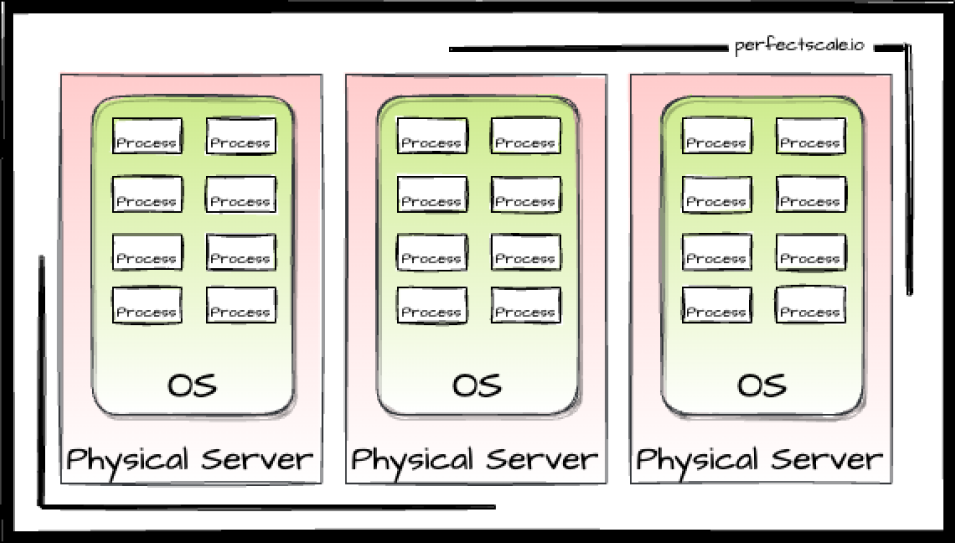
Physical servers came with a lot of operational burdens which were painful and tedious to deal with.
Every new server would need to be manually connected to electricity and the network. Then you needed to manually install the OS, networking, monitoring, firewall, basic libraries, and security patches - it took a lot of effort. Deploying an application on physical servers would also require you to manually install, connect, and configure each machine.
Also, physical servers did not scale on-demand. Everything described above was repeated as you scaled. It required a complete setup and deployment for every new server, which could easily take days if not weeks or even months if you need to order the hardware. You always needed reserve servers stashed away in case you had urgent production needs.
Physical servers were also not efficient from a capacity standpoint. Say you purchased a server for a mission-critical DB. You would purchase more capacity than you needed just to allocate some room for growth. This led to wasted, unused resources. Then, as your operation grew, this server soon wouldn’t be big enough for your DB, so you purchased a bigger one, then a bigger one, then a bigger one (an endless, painful cycle).
Another problem is that you weren't just running the DB on that server. You needed to run a monitoring agent, configuration management agent and some supervisor/nanny process to make sure your critical app was running properly. These processes weren’t guaranteed to play nice. A single monitoring process can suddenly take over all of the disk space or some other process can have a memory leak and cause OS level OOM.
Or those situations when you needed to upgrade a process (like a security fix for a monitoring agent), which in turn required an OS library upgrade. You would gladly do these upgrades only to later discover that they caused an incompatibility issue with a mission-critical service that now can’t start…
Luckily for us, a new solution came out to help and remove some of these pains:
Part 2: Virtual machines
To remove the burdens of physical servers, the OS and its processes were abstracted from the physical server with the introduction of virtual machines. This removed many of the operational complexities mentioned covered in Part 1.
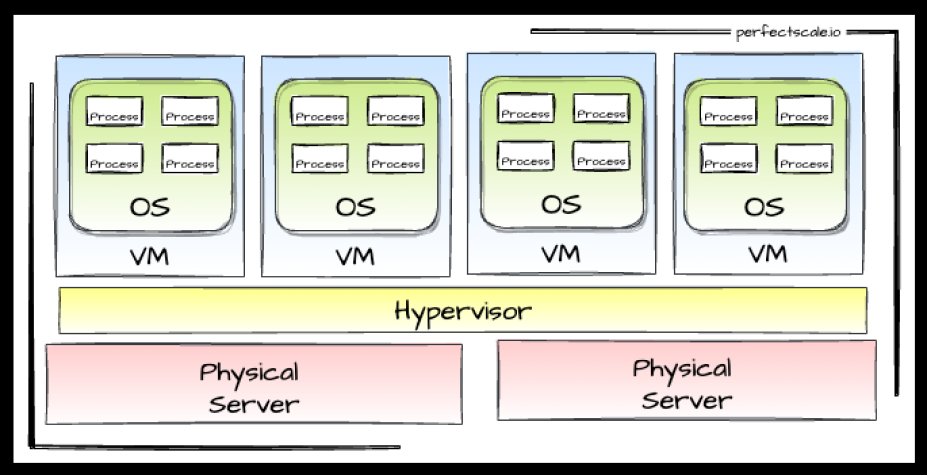
First, VMs solved the setup problem. You could snapshot (or create it in a declarative way) to store an image and later provision it as many times as needed to guarantee a similar initial state. It would still take several minutes, but this was nothing compared to the few hours/days needed in the pre-VM world.
VMs also greatly improved your ability to scale. They allowed you to maximize the capacity of your physical infrastructure or, with a few clicks, grow your footprint by buying VMs of any size from cloud providers (no more trips to remote data centers for me!). The rise of configuration automation tools, like Chef, Puppet, and finally Ansible made the initial setup and mass deployment management much easier.
However, we didn’t truly solve the dependency problem. To run, each VM required a full-blown operating system that lives on top of a hypervisor. Also, you would still run multiple processes per VM (we always need a monitoring agent...). This resulted in the same issue as above, where processes using different library versions caused services to suddenly stop working after an unrelated lib upgrade.
These dependencies were slowing teams down, and paved the way for the next evolutionary stage in application infrastructure:
Part 3: Containers
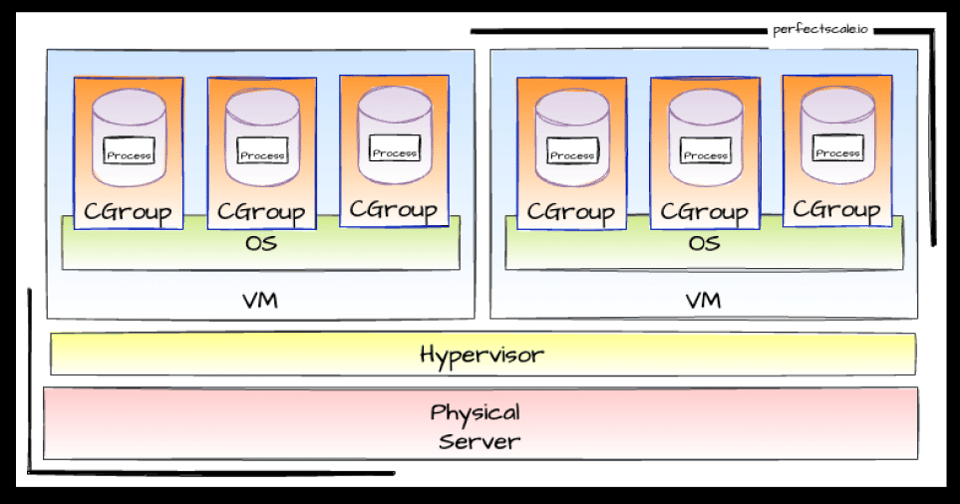
The next revolution came when it become possible to run processes in dedicated containers. These containers only required a thin OS level to access the hosting OS drivers. Docker let you package an application and its dependencies in a virtual container that can run on any Linux, Windows, or macOS computer.
As opposed to VMs, which are an abstraction of the OS and processes from a physical server, Containers are the processes abstracted from both the OS and physical servers.
However, it is important to remember the golden rule from Docker Docs: Separate areas of concern by using one service per container. In other words - only one process per container.
The benefits for containers are huge, for starters, no more dependencies. This enables the application to run in a variety of locations, such as on-premises, in a public or private cloud. Also, the container’s stateless images are well defined and fulfill the “runs on my laptop => runs anywhere” promise. (No more excuses folks!)
Containers usually start much faster than a VM (depending on your app), they are lightweight, and they allow application infrastructure to be more flexible and agile to better support CI/CD and DevOps practices. Additionally, upgrades are a breeze and we can always revert to the previous version if needed.
Tools like Docker Compose allow us to orchestrate multiple containers. It supports health checks, can restart services, run multiple instances, set up a shared network between the services, and provides a rich set of tools to manage containers' lifecycle. (All the things I ever dreamed of!)
The deployment is defined in a simple YAML format that’s pretty damn powerful. Unfortunately, all this magic happens on a single server. What can we do with a single server? A lot of things, but production isn’t one of them. A standard, modern, highly available (multi-zone), horizontally scalable application architecture by definition requires at least two servers.
To solve this limitation, we use Container / Cluster orchestration frameworks to run containers (cgroups, isolation, lightweight) on a cluster of servers. Out of three main orchestration frameworks (Docker Swarm, Mesos and Kubernetes), K8s reigned supreme and today is the standard container orchestration framework for literally every industry. From Education to farming to F-16s - you name it, Kubernetes is there.
Kubernetes
Kubernetes makes it easy to manage a cluster of nodes and bunches of processes (containers).
Hurray, we solved all the problems - we decoupled everything, and there are well-defined service discovery, monitoring, logging, load balancing, and role-based access capabilities. Failed services are restarted. Pod autoscaler will scale our services instances up and down, cluster autoscaler can even scale the cluster itself by releasing or allocating node instances.
I will ask it to “Schedule my workload, I want 15 instances”. K8s will take it from there and host them on different nodes. I really don’t care which VM my pod (service instance) is running, but I do care about the logical grouping of my services in namespaces and their scale. Everything seems so simple!
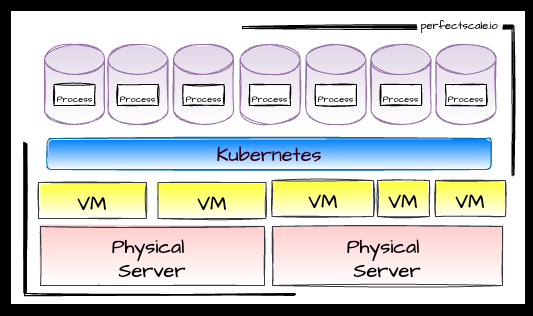
Well, that is not entirely as it seems. Application infrastructures built with Kubernetes have many benefits over physical servers and VM, but they come with their fair share of complexity. Kubernetes is a colossal beast, and you need to understand many (if not all) of its concepts to sustain a stable and resilient environment. “Day two Kubernetes” is when many DevOps discover a wide range of issues. For example:
- Pods are crashing (OOMs)
- Pods are evicted or throttled.
- Services are underperforming
- Services are throttled even though they don’t seem to be utilizing the requested resources.
- Scale-ups and failovers take forever
- The whole thing is still expensive and resources are wasted (It is rare to find a cluster in the wild that is over 60% utilized!)
The future is bright, but not perfect, yet. PerfectScale by DoiT aims to help you solve your “day two Kubernetes” (a.k.a real life) challenges. Follow us as we take you on a journey of Kubernetes scheduling mechanics, best practices and much more.