


A Kubernetes deployment strategy is the method you use to replace the running version of an application with a new one. It decides how the old pods give way to the new pods: all at once, gradually, or side by side with traffic shifted between them. The strategy you pick controls whether users see downtime, how fast you can roll back, and how much spare capacity the update needs.
In this guide, you'll learn how the Deployment object controls a rollout, the strategies built into Kubernetes, the patterns that need extra tooling, what each one costs in cluster capacity, how they interact with autoscaling, and how to match a strategy to your workload.
What is a Kubernetes deployment strategy?
A deployment strategy is how a Deployment moves from the current version of your app to a new one. When you change a Deployment, Kubernetes has to replace the pods running the old version with pods running the new version, and the strategy is the rule for how it does that.
The choice matters because each strategy trades off three things: how much downtime users see, how quickly you can undo a bad release, and how much extra capacity the rollout needs while both versions overlap. Kubernetes has two strategies built into the Deployment object, and several more advanced patterns you build on top with extra tooling.
How the Kubernetes Deployment object controls a rollout?
Every rollout strategy uses the same Deployment process, so it helps to know what happens when you update a Deployment. Let's discuss:
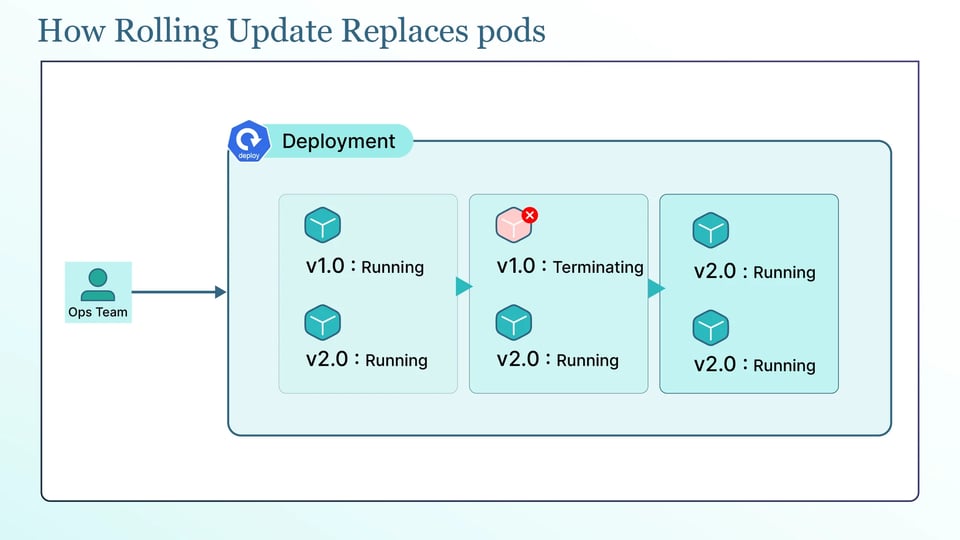
When you update a Deployment's pod template, Kubernetes does not edit the running pods. It creates a new ReplicaSet for the new version and changes the pod counts on the two ReplicaSets: the new one scales up while the old one scales down. The pods themselves are never modified, they are replaced, and the Deployment tracks each version as its own ReplicaSet so it can roll back later by scaling an old one back up.
The behavior is set by the .spec.strategy.type field, which takes one of two values: Recreate or RollingUpdate. Recreate removes all the old pods before creating the new ones. RollingUpdate, the default, replaces pods gradually so the app stays available throughout.
For a rolling update, two fields control how quickly pods are replaced. The maxSurge sets how many pods can exist above the desired count during the rollout, and it defaults to 25%, rounded up. The maxUnavailable sets how many pods can be missing below the desired count during the rollout, and it defaults to 25%, rounded down. Together, they determine how pods are replaced during the rollout. maxSurge: 1 with maxUnavailable: 0 adds one new pod before removing an old one and keeps the full desired capacity available.
There are three more fields that control the rollout behavior. The minReadySeconds makes a pod wait after it becomes ready before it counts as available, which catches a pod that passes its probe and then crashes. The progressDeadlineSeconds, which defaults to 600 (10 minutes), is how long Kubernetes waits for progress before marking the rollout failed. And revisionHistoryLimit, which defaults to 10, is how many old ReplicaSets Kubernetes keeps for rollback.
apiVersion: apps/v1kind: Deploymentmetadata: name: apispec: strategy: type: RollingUpdate rollingUpdate: maxSurge: 1 maxUnavailable: 0 minReadySeconds: 10 progressDeadlineSeconds: 600 # selector, template, etc.# Recreate: stop all old pods, then start new onesspec: strategy: type: RecreateNone of this is safe without good probes. A new pod only receives traffic once its readiness probe passes, so without a readiness probe tied to real health, Kubernetes will send traffic to a pod that is not actually ready, and the rollout will look successful while users see errors. For apps that are slow to start, a startup probe holds off the other probes until the app has finished starting, so a slow boot is not treated as a failure.
Deployment strategies built into Kubernetes
Kubernetes has exactly two native strategy types, Recreate and RollingUpdate. The other names you see, like "ramped" and "best-effort controlled," are not separate features. They are specific ways of configuring a rolling update. Let's dig into it:
Recreate deployment
The Recreate strategy stops every old pod, then starts the new ones. It is simple and guarantees the two versions never run at the same time, which suits apps that cannot tolerate two versions at once or that hold an exclusive lock, such as some database migrations. The trade-off is downtime, because there is a gap between the old pods stopping and the new pods becoming ready.
Rolling update
The rolling update strategy replaces pods gradually, keeping the app available the whole time. It is the default and the right choice for most stateless services, and its pace is set by the maxSurge and maxUnavailable fields described above.
Ramped slow rollout
A ramped slow rollout is just a rolling update tuned to move slowly and deliberately, for example with maxSurge: 1 and maxUnavailable: 0, so pods are replaced one at a time. To go further and pause between batches so you can watch each step, you use a rollout controller like Argo Rollouts rather than the Deployment on its own. The point is that "ramped" is a way of running a rolling update, not a different engine.
Best-effort controlled rollout
A best-effort controlled rollout is also a rolling update, configured to prioritize speed. You set maxUnavailable to a percentage and maxSurge to 0, which replaces pods as fast as possible without adding any extra capacity, at the cost of running below full capacity during the update. It is called best-effort because it proceeds as quickly as the allowed unavailability permits. Again, it is a configuration of RollingUpdate, not a separate strategy.
Deployment strategies that require a service mesh, ingress controller, or rollout controller
The strategies below are patterns, not built-in Deployment types. Kubernetes does not implement them for you. You build them with Services and labels, an ingress controller or service mesh for traffic control, or a rollout controller like Argo Rollouts or Flagger:
Blue/green deployment
You run two full environments, the current version (blue) and the new version (green), at the same time, and switch all traffic from blue to green at once by repointing a Service. It gives instant rollback, since you just point back to blue, but it needs roughly double the capacity while both are up.
Canary deployment
You send a small share of traffic to the new version, watch its metrics, and increase the share gradually if it stays healthy. It limits the blast radius of a bad release, but it needs traffic-splitting from a mesh or ingress controller, and ideally metric-based automation to promote or roll back.
A/B testing deployment
A variation of canary where you route specific users or requests to a version based on rules like headers, cookies, or geography, usually to compare behavior rather than just to test stability. It needs the same traffic-routing tooling as canary.
Shadow deployment with traffic mirroring
You send a copy of real production traffic to the new version without returning its responses to users, so you can test it under real load with zero user impact. It needs a service mesh that can mirror traffic, and care that the shadowed version does not write to production systems.
Dark launch with feature flags
You deploy the new code to production but keep it switched off behind a feature flag, then turn it on for chosen users when you are ready. This separates deploying from releasing, and it is driven by a feature-flag system rather than by the Deployment at all.
Comparison of deployment strategies
The following table compares the main deployment strategies and their trade-offs.
| Strategy | Downtime | Rollback speed | Traffic control | Spare capacity needed |
|---|---|---|---|---|
| Recreate | Yes | Slow (redeploy) | None | None |
| Rolling update | No | Medium | None | Small (maxSurge) |
| Blue/green | No | Instant | All-or-nothing | High (~2x) |
| Canary | No | Fast | Fine-grained | Small to medium |
| A/B testing | No | Fast | Rule-based | Small to medium |
| Shadow | No | N/A (no user traffic) | Mirrored | Medium (runs a full copy) |
What each deployment strategy costs in extra cluster capacity?
A deployment strategy is not just about safety. It also affects cluster cost, because some strategies need extra capacity while old and new versions run at the same time. The clearest example is blue/green. You run two full environments during the switch, which means roughly twice the number of pods and, therefore, roughly twice the CPU and memory. If your cluster does not have enough spare capacity, the standby environment may require extra nodes that sit mostly idle between releases, or the cluster may need to scale up during each release.
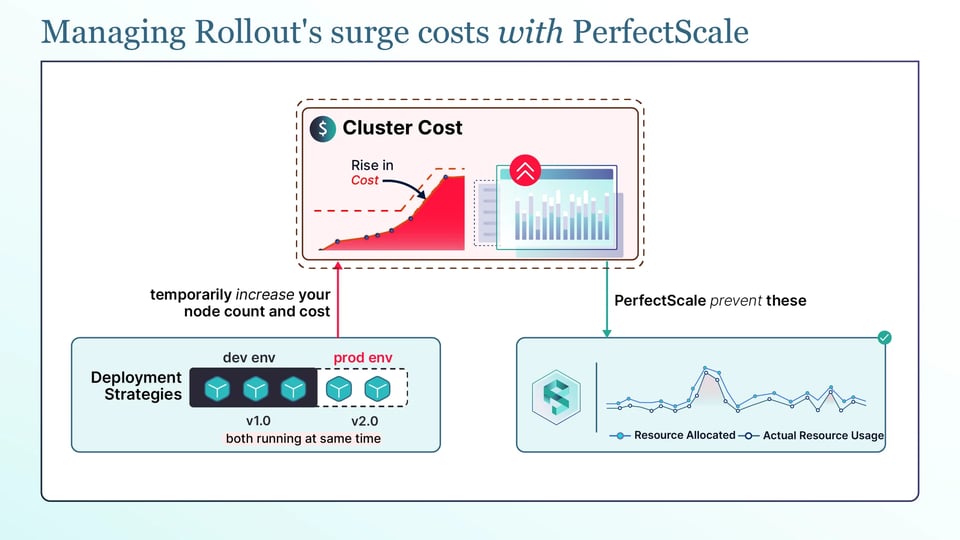
Rolling updates need less extra capacity, but they are not free. The maxSurge allows extra pods above the desired count during the rollout, and those pods still need resources. If the cluster has no room for them, the surge pods stay Pending and the Cluster Autoscaler adds nodes to run them. This means a rollout can temporarily increase your node count and cost.
The bigger factor behind both strategies is pod resource requests. Kubernetes scheduling and the Cluster Autoscaler use resource requests, not actual CPU and memory usage. If a pod requests much more than it normally uses, every surge pod or duplicated blue/green pod reserves that larger amount. The over-provisioned requests quietly make every release more expensive than it needs to be.
This is where PerfectScale helps. Its Kubernetes governance platform watches how your workloads actually use CPU and memory and turns that into actionable, automated right-sizing recommendations that you can apply manually or autonomously. With requests that match reality, your surge and standby pods reserve only what they need, so rollouts stop triggering unnecessary scale-ups, and every release costs less. Teams like Paramount Pictures and Creditas use PerfectScale to keep their clusters efficient, and you can give it a try or book a technical session.
How autoscaling and disruption controls interact with rollouts?
Rollouts can be affected by other Kubernetes features. If you know how they work together, it helps you avoid surprises:
The Horizontal Pod Autoscaler (HPA) keeps adjusting the number of replicas during a rolling update, which is expected. The problem comes when you also set replicas in the Deployment manifest. Every apply can reset the replica count to the value in the manifest, and the HPA then changes it again. This can cause unexpected scaling during the rollout. For Deployments managed by an HPA, leave replicas out of the manifest.
The Vertical Pod Autoscaler (VPA) works differently. It adjusts each pod's CPU and memory requests based on actual usage. Historically, applying these changes required recreating pods, which could cause disruption. As of Kubernetes 1.35, in-place pod resize is generally available, so CPU and memory resources can be changed on a running pod without recreating it. VPA can use this to right-size pods with much less disruption.
PodDisruptionBudgets (PDBs) are often misunderstood during rollouts. A PDB does not block a Deployment's rolling update because the Deployment replaces pods directly rather than using the eviction API. A PDB instead limits voluntary evictions, such as node drains and Cluster Autoscaler scale-down. So, a PDB will not slow down a rolling update, but it can block a node drain happening at the same time. For example, setting minAvailable equal to the total number of replicas can prevent voluntary disruptions entirely.
Matching a deployment strategy to your workload type
The following are the right deployment strategies that depend on what you are deploying:
Stateless HTTP services and APIs
A rolling update is the default choice, since these scale horizontally and tolerate two versions at once. When you need to reduce risk on a high-traffic service, add a canary on top with traffic-splitting so you can validate the new version on a slice of traffic first.
Stateful applications with persistent volumes
These often cannot run two versions against the same data at once, so Recreate, or a StatefulSet with careful ordered updates, is usually safer than a naive rolling update. Accept the short downtime rather than risk data corruption from overlapping versions.
Batch jobs, queue consumers, and CronJobs
These are not long-running services, so rollout downtime matters less. A rolling update or even a recreate is usually fine, and the real concern is draining in-flight work cleanly before old pods stop.
GPU and machine learning inference workloads
GPU nodes are expensive and scarce, which makes surge-heavy strategies costly, since spare GPU capacity for a blue/green or a wide maxSurge is expensive to keep. Prefer a rolling update with a small maxSurge, or a canary, and size requests carefully so you are not reserving whole GPUs you do not use.
Kubernetes deployment strategy best practices
The following are the practices that can make deployments safer and more cost-efficient:
1. Right-size resource requests before tuning rollout speed
Since surge and standby pods reserve requests, accurate requests do more for rollout cost than any strategy tweak. Get sizing right first, then tune the rollout.
2. Gate every rollout with readiness probes tied to real health signals
A readiness probe that only checks that the process is up will pass while the app is still broken. Tie it to a real health check so Kubernetes only sends traffic to pods that can actually serve it.
3. Set a PodDisruptionBudget for every production workload
A PDB will not slow your rollouts, but it protects your app during node drains and autoscaler scale-down by capping how many pods can be evicted at once. Every production workload should have one.
4. Automate rollback on failed health or SLO checks
Do not rely on a person watching a dashboard. You have to use a rollout controller like Argo Rollouts or Flagger to promote or roll back automatically based on metrics, so a bad release is reverted before it spreads.
5. Keep replica counts and node pools aligned with maxSurge headroom
You have to make sure the cluster has room for the surge pods a rollout creates. If it does not, either keep a little headroom or accept that the autoscaler will add nodes during every release.
6. Review cost and resource waste after every release
A release can quietly change your resource footprint. You should check usage against requests after rollouts so over-provisioning and drift do not build up over time.