


Kubernetes cost optimization breaks production when a tool cuts resources based on an incorrect view of a workload. Trim memory or CPU down to what a workload needed last week. Then the next release needs more, and it gets OOM killed or throttled. The savings look good on the report, until an incident wipes them out.
The fix is not to stop optimizing. It is to optimize on what each workload is doing now, in both directions, with guardrails around every change. This article shows why cost optimization goes wrong, and how revision-aware optimization keeps cost and reliability aligned on every deploy.
Most Kubernetes clusters are over-provisioned
Start with the waste. PerfectScale's data shows about 80% of Kubernetes clusters are over-provisioned, and each non-optimized cluster wastes roughly $5,000 to $10,000 a month. Waste is simple: resources you paid for but never used, like reserving 4 CPUs and 8Gi of memory for a workload that only ever touches 1 CPU and 2Gi.
So there is real money in right-sizing. The problem is that cutting resources feels dangerous, and for good reason.

The false tradeoff between cost and reliability
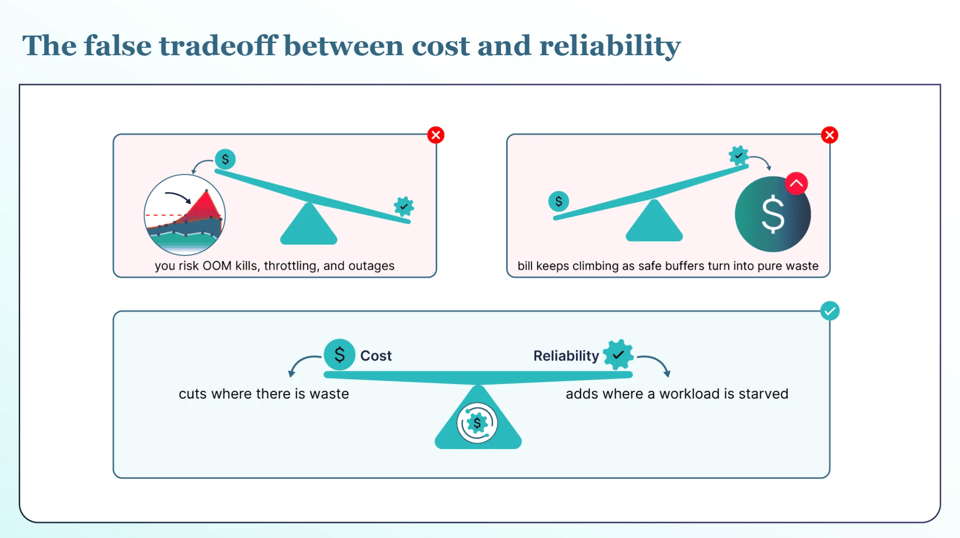
Engineers are judged on whether the system stays up, not on how much they saved, so trimming a workload feels like removing a safety buffer. And the risk is uneven: one bad incident can wipe out months of savings in an afternoon. That is the tradeoff teams get stuck in. Cut hard for cost and you risk OOM kills, throttling, and outages. Protect reliability and the bill keeps climbing as safe buffers turn into pure waste.
You should not have to choose. The right approach cuts where there is waste and adds where a workload is starved, and keeps doing it as the workload changes.
What actually breaks: OOM kills and CPU throttling
To cut safely, you need to know what fails when you cut too far, and CPU and memory fail in different ways. Cut a workload's memory below what it needs, and Kubernetes kills the container the moment it crosses the limit. It comes back as an OOM kill and a restart, and if it keeps happening the pod gets stuck in a restart loop. Cut CPU too tight, and the workload is not killed; it is throttled: it keeps running but slows down quietly, with no error in the logs.
Both come from the same mistake, cutting too aggressively for the sake of the savings number. And both get far more likely the moment a workload changes.
The real cost when it goes wrong
When a bad cut causes an incident, it is expensive. Industry research collected in DataBank's downtime report puts the average cost of unplanned downtime at around $9,000 a minute. Kubernetes usually makes an incident worse, not better. Services share an ingress, a control plane, and often a mesh, so one failure can hit many services at once. And because Kubernetes tries to heal itself, it can hide the problem, so the team is slower to notice. One incident like this pushes teams back to manual, over-provisioned work. After it happens once, most turn automation off for good and leave all the savings behind.
The fix: reliability-first, revision-aware optimization
Reliability-first optimization flips the goal. It is not the maximum savings a report can show. It is the maximum safe savings a team can trust enough to leave running, because savings you switch off are not savings.
Two things make that possible. First, right-size in both directions. Cut when there is waste, and add resources before a workload runs hot. Keep doing it, because the right numbers keep moving.
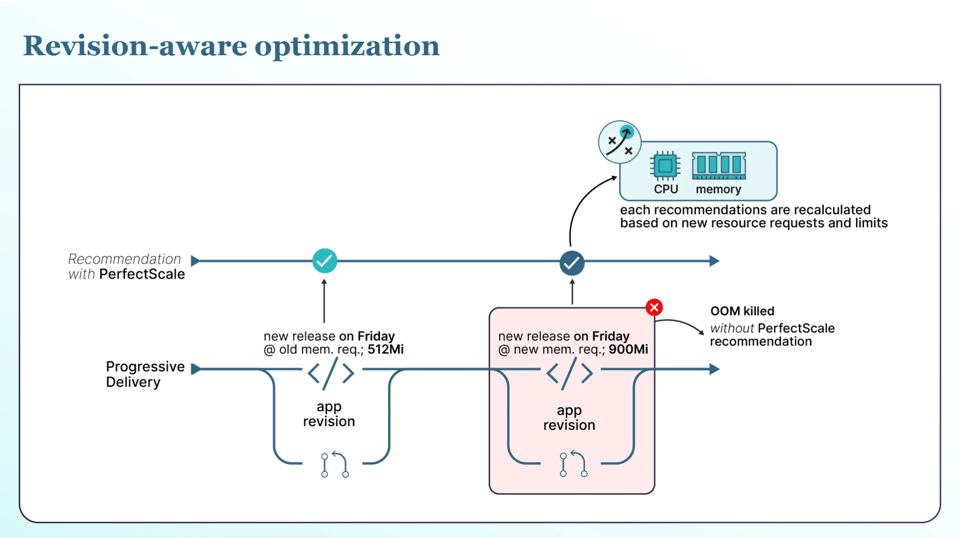
Second, and this is the part that actually prevents incidents: base every change on what a workload is doing now, not on what it did last week. Workloads change from one release to the next. A new version can add a caching layer, swap a library, or shift how traffic flows, and its real CPU and memory needs change with it. A tool that optimizes only on past usage is always looking at the old version, so it trims a workload toward last week's numbers right as a new release needs more. That is exactly when it gets OOM killed or throttled.
This is where PerfectScale's revision-aware and rollout-aware optimization is different. PerfectScale detects when a new revision goes live and judges that version on its own behavior. It treats each replica and version on its own, and it understands the rollout strategy in play, whether blue-green, canary, or A/B through Argo Rollouts, with no manual tagging. It bases changes on the version that is actually running, and by default it pauses new changes while a rollout is still in progress. You get the savings without betting your uptime on stale data, and that makes every deploy safer.
Here is what that looks like in practice. You ship a release on Friday that adds in-memory caching, and the service's real memory need jumps from 512Mi to 900Mi. A tool working off last week's data still sees 512Mi and trims the limit toward it, so the moment the new version takes traffic, it gets OOM killed. Revision-aware optimization sees the new revision, judges it on its own usage, and holds off on the old cut. Same automation, no incident.
PerfectScale keeps all of this inside guardrails you control: policies you can set per workload, namespace, or cluster; maintenance windows that decide when changes are allowed to run; a monitoring-only start that applies nothing until you turn automation on; and, where the workload supports it, changes applied in place without restarting your pods.
Solving cost and reliability with PerfectScale by DoiT
Kubernetes cost optimization only pays off when teams trust it enough to keep it on. PerfectScale by DoiT is built for that. It watches your clusters for resource risks like OOM kills, CPU throttling, and eviction, and turns them into right-sizing you can apply manually or automatically, always on current data and always inside your guardrails. Teams like Paramount Pictures and Creditas use PerfectScale to cut cloud spend without trading away production stability. It installs with a single Helm command and starts read-only, so you can see the savings before you turn anything on. Sign up or book a demo to get started.