
PerfectScale
Is the Blocker in Your NodePool or Your Workloads?
Learn how to identify whether a stuck Karpenter node is caused by a NodePool limit or a workload blocker, and discover who owns the fix using a 4-question.
This page is also available in Deutsch, Español, Français, Italiano, 日本語, and Português.

A node that keeps running after demand drops has a blocker. The blocker sits in your NodePool or in your workloads, and the answer decides who fixes it.
A NodePool limit is a setting that tells Karpenter not to consolidate. Examples are the policy, the wait time, and a disruption budget. The platform team owns the NodePool. A workload blocker is a pod that cannot leave its node. Examples are a PodDisruptionBudget (PDB), a do-not-disrupt annotation, and a placement rule. The application team owns those objects.
If you pick the wrong owner, the change goes to the wrong team and the node stays. This article gives you one decision tree with four questions. Answer them in order. The first yes names the class of the blocker, the owner, and the next step.
Two kinds of blockers
Karpenter removes a node only when two things are true. The NodePool allows the move, and every pod on the node can leave. Each condition has its own owner:
- NodePool limit: A setting in the NodePool stops Karpenter from acting. The fix is a change to the NodePool, and the platform team owns it.
- Workload blocker: A pod cannot leave the node, or it has no other place to run. The fix is a change to the workload, and the application team owns it.
Karpenter acts only on nodes that it created. A node from another tool is a third case, and no Karpenter setting can fix it. A node can also have more than one blocker, so fix one and then check the node again.
The decision tree
Start with a node that stays after demand drops. Answer the four questions in order. Stop at the first yes, because that answer names the class of the blocker and the owner of the fix.
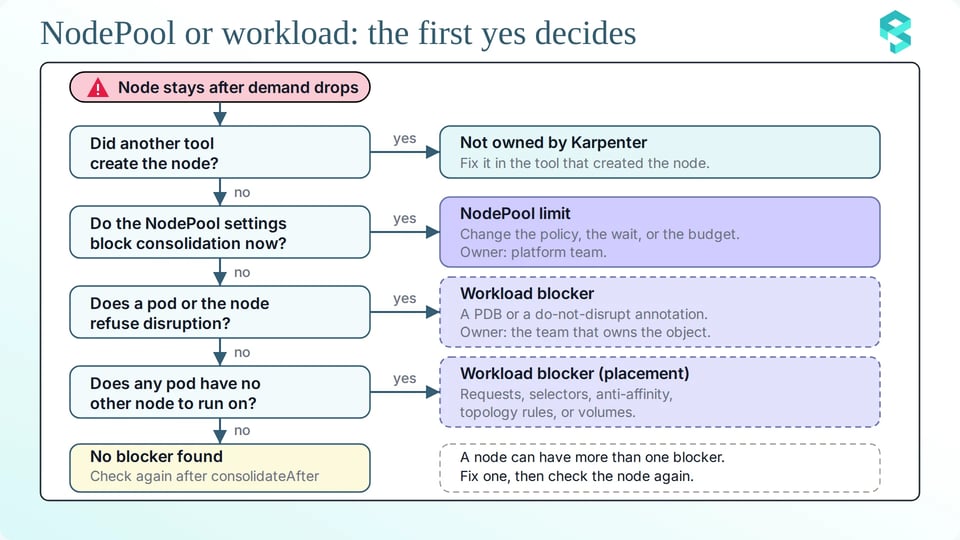
Each question has a short check that proves the answer. Run the check before you ask anyone to change anything.
Question 1: Did another tool create the node?
Karpenter acts only on nodes that it created, so check the owner first. A node without a NodeClaim is never a candidate for consolidation. The karpenter.sh/nodepool label shows which NodePool created the node. Replace $NODE with the node name:
kubectl get node $NODE -L karpenter.sh/nodepoolAn empty NODEPOOL column means that Karpenter did not create the node, so Karpenter never consolidates it. Fix it in the tool that created the node, for example a managed node group.
Question 2: Do the NodePool settings block consolidation now?
Four NodePool settings can stop consolidation. Read the disruption block first. It shows the policy, the wait time, and the budgets in one output. Replace $NODEPOOL with the NodePool name:
kubectl get nodepool $NODEPOOL -o jsonpath='{.spec.disruption}{"\n"}'Check these four settings:
- consolidationPolicy: The value WhenEmpty considers only empty nodes, so a node that holds pods stays. The values Balanced and WhenEmptyOrUnderutilized also consider nodes that hold pods. Balanced skips moves where the disruption is not worth the savings.
- consolidateAfter: This is the wait time. Karpenter resets the timer when a pod is added to or removed from the node, so a long value keeps a busy node out of consideration. The value Never turns consolidation off for the NodePool.
- budgets: A budget with nodes: '0' blocks all voluntary disruption. A budget with a schedule and a duration blocks it inside that window. Schedules always use UTC.
- requirements and limits: A replacement node must fit the requirements and the limits of the NodePool. When no cheaper node fits, Karpenter cannot replace the node.
This command prints the limits and the requirements:
kubectl get nodepool $NODEPOOL -o jsonpath='{.spec.limits}{"\n"}{.spec.template.spec.requirements}{"\n"}'Use the events to see which setting applies. These commands read the events of the NodePool and of the whole cluster:
kubectl describe nodepool $NODEPOOLkubectl get events -A --field-selector reason=Unconsolidatable --sort-by=.lastTimestampkubectl get events -A --field-selector reason=DisruptionBlocked --sort-by=.lastTimestampEach setting leaves its own mark:
| Setting | What you see | Smallest change |
|---|---|---|
consolidationPolicy is WhenEmpty |
NodePool "<name>" has consolidation policy WhenEmpty, but node is not empty | Set the policy to WhenEmptyOrUnderutilized |
consolidateAfter is Never |
NodePool "<name>" has consolidation disabled | Set a duration, for example 15m |
consolidateAfter is long |
No event. The Consolidatable condition of the NodeClaim is False |
Lower the duration |
budgets |
No allowed disruptions for disruption reason Underutilized due to blocking budget, on the NodePool | Replace nodes: '0' with a percentage, or limit the zero budget to a window |
| Requirements and limits | Can't replace with a cheaper node | Allow more instance options, or raise the limit |
A long wait time leaves no event. To read the Consolidatable condition, replace $NODECLAIM with the name of the NodeClaim:
kubectl get nodeclaim $NODECLAIM -o jsonpath='{.status.conditions[?(@.type=="Consolidatable")].status}{"\n"}'The value False means that the node is not yet a candidate for consolidation.
Each fix is a change to one field. The first diff lets Karpenter consider nodes that hold pods:
spec: disruption:- consolidationPolicy: WhenEmpty+ consolidationPolicy: WhenEmptyOrUnderutilizedThe next diff shortens the wait time:
spec: disruption: consolidateAfter: 15m # previously 2hThe last diff removes a zero budget. Ask the platform team first, because a zero budget often protects a release:
spec: disruption: budgets:- - nodes: "0"+ - nodes: "10%"The platform team makes these changes, because the platform team owns the NodePool.
Question 3: Does a pod or the node refuse disruption?
Before Karpenter disrupts a node, it checks every pod on it. A pod refuses in two ways: a PDB has no room, or the pod carries the karpenter.sh/do-not-disrupt annotation. The node can carry the annotation too. The events name the cause:
| Message | Means | Owner |
|---|---|---|
| Pdb prevents pod evictions (PodDisruptionBudget=[<namespace>/<name>]) | A PDB has no room for a pod on the node. | Application team |
| MultiplePodDisruptionBudgets | Two PDBs select the same pod. Recent Kubernetes versions write this event on the pod, and Karpenter may show no event. | Application team |
| Pod has "karpenter.sh/do-not-disrupt" annotation (Pod=<namespace>/<name>) | A pod on the node carries the annotation. | Application team |
| Disruption is blocked through the "karpenter.sh/do-not-disrupt" annotation | The node itself carries the annotation. | Platform team |
To confirm a PDB, list every PDB with its allowed disruptions:
kubectl get pdb -A -o custom-columns='NAMESPACE:.metadata.namespace,NAME:.metadata.name,MIN:.spec.minAvailable,MAXUNAVAIL:.spec.maxUnavailable,ALLOWED:.status.disruptionsAllowed'An ALLOWED value of 0 means that no pod behind that PDB can leave now. A pod must have only one PDB. If two PDBs select the same pod, Kubernetes refuses the eviction even when both PDBs have room.
To confirm an annotation, list the pods and the nodes that carry it. These commands use jq:
# Find pods with the karpenter.sh/do-not-disrupt annotationkubectl get pods -A -o json | jq -r '.items[] | select(.metadata.annotations["karpenter.sh/do-not-disrupt"] != null) | "\(.metadata.namespace)/\(.metadata.name) node=\(.spec.nodeName) value=\(.metadata.annotations["karpenter.sh/do-not-disrupt"])"'
# Find nodes with the karpenter.sh/do-not-disrupt annotationkubectl get nodes -o json | jq -r '.items[] | select(.metadata.annotations["karpenter.sh/do-not-disrupt"] != null) | .metadata.name'
The annotation works like a PDB for one pod. The value "true" protects the pod for good. A duration such as "30m" protects it for that time after it starts running.
Each fix is a small change. For a Deployment with 3 replicas, use maxUnavailable: 1 instead of minAvailable: 3, because maxUnavailable follows the number of replicas:
spec: minAvailable: 3 maxUnavailable: 1If the application team agrees that a pod may move after 30 minutes, change the permanent annotation to a duration:
template: metadata: annotations: karpenter.sh/do-not-disrupt: "30m"Sometimes a crash-looping pod blocks the eviction. Keep the PDB, and set unhealthyPodEvictionPolicy: AlwaysAllow in it. This field has been stable since Kubernetes v1.31.
When Karpenter drains a node, it does not evict static pods, pods that tolerate the karpenter.sh/disrupted:NoSchedule taint, or pods that have succeeded or failed.
The application team makes most of these changes, because it owns the PDB and the pod. The platform team owns an annotation on a node.
Question 4: Does any pod have no other node to run on?
Karpenter simulates where the pods can run before it removes a node. If all the pods fit on free capacity of other nodes, it deletes the node. If they fit on free capacity plus one lower-priced node, it replaces the node. If one pod fits nowhere, the node stays. The events do not always name that pod, so you find it in the pod specs.
To see what ties each pod on the node to its place, list the details of every pod on it:
kubectl get pods -A --field-selector spec.nodeName=$NODE -o json | jq '.items[] | {pod: "\(.metadata.namespace)/\(.metadata.name)", owner: (.metadata.ownerReferences[0].kind // "none"), nodeSelector: .spec.nodeSelector, requiredAntiAffinity: (.spec.affinity.podAntiAffinity.requiredDuringSchedulingIgnoredDuringExecution != null), topologySpread: [.spec.topologySpreadConstraints[]? | {key: .topologyKey, maxSkew: .maxSkew, whenUnsatisfiable: .whenUnsatisfiable}], claims: [.spec.volumes[]? | select(.persistentVolumeClaim != null) | .persistentVolumeClaim.claimName]}'Look for these causes:
- A request that is larger than the free capacity of the other nodes.
- A nodeSelector that matches only this node group.
- A required anti-affinity rule.
- A topology spread rule that the other nodes cannot meet.
- A volume that is bound to one zone.
- A taint on the other nodes that the pod does not tolerate.
Preferred anti-affinity and topology spread rules can also reduce the effectiveness of consolidation, because Karpenter tries to satisfy them when it removes a node.
Start with the first cause. Karpenter places pods by their requests, not by their use. This query compares the real CPU use with the CPU requests for each namespace. It uses the metrics of the kubelet and of kube-state-metrics:
query: sum by (namespace) (rate(container_cpu_usage_seconds_total{container!=""}[5m])) / sum by (namespace) (kube_pod_container_resource_requests{resource="cpu"})A ratio far below 1 means that the requests are too big. Each node then holds fewer pods than it could, and you pay for the empty room.
If the evidence shows an oversized request, lower it to the real need. Change only the one value that the evidence points to:
resources: requests: cpu: "4" cpu: "2"Also check for pods without a controller. They do not block Karpenter, but nothing starts them again after an eviction.
If no question says yes
Karpenter also skips a node for short, normal reasons. The consolidateAfter timer has not ended, the node is still starting, the node is already deleting, or Karpenter just chose the node for a pending pod. Check the node again after a few minutes.
Who fixes it
Every class has one owner and one smallest change, so the right team gets the right request.
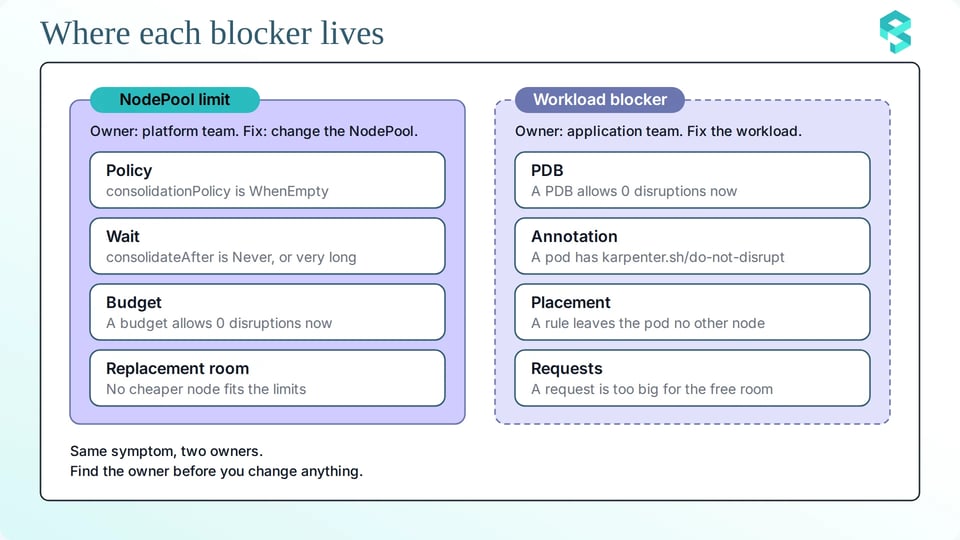
This table keeps the evidence, the owner, and the change together:
| Class | Evidence | Owner | Smallest change |
|---|---|---|---|
| Not created by Karpenter | An empty NODEPOOL column | The owner of the other tool | A change to the node in that tool |
| NodePool limit | A setting in the disruption block, and an event on the NodePool or the node | Platform team | One NodePool field |
| Workload blocker: PDB or annotation | A DisruptionBlocked event, the ALLOWED value, or the annotation filter | Application team, or platform team for a node annotation | One PDB field or one annotation value |
| Workload blocker: placement | An Unconsolidatable event or no event, and the pod placement filter | Application team | One request or one rule |
Send the owner a diff, and name the evidence in the request. The owner then reviews one field instead of a long report.
How PerfectScale can help
PerfectScale by DoiT does not replace the decision tree. It helps your team find the owner and the fix with less manual work.
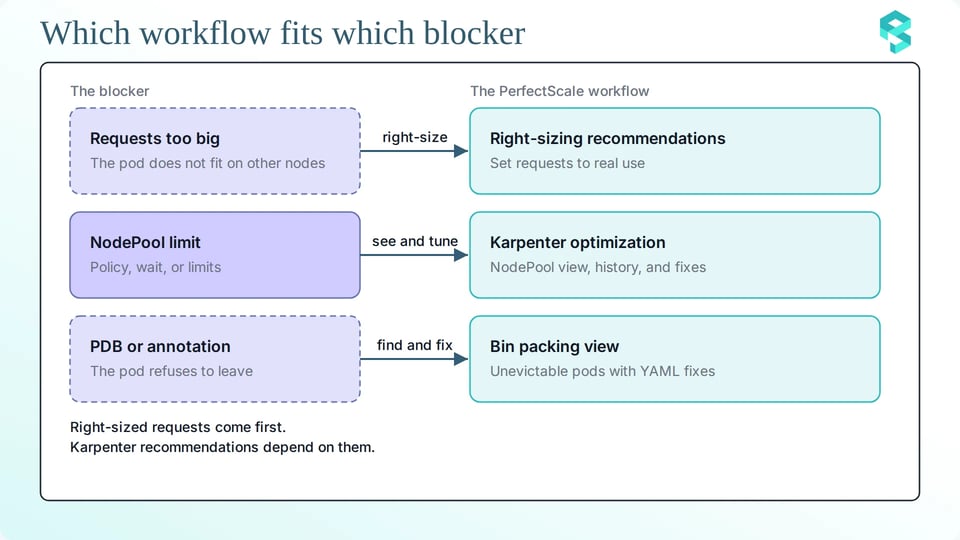
Here is how PerfectScale can help you:
1. Right-size the requests first: Oversized requests keep pods from fitting on other nodes, and the Karpenter recommendations depend on the requests of running workloads. PerfectScale recommends right-sizing the workloads first. You can apply its recommendations yourself, or turn on automation.
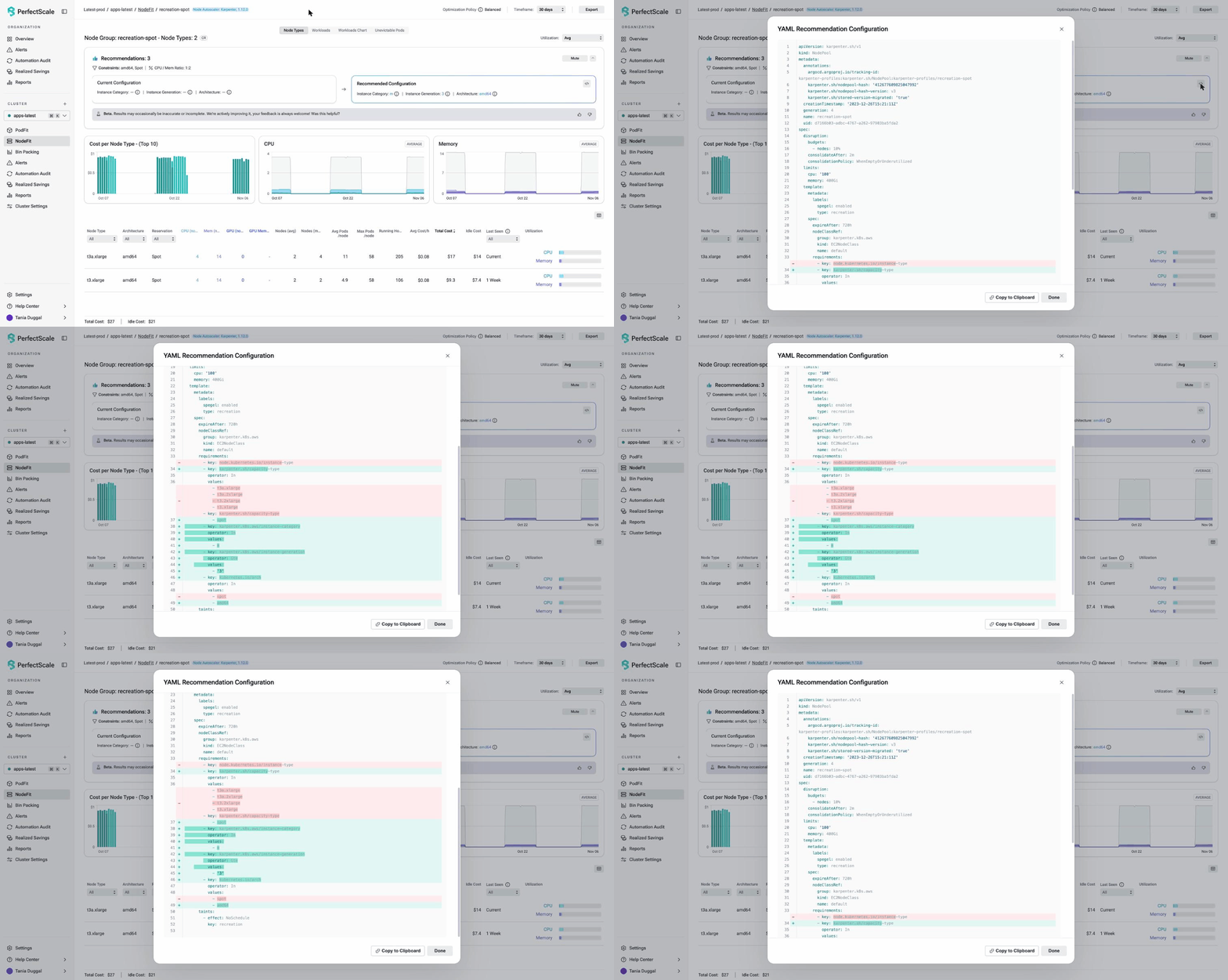
2. See the NodePool and every change to it: Karpenter settings change over time, so it helps to see what changed and when. PerfectScale detects Karpenter in the cluster and shows the NodePool and node class configuration, with a history of changes. You can check the policy, the wait time, and the budgets in one place.
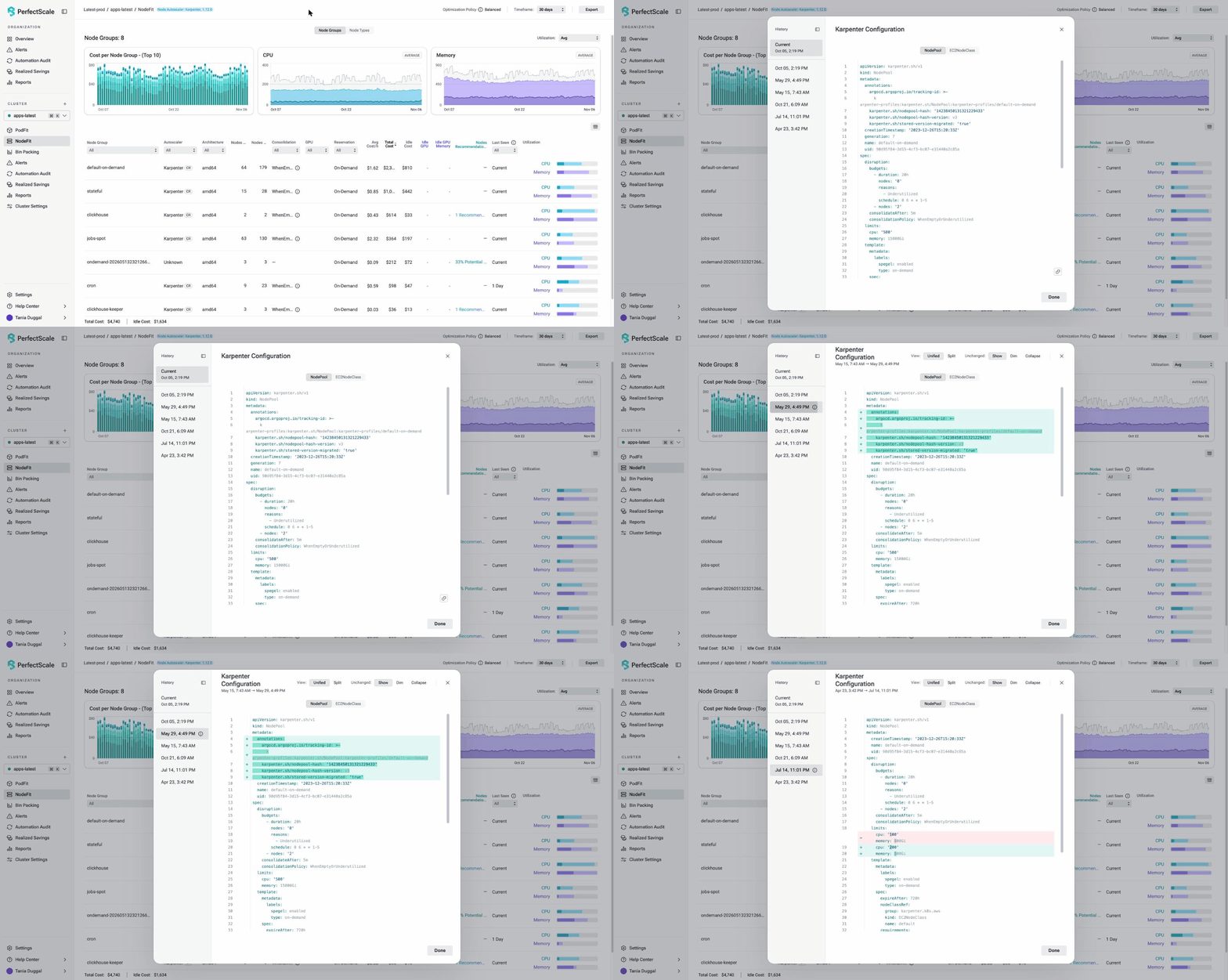
3. Get recommendations for the NodePool settings: PerfectScale gives Karpenter optimization recommendations for the settings that decide how fast Karpenter removes nodes. Its recommendations help you:
- Review the consolidation policy and the wait time.
- Give Karpenter more instance options when it provisions new nodes.
- Find NodePool limits that leave too little room for new capacity.
A YAML view shows the current and the recommended configuration, and you can copy the result.
4. Find the pods that stop nodes from being removed: The bin packing view shows which pods stop nodes from being removed. For each one, PerfectScale explains why the pod cannot be evicted and how to fix it. It gives YAML diff recommendations ranked by cost impact, and each one has a confidence level and a risk level. You can mute a finding that is intentional.
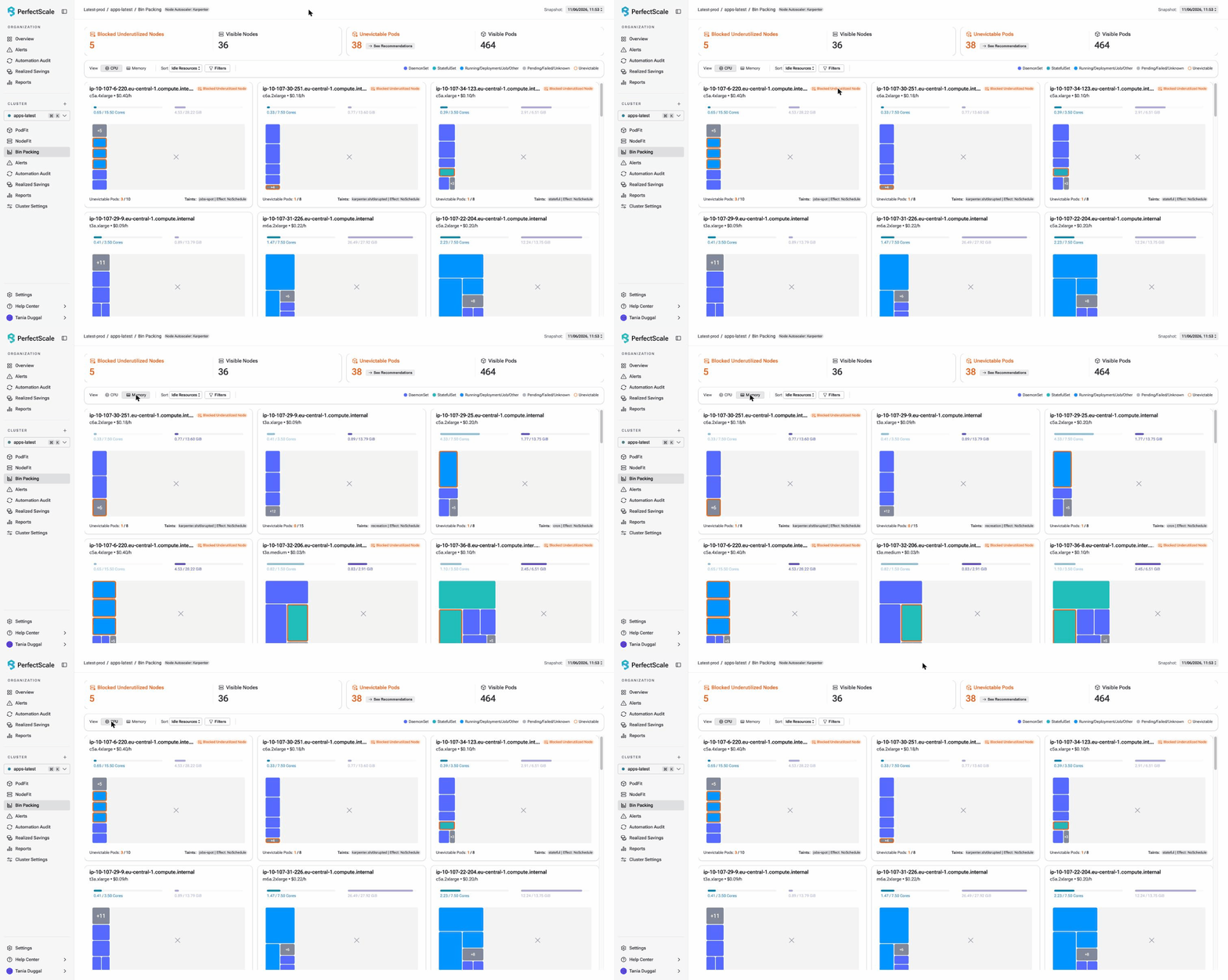
Each team gets its own list. The platform team works from the NodePool view, and the application team works from the pods.
An agent such as Claude can also query PerfectScale data with the PerfectScale AI agent skill. After each change, use the history of changes in your review to see what changed and what to automate next.
Take-home checklist
Use these lists for every change, and copy them into the pull request. A change has three stages, and each one has its own checks:
Before the change
All of these must be true before anyone applies the change:
- Karpenter created the node.
- The class of the blocker is named: NodePool limit or workload blocker.
- One event, field, or annotation proves the blocker.
- The change touches one field or one object.
- The owner of that object approved the change.
- A budget or a time window limits how many nodes can move at once.
- The change ran first on a test cluster or on a sandbox NodePool.
- The undo step and the reason to undo are written down.
During the change
Run these watch commands in separate terminals until the change ends:
kubectl get nodeclaims -wkubectl get events -A --field-selector reason=DisruptionBlocked -wkubectl get pods -A --field-selector=status.phase!=Running,status.phase!=Succeeded -wThese checks stay active until the change ends:
- The Karpenter events show no new blocker.
- Pods leave the node at the pace that the PDBs allow.
- The service dashboards stay inside the service level objective (SLO).
After the change
These checks close the change:
- The node count matches the expected result.
- No pod waits or restarts without a known cause.
- The ALLOWED value of every PDB is above 0 for the services that need to move.
- The record of the change is complete.
See the tree run with an agent in the workshop
Next time a node stays, start with the first question. An agent can help with the first checks, because it reads events, configuration, and metrics much faster than you can. It can also give a different answer each time you ask. That is why a person reviews every change, and why fixed rules, not an agent, should apply it in production.
The workshop Agentic Karpenter: Using kagent + Claude to Tune Your Autoscaling runs on November 17, 2026, at 11 AM ET. Vikram Seshadri and Ramesh Mathikumar show how an agent reads events like these and drafts the diff, and where fixed rules take over. Register for the workshop.
Dealing with nodes that stay running? Our team can help you find the blocker, review the change, and reclaim capacity without compromising reliability. Talk to our experts or sign up for free and try it yourself.