
PerfectScale
AWS ECS vs EKS: Which One to Choose?
EKS vs ECS. Learn the key differences between Amazon Elastic Container Service (ECS) and Amazon Elastic Kubernetes Service (EKS).
This page is also available in Deutsch, Español, Français, Italiano, 日本語, and Português.


About Marie Jaksman
Senior Marketing Manager
Part growth marketer, part DevOps translator. Optimizing funnels and clusters with a healthy fear of wasted compute.
My personal pageAWS ECS vs EKS: Which one to choose? If you’re planning to run your containerized applications on AWS you first have to choose what to use as an orchestrator: Amazon Elastic Kubernetes Service (AWS EKS) or Amazon Elastic Container Service (AWS ECS). Both EKS and ECS are powerful tools that allow developers to manage and deploy their containers.
However, there are some key differences between the two, making them suitable for different use cases.
In this article, we'll explore the difference between ECS and EKS, providing you with the necessary insights to make an educated decision about which service best suits your needs.
The primary difference between the two services is that Amazon ECS is an AWS-proprietary container orchestrator designed for simplicity and deep AWS integration, while Amazon EKS is a managed Kubernetes service that offers high flexibility, cloud portability, and access to the open-source CNCF ecosystem.
Choose Amazon ECS when you value simplicity and deep AWS integration:
- Low learning curve: ECS uses simple concepts like task definitions and services, making it easy for AWS developers to adopt.
- No control plane fee: ECS charges nothing to manage the orchestrator, so you only pay for the EC2, Fargate, or ECS Managed Instances compute your containers consume.
- Out-of-the-box AWS components: ECS connects directly with Application Load Balancers, Secrets Manager, and CloudWatch logs.
Choose Amazon EKS when you need flexibility and portability:
- Open-source ecosystem: EKS runs standard Kubernetes, so you can leverage projects like Prometheus, Istio or Linkerd, ArgoCD, Karpenter, and KEDA.
- Cloud portability: workloads can move to GCP, Azure, or on-premises with far less lock-in than ECS.
- Fine-grained scaling: EKS supports Horizontal Pod Autoscalers and advanced VPC CNI techniques for massive container density, at the cost of a $0.10/hour per cluster control plane fee and more operational overhead.
Both services have also grown more hands-off in the past couple of years. AWS now offers EKS Auto Mode, which fully automates compute, storage, and networking for Kubernetes clusters, alongside ECS Managed Instances, a fully managed EC2-based compute option for ECS. These additions narrow the operational gap between the two services and reshape how teams weigh simplicity against control.

What Is AWS EKS?
EKS, or Amazon Elastic Kubernetes Service, is a fully managed service that makes it easy to run Kubernetes on AWS. Kubernetes is an open-source container orchestration platform that automates the deployment, scaling, and management of containerized applications.
With EKS, you can easily deploy, manage, and scale your applications using Kubernetes without the need to install or operate your own Kubernetes control plane.
EKS provides all the benefits of Kubernetes, such as workload portability, scalability, and declarative APIs, while also managing the underlying infrastructure for you. It integrates seamlessly with other AWS services, allowing you to take advantage of features like Elastic Load Balancing, Auto Scaling, and Amazon Elastic File System.
For teams that want to offload even more, EKS Auto Mode fully automates compute, storage, and networking for a cluster, including node provisioning, scaling, OS patching, and Kubernetes version upgrades. It can be turned on for new or existing clusters and removes much of the deep Kubernetes expertise that running production infrastructure once required.
Advantages of AWS EKS:
When it comes to deploying containerized applications, EKS offers a range of features that simplify the process (as compared to self-hosted Kubernetes clusters).
- One of the key advantages of EKS is its ability to automatically provision and manage the underlying infrastructure needed to run Kubernetes. This means that you don't have to worry about setting up and configuring servers, networking, or storage. EKS takes care of all these tasks for you, allowing you to focus on developing and deploying your applications.
- Another benefit of EKS is its seamless integration with other AWS services. For example, EKS can be easily integrated with Elastic Load Balancing, which allows you to distribute incoming traffic across multiple instances of your application. This helps improve the availability and scalability of your application, ensuring that it can handle high levels of traffic without any downtime.
- In addition to Elastic Load Balancing, EKS can also be integrated with Auto Scaling. This feature automatically adjusts the number of instances running your application based on the current demand. If the traffic to your application increases, EKS can automatically add more instances to handle the load. Conversely, if the traffic decreases, EKS can scale down the number of instances, helping you optimize costs and ensure efficient resource utilization.
- Furthermore, EKS offers seamless integration with Amazon Elastic File System (EFS), a fully managed file storage service. With EFS, you can easily share files between multiple instances of your application, making it ideal for scenarios where your application requires shared storage. EFS provides high availability and durability, ensuring that your files are always accessible and protected.
- To further simplify Kubernetes infrastructure management one can choose to integrate EKS with AWS Fargate to get fully managed just-in-time worker nodes provisioned for their cluster.
Overall, EKS simplifies the process of running Kubernetes on AWS by managing the underlying infrastructure and providing seamless integration with other AWS services. Whether you are deploying a small-scale application or a large-scale production workload, AWS EKS offers the scalability, flexibility, and reliability you need to run your containerized applications with ease.
Recent improvements have made this scaling faster and more efficient. With Karpenter-based provisioning, EKS Auto Mode now boots nodes noticeably faster, scales out more quickly, and delivers more usable cluster capacity, with these gains applied automatically and no configuration changes required.
What Is AWS ECS?
ECS, or Amazon Elastic Container Service, is another popular container orchestration service provided by AWS. Unlike EKS, which uses Kubernetes as the underlying orchestration engine, ECS uses its own proprietary technology.
With ECS, you can easily run and manage application containers on AWS, without having to manage the underlying infrastructure.
ECS provides a fully managed and scalable environment for running containers. It integrates well with other AWS services, making it easy to build and deploy microservices architectures. ECS also provides features like service discovery, load balancing, and auto scaling, making it a comprehensive solution for running containerized applications.
ECS compute has expanded beyond EC2 and Fargate to include ECS Managed Instances, a fully managed option where AWS provisions right-sized EC2 instances from your task requirements and continuously optimizes placement and patching. Its autoscaling has also matured, with predictive scaling that uses machine learning to scale ahead of recurring demand and high-resolution metrics that let services react to load changes in as little as 20 seconds.
Pros and cons of AWS ECS:
- One of the key advantages of ECS is its simplicity. With ECS, you don't need to worry about setting up and managing a Kubernetes cluster. Instead, you can focus on developing and deploying your applications. ECS takes care of the underlying infrastructure, including provisioning and scaling of resources, so you can concentrate on building your containerized applications.
- ECS offers a flexible and customizable environment for running containers. You can choose from different launch types, such as EC2 or Fargate, depending on your specific requirements. EC2 launch type allows you to run containers on EC2 instances, giving you more control over the underlying infrastructure. On the other hand, Fargate launch type abstracts away the infrastructure management, allowing you to focus solely on running your containers.
- Another advantage of ECS is its seamless integration with other AWS services. You can easily leverage services like Amazon RDS for database management, Amazon S3 for object storage, and Amazon CloudWatch for monitoring and logging. This tight integration simplifies the development and deployment process, as you can easily incorporate these services into your containerized applications.
- ECS also provides built-in features for service discovery, load balancing, and auto scaling. With service discovery, you can easily discover and connect to other services within your ECS cluster. Load balancing ensures that traffic is distributed evenly across your containers, improving performance and reliability. Auto scaling allows you to automatically adjust the number of containers based on demand, ensuring that your applications can handle fluctuations in traffic.
ECS Limitations
It's important to note that ECS limitations are relative and depend on specific use cases and requirements. ECS is still a powerful solution for many container management scenarios, especially for those deeply integrated into the AWS ecosystem. Let's take a look at what could be considered as ECS limitations.
- Limited Orchestration Capabilities: Compared to Kubernetes (used in Amazon EKS), ECS has more limited orchestration features. For example - it’s not a good fit for running stateful workloads or high-throughout media streaming services.
- AWS Specific: ECS is designed specifically for AWS environments, vendor locking you into using AWS cloud services. This can be a drawback for organizations looking for a multi-cloud or hybrid cloud approach.
- Less Community Support: While ECS is popular, it doesn't have as large a community or as many third-party integrations and tools as Kubernetes.
- Less Flexibility in Networking and Storage: ECS offers fewer options for networking and storage compared to EKS, which can impact the customization of deployments.
- Container Auto-Scaling Limitations: While ECS supports auto-scaling, its scaling capabilities are less flexible compared to the auto-scaling capabilities in Kubernetes.
- Service Discovery and Load Balancing: While ECS supports basic service discovery and load balancing - advanced capabilities and smart routing may be significantly harder or simply unsupported .
Limited Customization for Advanced Use Cases: ECS might not offer the same level of customization and control required for more complex application deployments that are possible with Kubernetes.
Amazon ECS vs EKS comparison
When comparing AWS ECS and EKS, it's important to consider your specific use case and requirements. Both EKS and ECS are popular container orchestration services offered by AWS, each with its own unique features and benefits.
| AWS EKS | AWS ECS | |
|---|---|---|
| Orchestration | Kubernetes | Docker |
| Ease of Use | Generally more complex due to Kubernetes' steep learning curve. | Simpler to start with for Docker users. |
| Flexibility | Highly flexible, can run on AWS and on-premises. | Primarily for AWS cloud environments. |
| Scalability | Highly scalable with Kubernetes' features. | Scalable, but with some limitations compared to Kubernetes. |
| Community Support | Extensive, due to Kubernetes' popularity. | Strong, but not as extensive as Kubernetes. |
| Integration | Broad integration with AWS services and external tools. | Deep integration with AWS services. |
| Configuration | More complex configuration and management. | Simpler configuration and management. |
| Portability | High, can work across different environments. | Limited to AWS. |
| Use Cases | Suitable for complex, microservices-based applications. | Ideal for simple to moderately complex container management. |
| Pricing | Priced based on the number of EKS clusters, costing $0.10 per hour for each cluster, which amounts to $72 monthly. | ECS charges are based on the EC2 instances or Fargate tasks utilized. |
| Management Overhead | Higher, due to Kubernetes' complexity. | Lower, more straightforward management. |
| Customization | Highly customizable. | Less customizable than EKS. |
| Service Integration | Integrates with a wider range of AWS and third-party services. | More limited in integration options compared to EKS. |
| Container Interface | Kubernetes API. | Docker API. |
| Networking | More complex networking setup and options. | Simpler networking setup. |
| Storage Options | Wide range of storage options with Kubernetes. | More limited compared to EKS. |
When comparing AWS ECS and EKS, it's important to consider your specific use case and requirements. Both EKS and ECS are popular container orchestration services offered by AWS, each with its own unique features and benefits.
At a high level, the two services differ across a few decisive dimensions:
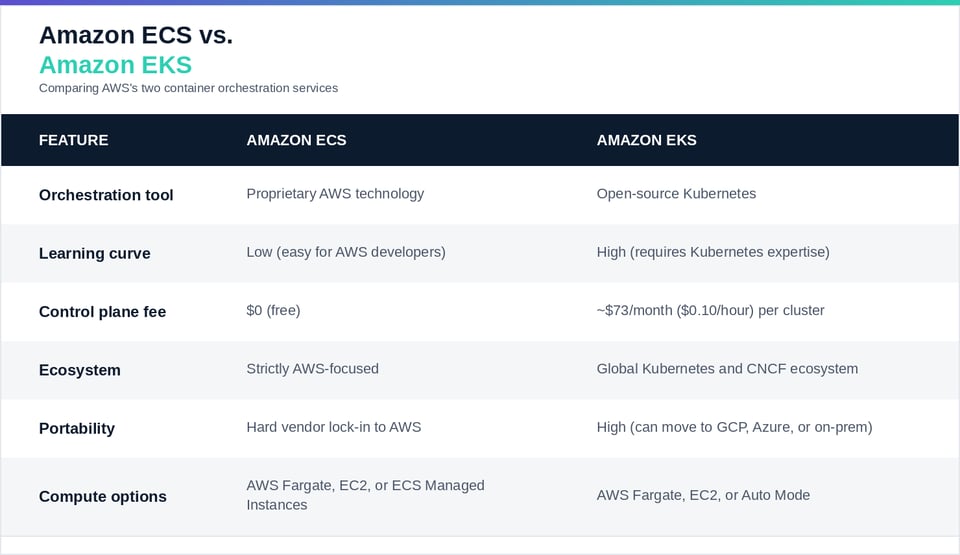
Having explored the features and performance of EKS and ECS, let's now examine specific use cases where each service excels.
While both EKS and ECS are powerful container orchestration solutions, there are some key differences between them. One of the main differences is the underlying technology used for orchestration. EKS uses Kubernetes, an open-source industry-standard platform, while ECS uses its own proprietary technology. This difference in technology affects the way you interact with and manage your containerized applications.
Core architectural differences
Beyond the high-level trade-offs, four architectural differences drive most day-to-day decisions between the two services.
1. Configuration abstractions
ECS uses simple concepts like task definitions (defining your container blueprint) and services (handling scaling and availability). EKS requires native Kubernetes constructs like pods, deployments, services, and namespaces, configured through YAML manifests or Helm charts.
2. Pricing and overhead
ECS charges no fee for the management infrastructure. You only pay for the compute resources (EC2, Fargate, or ECS Managed Instances) your containers actively consume. EKS charges a baseline $0.10/hour per cluster to manage the control plane, roughly $73 per month, and introduces operational overhead such as regular Kubernetes version upgrades. Clusters left on an unsupported Kubernetes version move into extended support, where the control plane fee rises to $0.60/hour, so staying current is an easy way to avoid a cost spike.
3. Networking and scaling
ECS maps tasks directly to AWS VPC networking through Elastic Network Interfaces (ENIs). This is simple, but it can hit hard limits on large-scale nodes. EKS uses the AWS VPC CNI with advanced techniques like prefix delegation, and supports fine-grained open-source scaling tools like Karpenter, KEDA, and Horizontal Pod Autoscalers (HPA) for massive container density.
4. Ecosystem and plugins
ECS connects directly out of the box with standard AWS components like Application Load Balancers (ALBs), Secrets Manager, and CloudWatch logs. EKS lets you leverage thousands of open-source projects, such as Prometheus for monitoring, Linkerd or Istio for service meshes, and ArgoCD for GitOps.
- Amazon EKS: One of the key advantages of using EKS is its compatibility with the Kubernetes API. This means that you can use any tool or framework that works with Kubernetes, making it easier to integrate with your existing workflows. Some examples may be - using community provided Helm charts for 3rd party software installations or employing GitOps practices for CD. EKS also provides automatic scaling, allowing you to easily handle fluctuations in traffic and demand.
EKS also improves the portability of your infrastructure - allowing for easier mluti-cloud or hybrid deployments.
- Amazon ECS: On the other hand, if you are looking for a simpler solution that requires less management overhead, ECS might be a better fit. It takes care of the underlying infrastructure for you, allowing you to focus on developing your applications.
If you’re ok with being vendor-locked into the AWS cloud and don’t require the advanced features Kubernetes has to offer - definitely consider ECS.
Fully managed compute is changing the trade-off
One of the biggest shifts in this comparison is that AWS has pushed both services toward fully managed compute, softening the old "simple ECS versus powerful but complex EKS" divide.
On the Kubernetes side, EKS Auto Mode takes over the full node lifecycle: it selects and provisions EC2 instances, scales them with Karpenter, patches the operating system, and keeps cluster components current, all while you keep the open Kubernetes API and ecosystem. A static-capacity option lets you hold a fixed number of nodes for mission-critical workloads that need pre-provisioned capacity.
On the ECS side, ECS Managed Instances brings a similar experience without Kubernetes. You define task requirements such as vCPUs, memory, and CPU architecture, and ECS provisions right-sized EC2 instances in your account, continuously consolidates workloads onto efficient instances, and patches on a regular cadence. Paired with predictive and high-resolution autoscaling, ECS can now respond to demand in seconds while keeping its low management overhead.
The practical takeaway is that the decision now hinges less on how much infrastructure you want to run and more on whether you need the portability and ecosystem of Kubernetes or the tighter, simpler AWS-native model of ECS.
In conclusion, choosing between EKS and ECS depends on your specific use case and requirements. If you prefer the familiarity and extensibility of Kubernetes, EKS is a great choice. With EKS, you can tap into the vast Kubernetes ecosystem and leverage the latest advancements in container orchestration. On the other hand, if you value simplicity and ease of use, ECS might be the better option. ECS abstracts away the infrastructure management, providing a more simplified and managed experience. Regardless of your choice, both EKS and ECS provide powerful solutions for managing and deploying containerized applications on AWS.
Optimize your EKS Cost with PerfectScale by DoiT
PerfectScale offers a comprehensive solution for organizations of all sizes to reduce cloud costs without sacrificing performance. Utilizing advanced algorithms and machine learning, it ensures services are optimally resourced to balance demand and cost. PerfectScale simplifies Kubernetes cost optimization by automatically right-sizing and scaling resources, adapting continuously to dynamic environments. This reduces waste and enhances system stability.
By handling Kubernetes cost optimization, PerfectScale frees DevOps, Platform, SRE, and FinOps teams to concentrate on more strategic projects. It assures ongoing optimal scaling of your K8s environment, resulting in lower cloud expenses, fewer SLA/SLO breaches, and reduced outages. Users experience enhanced reliability and stability.
Easy to implement, PerfectScale begins delivering immediate results. Sign up or Book a demo with the PerfectScale team today!