
PerfectScale
Commitments Are a Moving Target. Native Recommenders Miss It, So We Built Our Own.
AWS and Google Cloud get the number right. So do we. Then we keep going.
This page is also available in Deutsch, Español, Français, Italiano, 日本語, and Português.


About Mohammad Reza Saleh Sedghpour
Senior Software Engineer 2
Mohammad Reza Saleh Sedghpour is a Senior Software Engineer II at DoiT and a Cloud Engineer and Researcher with over a decade of experience in cloud computing and distributed systems. He holds a Ph.D. in Computer Science, specializing in resiliency patterns for microservices, and is an active open-source contributor who regularly publishes research and presents at international conferences. At DoiT, he works on the automation behind cloud cost-optimization tooling, including commitment management — helping businesses use cloud technologies for optimal performance, resilience, and cost.
My personal pageCommitments are one of the fastest ways to cut costs most teams have on a cloud bill. Keeping them sized right, week after week, is a full-time job.
So when we show PerfectScale for Commitments to a FinOps engineer, one question comes up almost every time.
"AWS already tells me how much to commit. So does Google Cloud. Why do I need yours?"
Fair. Honestly, it's the right question to ask. Both clouds ship a recommender. Both are free. And both are correct, for the question they were built to answer.
So we did the obvious thing and ran ours next to theirs. For months. Same accounts, same date ranges, same commitment types, no cherry-picking. This post is what came out of that.
The short version: ask the same question, get the same number. Everything interesting is in what surrounds that number. How often you're allowed to ask. What you can change before asking. Whether anyone can tell you why. And whether a machine can act on the answer at 3 a.m. without you.
How our engine finds the number
There are actually two engines. One for AWS Savings Plans, one for Google Cloud committed use discounts (CUDs). Separate code, because the two clouds price and apply commitments in genuinely different ways, and pretending otherwise would have cost us accuracy. The idea underneath is the same, though.
It all begins with raw usage data. We take every single hour of spend that a commitment might cover during the lookback period—which, for a 60-day window, means looking at roughly 1,440 individual hours and their exact amounts. Some of those hours will be absolutely busy. Others will be completely dead, especially when the weekend dip hits. Figuring out how to handle that wildly fluctuating shape is the real challenge here.
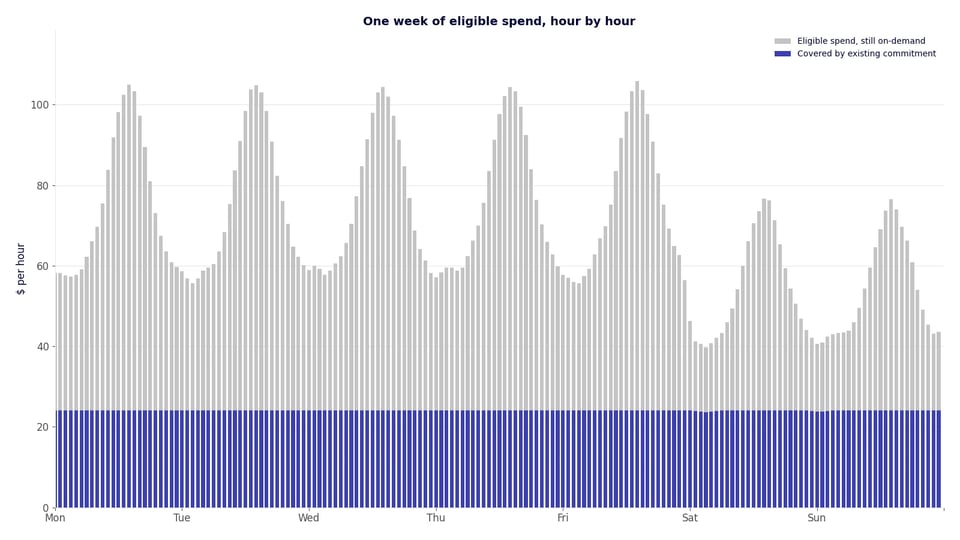
Then we take out what you already own. If you have active Savings Plans or CUDs, we apply them to each hour the same way the cloud provider does, best discount first. What those plans already cover is not in play. What is left is the spend a new commitment could still save you money on.
We also account for every discount you already have. Negotiated contract pricing. Sustained-use discounts on Google Cloud. Coverage from DoiT's Flexsave, if you use it. A commitment only makes sense if it beats the price you actually pay today, so that is the price we compare against, not the list price.
The two engines are separate because AWS and Google Cloud expose billing data differently and apply commitments by their own rules. The principle is shared, though: price the commitment against what you actually pay, not against a list price you never see on your invoice.
Now the part that matters.
Pick any hourly commitment you might buy. Over the window you'd pay two things. The commitment itself, every single hour, used or not. Plus whatever on-demand spend still spills over in the busy hours. Add them up and that's your total cost at that commitment level.
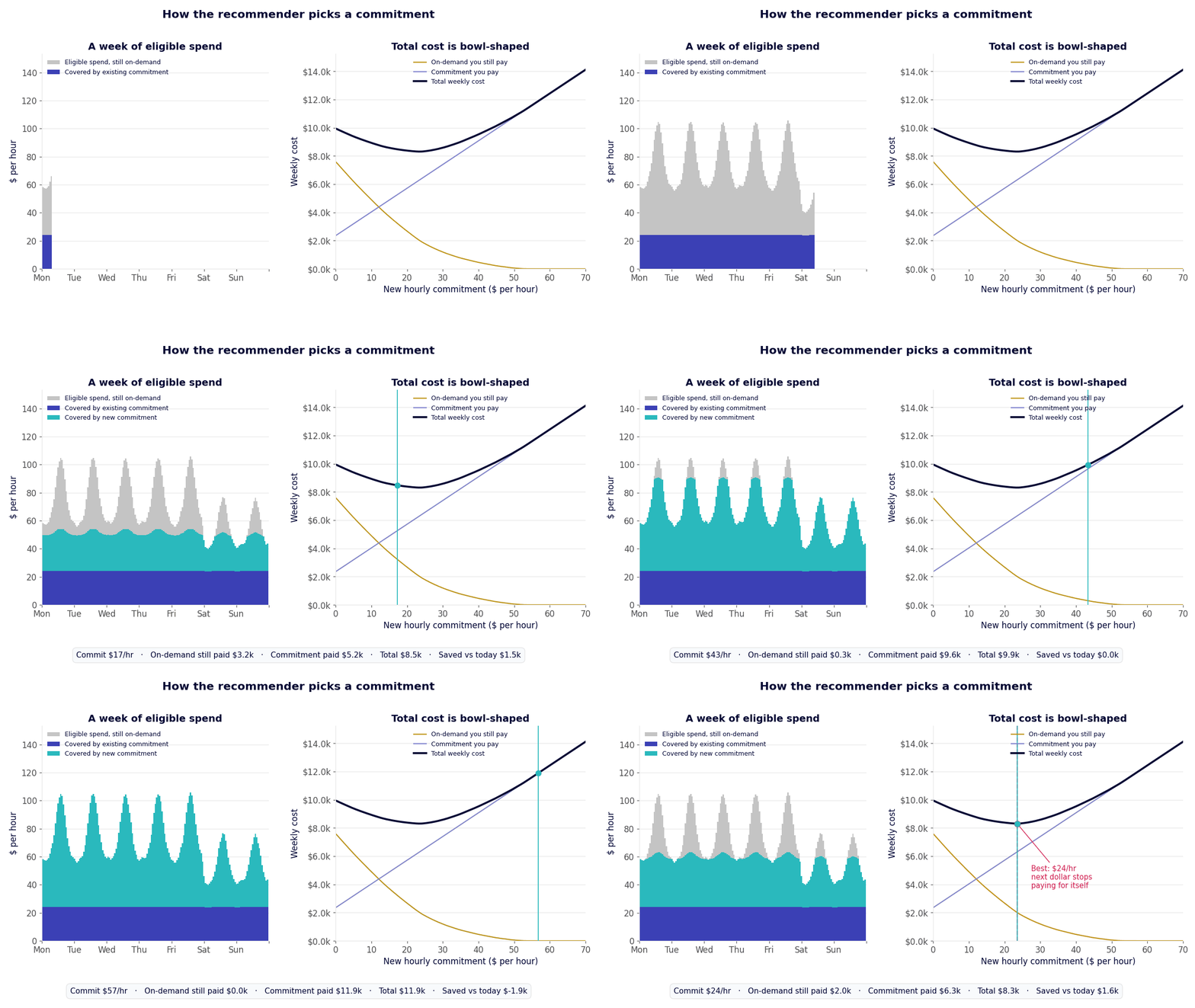
Quick example. One hour has $100 of eligible spend and you've committed $30 an hour at a 40% discount for simplicity. That $30 buys/covers $50 of on-demand usage. So you pay $30 for the commitment, $50 on-demand for the rest, $80 total instead of $100. Fine. Now take a quiet hour with only $40 of eligible spend. Your $30 still buys $50 of coverage, except there's only $40 to cover. You pay $30, save $10, and a slice of the commitment just sits there. The recommender runs this arithmetic for every hour in the window and adds it all up. Then it does the same for every commitment level it could recommend, to see which one saves the most.
Plot that total against the size of the commitment and you get a bowl. The bottom of the bowl is the sweet spot: the commitment where your total bill is lowest.
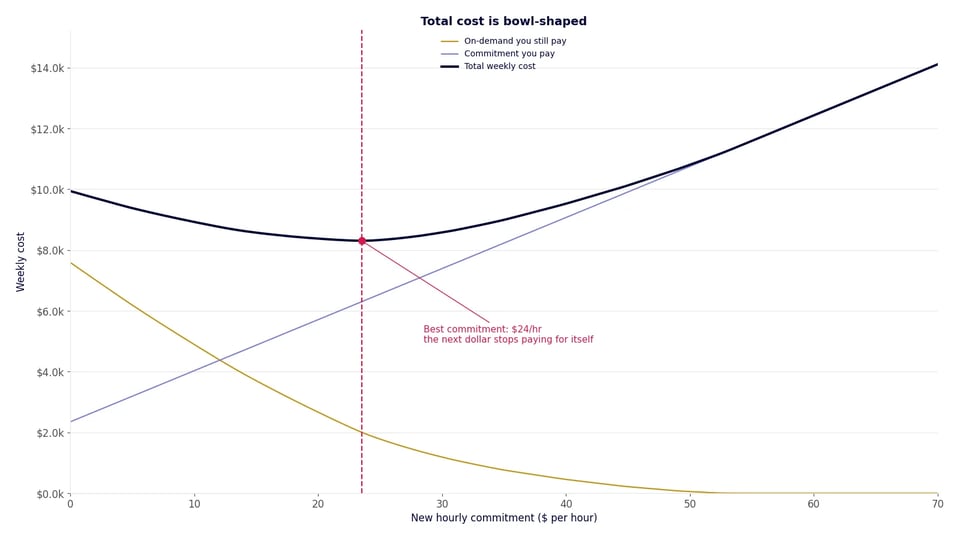
On the left side, you are under-committed. Each extra dollar of commitment replaces more than a dollar of on-demand spend, so total cost goes down. On the right side, you are over-committed. Extra commitment sits idle in quiet hours, so total cost goes back up.
The bottom of the bowl is the point where one more committed dollar would cost you more than it saves. That is the best commitment. We don't hunt for it by trying every value cent by cent and keeping the cheapest. The shape of the curve tells us where it turns, so we go straight to that point.
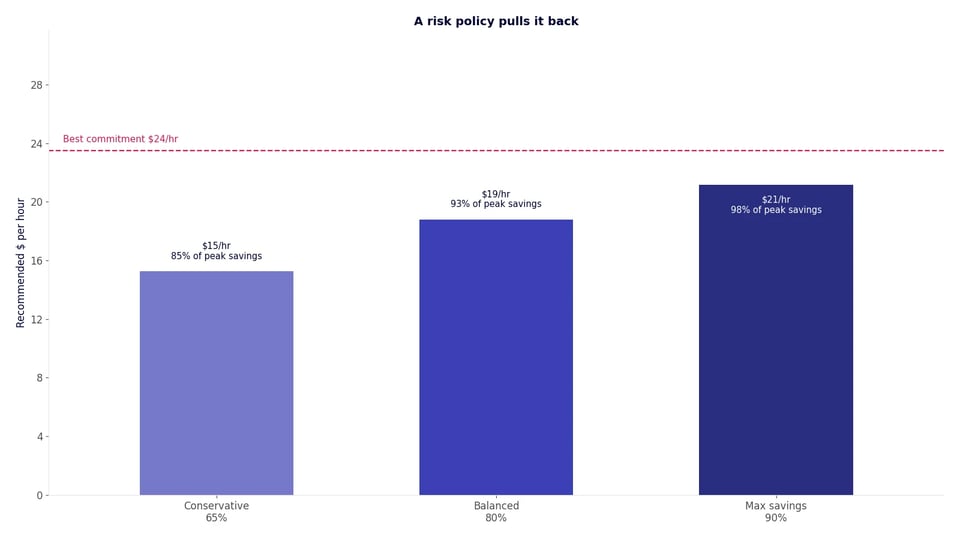
Then you pick a risk policy. Conservative, Balanced, Max Savings, or something you define yourself. Each one takes a share of that best commitment, 65%, 80%, or 90%, which leaves headroom for the week your usage dips. Custom policies go further: up to ten per customer, each with its own coverage target and its own purchase steps, so the recommendation follows your rules rather than the three presets a cloud vendor thought of. I went into why that headroom matters, and why we buy in steps instead of all at once, in an earlier post on the sizing problem.
On top of all that sits a small set of tuning knobs. We adjust them as real purchases teach us things. Their job is to keep the recommendation on the careful side of the optimal commitment value.
For instance, the bottom of the bowl might seem flat in some cases. A range of commitments, not one exact number, saves almost the same amount. The math alone would happily point at the biggest one, but we don't. When several sizes save about the same, we take the smallest. Same savings, less money locked in, more room if a workload disappears next month.
The knobs also let us react to what we see in production. If usage on an account trends down over the window, the recommendation leans smaller. If a purchase turns out less useful than the model expected, we learn from that and the next recommendation is more cautious.
And because the engine is ours, when a customer asks for something specific, say "never go below 70% utilization" or "leave extra room, we're consolidating accounts in Q3", we can honour it. You cannot ask AWS or Google to run their recommender with your rules. But you can ask us, or create your own policy and we'll follow it.
Where we agree with the clouds
Before we talk about differences, let's talk about trust. If our number were far from the cloud's number, you would be right to ask which one is wrong.
So we checked.
One thing has to be right first, or the whole comparison is noise: both recommenders must look at the same days of usage. Every recommender sizes on a lookback window, a fixed stretch of past hours. AWS lets you to pick up to the past 60 days. Ours can be set to anything. If the two windows don't line up, even by a few days, the numbers will differ, and that gap has nothing to do with method and everything to do with dates. So for every comparison below we set our engine to the exact same start and end dates AWS or Google used. Same days in, then compare what comes out.
On AWS, we ran our engine against the AWS Purchase Analyzer for multiple accounts. We tested every combination: one-year and three-year terms, no upfront, partial upfront, and all upfront. Same lookback window on both sides. Our recommended commitment landed within 1% of the AWS number in each case. We also ran the engine on our largest AWS customer to make sure it holds up at scale. It does.
On Google Cloud, we compared against the recommendations shown in the GCP console. On a billing account with standard pricing, we matched Google to the cent, across all eight commitment scopes we tested. That includes Compute Flexible CUDs, Memorystore, and Cloud SQL in each region. On an account with negotiated discounts, we were within 1%.
| Cloud | Account type | Scopes tested | Our number vs the cloud's |
|---|---|---|---|
| AWS | Mid-size payer, all term and payment combinations | 6 | Within 1% |
| AWS | Our largest customer | 6 | Runs fine, within 1% |
| Google Cloud | Standard pricing | 8 | Exact match, to the cent |
| Google Cloud | Negotiated discounts | 8 | Within 1% |
The point is simple. When you ask the same question, you get the same answer. Nobody is making up a bigger number to sell you more.
So why build our own?
Where the clouds stop and we keep going
Here are the questions our customers actually ask. In each case, the cloud's recommender either cannot answer, or makes you wait. The short version, before the details:
| AWS | Google Cloud | DoiT | |
|---|---|---|---|
| Recommendation accuracy | Baseline | Baseline | Within 1% of both |
| Every term and payment option, on demand | 20 analyses per day, one at a time | Some scenarios only | All combinations in under 20 seconds |
| Synchronous API | Async job, poll for minutes | Not available | Yes |
| Explain why the number moved | No | No | Yes, down to the billing rows |
| Scope by account or SKU | No | No | Yes |
| Custom date range | Partial | Partial | Yes |
| Independent of the cloud API on purchase day | No | No | Yes, reads billing data directly |
| Automated purchase ladder | No | No | Yes |
| Expiring commitments | Re-recommends after expiry | Re-recommends after expiry | Replacement sized and scheduled before expiry |
| Human monitoring of utilization | No | No | Yes, dedicated DoiT team |
"I want to compare 1-year vs 3-year, no upfront vs all upfront, and three risk levels, before I decide."
On AWS, each of those is a separate analysis. Purchase analyzer allows 20 analyses per payer account per day. Each one takes a few seconds to minutes, and they run one at a time. To see the full picture for one payer, you need more analyses than AWS allows in a day. So you pick a few, wait, and hope you picked right.
Google Cloud is more flexible here. The console lets you build scenarios over different lookback periods, and you can exclude a set of dates. Useful. But it stops there. You get the options Google thought of, on Google's terms, and once you want something outside that list you're on your own.
Our engine produces every combination for a payer account in under 20 seconds. You can run it as many times as you want.
"I want to wire recommendations into my own tooling."
The AWS recommender is an asynchronous job. You start it, then poll until it finishes, seconds/minutes later. Building a reliable pipeline on top of that takes work, and the daily cap still applies.
The Google Cloud console recommendation is built for reading, not for feeding into a purchase workflow.
Ours is a synchronous REST API, part of the DoiT Cloud Intelligence API. You call the endpoint with your API key, you get the recommendation back in the same response. It has the same shape on AWS and Google Cloud, so one integration covers both. You can post the daily recommendation into Slack, open a ticket when it moves by more than a threshold, or pull it into your own FinOps dashboard next to the rest of your cost data.
And because it's a plain synchronous API, it plugs into an AI assistant as easily as a dashboard. Connect it to Claude, or whatever you use, and ask in words: "What's the recommendation for Cloud SQL in us-east1?" "When does my next commitment expire?" "How much did compute commitments save us last month?" Try asking a console that.
Everything is computed in advance, too. Every option, every policy, every account, once a day. So when you or your assistant asks, nothing is queued, nothing is rate-limited, and there is no per-option wait. The answer is already there.
"Why did the number change since last week?"
We watched one AWS payer's recommendation move between two quite different levels within a single week. Nothing in the usage explained it. Our best read is that it comes down to the rolling window and the day of the week you ask. But we can't be sure, because the purchase analyzer doesn't show its work clearly enough to check.
Every number our engine produces traces back to billing rows. When a customer asks why the recommendation moved, we can show them which hours changed and by how much. Often the answer is simple: a batch job stopped running at night, or a new environment came online on Thursday. Either way, you get an answer instead of a shrug.
"That account is being decommissioned. Ignore it."
Or: "Leave out these SKUs, we are moving that workload." Or: "Size it on last quarter, not the default window."
Neither cloud lets you scope the recommendation by account, by SKU, or by an explicit time period. You get one answer for the whole payer, on the window they choose.
Ours does all three. Drop an account. Remove a share of specific SKUs. Set your own start and end dates. Eligibility is granular too: which linked accounts or projects are in scope for commitments at all is a setting, and the engine sizes only against those. Today we set it for you; a self-serve control is coming soon. And there are more controls behind that than either console exposes.
One honest note: today these are not self-serve buttons in the console. You tell your DoiT team what to leave out or which dates to use, and we run the engine with those settings for you. The point is that it can be done at all, and that the answer comes back the same day. And these are all on our radar: we intend to hand customers the tuning knobs so they can control every part of it themselves.
"What if Cost Explorer is down on purchase day?"
This sounds like an edge case until it happens. Sizing a commitment is not a one-time job. As I argued in the sizing post, it is a moving target you have to keep hitting, week after week, as your usage shifts underneath you. And the target multiplies. Two clouds, compute plus database, several regions, each with its own commitment and its own expiry date. That's not one weekly decision. It's a dozen.
A recommender that depends on an external job can miss a step. If the API is slow, rate-limited, or having an incident, that week's purchase does not happen. Ours reads your billing data directly. There is nothing external to wait on.
"I do not want to babysit this."
Here's the thing. This is the real answer to "why do I need yours."
A recommendation is only useful if someone acts on it. Our engine feeds an automated purchase ladder. Purchases happen behind the scenes, on a cadence the customer controls, in steps sized by the policy they chose. And a dedicated DoiT team watches utilization on every commitment. If something starts sitting idle, they catch it before it becomes waste on your bill. On AWS that can even mean returning a Savings Plan while the return window is still open.
Expiry is handled the same way. When a plan is about to run out, the next recommendation already assumes it's gone, and the ladder schedules the replacement to start the moment the old one ends. Coverage doesn't drop for a week while somebody notices. The clouds' recommenders only see the gap after it has opened.
Soon, customers will be able to define the purchase cadence policy themselves, on top of the risk policy they already pick today.
What is live today
On AWS, the engine covers Compute Savings Plans and Database Savings Plans. On Google Cloud, it covers Compute Flexible CUDs, which apply across Compute Engine and GKE, and Cloud SQL spend-based CUDs, which are bought per region. The other commitment types are on the roadmap and will become available soon.
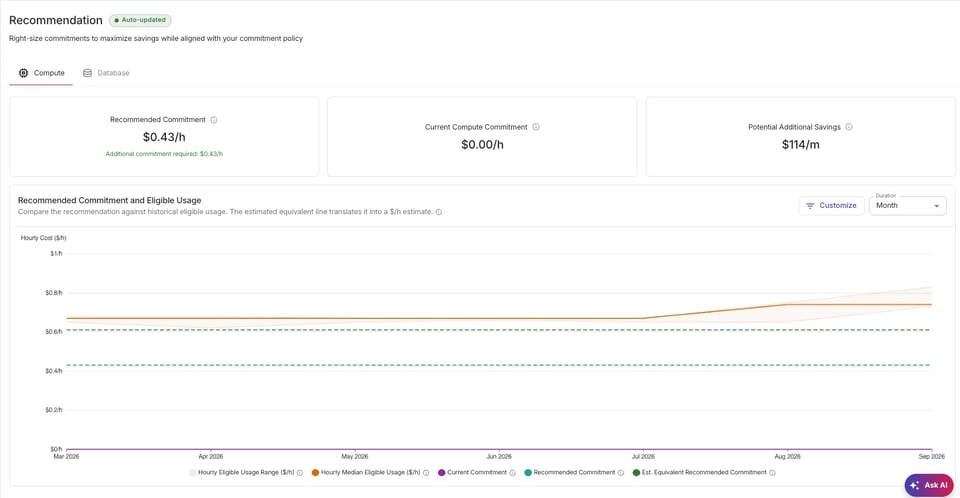
Existing Reserved Instances and resource-based CUDs are not something we buy for you. But the engine knows about them. Spend they already cover is not eligible, so we do not recommend a commitment on top of it.
The policies mean the same thing on both clouds. Balanced on AWS is the same 80% of the best commitment as Balanced on Google Cloud. If you run both clouds, your commitment strategy reads the same way in both places.
The recommender runs once a day, for every policy and every term and payment combination, for every payer account and billing account we manage. When you open the console, the numbers are already there.
What's next
Azure is next in line, so the same engine and the same policies will cover all three major clouds. The what-if simulator we use internally, where you remove a workload or an account and watch the recommendation move before you buy, is heading to customers. And on the wider FinOps side, showback by labels and tags is coming, so you can see which team or product each commitment is actually saving money for.
The takeaway
The built-in recommenders from AWS and Google Cloud are good. When we ask them the same question, we get the same answer. If you buy commitments once a year, they are probably all you need.
That holds while you have one cloud, one compute service, one region. Now add databases. Add a second region. Add Google Cloud next to AWS. Suddenly it's compute and database Savings Plans on one side, Compute Flexible and Cloud SQL CUDs per region on the other, each with its own expiry date, its own discount curve, its own quiet hours. The combinations multiply faster than anyone's calendar. Nobody sizes that by hand a few times a year. Not well, anyway.
But commitments are not a once-a-year job. Usage grows, shrinks, and moves. Old plans expire. New workloads show up. The right commitment today is not the right commitment in three months. It is a moving target you have to keep hitting.
For that, you need a recommender you can run any time, scope to your situation, explain to your finance team, and hand to an automated purchase process. That is why we built our own. It runs every day, on both clouds, and it is live now in PerfectScale for Commitments.
We did not build it to disagree with AWS or Google. We built it so that the right number shows up every day, on our schedule, for every option, with a reason attached. Then we let the machine act on it.
Stop sizing commitments in a spreadsheet once a year. Get in touch and we will run the engine on your actual bill, so you can see what automated, risk-aware commitments look like for you.