
PerfectScale
How Much AWS Savings Plans Commitment Is Right? The Sizing Problem, and How to Stop Guessing
This page is also available in Deutsch, Español, Français, Italiano, 日本語, and Português.


About Mohammad Reza Saleh Sedghpour
Senior Software Engineer 2
Mohammad Reza Saleh Sedghpour is a Senior Software Engineer II at DoiT and a Cloud Engineer and Researcher with over a decade of experience in cloud computing and distributed systems. He holds a Ph.D. in Computer Science, specializing in resiliency patterns for microservices, and is an active open-source contributor who regularly publishes research and presents at international conferences. At DoiT, he works on the automation behind cloud cost-optimization tooling, including commitment management — helping businesses use cloud technologies for optimal performance, resilience, and cost.
My personal pageEvery AWS cost conversation I've ever had eventually lands on the same question. Someone in finance, or an engineering lead, or a founder leans in and asks: "So how much should we commit to?"
It's the right instinct and the wrong framing. People ask it the way you'd ask for a thermostat setting as if there's a single correct number, and the only job is to find it once and lock it in.
There isn't. The right Savings Plans commitment isn't a number you discover. It's a moving target you have to keep hitting, month after month, as your usage shifts underneath you.
And the cost of missing that target is asymmetric, which is what makes it stressful. Under-commit, and you leave real money on the table, for instance Compute Savings Plans discount on-demand rates by up to ~66%, so every uncovered hour is an hour you overpaid for. Over-commit, and it's worse: you've signed a one- or three-year contract to pay for capacity you may not use. An idle Savings Plan doesn't just waste money. It can cost you more than the on-demand usage it was supposed to replace.
Play that out with a number. Say your durable baseline - the compute that's genuinely running around the clock - is about $60/hour, and you commit to $70. That extra $10/hour is roughly $7,200/month you're for nothing. And unlike an over-provisioned instance you can switchoff this afternoon, a Savings Plan gives you only a very narrow correction window; after that you generally can't cancel, reduce, or resize the commitment. You own that $10/hour for the rest of the term. On a three-year plan, a signle sizing mistake like this $10/hour compunds into a quarter-million-dollar liability before you've had your first review.
That's the trap. The upside is capped at the discount. The downside is a multi-year liability you're largely stuck with. So most teams do the rational thing under uncertainty: they under-commit, hedge, and quietly overpay for years.
This article is about why that number is genuinely hard to get right, why the manual process almost guarantees you'll be stale, and how a better mental model plus automation lets you hit the target continuously instead of guessing quarterly. (If you're still deciding which commitment instrument to use, start with our Savings Plans vs. Reserved Instances decision guide and our roundup of 7 common AWS commitment mistakes. This post assumes you've chosen Savings Plans and are staring at the "how much" question.)
The short answer
If you take one thing from this post: commit against your durable baseline — the compute that's genuinely on around the clock — not the average week, and not the peak. Turn that into a coverage policy you can defend (how much of your spend you want under commitment, plus a ceiling you won't cross), then add commitment in small steps toward it rather than in one big purchase.
Everything below is why that's the right answer, why the usual process makes it hard, and how to run it continuously without babysitting a spreadsheet.
Why "how much" is genuinely hard
Start with the two words people use interchangeably and shouldn't: coverage and utilization.
- Coverage is how much of your eligible on-demand spend is sitting under a commitment. If you're running about $80/hour on Savings-Plans-eligible compute and $60/hour of it is covered, you're at 75% coverage.
- Utilization is how much of the commitment you bought actually gets used. If you commit to $70/hour and only $60/hour of matching usage shows up, you're at ~86% utilization and you're still paying the committed rate for the 14% that went idle.
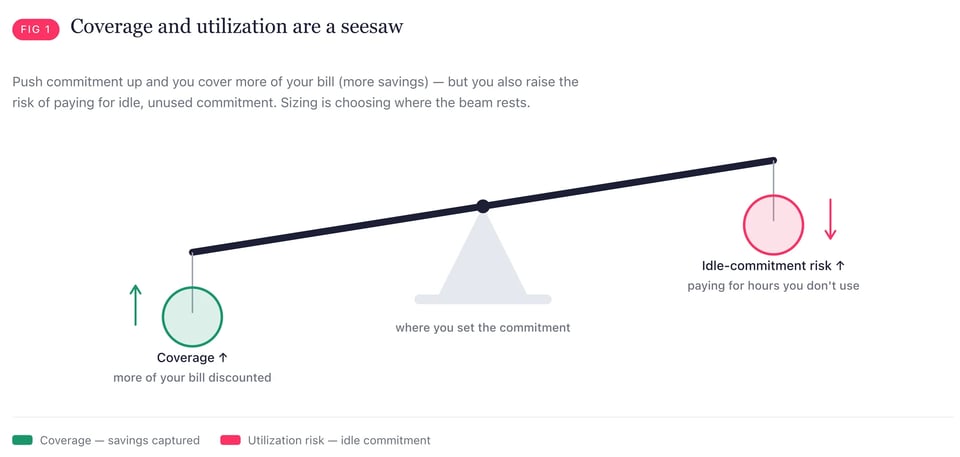
Here's the uncomfortable part: these two move in opposite directions when you push on them. Chase higher coverage and you buy more commitment, which makes it easier for utilization to slip if usage dips. Protect utilization by buying conservatively and your coverage — and your savings — stays low. Sizing a commitment is the act of choosing where to sit on that seesaw. Most teams never make the choice explicitly; they just react.
Then there are the levers, each of which changes the math:
| Choice | Options | The tradeoff |
|---|---|---|
| Term | 1 year vs. 3 years | 3-year deepens the discount but triples the lock-in you're betting on. |
| Payment | No / Partial / All Upfront | More upfront buys a slightly better rate, but ties up cash and raises the stakes on being wrong. |
| Plan type | Compute SP vs. EC2 Instance SP | Compute SP (~up to 66% off) flexes across instance family, size, region, OS, tenancy, and even Fargate/Lambda. EC2 Instance SP (~up to 72% off) pays a bit more but locks you to an instance family in a region. Flexibility vs. discount, again. |
To see what these choices are worth, look at what they do to the price of a single instance — the same c6a.8xlarge, one region, priced across Compute Savings Plan terms and payment options (plus on-demand):
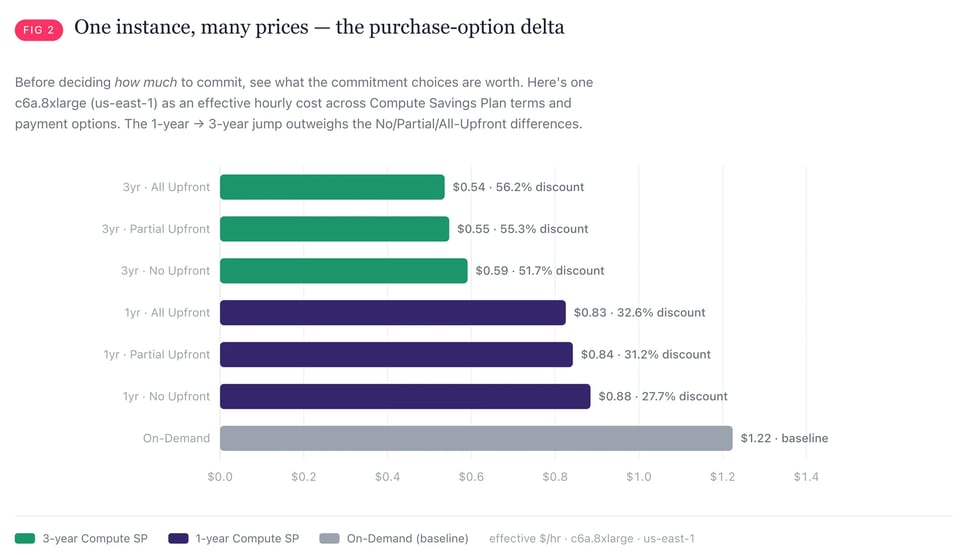
The spread is enormous: the same box runs about $1.22/hour on-demand down to ~$0.54/hour on a three-year Compute Savings Plan — a ~56% swing decided entirely by how you buy. And the deltas aren't evenly spaced: moving from a 1-year to a 3-year term nearly halves the rate, while the upfront choice (No / Partial / All) only nudges it a couple of percent. The lever that looks like fine print — term length — is the one that actually moves the money.
Every one of those choices assumes you know what your workload looks like over the entire term. On a three-year, all-upfront, EC2-Instance plan, you're not sizing a commitment — you're making a prediction about your architecture in 2028. That's the real difficulty. The number isn't hard to compute. The future it depends on is hard to know.
The five forces that keep moving the target
If your usage were a flat line, this would be a spreadsheet exercise. It never is. Five forces keep dragging the "right" number around after you've committed.
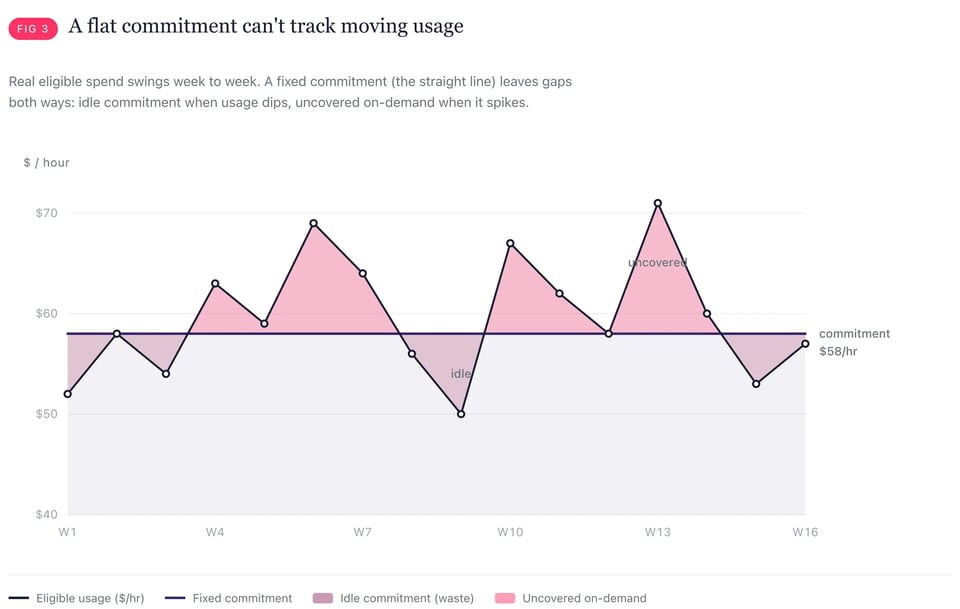
1. Usage isn't flat. Real compute spend swings week to week such as batch jobs, launches, seasonal traffic, a big customer onboarding. A commitment sized to a good week becomes over-commitment in a quiet one. Size to a busy week at $70/hour when your durable baseline is really $60/hour, and the moment things quet down the extra $10/hour is idle commitment, that's about $87,600 a year paid for capacity you're not using. The discount you were chasing is smaller than the waste you created.
2. Rightsizing and migrations shrink the baseline. This is the one that quietly strands the most money. You commit to today's usage, then your team does its job and rightsizes over-provisioned instances, moves a service to Graviton, refactors a monolith. Your usage drops, and your commitment doesn't. You commit to your $60/hour baseline, then your team migrates to Graviton and the baseline sttles at $50/hour. Overnight, that ~$10/hour of commitment has nowhere to land with about two years left on a three-year plan, roughly $175K stranded. You did the right engineering thing and got punished for it. The correct move is the opposite order: rightsize first, then commit to the leaner steady-state. Almost nobody does, because the commitment and the rightsizing live in different teams' backlogs.
3. Commitments expire and expirations arrive in clusters. A Savings Plan you bought a year ago drops off on a specific day. If you bought several in a burst, they expire in a burst, and your coverage falls off a cliff overnight. Renewing means re-running the whole sizing exercise, at exactly the moment you're least likely to be watching. Miss it and you're back on full on-demand rates for the expired slice.
4. A coverage target is not a utilization outcome. You can aim for 80% coverage and still end up with poor utilization if usage softens after you buy. Targets are set on history; utilization is realized in the future. The gap between them is pure waste, and you don't see it until the bill arrives.
5. Time itself. Every day you wait for "enough certainty" to commit is a day at on-demand rates. Teams delay commitments for months chasing confidence that never comes and the discount they postpone is gone for good. As we put it in the commitment-mistakes post: even during migrations and uncertainty, committing some portion beats committing nothing.
Notice that none of these are planning failures. They're just reality. Your infrastructure is supposed to change. The problem isn't that the target moves — it's that most commitment processes are built as if it doesn't.
Why the manual approach breaks down
Here's how sizing usually happens in practice.
Once a quarter, someone opens AWS's Savings Plans purchase recommendation. AWS looks back over a window - you can choose 7, 30, or up to 60 days — and hands you a single suggested hourly commitment optimized for maximum savings. Someone eyeballs it, maybe discounts it "to be safe," gets an approval, and buys.
There are three problems baked into that flow.
First, it's a single number from a single lookback. Max-savings recommendations assume your recent past is your future and push coverage high. Great when usage is stable; expensive the moment it isn't.
Second, it's a big-bang purchase. You take your whole quarter's commitment decision and execute it in one transaction, on one day. If that day happens to sit at the top of a usage spike, you've just anchored a year of commitment to a peak.
Third, it's already stale. By the time the recommendation is reviewed, approved, and purchased, days or weeks have passed and usage has moved. You're not committing to your current reality, you're committing to a snapshot of a reality that's already gone.
The deeper issue is cadence. Usage changes continuously; the manual process fires quarterly. You're sampling a moving signal four times a year and acting on each sample weeks late. No amount of spreadsheet rigor fixes a sampling-rate problem.
A better mental model: size to the baseline, then ladder to it
The fix is really two separate jobs, and it helps to name them: sizing (picking the right number) and laddering (getting there safely). Two changes in how you think about each.
Change one — sizing: anchor on the durable baseline. This is the job of choosing the number. Instead of "what's the right dollar amount," decide how much of your eligible spend you want covered — anchored on the durable baseline, the part that runs around the clock — and let the dollar amount fall out of that. It turns an unbounded guess into a policy you can reason about:
- Conservative (~65% coverage). You protect utilization and keep flexibility. You leave some savings on the table on purpose. Good for volatile or fast-changing usage.
- Balanced (~80% coverage). The default for most steady production workloads, meaningful savings with a comfortable buffer against dips.
- Aggressive (~90% coverage). Maximum savings, minimal buffer. Only appropriate when your baseline is genuinely stable and predictable.
Why not just always pick aggressive? Because coverage has diminishing returns, and the last slice is the dangerous one. The bottom of your usage — the part that's on 24/7/365 — is the safest to cover and where the discount is basically free money. As you push coverage higher, you start committing against the variable top of your usage: the hours that only exist during spikes. That marginal spend is exactly the spend most likely to disappear, which means the coverage you add above ~80% carries most of the over-commitment risk while adding the least reliable savings. The right posture isn't "cover everything." It's "cover the stable base aggressively and the volatile top cautiously."
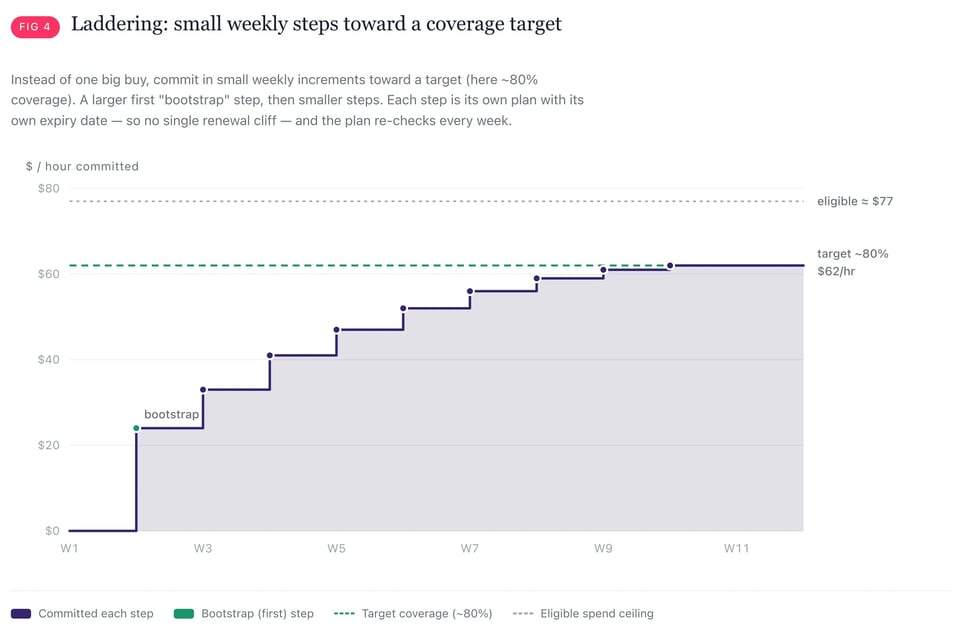
Change two — laddering: get there in small steps. This is a different job: not what to commit, but how to reach it. Instead of one large purchase, break the distance to your target into a series of small, staggered commitments over time. Laddering solves several of the five forces at once:
- Small, frequent steps mean no single purchase anchors to a peak. You're averaging into your commitment the way you'd dollar-cost-average into a position.
- Staggered start dates mean staggered expirations, no renewal cliff, because your plans roll off a few at a time instead of all at once.
- Committing gradually means you can stop or slow down the moment usage softens, instead of discovering the over-commitment a year into a locked contract.
But keep the two jobs separate. Laddering manages timing — purchase concentration and expiration cliffs — not sizing. It can't rescue a target that's too aggressive: ladder slowly toward the wrong number and you still end up over-committed, just a few weeks later. Get the baseline right first; ladder to it second.
The catch: sizing to a moving baseline, re-checking coverage every week, adjusting for expirations, and pausing on downturns is a genuinely continuous job. Done by hand, it's a part-time role nobody has. That's exactly the gap automation is built to fill.
How PerfectScale for Commitments automates this
PerfectScale for Commitments is DoiT's answer to the sizing problem. It runs the continuous version of everything above, sizing, laddering, and buying. So you get the coverage of an aggressive strategy with the safety of a conservative one, without anyone babysitting a spreadsheet. Here's how it maps to each challenge.
A recommendation engine that stays current. Rather than a quarterly snapshot, PerfectScale for Commitments refreshes its analysis continuously against your recent usage. It deliberately strips out spend already handled elsewhere, such as coverage and plans that are about to expire, so it's sizing your true net-new need, not double-counting.
Risk profiles that are just coverage targets. The conservative / balanced / aggressive framing above is built in as selectable profiles (Conservative ≈ 65%, Balanced ≈ 80%, Max Savings ≈ 90%). You pick your posture; the engine translates it into a target commitment and scales its buying to hit it. Balanced is the default because it's the right answer for most production workloads.
Laddering, executed weekly, where only the next step is live. PerfectScale for Commitments turns your target into a schedule of small weekly steps. Crucially, it only ever commits the next step, the rest of the ladder is a projection, and the plan is recomputed every cycle against fresh usage. So if your usage rises, the ladder steepens; if it falls, the ladder flattens. You're never locked into a plan you drew up weeks ago.
A guard against buying into a dip. If your eligible spend drops week-over-week beyond a threshold, PerfectScale for Commitments skips that cycle's purchase instead of committing into a downturn. This is the single most common way teams over-commit by hand, and it's handled automatically.
Automatic renewals — no cliff. Expiring plans are detected ahead of time and renewed as their own scheduled purchases, so coverage doesn't fall off when a plan rolls off. The renewal is sized proportionally to what's expiring, not bolted onto a fresh guess.
Waste monitoring after the buy. Sizing doesn't end at purchase. PerfectScale for Commitments watches utilization and flags a meaningful drop, so an over-commitment surfaces as an alert in days and not as a line item you notice at renewal.
You stay in control. By default PerfectScale for Commitments runs in approval-required mode: it prepares each purchase and asks before executing, so nothing happens without a human yes. Teams that want fully hands-off can switch to autonomous mode (Coming soon). Either way, you set a maximum commitment cap the system will never exceed, and you can pause and resume at any time and any step that would push your total past a commitment level you've already approved re-triggers approval rather than sliding through.
Every automated purchase clears a validation gate before it can execute: it must match your chosen term, payment option, and cap, land within your allowed purchase window, and it won't fire while another commitment purchase is already queued outside the system, so you don't get accidental double-buys stacking on top of each other. Each plan PerfectScale for Commitments places is tagged as such, so your inventory always shows exactly which commitments were automated and which you bought yourself. When a purchase is made or needs your approval, you get notified.
The net effect: the sizing decision stops being a stressful quarterly event and becomes a continuously-maintained policy. You choose a coverage posture and a ceiling once; the system does the weekly work of hitting the target, dodging the dips, and renewing the expirations safely, and with a full audit trail.
What good looks like: a quick decision framework
You don't need automation to think correctly about sizing. You do need it to act correctly every week. Here's how I'd match posture to situation:
| Your situation | Coverage posture | Automate it? |
|---|---|---|
| Stable, predictable baseline; mature workload | Aggressive (~90%) | Yes, the upside is real and the risk is low, but only automation reliably holds high coverage without over-shooting. |
| Steady production with normal week-to-week variance | Balanced (~80%) | Yes, this is the sweet spot; laddering smooths the variance. |
| Spiky, seasonal, or rapidly growing usage | Conservative (~65%), laddered | Strongly yes, the moving target is fastest here, so manual sizing is stalest here. |
| Mid-migration or active rightsizing | Conservative, small steps, rightsize first | Yes, commit gradually to the shrinking baseline; never big-bang. |
| Tiny/flat spend where a wrong guess is cheap | Any | Optional, the effort may not pay off yet. |
The through-line: the more your usage moves, the more you benefit from committing (the savings are large) and the harder it is to size by hand (the target won't sit still). That combination of high value, high difficulty is precisely where automation earns its keep.
TL;DR
- The "right" commitment is a moving target, not a fixed number. Your usage changes on purpose; your sizing process has to change with it.
- Commit against the durable baseline; the compute that's on around the clock and not the average week and not the peak. Express it as a coverage policy with a ceiling.
- Coverage and utilization are different metrics that trade off against each other. Sizing is choosing where to sit between "leaving savings on the table" and "paying for idle commitment."
- Sizing and laddering are two jobs. Sizing picks the right number; laddering reaches it in small steps to cut timing risk and expiration cliffs. Laddering can't fix a target that's too aggressive.
- Ladder toward the baseline instead of guessing a dollar amount and let automation like PerfectScale for Commitments run the weekly work: continuous sizing, dip-aware laddering, automatic renewals, waste monitoring, and a hard commitment cap you control.
Ready to stop guessing?
If you're sizing AWS Savings Plans by hand every quarter, you're almost certainly either leaving savings on the table or carrying commitment you don't use usually both, in different corners of the bill. PerfectScale for Commitments turns that into a policy you set once and a system that maintains it, with you in control of the ceiling and the approvals.