

An unevictable pod is a pod that Karpenter cannot evict. One such pod keeps its whole node running, even when the node is almost empty. Many nodes in this state mean low node density, and you pay for capacity that your workloads do not use.
Node density is the share of a node that your pods request. When density is low, the nodes cost more than the work they run. Karpenter can raise density only when it can move pods away from the weakest nodes, and an unevictable pod stops that move.
This article shows how to find unevictable pods, how to fix each constraint with the smallest change, and how to check that density rises. Each fix has an owner, so the right team gets the right request.
What makes a pod unevictable?
Before Karpenter removes a node, it checks the node and every pod on it. Karpenter stops at the first check that fails. These are the four checks, in order:
- A do-not-disrupt annotation on the node: The node carries
karpenter.sh/do-not-disrupt, so Karpenter does not disrupt it. - A do-not-disrupt annotation on a pod: The value is
"true", or it is a duration that has not ended. The annotation works like a PDB for one pod. - Two or more PDBs on one pod: Kubernetes does not support this, so the Eviction API refuses to evict the pod, even when both PDBs have room.
- A PDB with no room: The PDB allows 0 disruptions, so Kubernetes refuses to evict the pod until the allowed number rises.
Karpenter runs the four checks in this order, and the first check that fails stops the node:
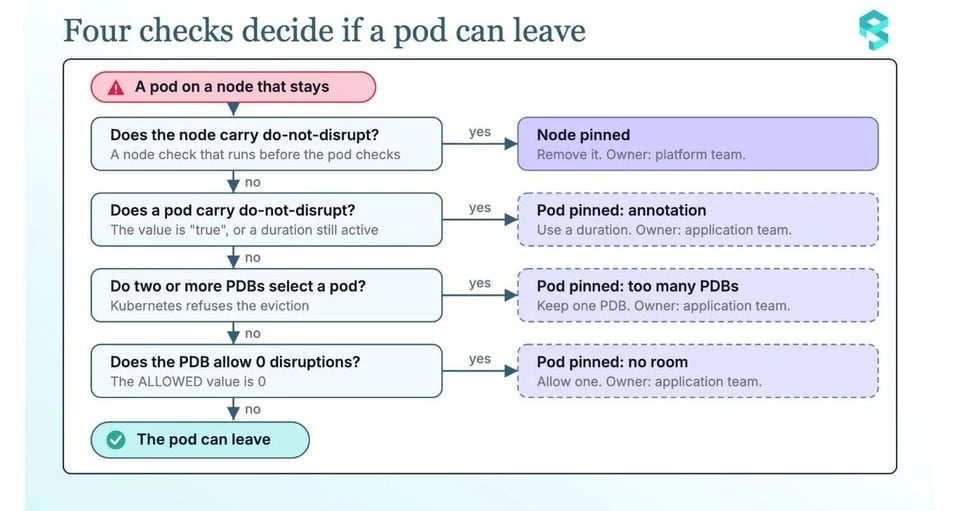
Some pods never block a node through eviction. Karpenter does not evict static pods, pods that tolerate the karpenter.sh/disrupted:NoSchedule taint, or pods that have succeeded or failed. Karpenter writes an event for three of these checks, so the events are the best place to start.
Why unevictable pods lower node density?
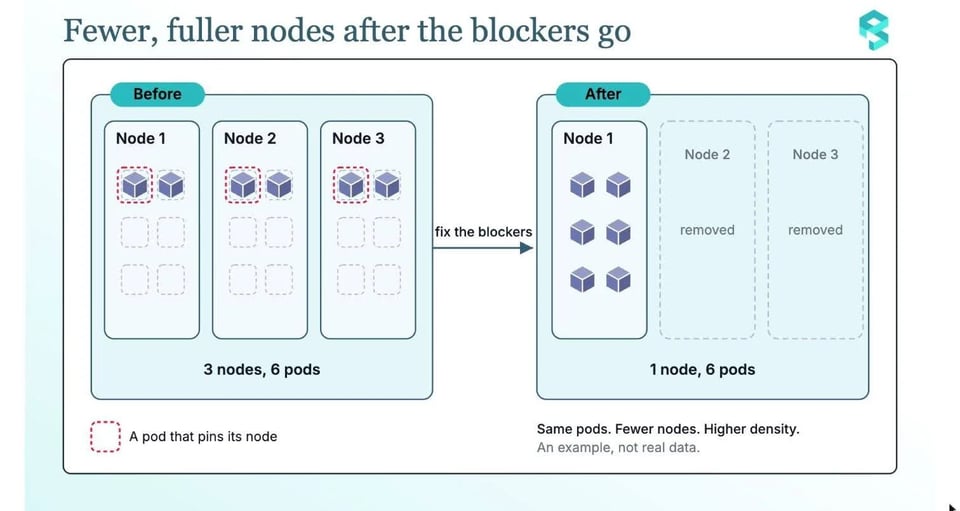
Karpenter consolidation moves pods from weak nodes to nodes with free room, and then it removes the empty node. A pod that cannot move stops this chain. The weak node stays, and the pods on it keep paying for a full node.
This example has six pods on three nodes. When the blockers go, the pods fit on one node:
Density has a simple measure: the CPU that pods request on a node, divided by the CPU that the node can allocate. This query shows the value for each node. It uses the metrics of kube-state-metrics:
sum by (node) (kube_pod_container_resource_requests{resource="cpu"})/sum by (node) (kube_node_status_allocatable{resource="cpu"})A node with a low value that stays for a long time is a good place to look for an unevictable pod. No single number is right for every cluster, so compare each node with the other nodes in the same NodePool.
You can read the same numbers for one node without Prometheus. The Allocated resources part of this output shows the requested share of CPU and memory. Replace $NODE with the node name:
kubectl describe node $NODEFind the unevictable pods
Low density shows you where to look. You should start with the events. Karpenter writes a DisruptionBlocked event when it cannot disrupt a node. These commands read the events of one node and of the whole cluster. Replace $NODE with the node name:
kubectl describe node $NODEkubectl get events -A --field-selector reason=DisruptionBlocked --sort-by=.lastTimestampThree messages name the checks:
| Message | Meaning |
|---|---|
Disruption is blocked through the "karpenter.sh/do-not-disrupt" annotation |
The node carries the annotation. |
Pod has "karpenter.sh/do-not-disrupt" annotation (Pod=<namespace>/<name>) |
A pod on the node carries the annotation. |
Pdb prevents pod evictions (PodDisruptionBudget=[<namespace>/<name>]) |
A PDB has no room for a pod on the node. |
Two PDBs on one pod leave a different mark. Karpenter may show no event, and Kubernetes writes a MultiplePodDisruptionBudgets event on the pod:
kubectl get events -A --field-selector reason=MultiplePodDisruptionBudgetsThis command lists the PDBs that allow 0 disruptions now. It uses jq:
kubectl get pdb -A -o json | jq -r '.items[] | select(.status.disruptionsAllowed == 0) | "\(.metadata.namespace)/\(.metadata.name)"'These commands list the pods and the nodes that carry the do-not-disrupt annotation:
# List pods with the karpenter.sh/do-not-disrupt annotationkubectl get pods -A -o json | jq -r '.items[] | select(.metadata.annotations["karpenter.sh/do-not-disrupt"] != null) | "\(.metadata.namespace)/\(.metadata.name) node=\(.spec.nodeName) value=\(.metadata.annotations["karpenter.sh/do-not-disrupt"])"'
# List nodes with the karpenter.sh/do-not-disrupt annotationkubectl get nodes -o json | jq -r '.items[] | select(.metadata.annotations["karpenter.sh/do-not-disrupt"] != null) | .metadata.name'
A duration value leaves two more events on the pod. The DoNotDisruptUntil event shows when the protection ends, and the DoNotDisruptGracePeriodElapsed event shows that it has ended:
kubectl get events -A --field-selector reason=DoNotDisruptUntilResolve each constraint
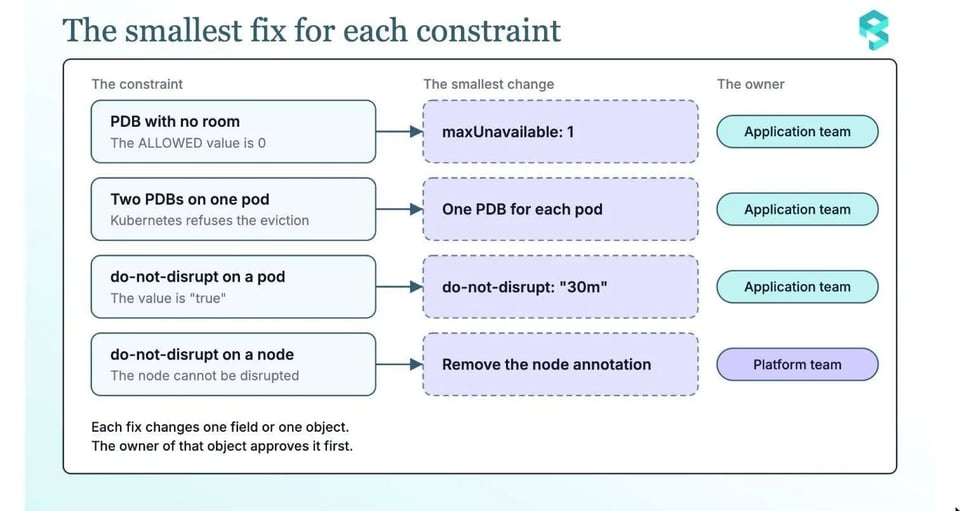
Now each constraint has a name and a place in the cluster. Every fix changes one field or one object. Send the owner a diff, and name the evidence in the request. The owner can then approve one small change. There are five fixes: a PDB with no room, two PDBs on one pod, a pod that is running but not ready, a do-not-disrupt annotation on a pod, and a do-not-disrupt annotation on a node.
This map shows the smallest fix and the owner for each constraint:
a. A PDB with no room
A PDB with maxUnavailable: 0, or with minAvailable set to the number of replicas, requires zero evictions. No pod behind it can leave. A Deployment with one replica and minAvailable: 1 has the same effect. There are two fixes:
1. Change the PDB: Use maxUnavailable: 1 instead, because it follows the number of replicas. A PDB can set only one of the two fields:
spec: minAvailable: 3 maxUnavailable: 12. Add a replica: A workload with one replica needs a second replica first. With two replicas, maxUnavailable: 1 lets one pod move while the other pod keeps serving:
spec:- replicas: 1+ replicas: 2b. Two PDBs on one pod
A pod must have only one PDB. Remove one of the two PDBs, or change the selectors so that each pod matches only one PDB. Then the pod can leave when the remaining PDB has room.
c. A pod that is running but not ready
A pod that crash-loops can block its own eviction when the PDB has no room. Keep the PDB, and add unhealthyPodEvictionPolicy: AlwaysAllow. Then Kubernetes can evict a pod that is running but not ready. This field has been stable since Kubernetes v1.31:
spec: maxUnavailable: 1 unhealthyPodEvictionPolicy: AlwaysAllowd. A do-not-disrupt annotation on a pod
The value "true" protects a pod for good. A batch job often needs protection only while it runs, so use a duration that matches the longest run. The protection then ends on its own, after the pod starts running:
template: metadata: annotations:- karpenter.sh/do-not-disrupt: "true"+ karpenter.sh/do-not-disrupt: "30m"Write the duration as a Go duration, such as 30m or 2h. Karpenter ignores a value that it cannot read, and it writes an event on the pod. The pod then loses its protection, so check the value twice.
e. A do-not-disrupt annotation on a node
The platform team can remove the annotation from the node. The hyphen at the end of this command removes the annotation:
kubectl annotate node $NODE karpenter.sh/do-not-disrupt-What to check after the fixes?
These fixes remove the eviction blockers. A pod that Karpenter can evict can still keep a node, when the pod fits on no other node. That is a placement problem, not an eviction problem. The usual causes are a request that is larger than the free room on other nodes, a nodeSelector that matches only one node group, and a required anti-affinity rule. Karpenter places pods by their requests, not by their use, so right-sized requests also raise density.
Also check for pods without a controller. They do not block Karpenter, but nothing starts them again after an eviction. Give each of them a Deployment, a StatefulSet, or a Job before you free its node.
Check that density rises
After the owner applies a fix, watch the result. Run these commands in separate terminals. They show new NodeClaims, new blockers, and pods that wait or fail:
kubectl get nodeclaims -wkubectl get events -A --field-selector reason=DisruptionBlocked -wkubectl get pods -A --field-selector=status.phase!=Running,status.phase!=Succeeded -wThen run the density query on the same nodes. The node count should fall, and the value of the remaining nodes should rise. If a node still stays, read its events again. A node can have more than one blocker, so fix one and check the node again.
How PerfectScale can help
PerfectScale does not replace this process. It finds the unevictable pods in your clusters, shows what each one costs you, and gives you the change for each one, so your team works from a ranked list. Here is how PerfectScale can help you:
1. Find the pods that block node removal: The bin packing view shows each node as a card. A card shows the requested share of the node and a treemap of its pods. Unevictable pods have an orange border, and each card counts them. You can sort the nodes by the number of unevictable pods. You can also click a pod or a node to see its requests, its limits, its real use, and its annotations.
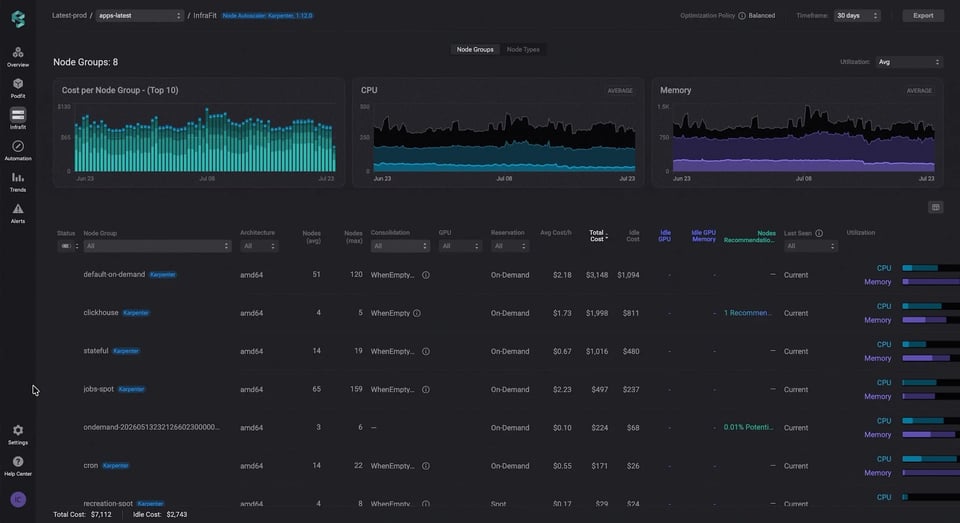
2. Fix the blocker with a ready change: For each unevictable pod, PerfectScale explains why the pod cannot be evicted and shows the cost that it blocks. It gives a YAML diff that you can copy and apply to your manifest. Each recommendation is ranked by cost impact, and it has a confidence level and a risk level. You can see what is safe to apply and what needs a review.
3. Keep the blockers that you want: Some blockers are intentional. A database pod with a strict PDB can be exactly right. When you mute a finding, PerfectScale hides it for all unevictable pods in that workload. The Active and Muted lists keep every finding visible, so nothing disappears without a record.
4. Use the same data in your own tools: The PerfectScale public API lists the unevictable pods for each cluster and node. For each pod, it returns the root cause, the fix, and the savings that the pod blocks. You can feed this data into your automation, and you can set priorities by cost, not by count. An agent such as Claude can also query PerfectScale data with the PerfectScale AI agent skill.
Safety checks before you change an eviction rule
Eviction rules protect real services, so check these points before anyone changes one. Copy them into the pull request:
- The owner of the workload approved the change.
- The workload has at least two replicas, or the team accepts a short pause.
- An event, or the
ALLOWEDvalue of the PDB, proves the blocker. - The change touches one field or one object.
- A budget or a time window limits how many nodes can move at once.
- The change ran first on a test cluster.
- The undo step is written down.
- After the change, the node count fell, and no pod waits or fails.
See the fixes run with an agent in the workshop
Next time a node stays, read the events before you change any rule. An agent can help with the first checks, because it reads events, configuration, and metrics much faster than you can. It can also give a different answer each time you ask. That is why a person reviews every change, and why fixed rules, not an agent, should apply it in production.
Dealing with nodes that stay running? Our team can help you find the blocker, review the change, and reclaim capacity without compromising reliability. Talk to our experts or sign up for free and try it yourself.