


Cluster Autoscaler (CA) and Karpenter are both Kubernetes node autoscalers, but they take entirely different approaches. CA operates at the node group level, scaling pre-defined pools. Karpenter bypasses node groups entirely, operating at the workload level to provision precisely the right compute resources just-in-time.
In this article, we will explore Karpenter vs Cluster Autoscaler. But before, let's find what is Karpenter and what is Cluster Autoscaler.
Here is how the two autoscalers compare across the metrics that matter most:
- Provisioning speed: Karpenter brings new nodes online in 45 to 60 seconds by calling cloud provider APIs directly, while CA resizes Auto Scaling Groups and typically takes 3 to 4 minutes.
- Resource optimization: Karpenter bin-packs unscheduled pods onto the cheapest exact-fitting instance from the entire cloud catalog, while CA fits pods into uniformly sized nodes and often over-provisions.
- Consolidation: Karpenter actively repacks running workloads onto fewer or cheaper instances, while CA only scales down nodes once they are entirely idle.
- Cloud support: CA is a mature, cross-cloud tool native to AWS, GCP, and Azure, while Karpenter is AWS-first and now powers EKS Auto Mode and Azure AKS Node Auto Provisioning.
When deciding between the two, a few clear guidelines apply:
- Use Cluster Autoscaler if: you run a multi-cloud environment (especially on GCP), have steady and predictable workloads, or prefer standard, tried-and-true node groups over dynamic infrastructure.
- Use Karpenter (or EKS Auto Mode) if: you are AWS-heavy, deal with bursty or unpredictable workloads, or want to cut your cloud bill through automated Spot selection and aggressive workload consolidation.
The landscape has shifted quickly in the last couple of years. Karpenter has reached its stable v1 APIs, and both major clouds now ship it as a managed service, which changes the calculus for teams weighing a switch away from traditional node groups.
Editor's note: Updated the article to reflect Karpenter's v1 graduation, managed offerings such as EKS Auto Mode and AKS Node Auto Provisioning, refreshed provisioning-speed and cost figures, and a new AI Overview-aligned comparison as of 2026.
What Cluster AutoScaler?
Kubernetes Cluster Autoscaler is a vital tool that helps manage the size of a Kubernetes cluster based on the workload needs. Its main role is to ensure that your cluster has the right amount of resources for running applications efficiently. This means it adds nodes when there aren’t enough resources for new pods and removes nodes when they are underused, so resources aren't wasted.
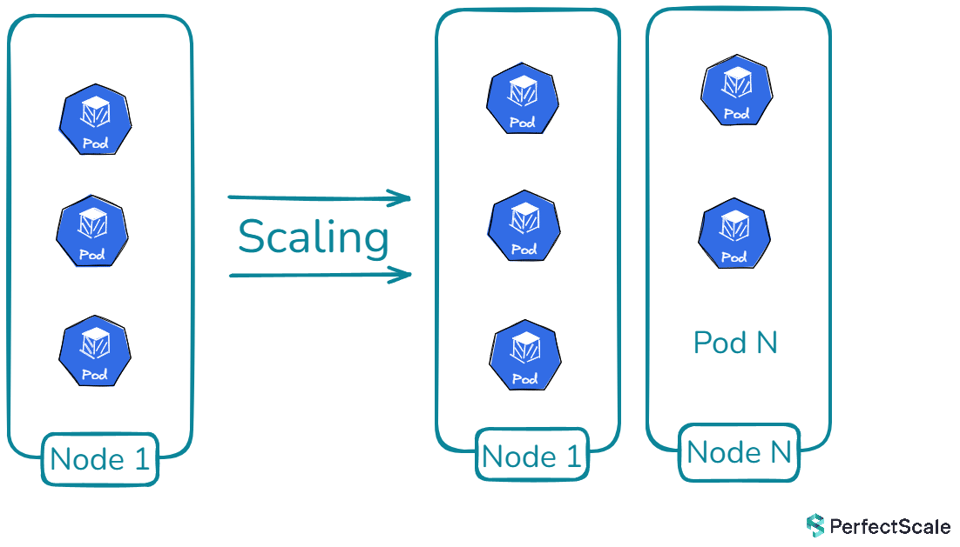
Cluster Autoscaler works by monitoring the cluster's resource use and the status of pod scheduling. If a pod can’t be scheduled due to lack of space, the autoscaler checks available node pools and instructs the cloud provider to add nodes that fit the requirements. This continues until all pods are scheduled or the maximum number of nodes is reached. Conversely, if a node is underused for some time (e.g., below 50% capacity for over 10 minutes), the autoscaler tries to move its pods to other nodes. If it succeeds, the node is marked for removal, and the cloud provider is notified to delete it.
For clusters with multiple node groups, the Cluster Autoscaler uses expanders—components that choose which node group to scale. Expanders include types like "least-waste" to reduce unused CPU, "most-pods" to maximize scheduling, "price" for cost savings, and "priority" for custom node group preferences. This allows tailored scaling to fit specific needs.
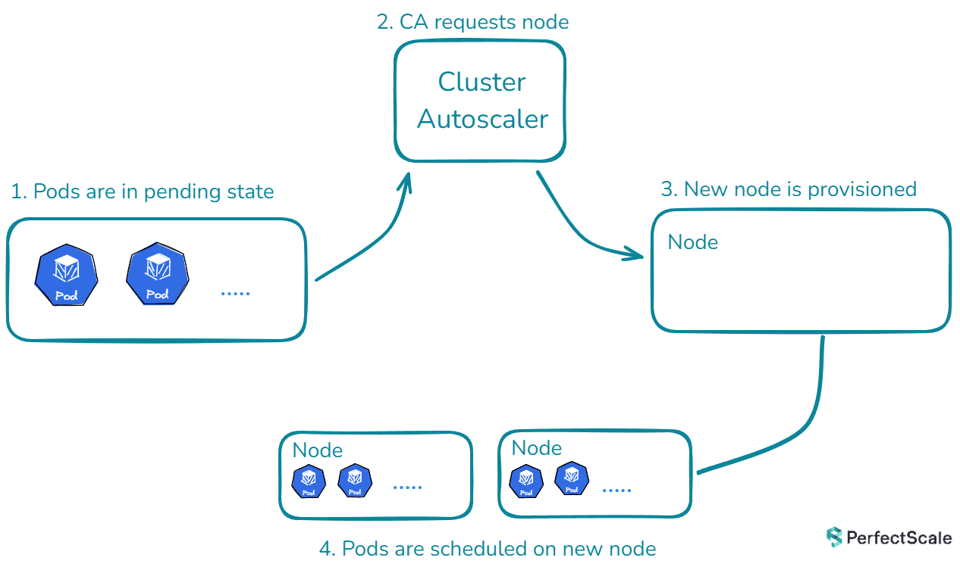
The Cluster Autoscaler also respects constraints set by administrators, such as minimum and maximum node group sizes, pod disruption budgets, and node scheduling rules like node selectors and taints. This makes it a robust tool that balances efficiency with resource availability.
›› Take a look at this Kubernetes Cluster Autoscaler full guide! This in-depth guide covers how the Kubernetes Cluster Autoscaler works, implementing it in EKS, troubleshooting, and deployment via Helm.
What is Karpenter an how it works?
Karpenter is an open-source, high-performance autoscaler created by AWS to enhance Kubernetes cluster management. It is built to flexibly and efficiently provide the right compute resources for a cluster. Unlike older autoscalers that depend on fixed settings and preset instance types, Karpenter adjusts resource allocation based on the real-time needs of the workloads running in the cluster.
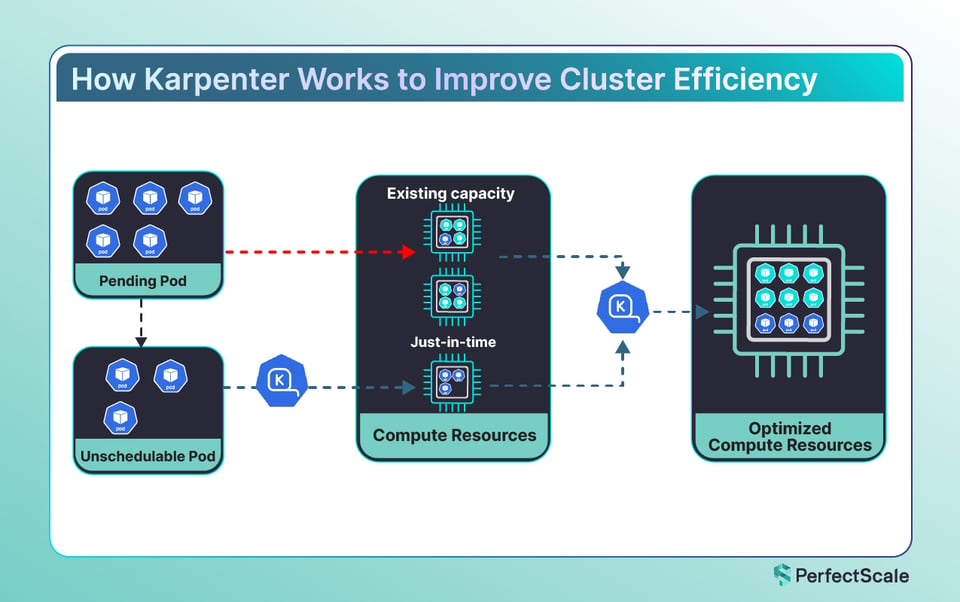
Karpenter operates natively within Kubernetes, constantly monitoring both pod and node metrics to determine the cluster's state. When it identifies a shortage of resources needed to support pending workloads, it scales the cluster up by provisioning new nodes with suitable instance types and sizes. On the other hand, when workload levels drop and nodes are underused, Karpenter safely scales down by removing these underutilized nodes while ensuring existing workloads continue uninterrupted.
A standout feature of Karpenter is its smart resource allocation, aimed at reducing operational expenses. It picks cost-effective instance types and packs workloads efficiently onto nodes to use resources fully. However, Karpenter’s effectiveness depends on accurate pod resource requests; it uses this data to make optimal scaling decisions. Tools like PerfectScale can support Karpenter by ensuring pods are properly sized, providing accurate data for better node selection.
Karpenter's flexibility comes from customizable settings. Users can define how Karpenter provisions resources using NodePool Custom Resource Definitions (CRDs), setting details like instance types, zones, and resource caps. Additionally, scaling policies can be configured to set minimum and maximum node counts and specify cooldown periods to control how often scaling actions take place.
›› Take a look at the ultimate guide to Karpenter
1. Karpenter vs Cluster AutoScaler: Architecture and Design
Karpenter's APIs graduated out of beta with the v1.0 release, marking the project's maturity and a commitment to stable, non-breaking APIs going forward. Recent versions added finer-grained disruption controls, letting teams set disruption budgets by reason such as underutilized, empty, or drifted, along with a tunable consolidation window and more aggressive, emptiness-first consolidation of idle nodes.
Cluster Autoscaler (CA):
****CA has been a cornerstone of Kubernetes autoscaling. It works by interacting with predefined node groups, typically Auto Scaling Groups (ASGs) in AWS, and scales these groups based on pod scheduling needs. This design is rooted in traditional infrastructure, where fixed node groups are provisioned ahead of time, and CA adjusts the number of nodes in these groups as required. The key advantage of this approach is predictability. Administrators can define node types, configurations, and limits in advance, giving them a clear understanding of their infrastructure. However, this predictability comes with rigidity. Because CA relies on predefined node groups, scaling decisions are limited by the configurations of these groups. This can lead to inefficiencies, such as over-provisioning, where more resources are allocated than necessary because the node group size increments are larger than the pod requirements.
Karpenter:
********Karpenter, on the other hand, was designed with flexibility and cloud-native principles in mind. Instead of relying on predefined node groups, Karpenter dynamically provisions nodes based on real-time pod requirements. This means that Karpenter can create exactly the resources needed at the moment, without being limited by predefined configurations. This flexibility allows Karpenter to be more efficient, especially in cloud environments where resources can be provisioned on demand. Karpenter uses the EC2 Fleet API to scale more quickly and responsively, as it doesn't have to wait for the ASG scaling process to complete before new nodes become available.

2. Karpenter vs Cluster AutoScaler: Node Provisioning and Management
Cluster Autoscaler:
****CA scales node groups up or down based on pod scheduling failures due to insufficient resources. It is constrained by the node group configurations, meaning it can only scale within the limits set by the node group’s minimum and maximum size.
AWS ASG configuration with Cluster Autoscaler:
apiVersion: eksctl.io/v1alpha5kind: ClusterConfigmetadata:  name: my-cluster  region: us-west-2
managedNodeGroups:  - name: ng-1    instanceType: m5.large    minSize: 1    maxSize: 5    desiredCapacity: 3    privateNetworking: true
In this configuration, the node group can scale between 1 and 5 nodes, but if a pod requires more specific resources (e.g., higher memory or CPU), the ASG may not be able to provide the right instance type.
Karpenter:
****Karpenter removes the need for managing node groups by directly provisioning instances that match the pod's requirements. This leads to a more efficient and flexible scaling process.
Karpenter NodePool configuration:
apiVersion: karpenter.sh/v1kind: NodePoolmetadata: name: defaultspec: template: spec: requirements: - key: karpenter.sh/capacity-type operator: In values: ["spot", "on-demand"] - key: karpenter.k8s.aws/instance-family operator: In values: ["c5", "m5", "r5"] limits: resources: cpu: 1000Here, Karpenter selects the appropriate EC2 instance type based on the pod's resource requests, such as CPU or memory, resulting in better resource utilization and less over-provisioning.
3. Karpenter vs Cluster AutoScaler: Scaling Speed and Efficiency
Cluster Autoscaler:
****CA takes several minutes to scale up because it relies on the AWS Auto Scaling Group to provision new instances. The time delay is primarily due to the time it takes for AWS to provision new instances and for those instances to become ready in the cluster.
Karpenter:
****Karpenter is designed to scale up much faster, often provisioning instances in less than a minute. This is because Karpenter directly interacts with the EC2 API, bypassing the slower ASG mechanism.
In practice, Karpenter brings new nodes online in roughly 45 to 60 seconds by calling the cloud provider APIs directly, whereas Cluster Autoscaler relies on resizing Auto Scaling Groups and typically takes 3 to 4 minutes. Because it bypasses the ASG layer, Karpenter can even replace an interrupted Spot node inside the two-minute interruption notice window.
The reduced latency in scaling can be crucial for workloads that require immediate resources, ensuring better performance during peak demands.
4. Karpenter vs Cluster AutoScaler: Resource Utilization
Cluster Autoscaler:
Due to its reliance on predefined node groups, CA often results in over-provisioning. For instance, if the only available instance type in a node group is larger than what a pod needs, the excess resources remain unused, leading to inefficient resource utilization.
Karpenter:
****Karpenter optimizes resource utilization by selecting the most appropriate instance type based on the pod's requirements. This approach minimizes wasted resources and ensures that the cluster only provisions what is necessary. Karpenter's ability to precisely match instance types to workload demands can result in cost savings and better overall cluster performance.
Karpenter analyzes the combined requirements of all unscheduled pods and dynamically bin-packs them, selecting the cheapest exact-fitting instance from the entire available cloud catalog rather than from a handful of predefined node types. It also consolidates running workloads onto fewer or cheaper instances over time. Real-world reports commonly cite compute cost reductions in the range of 20 to 40 percent from this combination of tighter bin-packing and native Spot usage.
5. Karpenter vs Cluster AutoScaler: Cloud Provider Integration
Cluster Autoscaler:
CA supports multiple cloud providers, including AWS, GCP, and Azure, with specific implementations for each. This makes CA a versatile tool for multi-cloud environments, but it also requires separate configuration for each cloud provider. Check this for detailed information on integration with different providers.
This cross-cloud maturity is CA's main advantage: it is native to AWS, GCP, Azure, and others, making it the safer choice for multi-cloud estates and, in particular, for GCP where Karpenter support is minimal.
Karpenter:
Karpenter was initially designed for AWS, leveraging AWS-specific services such as EC2 and EKS. While there are plans for multi-cloud support in the future, as of now, Karpenter is best suited for AWS environments.
Karpenter was initially designed for AWS, leveraging AWS-specific services such as EC2 and EKS, and it remains most mature there. It is no longer AWS-only, however. The provisioning model now has a vendor-neutral core, and Azure ships it through AKS Node Auto Provisioning, which reached general availability. GCP support remains very limited, so Cluster Autoscaler is still the production option on GKE.
6. Karpenter vs Cluster AutoScaler: Configuration and Management
Cluster Autoscaler:
CA requires the management of both the autoscaler and the underlying node groups. This means you need to ensure that node group configurations are properly optimized, and the autoscaler is correctly deployed within the cluster.
Cluster Autoscaler Deployment YAML:
apiVersion: apps/v1kind: Deploymentmetadata: name: cluster-autoscaler namespace: kube-system labels: app: cluster-autoscalerspec: replicas: 1 selector: matchLabels: app: cluster-autoscaler template: metadata: labels: app: cluster-autoscaler spec: serviceAccountName: cluster-autoscaler containers: - image: registry.k8s.io/autoscaling/cluster-autoscaler:v1.30.0 name: cluster-autoscaler resources: limits: cpu: 100m memory: 300Mi requests: cpu: 100m memory: 300Mi command: - ./cluster-autoscaler - --v=4 - --stderrthreshold=info - --cloud-provider=aws - --skip-nodes-with-local-storage=false - --expander=least-waste - --node-group-auto-discovery=asg:tag=k8s.io/cluster-autoscaler/enabled,k8s.io/cluster-autoscaler/ volumeMounts: - name: ssl-certs mountPath: /etc/ssl/certs/ca-certificates.crt readOnly: true volumes: - name: ssl-certs hostPath: path: "/etc/ssl/certs/ca-bundle.crt"This setup requires regular maintenance, especially when scaling needs change or new node groups are added.
Karpenter:
****Karpenter simplifies management by eliminating the need for node groups. Instead, you configure a single NodePool CRD, which dynamically provisions resources based on workload requirements.
apiVersion: karpenter.sh/v1alpha5kind: NodePoolmetadata: name: defaultspec: template: spec: requirements: - key: "karpenter.sh/capacity-type" operator: In values: ["on-demand", "spot"] # Specify whether to use on-demand or spot instances - key: "topology.kubernetes.io/zone" operator: In values: ["us-west-2a", "us-west-2b", "us-west-2c"] # Define the availability zones limits: resources: cpu: 1000 # Define maximum resources for the cluster (in this case, 1000 CPU units) memory: 2000Gi # Define memory limitsThe requirements field in Karpenter's NodePool configuration defines constraints on the types of instances that should be provisioned, such as specifying capacity types (e.g., on-demand or spot instances) and selecting availability zones. This ensures that the nodes provisioned align with the needs of your workloads. The limits field sets resource boundaries for the entire cluster managed by this NodePool, specifying a maximum of 1000 CPU units and 2000Gi of memory in this example.
7. Karpenter vs Cluster AutoScaler: Scaling Granularity
Cluster Autoscaler:
CA scales at the node group level, which can lead to unnecessary scaling events. For example, if a node group is configured to scale up when a single pod cannot be scheduled, it may provision an entire new node, even if only a small amount of additional capacity is needed.
Karpenter:
Karpenter scales at the pod level, allowing for more precise scaling decisions. It provisions exactly what is required to meet the pod's demands, minimizing the chances of over-provisioning.
Both Cluster Autoscaler and Karpenter offer unique advantages for scaling Kubernetes clusters, but they cater to different needs and environments. CA provides a predictable and well-established method for scaling node groups, making it suitable for multi-cloud environments and scenarios where predefined configurations are essential. However, this predictability comes at the cost of flexibility and can lead to inefficiencies such as over-provisioning.
On the other hand, Karpenter embraces cloud-native principles, offering dynamic and flexible node provisioning that aligns closely with real-time pod requirements. This results in faster scaling, better resource utilization, and cost savings, especially in AWS environments. Karpenter's ability to bypass the slower ASG mechanism and directly interact with the EC2 API ensures that resources are provisioned swiftly, meeting the immediate demands of your workloads. Organizations have reported up to 30% reduction in cluster costs thanks to Karpenter's efficient resource utilization and dynamic provisioning capabilities
Karpenter Goes Managed and Multi-Cloud
The biggest recent shift is that you no longer have to run Karpenter yourself. AWS EKS Auto Mode uses Karpenter as its built-in engine and manages the controller off-cluster, so provisioning, cost-aware instance selection, consolidation, and updates happen automatically. It ships with managed general-purpose and GPU node pools and removes the need for a separate managed node group or Fargate profile just to bootstrap the cluster.
Azure has followed the same path. AKS Node Auto Provisioning runs Karpenter as a managed add-on and reached general availability, using pending pod requirements to pick the optimal VM size and continually consolidating to cut waste. For most teams, these managed offerings deliver Karpenter's benefits without the operational overhead of running the controller, while GKE users continue to rely on Cluster Autoscaler.
Ultimately, the choice between CA and Karpenter depends on your specific requirements, cloud provider, and the level of flexibility you need in your scaling strategy.
| Karpenter | Cluster Autoscaler | |
|---|---|---|
| Scaling Approach | Just-in-time, pod-driven provisioning | Node group-based scaling |
| Node Provisioning Speed | Faster (typically < 1 min) | Slower (can take several mins) |
| Node Group Management | No need for predefined node groups | Requires predefined node groups |
| Resource Optimization | More granular, can provision exact resources needed | Less granular, scale based on predefined node types |
| Scaling Granularity | Can scale individual nodes | Scale entire node groups |
| Customization | Highly customizable through CRDs | Less customizable, relies on existing node groups |
| Scaling Down | More aggressive and efficient | More conservative, can be slower |
When to Use Cluster Autoscaler vs Karpenter
Use Cluster Autoscaler if you are operating a multi-cloud Kubernetes environment, especially one that includes GCP, if you have very steady and predictable workloads, or if you prefer standard, tried-and-true node groups over dynamic infrastructure.
Use Karpenter, or EKS Auto Mode on AWS, if you are an AWS-heavy organization, deal with bursty or unpredictable workloads, or want to significantly reduce your cloud bill by leveraging automated Spot instance selection and aggressive workload consolidation.
FAQ
1. What is the main difference between Karpenter vs Cluster Autoscaler?
Karpenter provisions new nodes, while Cluster Autoscaler adjusts existing nodes.
2. Karpenter vs Cluster Autoscaler -which tool is more cost-efficient for managing node scaling?
Karpenter is more cost-efficient due to its ability to optimize node usage.
3. How do Karpenter vs Cluster Autoscaler handle node scaling?
Karpenter automates node scaling based on resource requirements, while Cluster Autoscaler scales based on cluster load.
4. Can Karpenter and Cluster Autoscaler be used together?
Yes, combining Karpenter and Cluster Autoscaler can provide optimal node management.
5. Karpenter vs Cluster Autoscaler - which tool is more suitable for large-scale cloud deployments?
Karpenter is ideal for large-scale cloud deployments due to its resource optimization.
For more on how to use CA and Karpenter effectively, check out these articles:
- Kubernetes Cluster Autoscaler full guide! This in-depth guide covers how the Kubernetes Cluster Autoscaler works, implementing it in EKS, troubleshooting, and deployment via Helm.
- Getting the most out of Karpenter with PerfectScale by DoiT. Learn how PerfectScale by DoiT plus Karpenter can provide and additional 30 to 50% in cost reductions on top of what can achieved with Karpenter alone.
- Take a look at this tep-by-step tutorial how to leverage AWS Reserved Instances with Karpenter can help you maximize savings for your Kubernetes cluster
- Optimize Kubernetes autoscaling processes and strengthen your infrastructure with a powerful guide for Karpenter Monitoring with Prometheus.
Provide additional 50% in cost reductions with PerfectScale by DoiT + Karpenter
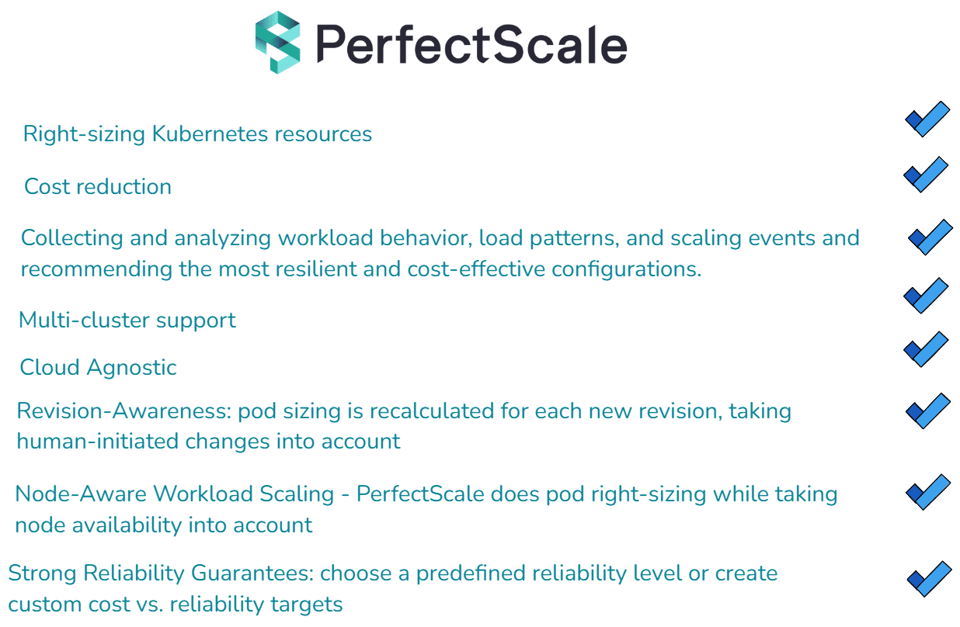
While both Cluster Autoscaler and Karpenter offer advantages for scaling Kubernetes clusters, PerfectScale by DoiT takes your Kubernetes scaling strategy to the next level by providing advanced automation and optimization capabilities that neither CA nor Karpenter can fully achieve on their own.
>> Take a look at how you can get most out of karpenter with PerfectScale by DoiT