
PerfectScale
Guide KEDA (Kubernetes Event-Driven Autoscaler) avec exemple
KEDA (Kubernetes Event-driven Autoscaling) is an open-source, CNCF-graduated project that allows you to automatically scale workloads in Kubernetes clusters.
Cette page est également disponible en English, Deutsch, Español, Italiano, 日本語 et Português.


What is KEDA (Kubernetes Event-Driven Autoscaler)?
KEDA (Kubernetes Event-driven Autoscaling) is an open-source, CNCF-graduated project that allows you to automatically scale workloads in any Kubernetes cluster based on external events. It acts alongside the native Horizontal Pod Autoscaler (HPA), letting you scale containers from zero up to any number based on things like message queues, databases, or web traffic.
KEDA was created by Microsoft and Red Hat to bridge the gap between Kubernetes' scaling and the event-driven architecture. Since its launch, KEDA has become the center of a CNCF project, with a growing community, and wide adoption in production environments.
KEDA supports over 65 scalers, including Azure Service Bus, AWS SQS Queue, Kafka, Prometheus, and more, allowing it to handle a wide range of event sources. It integrates with Kubernetes' Horizontal Pod Autoscaler (HPA), increasing its capabilities without introducing complexity. KEDA is lightweight and introduces minimal overhead, making it an efficient choice for production environments.
How KEDA (Kubernetes Event-Driven Autoscaler) Works
Event Detection: KEDA monitors in Kubernetes various event sources (e.g., message queues, databases) using components called scalers. Each scaler is designed for a specific event source and knows how to query it for metrics.
Metric Evaluation: When an event occurs, the scaler evaluates its associated metrics. For example, a scaler monitoring a message queue might check the number of pending messages.
Scaling Decision: Based on the metrics, KEDA determines in K8s whether to adjust the number of application instances (pods). If the metric exceeds a defined threshold, KEDA instructs Kubernetes to scale up the application; if it's below the threshold, it scales down.
Integration with Kubernetes: KEDA acts as a metrics server within Kubernetes, providing these event-based metrics to the Horizontal Pod Autoscaler (HPA). This integration allows Kubernetes to make informed scaling decisions based on both traditional metrics (like CPU usage) and external event metrics.
>> Take a Look at How HPA works and its Best Practices.
KEDA Architecture in Kubernetes
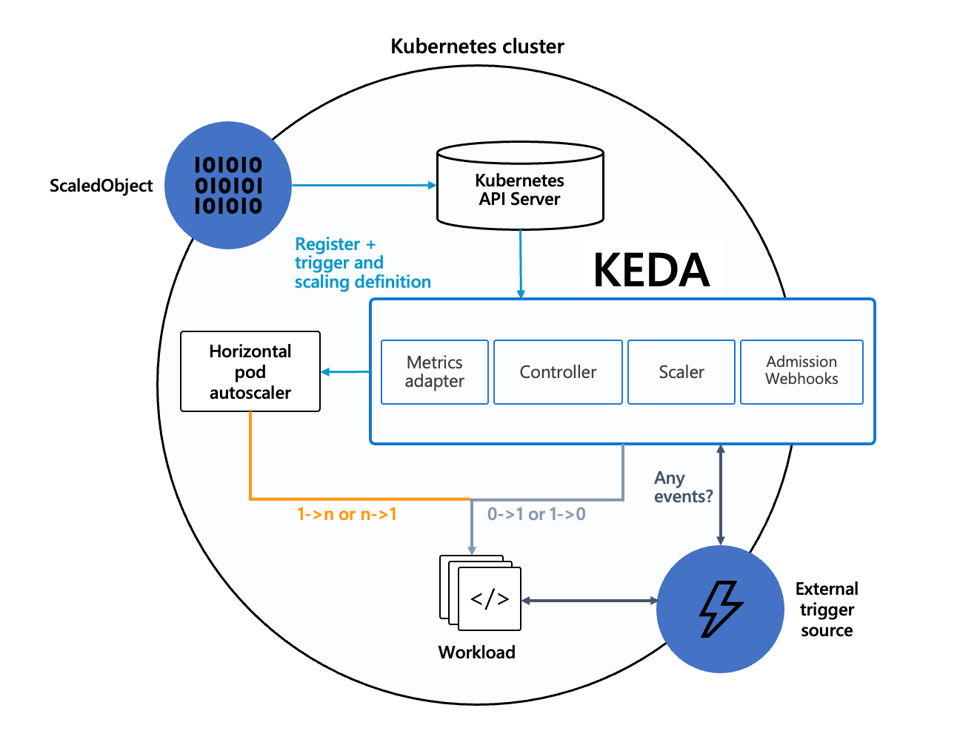
The following diagram shows the main components of KEDA architecture, which are described in more detail below.
KEDA Operator and Controller
The KEDA operator is the core component responsible for watching custom resources such as ScaledObject and ScaledJob. When a scaling resource is created or updated, the operator validates its configuration, creates or updates the required Horizontal Pod Autoscaler (HPA), and manages the scaling lifecycle for the target workload.
The operator continuously polls the configured event sources through the appropriate scalers. Based on the returned metrics, it determines whether the application should remain idle, scale up, or scale down. Unlike the HPA, which only reacts to metrics it receives, the operator is responsible for connecting Kubernetes workloads with external systems such as message queues, databases, or cloud services.
Another important responsibility of the operator is scaling workloads from zero replicas. Since the HPA cannot scale a deployment from zero on its own, the operator detects when an event source becomes active and starts the first pod. After the workload is running, the HPA takes over and manages scaling between the configured minimum and maximum replica counts.
Metrics Adapter
The metrics adapter exposes external metrics to Kubernetes through the External Metrics API. Instead of collecting CPU or memory metrics, it retrieves values from KEDA scalers, such as queue length, Kafka consumer lag, request counts, or the number of pending events, and makes them available to the HPA.
When the HPA needs to evaluate whether scaling is required, it sends a request to the metrics adapter for the latest metric value. The adapter forwards the request to the appropriate scaler, which queries the external system and returns the current metric. The adapter then exposes that value in the format expected by Kubernetes.
Because the metrics adapter implements Kubernetes' standard metrics interfaces, KEDA integrates with the existing autoscaling workflow without requiring changes to Kubernetes itself. This allows organizations to extend HPA with event-driven metrics while continuing to use the same scaling mechanisms and APIs they already rely on.
Admission Webhooks
KEDA admission webhooks validate and, when needed, mutate KEDA custom resources before they are stored in the Kubernetes API server. They help detect configuration errors early, such as invalid trigger definitions, unsupported parameter values, or missing required fields, reducing the chance of deployment failures.
The validation webhook checks whether resources such as ScaledObject, ScaledJob, and TriggerAuthentication follow KEDA's schema and configuration rules. Catching these issues during resource creation prevents invalid configurations from reaching the operator, where they could cause scaling failures or unexpected behavior.
Mutation webhooks can also apply default values or make small adjustments to resources before they are persisted. Together, the validation and mutation webhooks improve configuration consistency, simplify deployments, and ensure the operator processes only valid and predictable scaling resources.
What Are KEDA Custom Resources?
KEDA extends Kubernetes by introducing several Custom Resource Definitions (CRDs) that define how event-driven autoscaling should work. Instead of configuring scaling directly on a Deployment, users create KEDA custom resources that describe the target workload, the event source to monitor, authentication details, and scaling behavior. The KEDA operator watches these resources and automatically creates or manages the required Horizontal Pod Autoscaler (HPA).
The most commonly used resource is ScaledObject, which enables event-driven autoscaling for long-running workloads such as Deployments and StatefulSets. A ScaledObject specifies the workload to scale, one or more triggers (such as Kafka, RabbitMQ, Prometheus, or AWS SQS), polling intervals, cooldown periods, and the minimum and maximum number of replicas. KEDA supports multiple triggers in a single ScaledObject, allowing an application to scale based on several event sources at the same time.
For batch processing, KEDA provides the ScaledJob resource. Instead of scaling the number of pods in a Deployment, a ScaledJob creates Kubernetes Jobs in response to incoming events. This approach is useful for workloads where each event should be processed independently, such as image processing, data imports, report generation, or other asynchronous tasks.
KEDA also includes authentication resources such as TriggerAuthentication and ClusterTriggerAuthentication. These resources store the credentials required to access external event sources without embedding sensitive information directly in a ScaledObject. Authentication data can come from Kubernetes Secrets, environment variables, cloud identity providers, or external secret management systems, making it easier to securely manage connections across multiple applications.
KEDA Kubernetes Scalers
K8s Event-Driven Autoscaler scalers define the events or custom metrics that trigger scaling. Some scalers examples include:
Message queues: It can scale based on the number of messages in an Azure Service Bus queue or Kafka topic.
Database metrics: It adjusts the number of replicas based on the size of a Redis stream or MySQL binlog.
Cron-based: It scales workloads up or down at specific times using cron expressions.
Each scaler is configured using simple YAML, allowing users to define scaling behavior in a declarative manner.
>> Want to Maximize Cost Savings by Putting Your Kubernetes Resources to Sleep During Off-Hours? Check out this post.
KEDA vs. HPA and VPA
KEDA, Horizontal Pod Autoscaler (HPA), and Vertical Pod Autoscaler (VPA) solve different scaling problems in Kubernetes:
- HPA scales the number of pod replicas based on resource metrics such as CPU and memory usage or custom metrics exposed to Kubernetes.
- VPA adjusts the CPU and memory requests and limits assigned to individual pods instead of changing the number of replicas.
- KEDA complements HPA by enabling scaling based on external events and application-specific metrics.
One of KEDA's biggest advantages is its ability to scale workloads from zero replicas. This is particularly useful for event-driven applications that spend long periods idle, such as queue consumers or background workers. Standard HPA cannot scale a Deployment from zero because no running pods are available to generate metrics. KEDA monitors external event sources and starts the first pod when new work arrives, after which the HPA continues managing replica counts.
VPA addresses a different challenge. Instead of increasing or decreasing the number of pods, it analyzes resource usage over time and recommends or automatically adjusts CPU and memory allocations for each pod. This helps applications receive appropriate resources and reduces overprovisioning. However, changing resource requests often requires restarting pods, making VPA better suited for workloads with relatively stable resource requirements.
The following table summarizes the differences:
| KEDA | HPA | VPA | |
|---|---|---|---|
| Scaling method | Scales pod replicas based on external events and metrics | Scales pod replicas based on CPU, memory, or custom metrics | Adjusts CPU and memory requests/limits for pods |
| Scale to zero | Yes | No — not by itself | No |
| Best use case | Event-driven workloads — queue consumers, Kafka workers, background jobs | Web apps or services that need more replicas under load | Workloads that need right-sized CPU and memory allocations |
| Key limitation | Requires event source/scaler configuration | Needs running pods and metrics to scale | May restart pods when applying resource changes |
Tutorial: Cron-based Scaling with KEDA Kubernetes
Let’s consider a scenario where you need to scale a job to run only during business hours. This can be achieved using KEDA’s Cron scaler.
Step 1: Install KEDA
You should install KEDA in your cluster using Helm or other methods:
helm repo add kedacore https://kedacore.github.io/chartshelm repo updatehelm install keda kedacore/keda --namespace keda --create-namespaceStep 2: Define the Deployment and the Cron Scaler
Define Deployment:
envsubst < keda-deployment.yaml | kubectl apply -f -apiVersion: apps/v1kind: Deploymentmetadata: name: my-cron-jobspec: replicas: 1 selector: matchLabels: app: my-cron-job template: metadata: labels: app: my-cron-job spec: containers: - name: busybox image: busybox command: [“sleep”, “3600”]Then, create a `ScaledObject` that defines the scaling behavior based on a cron schedule:
envsubst < scaledobject.yaml | kubectl apply -f -apiVersion: keda.sh/v1alpha1kind: ScaledObjectmetadata: name: cron-scaler namespace: defaultspec: scaleTargetRef: apiVersion: apps/v1 kind: Deployment name: my-cron-job triggers: - type: cron metadata: timezone: Asia/Kolkata start: 0 6 * * * # At 6:00 AM end: 0 20 * * * # At 8:00 PM desiredReplicas: "10"With this configuration, the `my-cron-job` deployment will scale to ten replicas from 6 AM to 8 PM in the Asia/Kolkata timezone and scale down to zero outside these hours.
KEDA is an excellent choice for dynamic and event-heavy workloads. Under the hood, KEDA uses the Horizontal Pod Autoscaler (HPA) to implement its scaling decisions. While HPA traditionally depends on metrics like CPU and memory usage, KEDA introduces event-driven triggers, eliminating the need to monitor resource utilization directly.
In PerfectScale, you can easily jump over HPA using the switcher above the table.
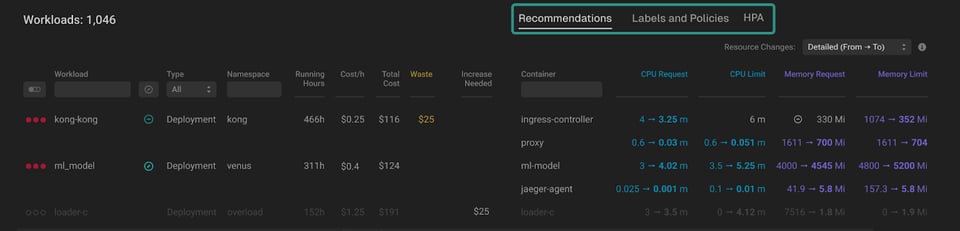
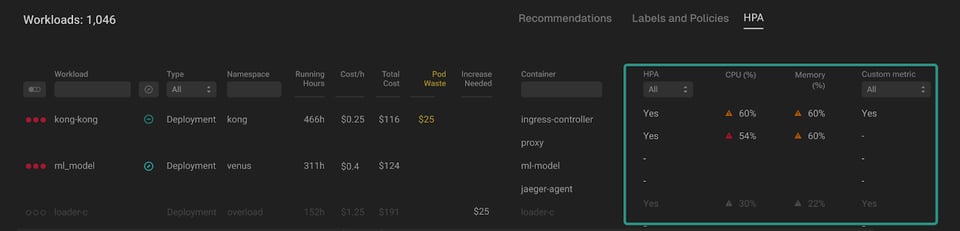
From there, you can see the HPA view provides a clear overview of workloads utilizing Horizontal Pod Autoscaler (HPA). This feature enables users to quickly identify the workloads where HPA has been introduced and adjust HPA thresholds with the provided informative tooltips that offer tailored recommendations. These recommendations are particularly helpful in optimizing scaling decisions, minimizing resource waste, and ensuring efficient operation of workloads.
| Column | Description |
|---|---|
| HPA | It indicates whether HPA has been introduced for the workload. You can easily sort the column by clicking the header or apply specific filters. |
| CPU (%) | It displays the trigger for HPA by CPU.There are two types of indicators to be aware of:- A red indication signifies that the threshold is below 60%, indicating potential significant CPU waste.- A yellow indication suggests that the threshold falls between 60% and 80%, pointing to potential moderate CPU waste. |
| Memory (%) | It displays the trigger for HPA by Memory.There are two types of indicators to be aware of:- A red indication signifies that the threshold is below 60%, indicating potential significant Memory waste.- A yellow indication suggests that the threshold falls between 60% and 80%, pointing to potential moderate Memory waste. |
| Custom Metric | It indicates whether a Custom metric has been detected. |
At PerfectScale by DoiT, we discover HPA configurations for workloads in clusters and optimize the pod resource requests and limits while accounting for horizontal scaling behaviors. With KEDA, this process becomes even more seamless, as scaling decisions are decoupled from resource metrics, focusing solely on external events or custom triggers. This enables teams to achieve cost efficiency and performance consistency without over-provisioning or under-utilizing resources.
Best Practices for Running KEDA in Production
Choose Scaling Thresholds Carefully
Scaling thresholds determine when KEDA adds or removes application replicas, making them one of the most important configuration settings. If thresholds are too low, the application may scale up and down too frequently, increasing resource usage and putting unnecessary load on the Kubernetes control plane. If they are too high, workloads may struggle to keep up with incoming events, resulting in higher processing latency and growing backlogs.
Instead of relying on default values, define thresholds based on production traffic patterns and application performance. Load testing is an effective way to identify the point at which additional replicas improve throughput without causing excessive scaling activity. Review and adjust these thresholds regularly as workloads and traffic patterns change.
Configure Polling Intervals and Cooldown Periods
KEDA periodically polls external systems to determine whether scaling is required. Short polling intervals allow workloads to respond quickly to new events but increase the number of requests sent to message queues, databases, or monitoring systems. Longer intervals reduce this overhead but may delay scaling during sudden traffic spikes.
Cooldown periods are equally important because they determine how long KEDA waits before scaling down after activity decreases. Setting an appropriate cooldown period prevents workloads from repeatedly scaling up and down during temporary fluctuations. This results in more stable applications and avoids unnecessary pod creation and termination.
Set Appropriate Minimum and Maximum Replicas
Define minReplicaCount and maxReplicaCount based on the application's availability requirements and the capacity of the Kubernetes cluster. For asynchronous background workers, allowing the workload to scale to zero can significantly reduce infrastructure costs during idle periods. For latency-sensitive services, keeping one or more replicas running can eliminate startup delays.
A reasonable maximum replica count is just as important as the minimum. Without limits, an unexpected surge in events could cause hundreds of pods to be created, consuming cluster resources and potentially affecting other workloads. Capacity planning should include both application performance and the available CPU and memory in the cluster.
Secure Authentication and Secrets
Many KEDA scalers require credentials to connect to external systems such as cloud messaging services, databases, or monitoring platforms. These credentials should never be embedded directly in ScaledObject definitions or stored in plain text within configuration files. Instead, use TriggerAuthentication or ClusterTriggerAuthentication to separate authentication from scaling configuration.
Authentication resources can retrieve credentials from Kubernetes Secrets, cloud-managed identities, or external secret management solutions such as HashiCorp Vault. This approach improves security, simplifies credential rotation, and allows multiple applications to reuse the same authentication configuration without duplicating sensitive information.
Monitor Scaling Behavior and Scaler Health
Production deployments should monitor not only Kubernetes metrics but also the event sources that drive autoscaling. Metrics such as queue length, Kafka consumer lag, processing latency, replica count, and scaler errors provide valuable insight into whether KEDA is scaling applications as expected. Monitoring these metrics helps detect bottlenecks before they affect users.
Integrating KEDA with observability tools such as Prometheus and Grafana makes it easier to visualize scaling activity and identify trends over time. Alerting on failed scaler queries, authentication errors, or unusually large event backlogs enables teams to respond quickly to operational issues and maintain reliable event-driven applications.
Video: KEDA Kubernetes Explained
Ant Weiss, our Chief Cluster Whisperer, recentlyhosted a webinar with Zbynek Roubalik, the CTO of Kedify and maintainer of KEDA. The session was packed with Kubernetes Event-Driven Autoscaling (KEDA) overview, why event-driven autoscaling matters, what benefits it brings to the table, and what challenges the community still needs to solve.
**KEDA Kubernetes FAQ
**
What is KEDA?
Kubernetes Event-Driven Autoscaling (KEDA) scales Kubernetes workloads based on events and external metrics, such as queue length, Kafka lag, or incoming requests. It works with the Kubernetes Horizontal Pod Autoscaler (HPA).
How is KEDA different from HPA?
HPA commonly scales workloads based on CPU and memory usage. KEDA supports these metrics but can also scale workloads based on external events. This allows scaling to begin before resource utilization increases.
Can KEDA replace HPA and VPA?
KEDA can replace a directly configured HPA because it creates and manages an HPA resource under the hood. It does not replace the Vertical Pod Autoscaler (VPA), as KEDA only changes the number of pods.
Using horizontal and vertical autoscaling on the same workload and metric can create conflicting scaling decisions.
How is KEDA different from HPA with Prometheus custom metrics?
KEDA provides simpler per-workload configuration and includes a built-in Prometheus scaler. It also supports many other event sources without requiring separate metrics adapters for each integration.
What workloads can KEDA scale?
KEDA can scale Deployments, StatefulSets, Kubernetes Jobs, and other workloads that expose a scalable target. For example, it can create Jobs dynamically in response to CI/CD pipeline events.
Which event sources does KEDA support?
KEDA supports numerous scalers, including Apache Kafka, Confluent Kafka, AWS SQS, Prometheus, databases, message queues, and cloud services. Organizations can also build custom scalers for unsupported systems.
How is KEDA different from Karpenter?
KEDA scales pods, while Karpenter scales cluster nodes. When used together, KEDA adjusts the number of pods and Karpenter provisions or removes nodes based on the resulting scheduling demand.
Can KEDA support time-based autoscaling?
Yes. The KEDA Cron scaler can maintain a specified replica range during scheduled periods. This can prevent workloads from scaling below a required capacity during seasonal peaks or business-critical processing windows.
Does KEDA work on Oracle Cloud Kubernetes clusters?
KEDA can run on Kubernetes clusters hosted on Oracle Cloud Infrastructure. However, community-provided scalers for OCI-specific services may be more limited than those available for other major cloud platforms.
Is KEDA free?
Yes. KEDA is an open-source project and is free to use. Kedify provides a commercial platform built on KEDA with additional capabilities such as support, dashboards, security fixes, and features for larger deployments.
Is the KEDA HTTP add-on production-ready?
The open-source HTTP add-on remains in beta and is not generally recommended for production use. It routes traffic through an interceptor that collects metrics and supports scaling to zero, but this component can introduce performance and reliability limitations.
When should organizations consider KEDA?
KEDA is appropriate when CPU- and memory-based autoscaling cannot meet latency, throughput, reliability, or cost requirements. It is particularly relevant when workload demand can be measured through events such as queue depth, request volume, or message lag.
Can KEDA determine the CPU and memory required by each pod?
No. KEDA only performs horizontal scaling by changing the number of workload replicas. Pod resource requests and vertical scaling must be handled separately.
Final Thoughts
KEDA makes event-driven autoscaling in Kubernetes easier, more flexible, and more efficient, especially when resource-based scaling falls short. Whether you’re dealing with unpredictable workloads, integrating external services, or optimizing your infrastructure costs, KEDA provides a powerful solution to scale your applications dynamically.
If you’re new to KEDA, start by exploring the KEDA docs to understand how it can fit into your Kubernetes environment. And if you're looking for a way to optimize both horizontal and vertical scaling, give PerfectScale a try. Start your free trial today and see how it can fine-tune your autoscaling strategy!