
Amazon EKS Auto Mode fully automates Kubernetes cluster management for compute, storage, and networking. It handles infrastructure provisioning, optimal compute instance selection, continuous cost optimization, and automatic OS patching, all without requiring deep Kubernetes expertise.
Last week AWS announced the general availability of EKS Auto Mode. While on the surface it’s just a switch on the management console interface - this new feature packs a lot of value. And if you were wondering - no, it’s not free. Beside the cost of vendor-lock - it will also cost you a little more for each node it connects to your cluster. You can check out the prices for each instance type here.
Key features and benefits:
- Automated compute and scaling: Replaces manual Auto Scaling Groups and Managed Node Groups with a Karpenter-based system that dynamically scales infrastructure in response to pod requests.
- Managed add-ons: Automatically provisions and patches essential components like pod networking (VPC CNI), local DNS, and block storage drivers (EBS CSI).
- Hardened security: Uses immutable, AWS-managed Bottlerocket AMIs with read-only root file systems and SELinux enforcement, while automatically cycling nodes every 21 days.
Considerations to keep in mind:
- Cost: EKS Auto Mode adds a premium (roughly 10 to 12%) on top of the underlying EC2 instances it manages.
- Customization limits: Nodes are treated as locked-down appliances, so you cannot log directly into them or use custom AMIs.
AWS has kept investing heavily in Auto Mode since launch, rolling out faster node provisioning, cheaper GPU and accelerated compute, and built-in resilience features. That steady stream of updates makes it an increasingly compelling default for teams that want a production-ready cluster without assembling and maintaining every layer themselves.
Editor's note: Updated the article with the latest EKS Auto Mode capabilities, including reduced GPU management fees, faster Karpenter scaling, and new resilience features as of 2026.
In practice the Auto Mode management fee typically adds around 12% on top of your data plane, charged only on the nodes it manages, so the extra cost scales with how much compute you actually run.
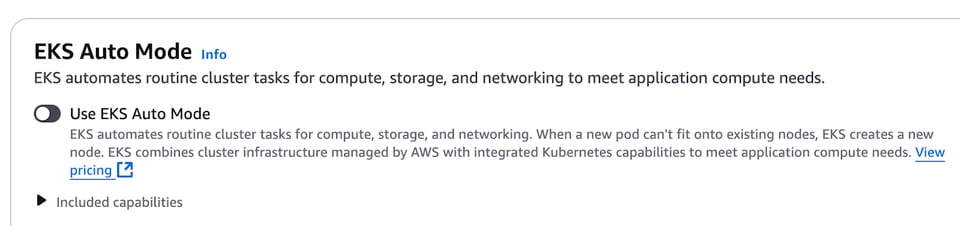
What’s in the Bundle?
According to the docs - EKS Auto mode brings the following capabilities to the table:
- Application load balancing
- Block Storage
- Compute Autoscaling
- GPU support
- Cluster DNS
- Pod and service networking
Which basically means that it takes care of the following add-ons that we previously had to install and configure separately:
- AWS Load Balancer Controller
- EBS CSI driver
- VPC CNI add-on
- core-dns
- Karpenter (!)
- Nvidia and Neuron Device Plugins
All these make a lot of sense (to me). Most clusters out there already have EBS CSI, ALB Controller and VPC CNI enabled. Also Karpenter is slowly but surely becoming the go-to autoscaling solution for EKS. The interesting thing here is the default support of GPU instances - AWS definitely see what we are seeing - more and more businesses running AI/ML workloads on their own infrastructure. Which makes our upcoming GPU optimization support ever more relevant.
Because these add-ons are now managed by AWS, they are also provisioned and patched automatically, so pod networking, local DNS, and the block storage drivers stay current without manual add-on upgrades.
Yes, sure - if you have all of these add-ons already automated and managed with IaC - it’s not such a huge deal. But if you’re only starting out - this definitely changes the onboarding experience and also going forward - takes a lot of the maintenance burden off the ops team shoulders.
Bye Bye Cluster Autoscaler!
By integrating managed Karpenter node provisioning in the EKS Auto Mode AWS practically voids the need for using cluster-autoscaler ever again. Just in time node provisioning is faster, more cost efficient and covers all of our autoscaling needs. And if there are critical workloads we need to always be immediately available - auto mode comes with a dedicated built-in system NodePool.
AWS has also kept tuning the managed Karpenter engine for speed. Recent optimizations to the scheduling simulation and node startup detection have cut node boot time by roughly 39%, and dozens of scale-out and scale-in improvements now make large clusters react faster while consolidating idle capacity more aggressively.
If you want to learn more about the advantages of using Karpenter and how to get the most out of it - read here and here.
Troubleshooting EKS Auto Mode
And the moment we say “maintenance” - we’re faced with the dilemma of all managed services. Yes, we are relieved of the maintenance burden - but it also means we give up control. Now that the pods for all of the add-ons are nowhere to be seen - how do we access their logs and metrics? How do we know why something went wrong? As we know it inevitably will, right?
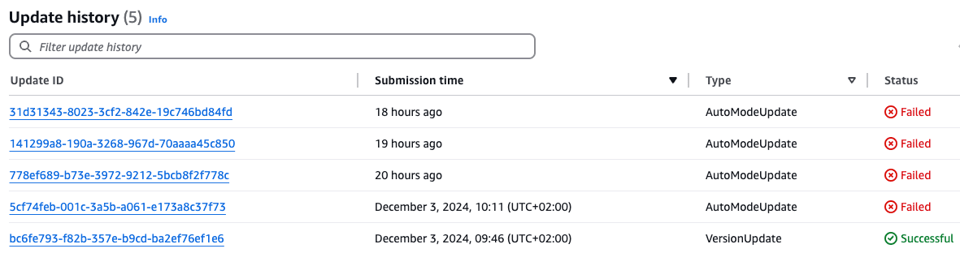
I already faced this when trying to enable auto mode on an existing cluster. As you can see in the image below - I failed miserably 4 times in a row. Mind it - I had to wait an hour for each one of the failures.
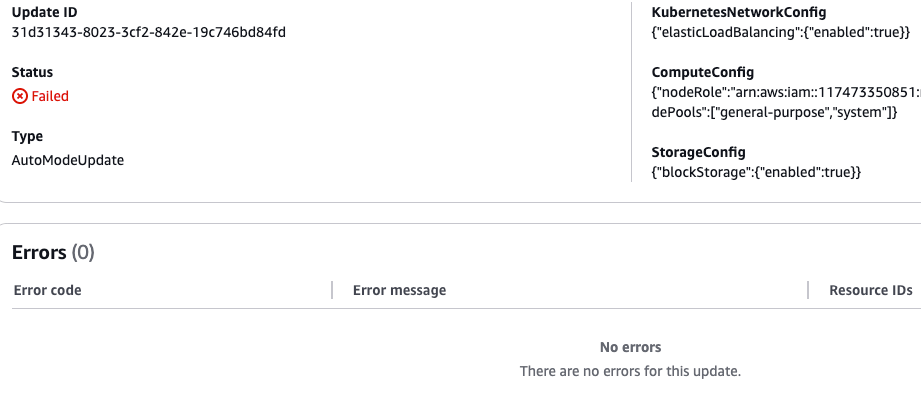
Why? No idea. All the AWS console told me is that the update attempts failed but there were no errors:
(BTW - if you want to see me fail - I’ll release a video describing this experience next week.)
But in general - AWS documentation suggests we retrieve node logs with the help of AWS CLI and persist them to S3 with the help of the new NodeDiagnostic CRD.
What isn’t totally clear is how we can, for example, access the logs and metrics of Karpenter or the ALB Controller. And we know that they can have issues. We even created our own very popular Grafana dashboard for Karpenter troubleshooting.
Hardened Security by Default
One thing I really appreciate is that Auto Mode nodes are secure out of the box. They run on immutable, AWS-managed Bottlerocket AMIs with a read-only root file system and SELinux enforcement, and there is no direct SSH or SSM access into the nodes. To keep the fleet patched, Auto Mode automatically cycles nodes with a maximum lifetime of 21 days (which you can shorten), and AWS ships fresh AMIs frequently, often weekly, with CVE and security fixes.
The flip side is customization. Nodes are treated as locked-down appliances, so you cannot log directly into them or bring your own custom AMI. If your platform depends on custom host access, privileged DaemonSets, or bespoke AMIs, that is the main trade-off to weigh before switching.
Getting Started with AWS EKS Auto Mode
While enabling it on an existing cluster definitely has issues, getting started with EKS Auto Mode from scratch is easy - as eksctl create cluster now has the --enable-auto-mode flag. Or you can use the following very simple yaml config:
apiVersion: eksctl.io/v1alpha5kind: ClusterConfigmetadata: name: auto region: eu-central-1autoModeConfig: enabled: trueTerraform EKS module has also been updated. If you’re using another IaC tool - check its documentation.
Spinning up a new auto-mode cluster is actually a breeze - as no nodes are needed. And that’s a huge game changer in itself. Managed Karpenter means now we don’t need to have neither a managed node group nor a Fargate config in our cluster. Just deploy your workloads and the nodes will come.
Again - if you want to see my onboarding experience - watch out for the video next week.
What's New in EKS Auto Mode
Auto Mode has matured a lot, and some of the newest changes matter most for AI and ML teams. AWS has significantly cut the Auto Mode management fees for accelerated compute: G-series fees dropped by 35%, while P-series and AWS Trainium fees fell by 60%. These reductions apply automatically to existing clusters, which makes running inference, fine-tuning, and batch GPU workloads on Auto Mode noticeably cheaper than before.
On the reliability side, Auto Mode now integrates with Application Recovery Controller zonal shift, so it can automatically move in-cluster traffic away from an impaired Availability Zone with no extra configuration or cost. Other recent additions include static-capacity node pools that hold a fixed number of nodes, FIPS-compatible AMIs for regulated US workloads, and finer control over pod networking such as secondary IP mode. Together these close many of the gaps that made early adopters cautious.
EKS Auto Mode and PerfectScale by DoiT
To sum things up - EKS Auto Mode makes provisioning and managing a fully featured cluster much easier by packaging most of the necessary components in one ready-to-use bundle. With Karpenter now being the built-in autoscaling mechanism - these clusters are cost effective out of the box - relying on just in time node provisioning. Yet, a truly optimized cluster also requires responsible pod right-sizing and careful NodePool fine-tuning. And this is where PerfectScale by DoiT shines. Just as with self-managed Karpenter - PerfectScale by DoiT can give you additional 30 to 50% cost reduction - while improving your workloads reliability. And it’s also fully automated!
So, ready to put your Kubernetes optimization in auto mode? What’s holding you back?