


What Is the Kubecost Helm Chart?
You can install Kubecost using the official Helm chart via the cost-analyzer repository. This chart is a package for deploying Kubecost to a Kubernetes cluster with Helm. It defines the Kubernetes resources Kubecost needs, such as deployments, services, configuration, and related components. Helm handles these resources as a single release, which makes Kubecost easier to install, upgrade, configure, and remove.
What the chart includes:
The Kubecost Helm chart packages the Kubernetes resources and configurable dependencies needed to run Kubecost. Depending on the configured values, this can include Kubecost application components, Prometheus integration, Kubernetes metrics components, persistent storage, Services and Ingress, monitoring resources, network-cost collection, network policies, and cloud-provider pricing integrations.
Best practices for configuration:
- Pin Kubecost Helm chart versions: Specify an explicit chart version to keep deployments predictable and prevent unexpected changes from newer releases.
- Maintain Helm values in version control: Store configuration overrides in a version-controlled
values.yamlfile while keeping credentials and other secrets outside the repository. - Use separate values files for different environments: Maintain environment-specific configuration for development, staging, and production instead of duplicating or modifying chart manifests.
- Set appropriate resource requests and limits: Size CPU and memory settings for Kubecost components according to cluster scale and adjust them using observed resource consumption.
- Configure persistent storage for production: Select suitable persistent volume capacity and a reliable StorageClass based on retention, growth, backup, and recovery requirements.
- Test Helm upgrades before production: Validate new chart versions and existing custom values in a non-production environment and maintain a tested rollback path.
In this article:
- The Two Kubecost Helm Charts: cost-analyzer vs. kubecost
- What the Helm Chart Includes
- How to Install Kubecost with Helm
- Kubecost Helm Chart vs. Kubernetes Manifests
- Kubecost Helm Chart Best Practices
The Two Kubecost Helm Charts: cost-analyzer vs. kubecost
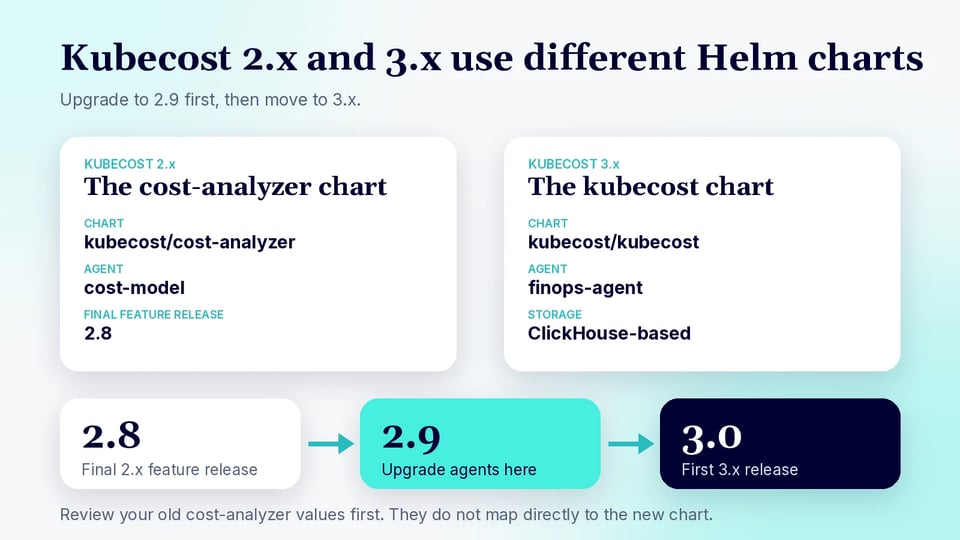
Kubecost now has two Helm chart lines that administrators may encounter: the older cost-analyzer chart used for Kubecost 2.x deployments, and the newer kubecost chart introduced for Kubecost 3.x. The current Kubecost repository identifies version 2.8 as the final feature release of the 2.x line, version 2.9 as an intermediate upgrade step, and version 3.0 as the first Kubecost 3.x release.
The cost-analyzer chart is the legacy deployment method used throughout Kubecost 2.x. Existing environments may continue to reference commands such as kubecost/cost-analyzer, and Kubecost still maintains repositories associated with that chart for older deployments and upgrade scenarios.
For Kubecost 3.x, the primary chart is now named kubecost. New installations use the kubecost/kubecost chart from the Kubecost Helm repository. Kubecost 3.x also introduces significant architectural changes, including ClickHouse-based storage and a new finops-agent that replaces the previous cost-model agent used in 2.x.
Organizations upgrading an existing Kubecost 2.x deployment should therefore treat the change as more than a simple chart rename. Kubecost recommends upgrading agents to version 2.9 before moving to 3.x, allowing time for the intermediate version to run before completing the migration. Existing cost-analyzer values should also be reviewed rather than assumed to map directly to the new kubecost chart because component names, storage architecture, and configuration options have changed.
What the Helm Chart Includes
The Kubecost Helm chart includes the Kubernetes templates and configurable dependencies required to run Kubecost. The exact resources deployed depend on the chart version and the values you enable, but the chart generally covers the following components:
- Kubecost application components: Deployments, Services, ConfigMaps, Secrets, service accounts, and other resources required to run Kubecost and expose its cost-monitoring functionality.
- Metrics collection (
finops-agent): The chart deploys thefinops-agent, a lightweight agent that collects the cluster metrics Kubecost uses for cost allocation, with no separate Prometheus deployment required. - Kubernetes metrics components: Depending on configuration, the chart can deploy supporting components such as
kube-state-metricsand Node Exporter, which provide Kubernetes object and node-level metrics. - Persistent storage: Helm values can create persistent volume claims for Kubecost and Prometheus data, with configurable storage sizes and storage classes.
- Ingress and service configuration: The chart provides settings for exposing Kubecost through Kubernetes Services and, when enabled, an Ingress with configurable hosts, paths, annotations, and TLS settings.
- Monitoring resources: Optional resources such as
ServiceMonitorandPrometheusRulecan be created for environments using the Prometheus Operator. - Optional features and integrations: Helm values can enable additional functionality such as network-cost collection, network policies, cloud-provider pricing integrations, and other Kubecost features without manually modifying the generated Kubernetes manifests.
Because these components are controlled through the chart's values.yaml, organizations can enable only the resources they need or integrate Kubecost with monitoring and infrastructure components that already exist in the cluster.
Related content: Read our guide to Kubernetes cost optimization
How to Install Kubecost with Helm
Kubecost can be installed with Helm by adding the official Kubecost chart repository and deploying the chart into a dedicated namespace. Kubecost's current Helm chart repository provides the kubecost/kubecost chart for Kubecost 3.x.
First, add the Kubecost Helm repository and update your local chart index:
helm repo add kubecost https://kubecost.github.io/kubecost/helm repo updateThen install Kubecost in a kubecost namespace:
helm install kubecost kubecost/kubecost \ --namespace kubecost \ --create-namespaceKubecost also supports installing directly from the repository URL. The official example sets global.clusterId to identify the cluster:
helm install kubecost \ --repo https://kubecost.github.io/kubecost kubecost \ --namespace kubecost \ --create-namespace \ --set global.clusterId=my-clusterBefore deploying to production, you can inspect the values supported by a specific chart version:
helm show values kubecost/kubecost --version <chart-version>You can then place required configuration in a custom values.yaml file and install Kubecost with:
helm install kubecost kubecost/kubecost \ --namespace kubecost \ --create-namespace \ --values values.yamlUsing a values file makes it easier to version and reproduce configuration for settings such as storage, resource allocation, monitoring, and Kubecost components. The official Kubecost repository also recommends checking chart/Kubernetes version compatibility when selecting a release; for example, Kubecost 3.0 charts target newer Kubernetes versions than the final Kubecost 2.x releases.
Kubecost Helm Chart vs. Kubernetes Manifests
Both Helm charts and Kubernetes manifests can be used to deploy applications to Kubernetes, but they manage configuration differently. Kubecost recommends Helm as its primary installation method; its official chart packages the required resources and exposes configuration through Helm values.
| Kubecost Helm Chart | Kubernetes Manifests | |
|---|---|---|
| Deployment | Installs Kubecost as a Helm release using a packaged chart. | Resources are applied directly with kubectl apply. |
| Configuration | Settings are centralized in values.yaml or provided with --set. |
Configuration is changed by editing individual YAML resource definitions. |
| Upgrades | Helm tracks the release and can apply chart-version and configuration changes through helm upgrade. |
Updated manifests generally need to be applied and maintained manually. |
| Customization | Chart values provide configurable options for components, storage, Prometheus, resource limits, and other settings. | Provides direct control over every Kubernetes object but requires more manual maintenance. |
| Repeatability | A chart version plus a values file makes the deployment easier to reproduce across clusters. | Teams must maintain and synchronize their own collection of manifests. |
| Lifecycle management | Helm provides built-in release installation, upgrades, rollback capabilities, and uninstallation. | Kubernetes manages individual resources rather than a Helm release lifecycle. |
| Best suited for | Most Kubecost deployments, particularly environments that need repeatable configuration and ongoing upgrades. | Environments that specifically require direct control over static Kubernetes resources or cannot use Helm. |
Kubecost has historically provided static-manifest deployment as an alternative, but its documentation recommends Helm, especially for production deployments. Helm also makes it easier to customize dependencies and settings (for example, whether Kubecost uses its bundled monitoring components or existing infrastructure) without maintaining modified copies of every Kubernetes resource.
Kubecost Helm Chart Best Practices
Here are some useful practices to consider when working with the Kubecost Helm chart.
1. Pin Kubecost Helm Chart Versions
Specify an explicit Kubecost chart version instead of allowing Helm to automatically install the latest available release. Helm supports selecting a specific chart version with the --version option, while omitting it can cause the latest chart version to be selected.
Pinning versions makes deployments more predictable and prevents an automated installation or CI/CD pipeline from unexpectedly adopting a newer chart with changed defaults or dependencies. Review Kubecost release notes and compatibility requirements before deliberately updating the pinned version.
2. Maintain Helm Values in Version Control
Store the Kubecost configuration you override in a dedicated values.yaml file and keep it in version control. Helm values provide the standard mechanism for overriding chart defaults, including settings for application components, storage, ingress, and other deployment options.
Version control provides a history of configuration changes and makes it easier to review, reproduce, or revert Kubecost deployments. Avoid placing credentials or other sensitive secrets directly in a repository; reference an appropriate Kubernetes or external secrets-management mechanism instead.
3. Use Separate Values Files for Different Environments
Maintain separate values files for development, staging, and production when those environments require different Kubecost configurations. Helm is designed to deploy the same chart with different values, avoiding the need to maintain separate copies of the underlying Kubernetes manifests.
For example, production might use larger persistent volumes and resource allocations, while a development cluster can use smaller settings. Keeping environment-specific overrides separate also reduces the risk of accidentally applying development configuration to production.
4. Set Appropriate Resource Requests and Limits
Configure CPU and memory requests and limits for Kubecost components according to the size and workload of the cluster. Requests help Kubernetes reserve enough resources for Kubecost pods, while limits can prevent individual components from consuming excessive cluster capacity.
Avoid simply copying the same resource configuration across clusters of significantly different sizes. Monitor Kubecost's actual resource consumption after deployment and adjust the Helm values as the number of nodes, workloads, and collected metrics increases.
5. Configure Persistent Storage for Production
Use persistent storage for Kubecost components that need to preserve data across pod restarts or rescheduling. Kubecost's chart exposes persistent-volume configuration such as whether persistence is enabled, volume size, and the Kubernetes StorageClass used for the volume.
For production deployments, choose a reliable StorageClass and provision enough capacity for expected data growth. Storage settings should also align with the organization's backup, retention, and disaster-recovery requirements.
6. Test Helm Upgrades Before Production
Apply Kubecost chart upgrades in a development or staging cluster before updating production. Test both the new chart version and your existing custom values because chart upgrades can introduce new settings, modify defaults, or change Kubernetes resources.
Helm supports reviewing and controlling upgrade values, as well as rolling a release back to an earlier revision when necessary. Maintain the previous chart version and configuration so you have a tested rollback path if the production upgrade causes problems.
Optimizing Kubernetes Costs Beyond Kubecost with PerfectScale
PerfectScale by DoiT provides responsible cost optimization that eliminates wasted resources without impacting Kubernetes stability and performance. Kubecost is primarily focused on Kubernetes cost monitoring. PerfectScale goes further: it continuously fine-tunes your environment for optimal performance and cost efficiency, and it provides enhanced visibility and governance across node groups, namespaces, containers, and workloads. The Kubecost Helm chart deploys and maintains Prometheus and related metrics components. PerfectScale instead runs as a single stateless agent with a minimal footprint, and it doesn't require Prometheus.
Key capabilities of PerfectScale:
- Autonomous cost optimization: Autonomously fine-tunes your Kubernetes environment with GitOps-integrated actions, so cost savings are applied continuously rather than surfaced only on dashboards.
- Comprehensive right-sizing: Provides CPU and memory recommendations for both requests and limits. These recommendations account for code changes and HPA configuration.
- Stateless agent deployment: Installs as a single lightweight agent with minimal ongoing maintenance. There is no Prometheus implementation to set up or maintain.
- Granular cost visibility and allocation: Delivers cost visibility and allocation, cost and waste forecasting, and visibility into ephemeral workloads. It also shows node allocation, utilization, and idle capacity, supports node groups, and lets you group ephemeral workloads in custom ways.
- Resilience issue detection and remediation: Identifies OOM events, CPU throttling, suspected memory leaks, frequent restarts, evictions, and workloads reaching replica limits. It also provides automatic resiliency risk prioritization, customizable alerts, and autonomous remediation.
- Works everywhere Kubernetes runs: Supports EKS, GKE, AKS, OpenShift, and on-prem clusters.
Ready to move from cost monitoring to autonomous Kubernetes optimization? See how PerfectScale compares to Kubecost and start a free 30-day trial.