


The ImagePulBackOff error is the most common Kubernetes error that DevOps engineers face in their day-to-day lives. This error not only creates a problem in deployment but also acts as a critical signal pointing towards issues with accessing or retrieving container images from image registries.
ImagePullBackOff is a Kubernetes error indicating that a pod cannot start because Kubernetes failed to pull its container image. Kubernetes initially throws an ErrImagePull error and, after successive failed retries, exponentially backs off its attempts up to a 5-minute delay, changing the pod status to ImagePullBackOff.
Here are some of the main errors you might encounter in Kubernetes, and quick advice for how to resolve them.
- Kubernetes CrashLoopBackoff: An Ultimate Guide
- The Ultimate Guide: Kubernetes CreateContainerConfigError and CreateContainerError
- How to fix OOMKilled in Kubernetes
- Kubernetes Node NotReady: Troubleshoot & Best Practices
Modern clusters add a few extra wrinkles to this classic error. Container registry rate limits, such as Docker Hub's caps on anonymous pulls, are now a leading cause of intermittent pull failures, and Kubernetes has introduced newer, short-lived credential mechanisms for authenticating against private registries. Understanding these recent changes alongside the classic causes makes troubleshooting far faster.
In this article, we will explore what is ImagePullBackOff, its causes, and how to troubleshoot it.
How to diagnose and fix ImagePullBackOff:
- View the exact error: Run kubectl describe pod to check the pod's events and reveal why the pull failed.
- Check image name and tag: Look for typos in your deployment manifest, or verify that the specific image tag actually exists in the registry.
- Verify authentication: If pulling from a private registry such as AWS ECR, Docker Hub, or a private Harbor instance, ensure you have correctly created and configured your imagePullSecrets.
- Test network connectivity: Ensure your worker nodes have network access to the container registry, and verify that you have not exceeded any registry API rate limits such as Docker Hub download limits.
Editor's note: Updated the article to add registry rate limiting as a modern cause, new Kubernetes credential and image-pull-policy improvements, and current troubleshooting best practices as of 2026.
What is ImagePullBackOff?
When we all started our Kubernetes journey, we always did the practical task of deploying pods onto the Kubernetes cluster, and the error is related to this particular task. As the name suggests, the error is associated with pulling a container image onto the Kubernetes cluster. When you try to deploy your application as a container image onto the Kubernetes cluster, you might run into this error called ImagePullBackOff. It has two parts: ImagePull and Backoff. The first part suggests an error in pulling the image, and backoff is an algorithm that Kubernetes uses when each attempt fails, and Kubernetes waits for a longer period before trying again. This wait time increases with each failure, up to a maximum backoff limit.
Causes of ImagePullBackOff:
Different scenarios cause the ImagePullBackOff error. Let's discuss the causes:
1. Invalid image: It's a very common mistake that we make generally. Let's say you want to deploy a pod onto the Kubernetes cluster, and you are using the nginx image in your manifest. If you mistakenly write the wrong image name, as below in the manifest, that does not exist, it will cause an error of ImagePullBackOff.
piVersion: v1kind: Podmetadata: name: test-pod labels: app: nginxspec: containers: - name: nginx image: nginy:1.14.2 ports: - containerPort: 802. Non-existent Image: If you are pointing to an image in your manifest that does not exist or was deleted by anyone, it will cause an error of ImagePullBackOff because that image cannot be found anywhere to be pulled.
3. Not Authorized for the Image Registry: When you deploy your application as a container image, but the container image is private and secure, it means you can't access the image without credentials or authorization. If an image is private and you do not mention the credentials in your manifest file, you will encounter an ImagePullBackOff error.
On managed clusters, long-lived pull secrets are increasingly replaced by node-level kubelet credential providers for registries such as Amazon ECR, Azure ACR, and Google Artifact Registry. Recent Kubernetes releases also add service-account-based image pull authentication, letting workloads use short-lived, automatically rotated credentials scoped to a specific pod instead of static secrets stored in the API.
What happens during ImagePullBackOff?
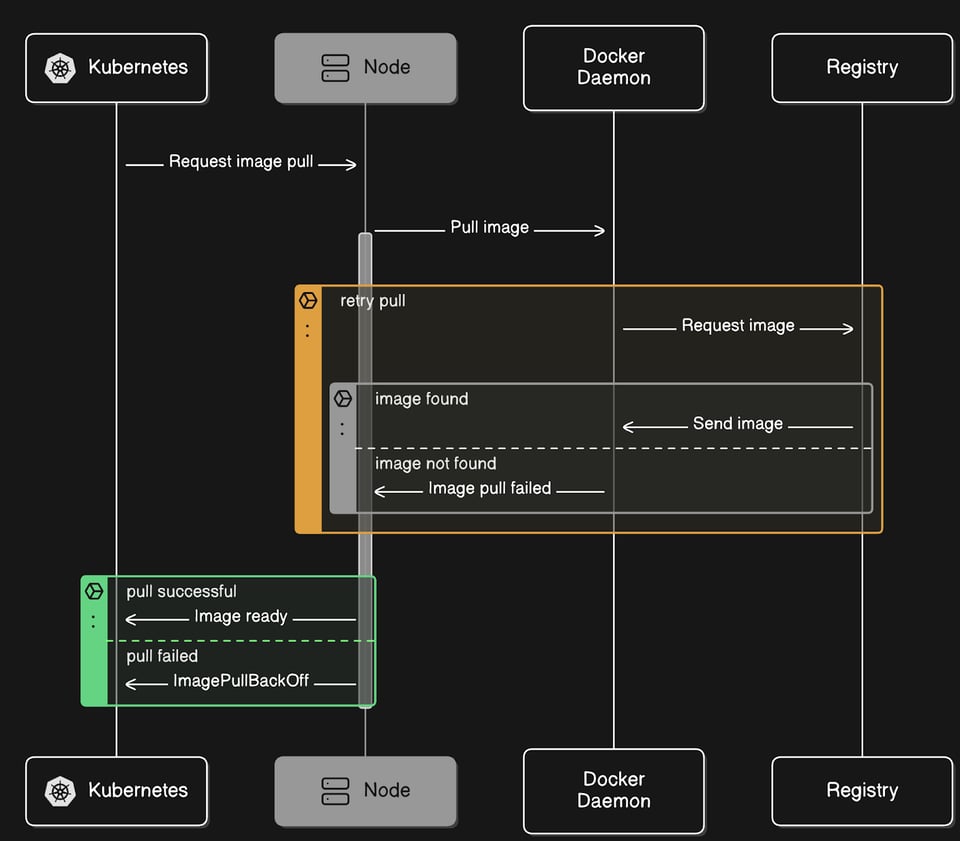
When a pod enters the ImagePullBackOff state, it retries to pull an image for your pod. If, due to some issue, it is not successful in pulling the image for the first time, it refers to the backoff strategy to increase the time after each failure. Kubernetes retries pulling the image after each backoff period, but eventually, when it fails to pull the image, it ends up with the status of ImagePullBackOff.
What is ErrImagePull Error?
When there is a problem in pulling the container image for your pod, Kubernetes tries to increase the time or wait to pull the image for your pod, but when it does not succeed in pulling the image for the first time, it tries again, and if it's again not successful, it tries again, and initially, it's waiting for 5 seconds, then it waits for 20 seconds. During this waiting time, Kubernetes throws an ErrImagePull error. It will eventually wait 5 minutes to pull the container image, so if this time it is not successful to pull the container image, then the status will be ImagePullBackOff. Each time, it will add a delay incrementally and try to pull the image for your pod; this process is called a backoff delay.
These errors ErrImagePull and ImagePullBackOff both reflect the same type of cause or issue. ImagePullBackOff results after trying so many times to pull the image, and it's failing.
$ kubectl get podsNAME READY STATUS RESTARTS AGEtest-pod 0/1 ErrImagePull 0 19sRegistry Rate Limits: A Modern Cause of ImagePullBackOff
One of the most common yet easily overlooked causes of ImagePullBackOff today is container registry rate limiting. Docker Hub caps anonymous pulls at 100 per six hours per IP address, and because Kubernetes nodes often share a single NAT gateway IP, every unauthenticated pull across the cluster counts against the same quota. A single rolling deployment or a wave of new nodes can exhaust it in minutes.
When this happens, the pod events show a toomanyrequests message alongside the failed pull, and the pod settles into ImagePullBackOff. The fix is to authenticate your pulls even for public images, upgrade to a paid registry plan, or route pulls through a pull-through cache or mirror such as Amazon ECR or a self-hosted Harbor registry so the same layers are not fetched repeatedly from the upstream registry.
Troubleshooting ImagePullBackOff error:
To troubleshoot the ImagePullBackOff error, follow the below steps:
1. View Pods Status: Run the kubectl get pods command to check whether your pod is running or not. If it's an error due to image pulling, you can see the status of ErrImagePull.
$ kubectl get podsNAME READY STATUS RESTARTS AGEtest-pod 0/1 ErrImagePull 0 19sWait a minute, then run the get pods command again:
$ kubectl get podsNAME READY STATUS RESTARTS AGEtest-pod 0/1 ImagePullBackOff 0 52sYou can see here the status shown as ImagePullBackOff.
2. Inspect your Pod: To inspect the pod and why this error appeared, you can use the kubectl describe pod <pod-name> command to view the events. In the events section, you will get to know the exact reason behind getting the ImagePullBackOff error.
Pay close attention to the image name and tag reported in the events. A typo in the manifest, or a tag that does not actually exist in the registry, is one of the most frequent reasons the pull fails, so confirm the exact image and tag exist in the registry before looking elsewhere.
Events: Type Reason Age From Message ---- ------ ---- ---- ------- Normal Scheduled 41s default-scheduler Successfully assigned default/test-pod to docker-desktop Normal Pulling 19s (x2 over 39s) kubelet Pulling image "nginy:1.14.2" Warning Failed 14s (x2 over 34s) kubelet Failed to pull image "nginy:1.14.2": Error response from daemon: pull access denied for nginy, repository does not exist or may require 'docker login': denied: requested access to the resource is denied Warning Failed 14s (x2 over 34s) kubelet Error: ErrImagePull Normal BackOff 3s (x2 over 34s) kubelet Back-off pulling image "nginy:1.14.2" Warning Failed 3s (x2 over 34s) kubelet Error: ImagePullBackOffThese events say that no image like nginy:1.14.2(used above) exists. That's why you're getting the error of ImagePullBackOff.
How to fix ImagePullBackOff error:
The fix for the ImagePullBackOff error depends on the cause of the problem:
1. Fix Manifest or Image Name: Check your pod’s manifest to see if it contains an invalid image name or a typo mistake in the image name. Once you correct this, you can avoid the error of ImagePullBackOff.
In the above example, we have used the wrong image name; if we correct it, it can be successfully deployed onto our Kubernetes cluster without the ImagePullBackOff error.
apiVersion: v1kind: Podmetadata: name: test-pod labels: app: nginxspec: containers: - name: nginx image: nginx:1.14.2 ports: - containerPort: 80Now, apply this manifest again to the Kubernetes cluster by following the command:
$ kubectl apply -f pod.yamlpod/test-pod configuredSee the status of the pod with get pods command. The pod is happily running:
$ kubectl get podsNAME READY STATUS RESTARTS AGEtest-pod 1/1 Running 0 8m2. Non-existent Image: Make sure your image exists or is not deleted by anyone from where you pulled it. If an image does not exist on the registry and you are trying to pull that image, you will face an error of ImagePullBackOff.
3. Not Authorized for Image Registry: If you are using a private image from the registry, make sure you are authorized for that image registry or you have credentials to use that image in your pod.
4. Reduce Repeated Pulls: Setting imagePullPolicy: IfNotPresent tells the kubelet to skip the registry check when the image is already cached on the node, which eliminates many rate-limit and connectivity failures for stable workloads. Reserve the Always policy for development and staging, and consider pre-pulling critical images to every node so pods do not depend on a live registry call at startup.
In order to pass the credentials to a container registry, you have to create a secret like this:
$ kubectl create secret docker-registry docker-cred \ --docker-server=private-registry.io \ --docker-username=registry-user \ --docker-password=registry-password \ --docker-email=registry-user@org.comNote: The secret type is called ‘docker-registry’ but the credentials are compatible with all OCI-compliant registries.
Then you can specify this secret object in your pod definition file under the imagePullSecrets section:
apiVersion: v1kind: Podmetadata: name: test-pod labels: app: nginxspec: containers: - name: nginx image: private-registry.io/apps/internal-app imagePullSecrets: - name: docker-credResolving the ImagePullBackOff error can take time, but understanding its reasons, how to troubleshoot it, and the solution can help you a lot in figuring out the exact cause. By following the steps shown above, you can identify the issue and work with your Kubernetes environment happily.
Fix Kubernetes ImagePullBackOff Errors 10x Faster with PerfectScale by DoiT
PerfectScale Kubernetes governance platform continuously monitors workload behavior and detects signs of instability, such as OOM events or CPU throttling, that often lead to crash loops.
Identify up to 30 Different Resilience Rypes of Risks
PerfectScale’s tracks up to 30 K8S alerts are tailored specifically for Kubernetes. They cover a wide range of potential issues, such as pod failures or resource exhaustion, eliminating the need for deep Kubernetes expertise.
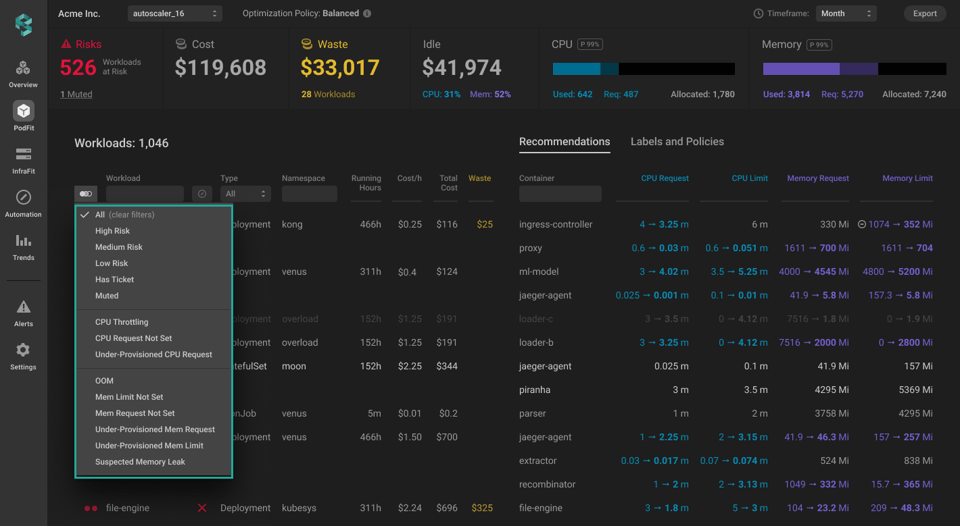
Real-time Alerts without Alerts Fatique
PerfectScale allows users to easily set up alerts for their clusters and manage them efficiently with Alert Profiles. You can easily monitor and get notified about alerts that are relevant for your setup.
For faster updates, utilize Slack or MS Teams Integration Profiles to receive notifications when an Alert is generated.
Get Actionable Recommendations to Eliminate Kubernetes Node NotReady Error
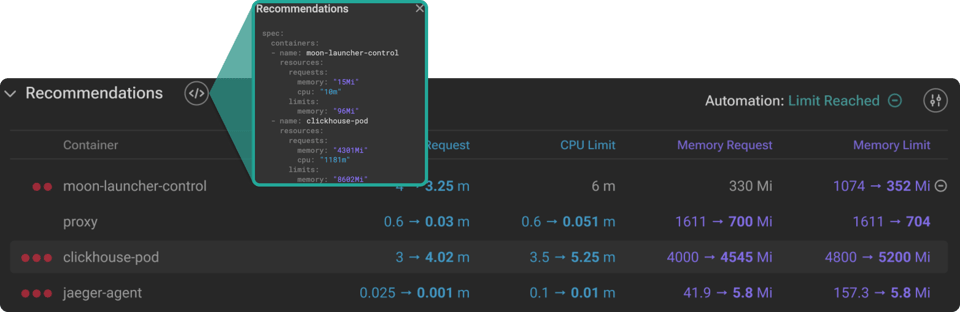
By leveraging real usage data and resilience-aware policies, PerfectScale delivers precise recommendations for right-sizing workloads s at the container level, ensuring workloads have exactly what they need. Whether applied manually or autonomously for immediate impact, these recommendations restore workload stability, eliminate recurring restarts, and help prevent similar failures in the future.
To apply the recommendations, you can effortlessly copy the .yaml and deploy it to your cluster.
Join industry leaders like Paramount Pictures and Creditas who have already optimized their Kubernetes environments with PerfectScale. Sign up or Book a demo with Kubernetes optimization expert.