
PerfectScale
CrashLoopBackOff in Kubernetes: Der ultimative Guide
Kubernetes CrashLoopBackOff errors slowing your deployments? Learn causes, diagnosis commands, and proven fixes.
Diese Seite ist auch in English, Español, Français, Italiano, 日本語 und Português verfügbar.
CrashLoopBackOff Kubernetes errors slowing your K8s deployments? CrashLoopBackOff in Kubernetes means a container repeatedly starts, crashes, and restarts with exponential backoff. It’s usually caused by bad config, missing dependencies, OOM events, failing probes, or app errors. Use describe, logs, and events to find the root cause, then apply targeted fixes below.
This status means the container image was pulled successfully, but the software inside failed to stay alive. Because the container keeps failing, Kubernetes applies an exponential backoff delay (from 10 seconds up to 5 minutes) before each restart to protect cluster resources.
In this article, you will learn what causes pods to get stuck restarting, see an example, and apply fixes to get out of the CrashLoopBackOff state for good. No more wasted cycles or downtime.
You will also see how to read container exit codes, use ephemeral debug containers, and take advantage of the newer, configurable restart backoff behavior in recent Kubernetes releases, so you can diagnose and recover from crash loops even faster.
Editor's note: Updated the article in 2026 to cover exit-code interpretation, ephemeral debug containers, configurable restart backoff in recent Kubernetes releases, and current memory right-sizing research.
Here are some of the main errors you might encounter in Kubernetes, and quick advice for how to resolve them.
Main Takeaways
- A CrashLoopBackOff in Kubernetes indicates a container is repeatedly crashing and restarting with exponential backoff; it’s a state, not a single error.
- The most common causes are resource mis-sizing (OOMKilled), bad images/config, failing probes, and unavailable external services.
- Diagnose quickly with
kubectl describe, container logs (current/previous), and namespace events, then fix the exact root cause rather than disabling restarts. - Prevent repeats with accurate requests/limits, sane probes, dependency health checks, and policy guardrails across environments.
Understanding the pod phases in Kubernetes
In general, when you submit the YAML configuration file to create a pod (resource) in Kubernetes the Kube API Server validates the YAML configuration and makes it available. Simultaneously, the Kube-Scheduler watches for new pods for scheduling to nodes based on resource requirements.
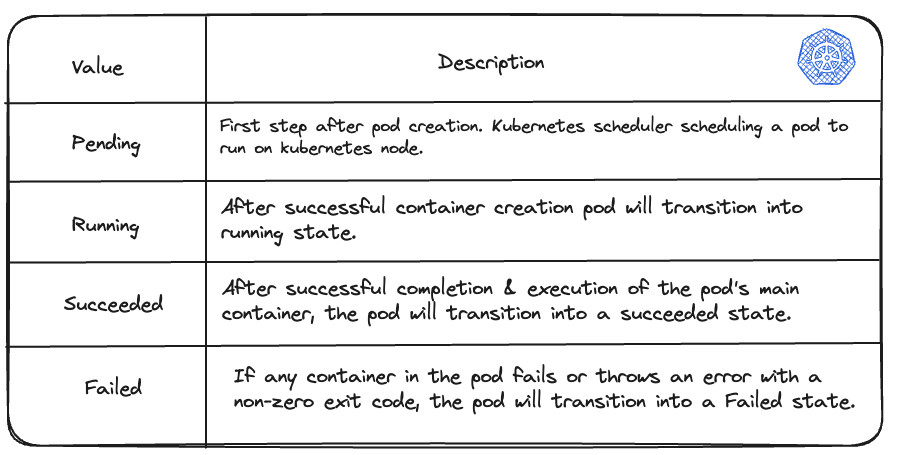
You can simply check the above pod phases with the below command:
$ kubectl get pod
Understanding various container states in a pod
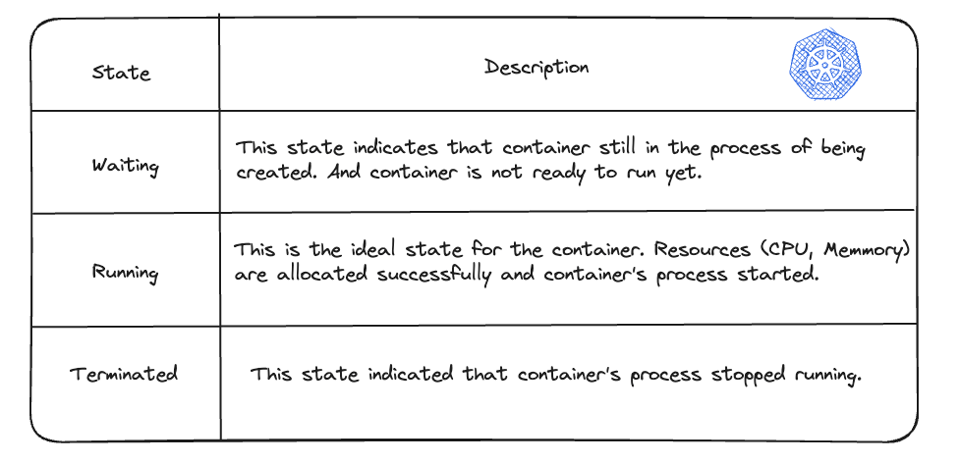
As mentioned above, there are different phases of the pod, similarly, Kubernetes tracks the status of each container inside the pod. There are three states while creating and tracking the status of the pod’s containers “Waiting”, “Running”, and “Terminated”. When the Kubernetes scheduler starts scheduling pods to the nodes, the Kubelet starts creating containers for specific pods using a container runtime.
You can check the container state using:
$ kubectl describe pod <name-of-pod>
What is CrashLoopBackOff in Kubernetes?
“CrashLoopBackOff” Kubernetes state indicates that the pod is stuck in a restart loop. It means that one or more containers in a pod fail to start successfully.
In general, in a pod, the container starts then it crashes and restarts over and over again this is called a “CrashLoop”.
How BackOff Works (and why restarts slow down)
The BackOff algorithm is a simple technique that is used in the networking and computer science field to retry tasks in case of failure. Imagine you’re trying to send a simple message to your friend but it fails due to some reason, in case of try immediately the algorithm says just wait a little bit before we try again.
So basically, for the first time you try and fail, the second time you wait for some short period and then try again. If it still fails, you wait a bit longer period and then try again. The ‘backoff’ term explains that the waiting period gradually increases each time with the loop. This gives the system or network time to recover from the error and prevents overwhelming responses.
The “BackOff” time is delayed after the pod is terminated and trying to restart. This back-off time gives the pod the time to recover and resolve the error. This means a set of backoff intervals delays restart.
For example, If a pod fails to start running by default (kubelet configuration) restart time is 10 seconds. It’ll increase to multiply by 2 usually.
So initial backoff duration is 10 seconds, if a pod fails after that the next attempt of retry will be 20 seconds then 40 seconds then 80 seconds, and so on. This increased time is used by kubelet and sends new API requests to start a container inside a pod.

Tuning the backoff delay in recent Kubernetes
Recent Kubernetes releases make the restart backoff less rigid. An alpha feature gate lets the kubelet use a faster default decay so crashing containers restart sooner, following a 1s, 2s, 4s progression capped at 60 seconds instead of the traditional 10s to 5 minute curve. This shortens the feedback loop when you are actively debugging a transient failure, without disabling the protective backoff entirely.
A companion node-level setting lets operators configure the maximum restart delay per node, so the cap can be lowered from the historical 5 minutes. When both are in play, the node-level maximum takes precedence. There is also a backoff reset: if a container runs successfully for roughly 10 minutes, Kubernetes resets the counter and treats the next crash as the first one.
What does CrashLoopBackOff mean in Kubernetes?
As you read above, Kubernetes tries to restart a pod when it fails. In Kubernetes, pods are designed to be self-healing entities. This means they can automatically restart containers that encounter errors or crashes.
This behavior is controlled by a configuration called the "restartPolicy" within the pod's specification. By defining the restart policy, you dictate how Kubernetes handles container failures. The possible values are “Always", “OnFailure”, and “Never”. The default value is “Always”.
K8s restart policy configuration
apiVersion: v1kind: Podmetadata: name: my-nginxspec: containers: - name: nginx image: nginx:latest ports: - containerPort: 80 restartPolicy: Always #restart policyHow you can detect the Kubernetes CrashLoopBackOff
You can check the status of your pod using simply the kubectl command.

As far as you execute this command you’ll see an output similar to the above details. You can see the my-nginx pod is
- Not in `Ready` state
- It has the status “CrashLoopBackOff”
- The number of restarts is one or more
As we discussed above the same condition happening here. The pod is failing and tries several times to start again. This period is described here as CrashLoopBackOff status. You may find the reason for restarts or failure during this back-off time.
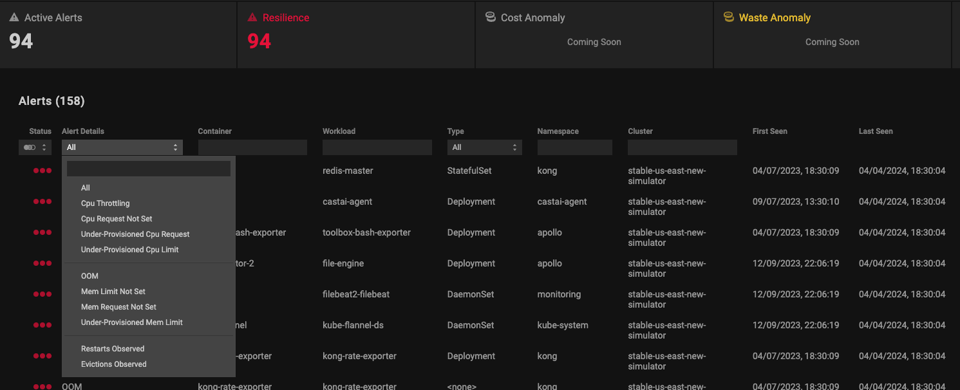
If you’re using PerfectScale by DoiT you can see the Alerts tab in which you can get critical alerts regarding your Kubernetes resources to inform you about the unusual system activity.
You can simply go to the “Alerts tab” and monitor and deal with specific alerts. Also, you can see the detailed alert summary regarding single tenant.
Common Causes of Kubernetes CrashLoopBackOff
1. Resource constraints (OOMKilled, limits/requests)
Memory allocation plays a crucial role in ensuring the smooth functioning of your Kubernetes deployments. If a pod's memory constraints aren't carefully considered, you might encounter the dreaded Kubernetes CrashLoopBackOff state.
For example, if your application requires more memory than what’s allocated, it can lead to OOM (Out Of Memory). This can create Kubernetes CrashLoopBackOff.
Memory mis-sizing remains one of the biggest drivers of both cloud waste and crash loops. Industry research shows only about a third of memory allocated in Kubernetes clusters is actually used, while close to 40% of organizations run at least one service that is regularly OOMKilled from under-provisioning or leaks. Right-sizing requests and limits from real usage data addresses both problems at once.
2. Image & registry issues (pull/auth/tag)
Insufficient permissions - If you are using a container image that does not have the necessary permissions to access your resources, the container may crash.
Incorrect container Image - If your pod pulls an incorrect container image to start a container, it leads to crashes and restarts again & again.
The above conditions lead to the Kubernetes CrashLoopBackOff error.
3. Config errors (env, args, command, typos)
The fix: verify that all ConfigMaps and Secrets referenced by the pod actually exist and are spelled correctly. Use an initContainer to wait for a database or other dependency to become reachable before booting the main app.
- Syntax error or Typos - While configuring the Pod spec, there may be mistakes such as typos in container names, image names, and environment variables, which can prevent containers from starting correctly.
- Incorrect Resource Requests & Limits - Mistakes in configuring Requested resources (minimum amount needed) & limits (Maximum amount allowed) may lead to container crashes and not started correctly.
- Missing dependencies - In your Pod spec file, if any services need dependencies that are missing can lead to the failure of the container.
4. External dependencies (DB, queues, DNS, network)
Network Issue - If your container relies on any external service for example database, and that external service is not reachable at that point or is unavailable this can lead to k8s CrashLoopBackOff.
If one of the external services is down itself and your container in a pod relies on that can lead to container failure due to the container failing to connect.
5. App exceptions (uncaught errors, perms)
When a containerized application encounters an error or exception during runtime, it may cause the application to crash. These errors could be due to various reasons such as invalid input, resource constraints, network issues, file permission issues, misconfiguration of secrets, and environmental variables or bugs in the code. If the application code does not have proper error-handling mechanisms to catch and handle these exceptions gracefully, can trigger the CrashLoopBackOff state in Kubernetes.
6. Incorrect file permissions or paths
The issue: the application user inside the container doesn't have permission to write to a mounted volume, or a configuration file path is incorrect. The fix: verify the securityContext settings and ensure the target directories are writable.
7. Port binding collisions
The issue: two containers are attempting to listen on the exact same port on the host network. The fix: change the application port configurations to prevent the conflict.
8. Misconfigured liveness/readiness probes
Liveness probes exist to ensure that the process in your container isn’t stuck in a deadlock. If it is - the container will get killed and restarted (if the Pod’s restartPolicy defines so). A common mistake is configuring a liveness probe so that it causes a container to restart because of a temporary slowness (which can happen if the pod is under heavy load) which can only exacerbate the problem instead of resolving it.
The fix: increase the initialDelaySeconds or failureThreshold in the pod's YAML manifest to give your app more time to initialize before the health check probes it.
How to fix CrashLoopBackOff Kubernetes pod?
From the previous section, you understand that there are several reasons why Pod ends in CrashLoopBackOff state. Now, let’s dive into how you can troubleshoot Kubernetes CrashLoopBackOff with various methods.
The common thing for troubleshooting is first finding potential scenarios and finding the root cause by debugging and eliminating them one by one.
Quick diagnostic playbook
To find out why your pod is crashing, run these commands in order. Check pod events and status first, then read the logs of the crashed instance, and finally review namespace events:
- Check pod events and status: run kubectl describe pod -n and scroll to the Events and Containers sections to find the Exit Code and Reason.
- Check logs of the crashed instance: run kubectl logs -n --previous. The --previous flag is critical because it retrieves logs from the container before it crashed.
- Check global namespace events: run kubectl get events -n --sort-by='.metadata.creationTimestamp' to see the most recent events across the namespace.
When you execute the ` kubectl get pods ` command you can see the status of the pod is CrashLoopBackOff
$ kubectl get podsNAME READY STATUS RESTARTS AGEapp 1/1 Running 1 (3d12h ago) 8dbusybox 0/1 CrashLoopBackOff 18 (2m12s ago) 70mhello-8n746 0/1 Completed 0 8dmy-nginx-5c9649898b-ccknd 0/1 CrashLoopBackOff 17 (4m3s ago) 71mmy-nginx-7548fdb77b-v47wc 1/1 Running 0 71m- Right-size memory/CPU: Set requests from real usage and raise memory if you see
OOMKilledinlastState.terminated.reason. - Fix the image: Verify registry creds, tag/digest, and entrypoint/cmd; re-push if the image is corrupt or missing.
- Repair config/env: Correct env vars, flags, and file paths; mount required Secrets/ConfigMaps and verify permissions.
- Stabilize probes: Loosen liveness/readiness thresholds (initialDelaySeconds, periodSeconds, timeoutSeconds, failureThreshold) so brief slowness doesn’t kill the pod.
- Resolve dependencies: Ensure DB/queue/URL/DNS reachability; add retries and timeouts in app code, not just probes.
- Check file perms & users: Align container user with mounted volume/secret permissions; fix
chmod/chownas needed. - Handle crashes in code: Catch startup exceptions; fail fast on config errors with clear logs.
- Restart policy sanity: For Deployments keep
restartPolicy: Always; avoid masking real issues by switching toNever. - Throttle backoff experiments: Don’t “kubectl delete” loop—fix root cause; the kubelet’s exponential backoff will subside once healthy.
- Lock prevention: Add PDBs, resource quotas, and CI tests to catch probe/config regressions before prod.
Let’s go one by one :
1. Check the description of the Pod -
The command `kubectl describe pod pod-name` gives detailed information about specific pods and containers.
On current Kubernetes versions you can also attach an ephemeral debug container to a crashing pod with kubectl debug, targeting the failing container's process namespace. This gives you a shell with your own tools even when the original image is minimal and lacks a shell, which is invaluable for inspecting the filesystem, environment variables, and network from inside the pod.
$ kubectl describe pod pod-name
Name:           pod-nameNamespace:      defaultPriority:       0……………………State:         WaitingReason:        CrashLoopBackOffLast State:    TerminatedReason:        StartError……………………Warning  Failed   41m (x13 over 81m)   kubelet  Error: container init was OOM-killed (memory limit too low?): unknown
When you execute kubectl describe pod you can extract meaningful information from the output such as,
Interpreting exit codes
When inspecting kubectl describe pod, the container's exit code reveals the most likely culprit:
| Exit code | Meaning | Likely cause and solution |
|---|---|---|
| 1 | General application error | A bug in code, an unhandled exception, or a typo in config. Check the application logs. |
| 0 | Normal completion | The container finished its task and closed normally (for example, a script or busybox finished running). Kubernetes expects web servers and APIs to run indefinitely, so add a continuous command or loop. |
| 137 | OOMKilled (out of memory) | The container exceeded its memory limit and was killed by the OS. Increase the memory limit in your YAML manifest. |
| 139 | SIGSEGV | A segmentation fault, typically a low-level library issue, memory corruption, or binary incompatibility. |
| 143 | SIGTERM | The container was gracefully asked to shut down but failed to stop on time. |
State - waiting
Reason -CrashLoopbackOff
Reason - StartError
From this, we can figure out the reasons behind CrashLoopBackOff in Kubernetes. From the final lines of the output “ kubelet Error: container init was OOM-killed (memory limit too low?)” you can understand that the container is not starting due to Out Of Memory.
2. Check Pod logs
Logs are detailed information related to a specific resource in Kubernetes from the starting container, any obstacle, termination, or even successful completion.
Check pod logs using these specific commands
` $ kubectl logs pod-name ` - extract the logs of the pod having only one container.Check logs of the pod having multiple containers.
` $ kubectl logs pod-name --all-conainers=trueYou can check pod logs for a particular time interval. For example, if you want to check logs from the last 1 hour simply execute the -
` $ kubectl logs pod-name --since=1h `3. Check events
Events are the most recent information about your Kubernetes resources. You can request events for a specific namespace or filter to any particular workload.
$ kubectl eventsLAST SEEN TYPE REASON OBJECT MESSAGE4h43m (x9 over 10h) Normal BackOff Pod/my-nginx-5c9649898b-ccknd Back-off pulling image "nginx:latest"3h15m (x11 over 11h) Normal BackOff Pod/busybox Back-off pulling image "busybox"40m (x26 over 13h) Warning Failed Pod/my-nginx-5c9649898b-ccknd Error: failed to create containerd task: failed to create shim task: OCI runtime create failed: runc create failed: unable to start container process: container init was OOM-killed (memory limit too low?): unknownYou can easily see all events related to resources as in the above output.
- List all recent events in all namespaces.
$ kubectl get events --all-namespaces- List all events for a specific pod
$ kubectl events --for pod/pod-name4. Check deployment logs
$ kubectl logs deployment deployment-name
Found 2 pods, using pod/my-nginx-7548fdb77b-v47wc/docker-entrypoint.sh: /docker-entrypoint.d/ is not empty, will attempt to perform configuration/docker-entrypoint.sh: Looking for shell scripts in /docker-entrypoint.d//docker-entrypoint.sh: Launching /docker-entrypoint.d/10-listen-on-ipv6-by-default.sh10-listen-on-ipv6-by-default.sh: info: Getting the checksum of /etc/nginx/conf.d/default.conf10-listen-on-ipv6-by-default.sh: info: Enabled listen on IPv6 in /etc/nginx/conf.d/default.conf/docker-entrypoint.sh: Sourcing
You can debug the deployment using deployment logs and may figure out the reasons for crashing the containers and why the pod ends in the CrashLoopBackOff state.
In this article, we have studied the in-depth guide on Kubernetes CrashLoopBackOff. Which is not in itself an error but a state.
We dig into the common Kubernetes CrashLoopBackOff state, analyze a sample case, and provide fixes to get your pods back on track. Everything you need to troubleshoot and resolve this error.
How to Prevent Future CrashLoopBackOff in Kubernetes
A growing best practice is to shift prevention left with admission-time guardrails. Instead of relying on every developer to remember each setting, cluster policies can block pods that omit resource requests and limits, probes, or security settings, or that request obviously unsafe values, stopping many crash-loop conditions before they ever reach a node.
- Requests/limits from real usage (p95 + headroom); avoid too-low memory.
- Probes with margin (readiness stricter than liveness; use startupProbe for slow boots).
- Dependency health (readiness checks external deps; circuit breakers & timeouts).
- Image discipline (immutable digests, SBOMs, small base images).
- Policy guardrails (PDBs, LimitRanges, ResourceQuotas, admission policies).
- Observability (structured logs, alert on repeated restarts, error budgets).
FAQs
Q1: What does CrashLoopBackOff mean in Kubernetes?
It means a container keeps crashing after start and the kubelet applies exponential backoff before trying again, so restarts get spaced out until the pod becomes healthy.
Q2: How do I quickly find the root cause of CrashLoopBackOff?
Run kubectl describe pod for reasons/events, check kubectl logs and --previous for the last crash, and inspect lastState.terminated for exit reason and code.
Q3: Why do liveness probes cause CrashLoopBackOff?
Over-strict liveness probes kill pods during transient slowness; use startupProbe, relax timeouts/delays, and put dependency checks in readiness, not liveness.
Q4: Is CrashLoopBackOff caused by low memory?
Often OOMKilled is common; right-size memory requests/limits based on real usage and reduce footprint to prevent immediate re-crashes.
Q5: Should I change restartPolicy to stop CrashLoopBackOff?
No! fix the underlying issue; for Deployments keep restartPolicy: Always so Kubernetes can recover automatically after you correct the cause.
Q6: How is CrashLoopBackOff different from ImagePullBackOff?
ImagePullBackOff is a pull/auth/tag problem before the container runs; Kubernetes CrashLoopBackOff happens after the container starts and then crashes.
Q7: Can I reduce the backoff delay?
You generally shouldn’t; it protects the node and services. Solve the root cause—the backoff resets once the container runs successfully.
Fix Kubernetes CrashLoopBackOff errors 10x faster with PerfectScale
PerfectScale Kubernetes governance platform continuously monitors workload behavior and detects signs of instability, such as OOM events or CPU throttling, that often lead to crash loops.
By leveraging real usage data and resilience-aware policies, PerfectScale delivers precise recommendations for right-sizing workloads s at the container level, ensuring workloads have exactly what they need. Whether applied manually or autonomously for immediate impact, these recommendations restore workload stability, eliminate recurring restarts, and help prevent similar failures in the future.
Join industry leaders like Paramount Pictures and Creditas who have already optimized their Kubernetes environments with PerfectScale.